Like it or not, AI is already part of the writing world, and ChatGPT is one of the main tools authors keep hearing about.
Some writers are excited about that, some are deeply skeptical, and plenty are somewhere in the middle, mostly wondering whether this is actually useful or just another shiny tool that promises to “change everything” before making your life more complicated.
I understand the hesitation, because using AI to write a book can sound strange at first. Most authors don’t want a machine taking over their voice, flattening their style, or spitting out generic prose that technically forms sentences but has all the personality of a microwave manual. That’s a fair concern, and it’s one of the reasons ChatGPT works best when you treat it as an assistant rather than a replacement.
Used well, ChatGPT can help you brainstorm ideas, organize messy notes, outline chapters, develop characters, summarize research, rewrite awkward sections, and get unstuck when you know what you’re trying to say but your brain refuses to participate. It can speed up parts of the process that normally eat a lot of time, especially in the early planning stages, but it still needs a human author guiding the work.
In this article, I’ll walk you through how to use ChatGPT to help write a book, where it works well, where it falls short, which features are worth knowing about, and how to approach it without handing your entire creative process over to the robot intern.
What is ChatGPT?
ChatGPT is an AI-powered writing assistant that responds to text prompts in a natural, conversational way. You can ask it questions, give it tasks, or ask for ideas—and it will respond with something that sounds like a real person wrote it.
Launched in late 2022, ChatGPT helped kick off the current wave of AI interest. After it took off, tech giants like Microsoft and Google jumped into the race to develop competing tools.
But for writers, ChatGPT isn’t just a novelty. It can help you brainstorm story ideas, build outlines, get past writer’s block, and even generate full paragraphs of prose (though you’ll almost always want to revise what it writes).
As of 2026, ChatGPT’s model lineup changes often, so the exact names you see in your account may vary depending on your plan and when you’re reading this. Currently, ChatGPT centers around GPT-5.5 models:
- GPT-5.5 Instant – The default everyday model. It’s designed for fast, general-purpose help with writing, brainstorming, research, and problem-solving.
- GPT-5.5 Thinking – A stronger reasoning model for more complex tasks, including deeper planning, analysis, and structured work.
- GPT-5.5 Pro – A higher-end model available on Pro and certain business/education plans, designed for more demanding work.
Free users get limited access to GPT-5.5, while paid plans offer higher usage limits and more advanced tools.
How Much Does ChatGPT Cost?
There are several ChatGPT plans, but most authors will mainly care about these:
- Free – Good for testing ChatGPT and doing light brainstorming. Free users get limited access to GPT-5.5, file uploads, image generation, memory/context, and other tools, but usage limits are lower.
- ChatGPT Go – A lower-cost paid option that gives expanded access compared to Free. It may be useful if you want more room to experiment but don’t need the full Plus plan.
- ChatGPT Plus – At $20/month, this is the plan most serious authors should consider first. It includes expanded usage, better access to advanced reasoning, more uploads, better image generation, Projects, tasks, custom GPTs, and early access to some features.
- ChatGPT Pro – Pro is for heavy users who rely on ChatGPT constantly. OpenAI currently offers Pro options starting at $100/month, with a higher-usage $200/month option also available. Most authors probably won’t need this unless they’re using ChatGPT for large-scale writing, research, coding, or business workflows every day.
There are also Business and Enterprise plans, but those are mainly for teams and organizations.

I've put together a list of prompts that you can use for just that purpose!
Check them out here:
Additionally, if you'd like to know more about how authors can leverage AI, I'd invite you to check out my Story Hacker community, where we have dedicated teachers on various topics, including AI writing tools like this one.
Is ChatGPT Plus worth it?
If you plan to use ChatGPT for in-depth plotting, worldbuilding, file uploads, research, or drafting actual prose, then yes, ChatGPT Plus is probably worth the upgrade. The higher usage limits and access to stronger tools can make a real difference.
But if you’re only using ChatGPT occasionally for brainstorming, summarizing, or outlining, the free version may be enough.
As for ChatGPT Pro, most writers won’t need it. Pro is best for power users who rely on ChatGPT throughout the day and need the highest usage limits, larger context windows, and access to the most advanced models.

What Are ChatGPT’s Strengths (Compared to Other Tools)
ChatGPT has emerged as a frontrunner among many AI tools and models. However, there are other tools like Sudowrite, Novelcrafter, Claude, or even OpenAI’s Playground that all have different and unique offerings.
So what makes ChatGPT unique?
Well, after having written tens of thousands of words with a variety of tools and platforms, I have several unique strengths that I’ve seen in ChatGPT that keep me coming back.
Better at Following Directions
One of ChatGPT's standout features is its ability to follow directions. While many AI tools can process instructions, ChatGPT does so with a precision and context-awareness that is hard to get with some other tools.
This means fewer errors, more accurate outputs, and less chance that the AI will wander off of the guardrails you’ve given it.
Better at Defined Structures and Logic
This is a little harder to pin down, exactly, but those who have been using ChatGPT for a while, and comparing to other platforms, will agree that ChatGPT is much better at structure, and providing structured answers.
Again, it’s hard to find a way to say it better than that.
ChatGPT usually provides answers that are easier to scan, are broken down nicely into a format, plus it’s also much better at following directions when you provide specific frameworks or examples to follow.
Code Interpreter
ChatGPT’s Data Analysis feature, sometimes referred to as Code Interpreter, lets ChatGPT work with uploaded files and run code in a secure environment when needed.
For authors, this can be useful if you want to upload research notes, outlines, spreadsheets, manuscript excerpts, or other documents and ask ChatGPT to analyze, organize, summarize, compare, or extract information from them.
For example, you could upload several outline documents and ask ChatGPT to find inconsistencies, organize your chapters, summarize character arcs, or turn messy notes into a cleaner planning document.
Custom Instructions
Every user is unique, and so are their requirements. Recognizing this, ChatGPT offers the ability to provide custom instructions. This means you can tailor the AI's responses to fit specific needs, ensuring personalized and relevant outputs.
Custom Instructions let you tell ChatGPT what you want it to consider when responding. For example, you can add details about your writing style, your genre, your audience, or the kind of feedback you prefer.
These instructions can apply across your chats, which means you don’t have to repeat the same background information every time. It’s not perfect, and you’ll still need to steer the output, but it can make ChatGPT much more useful for ongoing writing projects.
Custom GPTs and Projects
ChatGPT also lets paid users create or use Custom GPTs, which are specialized versions of ChatGPT built for specific tasks. A Custom GPT can include its own instructions, uploaded reference files, and selected tools.
For authors, that means you could create a GPT for brainstorming book ideas, reviewing chapter outlines, checking continuity, or helping you stay consistent with a specific series bible.
Projects are useful for longer-running work. A project can contain related chats, uploaded files, and project-specific instructions, which makes it easier to keep everything connected instead of starting from scratch every time you open a new chat.
Canvas
Canvas is ChatGPT’s built-in workspace for longer writing and coding projects. Instead of only working through the normal chat window, you can open a document-like space where you and ChatGPT can revise, expand, shorten, or edit specific sections.
For authors, Canvas can be useful for revising a scene, developing a synopsis, editing a book description, or working through longer pieces of text without constantly copying and pasting between tools.
One note: Canvas availability can depend on the model and plan you’re using, so if you don’t see it, check your current model or plan settings.
How to Write a Book in ChatGPT
My approach to writing a book with ChatGPT is similar to what you'd do in other AI platforms, like Claude or OpenAI's Playground.
The main differences come down to the tools ChatGPT offers, such as Data Analysis, Custom Instructions, Custom GPTs, Projects, file uploads, and Canvas.
That said, here’s my seven-step system for using ChatGPT to write a book. You can apply it to the whole process, or just the parts where you need the most support.
For example, I enjoy outlining, so I usually do that part myself. But when it comes to other steps, ChatGPT has proven to be a huge help.
Step 1: Brainstorm
Brainstorming is the creative groundwork for your novel. Here, you'll gather ideas, themes, and concepts that resonate with your story.
It's all about letting your imagination run wild and capturing the sparks of creativity.
Personally, I always start by brainstorming my premise and my ending, if I don’t know what they should be already.
Here are some prompts I’ve used:
Give me [NUMBER] high-concept pitches for a bestselling [GENRE] story with a unique twist, intriguing characters, and gripping emotional stakes.
Given the following premise and story information, give me [NUMBER] possible endings to this [GENRE] novel.
Step 2: Synopsis
The synopsis is a concise summary that encapsulates the main plot points of your novel. It helps you understand the flow of your story and ensures that the critical elements align cohesively.
You can expand upon your brainstormed premise and ending using a prompt like the following:
Given the following premise and story information, give me a highly detailed synopsis for a [GENRE] story in the traditional three act structure. Each act should be clearly labeled and should build toward the ending I've described.
Premise:
Ending:
Other Information:
Step 3: Characters and Worldbuilding
Characters are the heart of your story, and worldbuilding sets the stage on which they perform. There are many prompts you could use here, but here is a sample prompt for developing a character profile:
Write a character profile about the protagonist/antagonist/mentor of this novel:
[INSERT SYNOPSIS]
Here is what we know so far about this character: [INSERT CURRENT SUMMARY OF CHARACTER]
Include the following elements: [INSERT DESIRED ELEMENTS HERE]
Step 4: Outline
Outlining offers a structured view of your novel's framework. It can be as detailed or as broad as you need it to be, providing a plan that you can follow as you write.
From your synopsis, you can expand it further into a fully fleshed out outline:
Using the following synopsis, create a detailed summary of the story, fleshing out additional details, and breaking it into parts using the [OUTLINE METHOD OF CHOICE]:
[INSERT SYNOPSIS HERE]
Step 5: Story Beats
When creating a story with AI, it helps to have an intermediate step between the outline and the actual writing. So fleshing out the outline into individual story beats (essentially a highly-detailed outline of each chapter), can look something like this:
Take the following chapter summary, and generate a list of 12 highly detailed action beats for a script with additional STORY INFORMATION to fully flesh out the chapter. Make sure to always use proper nouns instead of pronouns.
[INSERT CHAPTER SUMMARY HERE]
Step 6: Style
A style prompt is possibly the most important prompt on this list, as it will affect how the prose sounds when you use AI to generate prose.
Style prompts can be lengthy, depending on how you use them. I've seen some that go on for hundreds of words, but here is one example of a shorter one that could work:
First person past point of view of [MAIN CHARACTER], show don't tell, deep point of view. Realistic dialogue. Stronger verbs. Lots of conflict, drama, and description. Avoid mushy descriptions/dialogue.
Step 7: Prose
Last but not least, it's time to create the prose prompt. Now many, if not most, authors will not be using AI for this step, and that's okay. In fact, I would say that AI is best used as a brainstorming tool.
However, there are many who DO want to write prose with AI, and I would do it something like this, using 2-3 story beats at a time.
Note that a tool like Sudowrite or Novelcrafter make this process a lot easier, removing the need for any prompt, and instead you just give it a summary of the next section of prose.
Write 600 words of a chapter using the following details:
Genre: [ENTER GENRE HERE]
Tone: [ENTER TONE HERE]
Point of View: [ENTER POV/TENSE HERE]
Setting: [ENTER SETTING HERE]
Key Characters in This Scene: [ENTER CHARACTER DETAILS HERE]
Style: [ENTER STYLE HERE]
Story Beats to Cover: [INSERT STORY BEATS]
Other Resources
AI is an ever-shifting resource, and so there are a few additional resources that I would recommend if you want to stay on top of it.
The first is my own YouTube channel, The Nerdy Novelist (a personal project, not associated with Kindlepreneur) where I provide almost daily videos about what’s happening in AI.
The second is my membership: Story Hackers, where you can learn everything you need to know not just about writing with AI, but a more well-rounded overview of how to publish a book and the basic principles of good storytelling.
We have multiple classes each week where you can get tailored advice for your specific situation.
So, is ChatGPT the Best Way to Write with AI?
ChatGPT is powerful, but it wasn’t built specifically for novelists. That means you’ll usually need to bring more structure to the process yourself.
Author-focused tools like Sudowrite and Novelcrafter can make parts of the fiction-writing workflow feel more natural because they’re built around things like brainstorming, character development, outlining, scene planning, and drafting.
The latter is an all-in-one AI platform tailored for novelists. It combines outlining, scene planning, world-building, and drafting workflows in a single interface. It works with models like GPT, Claude, and Gemini via OpenRouter and is rapidly gaining popularity among serious fiction writers.
Meanwhile, Sudowrite is carefully designed to cover tasks that authors often need, like brainstorming, character creation, and editing.
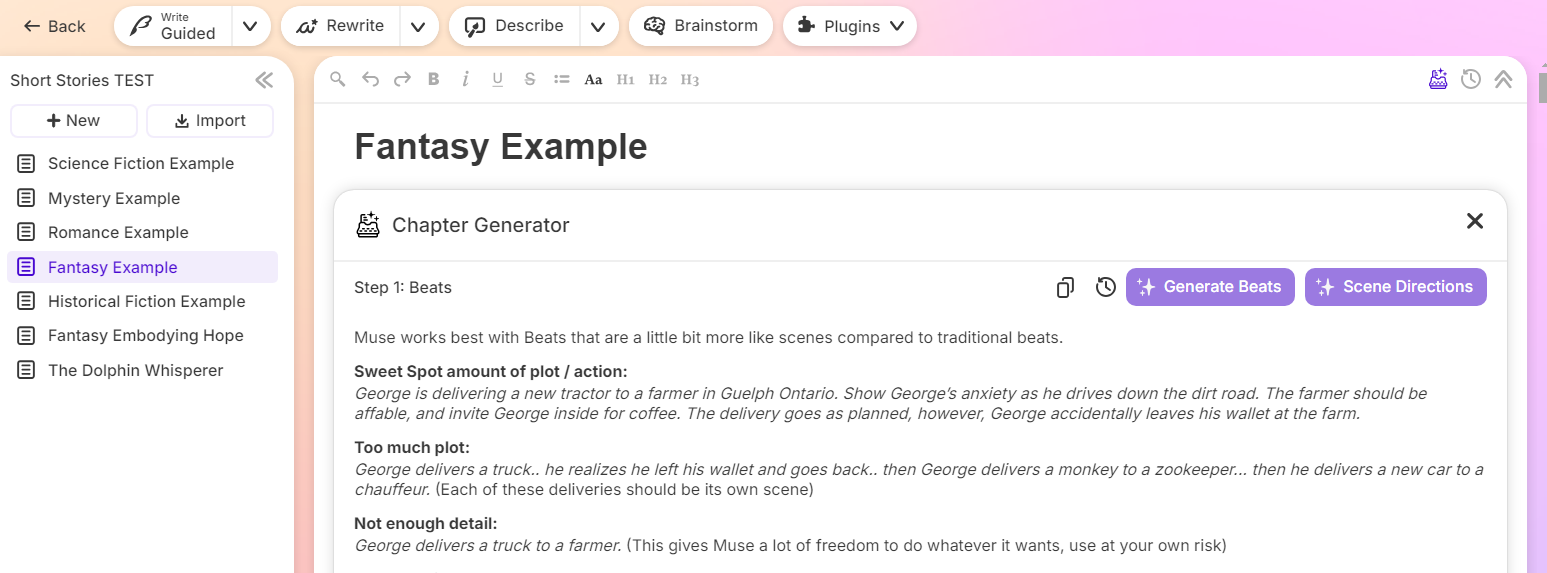
Sudowrite is packed with a lot of different features, to the point that I'm sure many of you can find something that works for you, and it's a great way to start experimenting with AI, even if you're still a little on the fence about it.
To help with that, if you use the link below, you can actually get 10,000 words for free when you sign up, meaning you can use those words to experiment further before you even pay for the tool. So check them out if you're interested.