AI is moving fast enough that even if you’re tired of hearing about it, you probably can’t ignore it anymore.
I don’t say that because I think every author needs to use AI to write their books. I don’t. But I do think authors who understand these tools are going to have an advantage, whether they use them for brainstorming, outlining, editing, marketing, research, or just getting unstuck when a scene refuses to cooperate.
And right now, one of the most useful tools for writers is Claude.
Most people are already familiar with ChatGPT because it’s the name everyone knows. Claude is a little quieter by comparison, but I’ve found it just as useful, and in some writing situations, better. It tends to handle natural language well, it can work with long documents, and it often feels less like you’re fighting the machine to get something readable out of it.
At its core, Claude is Anthropic’s AI assistant. Like other large language models, it can brainstorm ideas, summarize text, answer questions, translate content, help you outline, and generate writing based on the instructions you give it. If you’ve used ChatGPT before, Claude will feel familiar pretty quickly, though there are some differences that matter for authors.
One of the big ones is context. Claude can work with long conversations and uploaded documents, which is helpful if you’re dealing with outlines, story bibles, character notes, sample chapters, or research files. Depending on your plan and which features are available in your account, Claude can also connect with tools like Google Docs, Gmail, Google Calendar, Google Drive, Microsoft 365, Slack, and more, which makes it easier to work with your actual writing materials instead of constantly copying and pasting everything into a blank chat.
Claude also comes in different model families, including Haiku, Sonnet, and Opus, with newer versions released over time. The short version is that some models are faster and cheaper to run, while others are better suited for heavier writing, reasoning, and long-context work.
Pricing works the same general way. There’s a free version, and there are paid plans if you need more usage. Claude Pro currently costs $20 per month, or $200 per year if you pay annually. If you hit those limits too often, Claude Max offers higher-usage tiers, and developers can access Claude through Anthropic’s API with usage-based pricing.
So Claude is not magic, and it is not a replacement for knowing how to write. But if you learn how to use it well, it can become a pretty powerful assistant for the parts of writing that tend to slow authors down.
What Makes Claude Unique (Compared to ChatGPT)?
While AI assistants like ChatGPT also create content, Claude differs in a few key ways:
Claude is Much Better at Natural Language
Claude tends to sound a lot better in its natural language than the GPT models (for the most part). This makes it better suited for writing and content creation compared to ChatGPT's generalist approach.
In my experience, Claude writes more naturally and conversationally. Its casual tone and vocabulary mirror human speech much more effectively.
Claude Has a Massive Context Window
Depending on the model and how you access Claude, it can work with very large context windows. Many Claude models support up to 200,000 tokens, while some newer models and platform options support up to 1 million tokens. That doesn’t mean every Claude user gets the same limit in every chat, but it is still one of Claude’s biggest strengths for authors working with long outlines, chapters, story bibles, and research documents.
With more context, Claude is able to do a number of things that are useful for authors, including summarizing a book or what happens to a character in a book (good for developing a story bible), develop marketing material from your book, and remember past chapters as you are writing.
Claude Can Reference External Documents
Like many other chatbots, Claude allows you to upload files and use them as context. It supports common file types like PDFs, DOCX files, CSVs, text files, HTML, EPUBs, JSON, and, when analysis is enabled, XLSX spreadsheets. For authors, that means you can upload things like a book outline, character notes, sample chapters, research files, or a style guide so Claude has more context for the conversation.
Claude can also create and edit files in supported workflows, which is useful for turning notes into documents, drafting structured materials, or working with files directly. Just keep in mind that file creation uses the same plan limits as the rest of Claude, so large or repeated file tasks can consume your usage more quickly.
You can also provide supporting documents like:
- Background research materials
- Character info
- Sample chapters
- Transcripts of interviews or conversations
- A more extensive style guide
Claude can also read and summarize long PDFs, which is useful for research-heavy authors. Just remember that long documents use more of your context window and usage capacity, so extremely large files can still run into limits.
Another useful feature for authors is Projects. Instead of starting from scratch every time, you can keep related chats, instructions, and reference files together in one place. For a novel, that might mean keeping your outline, character notes, worldbuilding document, and style guide in the same project so Claude has a better sense of what you’re working on over time.

I've put together a list of prompts that you can use for just that purpose!
Check them out here:
How to Write a Book in Claude
My steps for how to write a book in Claude are similar to how you would do so in other AI programs, especially ChatGPT and the OpenAI Playground.
The biggest differences are the way Claude tends to handle natural language, long context, and project materials. In my experience, Claude often writes more natural-sounding prose than many other general-purpose chatbots, especially when it comes to dialogue and humor. It can also be useful when you’re working with longer outlines, story bibles, and supporting documents.
That said, here is my 7-step system for writing with Claude. As always, you can use the AI for just one of these steps, or for all of them. Just pick where you have the most pain associated with the step, and use it for that.
For instance, I love doing the outlining, so I don’t use AI for that. But I’ve found it to be a great help in other areas.
Step 1: Brainstorm
Brainstorming is the creative groundwork for your novel. Here, you'll gather ideas, themes, and concepts that resonate with your story.
It's all about letting your imagination run wild and capturing the sparks of creativity.
Personally, I always start by brainstorming my premise and my ending, if I don’t know what they should be already.
Here are some prompt I’ve used:
Give me [NUMBER] high-concept pitches for a bestselling [GENRE] story with a unique twist, intriguing characters, and gripping emotional stakes.
Given the following premise and story information, give me [NUMBER] possible endings to this [GENRE] novel.
Step 2: Synopsis
The synopsis is a concise summary that encapsulates the main plot points of your novel. It helps you understand the flow of your story and ensures that the critical elements align cohesively.
You can expand upon your brainstormed premise and ending using a prompt like the following:
Given the following premise and story information, give me a highly detailed synopsis for a [GENRE] story in the traditional three act structure. Each act should be clearly labeled and should build toward the ending I've described.
Premise:
Ending:
Other Information:
Step 3: Characters and Worldbuilding
Characters are the heart of your story, and worldbuilding sets the stage on which they perform. There are many prompts you could use here, but here is a sample prompt for developing a character profile:
Write a character profile about the protagonist/antagonist/mentor of this novel:
[INSERT SYNOPSIS]
Here is what we know so far about this character: [INSERT CURRENT SUMMARY OF CHARACTER]
Include the following elements: [INSERT DESIRED ELEMENTS HERE]
Step 4: Outline
Outlining offers a structured view of your novel's framework. It can be as detailed or as broad as you need it to be, providing a plan that you can follow as you write.
From your synopsis, you can expand it further into a fully fleshed out outline:
Using the following synopsis, create a detailed summary of the story, fleshing out additional details, and breaking it into parts using the [OUTLINE METHOD OF CHOICE]: [INSERT SYNOPSIS HERE]
Step 5: Story Beats
When creating a story with AI, it helps to have an intermediate step between the outline and the actual writing. So fleshing out the outline into individual story beats (essentially a highly-detailed outline), can look something like this:
Take the following chapter summary, and generate a list of 12 highly detailed action beats for a script with additional STORY INFORMATION to fully flesh out the chapter. Make sure to always use proper nouns instead of pronouns.
[INSERT CHAPTER SUMMARY HERE]
Step 6: Style
A style prompt is possibly the most important prompt on this list, as it will affect how the prose sounds when you use AI to generate prose.
Style prompts can be lengthy, depending on how you use them. I've seen some that go on for hundreds of words, but here is one example of a shorter one that could work:
First person past point of view of [MAIN CHARACTER], show don't tell, deep point of view. Realistic dialogue. Stronger verbs. Lots of conflict, drama, and description. Avoid mushy descriptions/dialogue.
Step 7: Prose
Last but not least, it's time to create the prose prompt. Now many, if not most, authors will not be using AI for this step, and that's okay. In fact, I would say that AI is best used as a brainstorming tool.
However, there are many who DO want to write prose with AI, and I would do it something like this, using 2-3 story beats at a time.
Write 600 words of a chapter using the following details:
Genre: [ENTER GENRE HERE]
Tone: [ENTER TONE HERE]
Point of View: [ENTER POV/TENSE HERE]
Setting: [ENTER SETTING HERE]
Key Characters in This Scene: [ENTER CHARACTER DETAILS HERE]
Style: [ENTER STYLE HERE]
Story Beats to Cover: [INSERT STORY BEATS]
Additionally, I like to add one extra instruction that helps keep Claude from rushing past the beats or inventing new events too quickly. This may vary depending on the model you’re using, but I’ve found this kind of guardrail especially useful with Claude. That prompt looks something like this:
All paragraphs should take place during the timeframe of the summary instead of adding new events. Focus on fully developing the given story beats rather than rushing to new plot points. End the scenes at the specified story beat rather than continuing further.
Other Resources
AI is an ever-shifting resource, and so there are a few additional resources that I would recommend if you want to stay on top of it.
The first is my own YouTube channel, The Nerdy Novelist (a personal project, not associated with Kindlepreneur), where I regularly cover what’s happening with AI for authors.

The second is my membership, Story Hackers, where you can learn everything you need to know not just about writing with AI, but a more well-rounded overview of how to publish a book and the basic principles of good storytelling.
We have multiple classes each week where you can get tailored advice for your specific situation.
So, is Claude the Best Way to Write with AI?
Claude is a powerful tool, but it does have its limitations.
For one, Claude still isn’t built specifically for authors in the way a fiction-focused tool is. That said, its long-context abilities, file handling, Projects, and workspace integrations make it increasingly useful for long-form writing and creative work. Personally, I still wouldn’t rely on it for anything that’s specifically tailored to the author experience, but it is incredibly versatile, and the natural-sounding output is one of its biggest strengths.
Another thing to keep in mind is that Claude really shines when you know how to use it. Getting the most out of it usually takes some level of prompt engineering. The prompts in this article will give you a starting point, but there’s definitely a learning curve if you want consistent results.
Because of that, a lot of writers end up using tools that build on top of models like Claude and shape them into something more author-focused.
One of those tools is Sudowrite, and it’s the one I usually recommend for fiction authors who are just getting started with AI. It’s designed around the kinds of tasks authors actually care about, like brainstorming ideas, building characters, working through edits, and developing scenes. Just remember that Sudowrite runs on a credit system, so the plan you choose mostly affects how much you can use it.
I’ve put together a full roundup of the best AI writing tools, but Sudowrite stands out because it’s built specifically for this use case, rather than being a general-purpose tool.
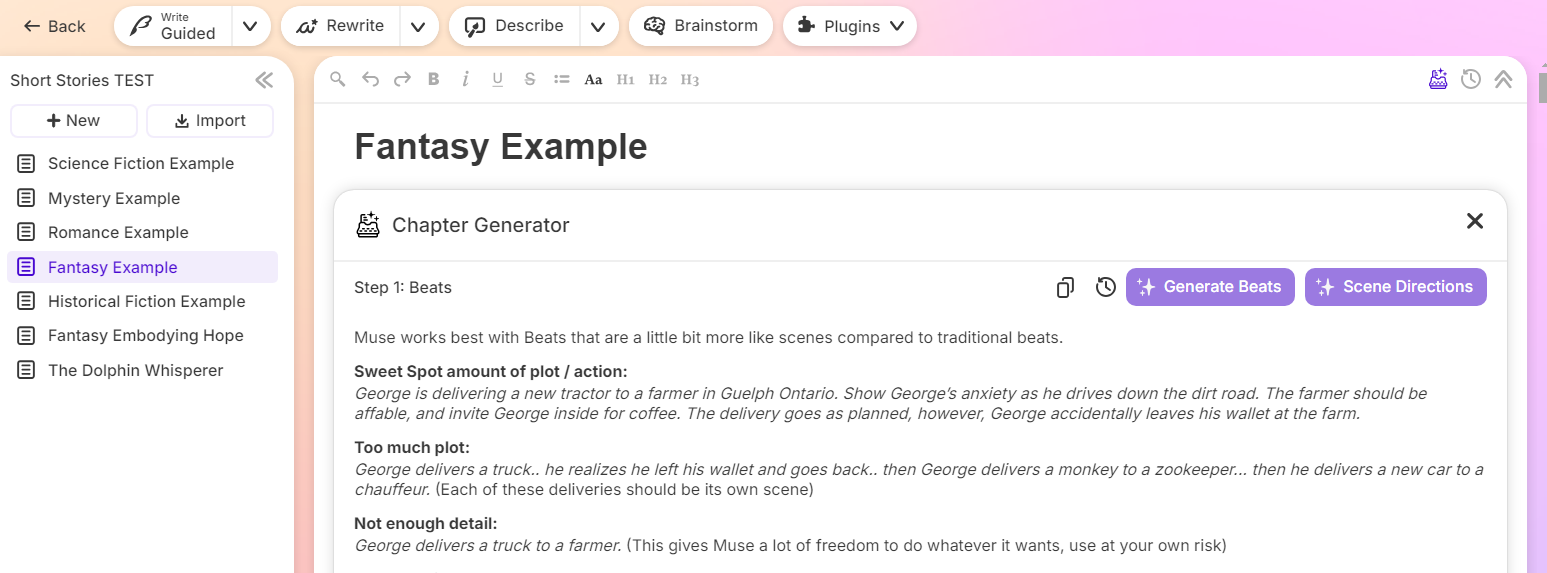
There’s a lot packed into it, and most writers will be able to find at least a few features that fit their workflow. It’s also a good way to start experimenting with AI if you’re still a bit unsure about it and want something that feels more guided.
If you want to try it out, you can use the link below to get 200,000 bonus credits when you sign up, which gives you a chance to experiment before committing to anything.