Finding the right book writing software can make a big difference in your writing process.
The right tool doesn’t just save time, it can reduce frustration and even make the long road of writing a novel or nonfiction book more enjoyable.
Bottom line: After years of writing books and testing tools, I’ve found that Atticus is the best book writing software out there. It’s not only a great place to write your manuscript, but it also handles formatting — all in one clean, easy-to-use platform.
If you’re looking for a free option, I recommend Google Docs. It’s a solid tool for shorter projects and great for real-time collaboration.
- The best free and paid book writing software (plus the cost and pros/cons of each)
- The best book editing software
- Other software every writer should have (to help with everything from focus to book marketing)
Why am I Qualified to write about the Best Book Writing Software?
Let’s be honest…
A lot of the “best writing software” articles out there are just regurgitated lists. Some are written by people who’ve never actually used the tools they’re recommending.
(Or worse, the whole thing’s written by AI.)
That’s not what you’ll find here.
I’ve been publishing books for over 13 years, and during that time I’ve seen more book writing apps come and go than I can count. Some looked promising, but didn’t deliver. Others quietly became staples in my workflow.
Fun fact: back when I worked at Apple, I was given one of the first-ever copies of Scrivener — long before it became a household name for authors. Since then, I’ve tested just about every writing tool out there, including many free options.
But this isn’t just based on my preferences. I know what works for me might not work for every writer.
So I also sent out surveys to my readers and spoke with some of the most experienced authors and publishers in the industry (many of whom I’ve consulted with directly).
The result is this guide. A no-fluff, real-world breakdown of the best book writing software available today.

Based on my observations, the results from those surveys, and talking with some of the most well-known authors out there, I feel very strongly that this is a subject I can tackle.
So, with that…
Let's jump into a list of what I think is the best overall writing software in the industry. I'll even try to break them down into best categories based on their strengths.
1. Atticus: Editor's Choice

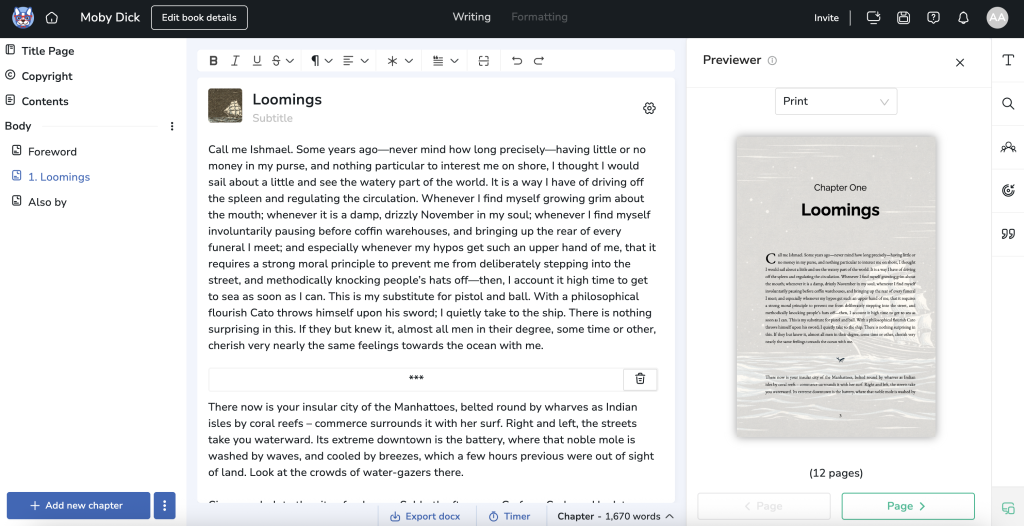
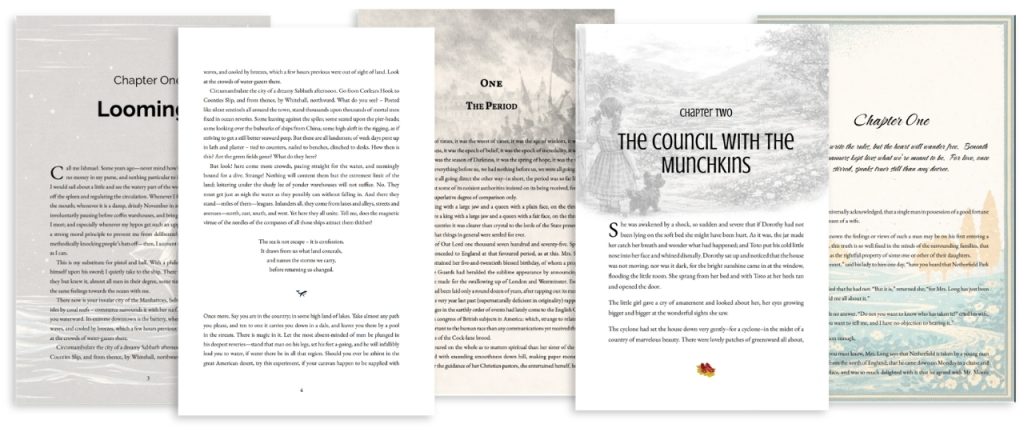
Atticus is the best all-in-one novel writing software for writing and formatting a book. It provides full capabilities for both of these tasks and works on Mac, Windows, Linux, and Chromebook. If Scrivener, Google Docs, and Vellum had a baby, its name would be Atticus.
Can I write a book in Atticus? Absolutely! It’s built with goal tracking and other tools that make writing in Atticus a way to increase your writing momentum.
How much does Atticus cost? Atticus is a one-time fee of $147 USD. That includes all future updates, which you will receive at no extra cost. Forever. No subscriptions.
Pros for using Atticus to write a novel:
- Available on all platforms
- More affordable than alternatives
- Easy to use
- Combines features of Vellum and Scrivener
- Works as a formatting software and a word processor
Cons for using Atticus to write a novel:
- Not all features are available at launch
Why not Vellum? Atticus costs $147 for everything — writing, formatting, and all platforms. Vellum, by comparison, starts at $199.99 and only works on Mac. For a detailed comparison, check out our Vellum vs Atticus article.
In the end, I really like this software. It’s clean and super easy to use. Because it can handle both writing and formatting, this is my go-to software and the one I will use for the rest of my writing life.
2. Scrivener: Best for Pure Writing

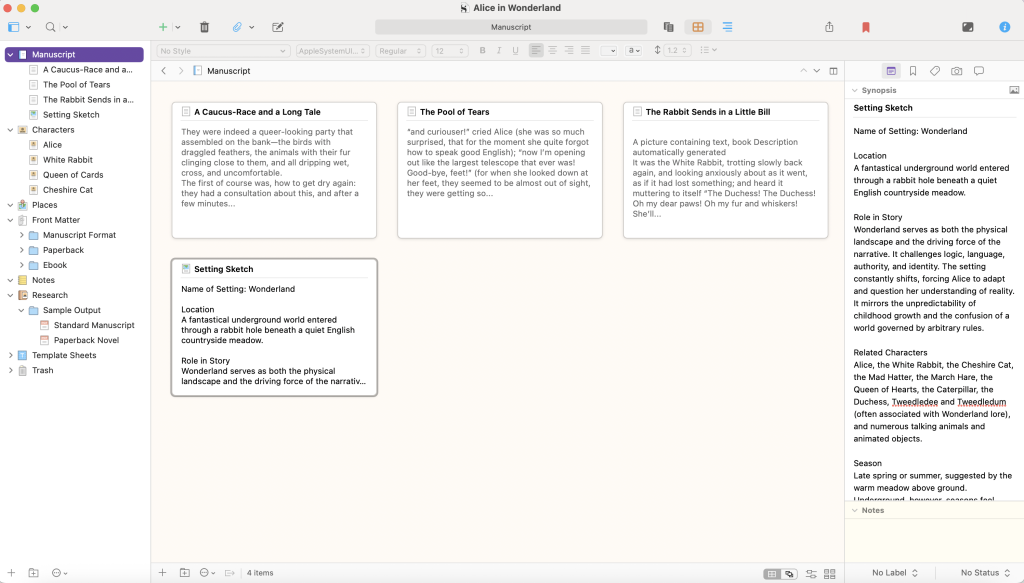
Scrivener is an amazing creative software developed by Literature & Latte that lets you view multiple documents at once, set writing goals, leave yourself brainstorming comments for later, and even import research files to keep on hand. Scrivener's extensive features allow authors to refine their writing style, making it an invaluable tool for serious writers.
What is the most complicated program for writing a book? The most complicated program for writing a book is Scrivener in my experience. It’s inexpensive and its myriad features more than make up the price tag.
Read my more in-depth review of Scrivener version 3.0.
How much does Scrivener cost?
- Scrivener costs $59.99 (one-time) for Mac or Windows.
- It’s $23.99 for iOS devices (iPhone, iPad, iPod Touch).
- If you use both Windows and Mac, you can buy the combined bundle for a discounted price of $95.98. You get a separate license for each platform.
- Reduced pricing of $50.99 is available for “students & academics.”
- Click Here, and then use Kindlepreneur’s unique discount code (KINDLEPRENEUR) to get 20% OFF your purchase.
Follow these steps to use my discount coupon.

Before you purchase it, you can try Scrivener’s full trial for 30 working days, for free. 30 working days means that Scrivener only counts the trial days when you actually open the app and work on it.
Within Scrivener, you open projects, not documents. Its developers realized that one project itself can entail endless files and folders and spreadsheets, so they made it incredibly simple to navigate through multiple documents within the same Scrivener project. Also, you can find some excellent Scrivener templates for just about every creative writing form out there.
Unfortunately, when I imported a TXT file into Scrivener, it seemed to undo all italics I had in the file. I had no formatting problems when importing DOCXs or RTFs.
Pros of using Scrivener:
- Organizes entire projects in one file with easy access to countless documents and research
- Corkboard with index cards, split-screen, and outliner working views makes it ideal for longer or more complicated works
- Comments, notes, and synopses are all simple to make for future reference
- Composition Mode erases all distractions and lets you write on a screen of nothing but text
- Customizable toolbar
- More affordable than its competitors
- Can export (or “compile”) projects as EPUB, MOBI, PDF, RTF, RTFD, DOC, DOCX, OTD, HTML, TXT, or even FDX, MD, or FOUNTAIN files
Cons of using Scrivener:
- Can open DOCX files but not DOC files or ODT files
- No real-time collaboration or co-author capabilities
- There’s a learning curve to learn all of Scrivener’s advanced features (check out this crash course tutorial on Scrivener)

One of my favorite aspects of Scrivener is that you can customize the toolbar.
Some authors will want the Dictionary feature on their toolbar, while others want the Insert feature. When editing, you may add the Comment button to your toolbar, or the Add button when you’re first compiling your project.
3. Sudowrite: Best AI Book Writing Software

Sudowrite is a powerful AI writing tool specifically designed for fiction authors. It offers a comprehensive suite of features to assist writers throughout the entire creative process, from brainstorming to editing. Sudowrite's AI-driven features ensure that authors can focus on the actual writing, enhancing creativity and productivity.
Pricing:
- Hobby & Student:
- $19/month or $120/year for 225,000 credits per month
- Professional:
- $29/month or $264/year for 1,000,000 credits per month
- Max:
- $59/month or $528/year for 2,000,000 credits per month
Pros:
- Extensive feature set tailored for fiction writing
- Story Engine for guided novel creation
- Excellent tools for first drafts, revisions, and brainstorming
- No content restrictions, suitable for all genres
- Unique features like “Show Don’t Tell” rewrite and plot twist generator
Cons:
- Interface can be overwhelming with numerous features
- Higher price point compared to some alternatives
- Some features may need refinement
Key Features:
- Story Engine for step-by-step novel creation
- First Draft and Guided Write for prose generation
- Expand and Rewrite tools for enhancing existing text
- Brainstorming tools for various story elements
- Canvas for organizing notes and outlining
Sudowrite stands out as one of the best AI tools for fiction authors, offering a guided experience that doesn’t require extensive prompt engineering skills. While it may have a steeper learning curve due to its many features, it provides unparalleled support for fiction writing, making it an excellent choice for authors looking to integrate AI into their creative process.
Note: While Sudowrite is built specifically for fiction authors, general-purpose AI tools like ChatGPT, Claude, and Gemini can also assist with brainstorming, outlining, or editing (though they require more manual guidance).
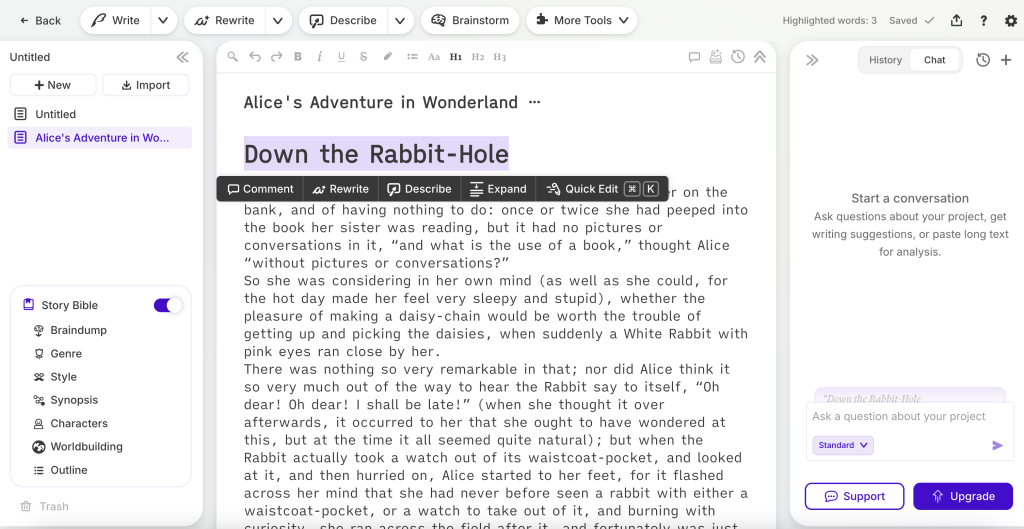
4. Google Docs: Best for Collaboration

Google Docs is a useful browser-based writing app that is free and available to anyone with a Google account. However, Google Docs may not be able to handle a lengthy manuscript.
Our team uses Google Docs for writing our blog posts because it’s the easiest way we’ve found to all work on one document at the same time, add comments, see revisions, and even chat. (Google spreadsheets can also be a useful tool, especially for outlining.)
What is the best free software for writing a book? If your book is short, the best free software for writing projects is Google Docs. If your book is longer, Apple Pages or yWriter may be better (among the free options).
Read my more in-depth discussion on writing a book in Google Docs.
Many users report lag when editing documents over 25,000 words, which makes it less ideal for full-length books.
I’ve known authors who used Google Docs because it was free and convenient, then had to give it up. Why? Because you have to wait five seconds for every sentence to appear after you type it once you surpass 15k-25k words.
Pros for using Google Docs to write a novel:
- Autosaves every change you make and every version of your manuscript along the way
- Free to use with a Google account
- Accessible on any device
- Built-in Headings and Title functions make navigating your document simple using the table of contents
- Designed with real-time collaboration in mind
- Probably the most convenient word processor on this list, especially for bloggers and coworkers
Cons for using Google Docs to write a novel:
- Cannot handle large documents (15,000 words plus) without huge latency problems
- Cannot export to PDF at a higher word count
- The grammar checker is not as robust as MS Word, let alone Grammarly or ProWritingAid
As you can see by this screenshot, Google Docs offers a whole host of formatting options, constant autosaving (as long as you’re online), and extensive sharing/collaboration capabilities.
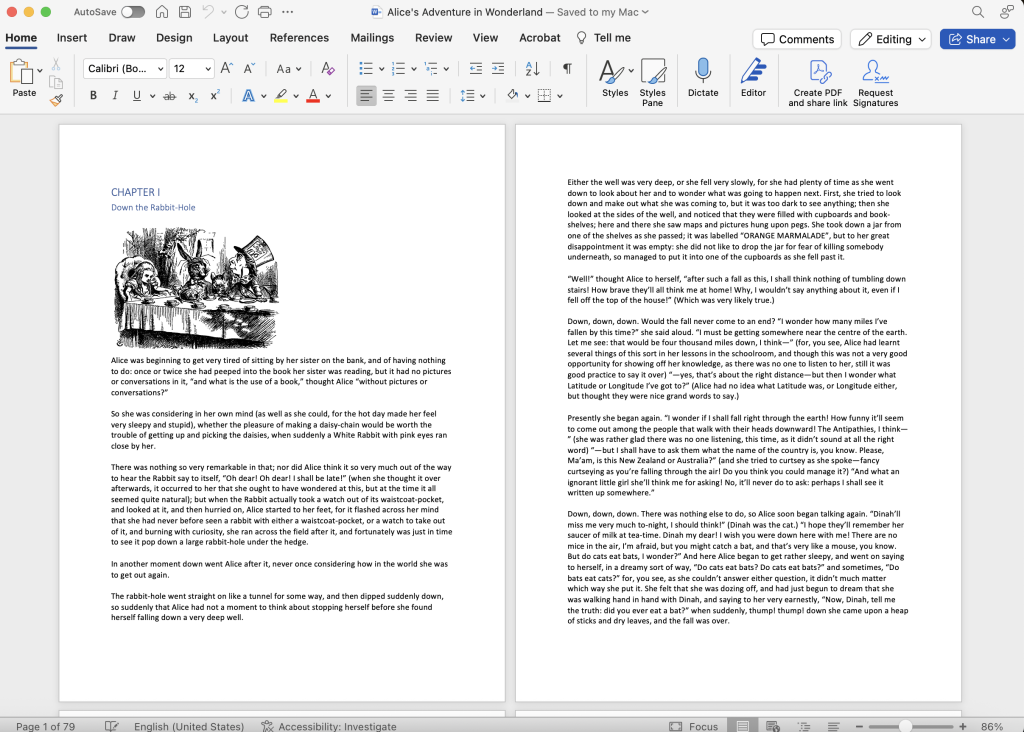
5. Microsoft Word

Microsoft Word is the industry-standard word processor — for better or worse. When you ask the average person what they think of when you say word processing, a majority will say MS Word.
What software do most writers use? Most writers probably use MS Word because it is the gold standard of word processors, even if it shouldn't be (yep, I said it).
The famous DOC and DOCX file formats come from Microsoft's ubiquitous software. Many publishers ask for manuscripts to be submitted in DOC or DOCX files, and nothing else. (It's easy to convert another file format into DOC or DOCX.)
Can I write a book in Microsoft Word? Yes, you can write a book in Word. However, I would not recommend it.
Read my more in-depth instructions to use Microsoft Word to write books.
My biggest problem for Word? It was designed for writing anything — not specifically for writing novels or long nonfiction books. It was not created by authors, nor for authors.
Word is tolerable for shorter works; however, if you're really looking for the best book writing software, Word does not measure up to its competitors.
Interesting fact: Stephen King uses MS Word to draft his book manuscripts. He uses Final Draft to write screenplays.
How much does Word cost? A limited web-based version of Word is available for free through Microsoft Office Online. For full features, you’ll need a Microsoft 365 subscription.
Pros for using Word to write a novel:
- “What you see is what you get” formatting
- Many book editors prefer Word documents (DOC, DOCX)
- Customizable toolbar
- Comes with a bunch of handy templates for books, essays, resumes… you name it!
- It's industry-standard, so you'll find this software on public library computers and company computers and everywhere in between
Cons for using Word to write a novel:
- Difficult to use if you don't work in a linear fashion
- Cumbersome for writing lengthy novels and other books
- Must use a separate tool, like Calibre, to export as EPUB (Amazon’s preferred format) or other ebook files
- Updates every few years, which creates a brand new learning curve each time
6. yWriter

Simon Hayes (AKA Spacejock) developed yWriter to be the best free, standalone app for fiction writing.
It encourages writers to write scenes, not chapters — since scenes are smaller and more manageable. Also, you can input data into multiple fields concerning each scene and chapter. This provides authors with a wealth of raw data they can analyze at any time.
You can even set goals for words per day or words per hour.
Read my more in-depth review of yWriter.
How much does yWriter cost?
- Free on Windows/macOS
- $5.49 on Android
- $14.99 on iOS
All in all, yWriter is great for authors who love analyzing how many chapters each character is in, how many scenes are in each chapter, etc. For authors who don't care about that, this may sound foreign. But I know a lot of writers who pour over the metadata of their novel almost as much as they pour over the actual story.
Pros for using yWriter to write a novel:
- Breaks down novels into chapters and scenes
- Stores snapshot backups of your work automatically
- Great tools for character development
- Offers the data-hungry author a wealth of useful data points
Cons for using yWriter to write a novel:
- Does not come with templates
- Doesn’t export directly to Amazon’s preferred format (KPF), and EPUB export options are basic compared to tools like Atticus or Vellum
- Not for minimalist writers
- Not the most elegant design — looks dated
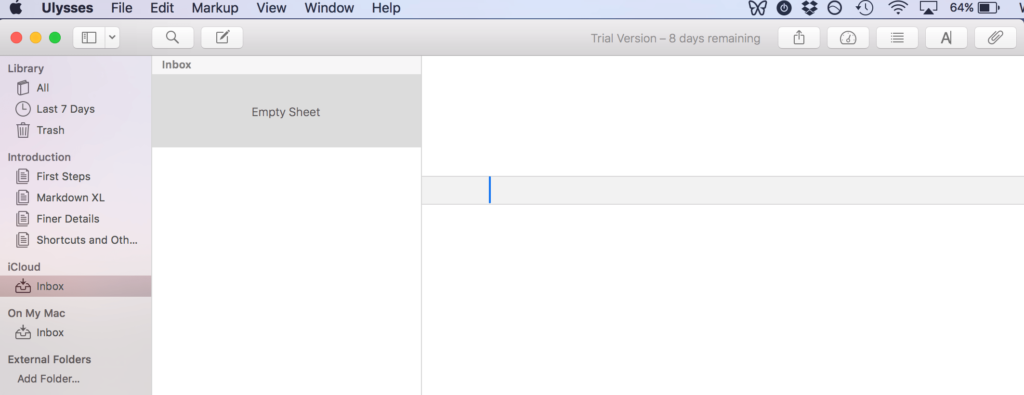
7. Ulysses

Ulysses is a simple, clean, yet customizable app for writing longer projects. Your work syncs automatically between your devices, or you can choose to store work locally. Ulysses also offers light and dark modes, allowing users to customize their writing environment for better comfort.
Unfortunately, Ulysses works only on Apple products.
The price has gone up in recent years. Ulysses now costs $5.99/month or $39.99/year. They also offer a free 2-week trial.
Read my more in-depth review of Ulysses, as well as my comparison to Scrivener.
Pros for using Ulysses to write a novel:
- Clean interface for distraction-free writing
- Drag and drop functionality concerning scenes and chapters (called the library)
- Ability to add filters to scenes and chapters
- Export to PDF, DOCX, HTML, or EPUB with ease
Cons for using Ulysses to write a novel:
- Only available on Apple devices (macOS and iOS)
- Price is a yearly or monthly subscription model, instead of one-time
- No collaboration functionality
- No built-in templates (though you can find them online)
- Steep learning curve if you are not familiar with markdown
- Not available for PC users
8. Apple Pages

Pages is Apple’s free text editor which lets you write, edit, comment, and collaborate. It is streamlined, yet versatile, offering a distraction-free writing experience.
Like most basic word processing programs, Pages can apply text styles and formatting to your words. You can insert images, graphs, and more. And they look great with Pages’ layouts.
Similar to Google Docs, Pages allows real-time collaboration via iCloud. The original author can decide who is allowed to edit or view only.
However, Pages is all about making every page look fantastic — hence the name. It’s not meant to be a strong word processor.
Pages is free for anyone with an Apple account from the Apple Store. Pages comes pre-installed on Apple devices.
Pros for using Pages to write a novel:
- Probably the easiest-to-use word processor on this list
- Absolutely free with every Mac or iOS device (Or use it on a browser)
- Has helpful “Track Changes” and “Smart Annotations” features
- Comment features can be used by an author trying to organize their thoughts or a collaborator editing the work
Cons of using Pages to write a novel:
- Every real-time collaborator in Pages needs an Apple ID
- Lacks a Draft View that displays text without page headers or footers
- Not meant to process words, so much as produce good-looking pages
As you can tell from this apple.com screenshot, Pages works cross-platform and seamlessly collaborates between devices.
9. Novlr

This beautiful display (Novlr's best feature) shows Novlr's simple word processing in Night Mode. From Novlr's website.
Novlr is a simple word processor with just a few added perks.
The Novlr Proof Reader (grammar and spell check) is on par with Grammarly, which is amazing — a lot better than Google Docs or MS Word. And Novlr offers in-app writing courses to help get the most out of its features.
It doesn't come with story templates like other premium word processors. And its formatting options are surprisingly limited.
A subscription to Novlr Plus costs $8/month or $72/year, while Novlr Pro costs $18/month or $168/year. They also offer a 2-week trial for free — no credit card required. In my estimation, though, Novlr is not worth the money.
Pros for using Novlr to write a novel:
- Constant autosaving
- Can sync with Google Drive and Dropbox
- Offers Day, Evening, and Night mode to set the mood with color schemes
- Tracks progress with the Analytics tab
- Works both online and offline
Cons for using Novlr to write a novel:
- Limited formatting options, including for front matter and back matter and print-friendly formatting
- The analytics tab is nice but very limited — only gives stats for today, this month, and this year
- No collaborative editing
If you'd like to learn more, I have a full Novlr review you can check out.
10. Squibler

Squibler is another tool that many authors use for writing books, plotting, and managing their projects. It features several appealing features such as a clean organizational system, writing templates, and more.
It is built more as a project management system, meaning it’s ideal for authors who work on big interconnected stories together.
You can also use it to write virtually any kind of written material, from technical writing to novels to a screenplay.
But how much does Squibler cost? While there is a free version that lets you try out its features, Squibler Pro is a little pricey at $29/month or $192/year (with no lifetime price). That means you’re paying $192 every year. This is why we recommend Atticus which has a lifetime price of $147, meaning you’ll never have to pay for it ever again, and all future updates come at no extra cost.
Read my more in-depth review of Squibler.
Pros for using Squibler to write a novel:
- Great organizational features
- It has a lot of writing templates for all sorts of writing types and styles
- It exports to any file format that you need
Cons for using Squibler to write a novel:
- It’s expensive
- While Squibler now offers some interface customization, it still lacks a true distraction-free mode and can lag during heavy use
- The app can lag a bit
- It lacks advanced formatting features
One More Worth Noting: Reedsy
Reedsy’s writing tool is simple, clean, and ideal for authors who want distraction-free writing with built-in formatting.
It’s completely free and runs in your browser (no downloads needed).
However, it doesn’t offer advanced outlining or project management features, so it’s best for straightforward writing projects.
Book Writing Software We Don't Recommend
While the following software options have their merits, we believe there are better alternatives available:
- Bibisco: While it offers character-focused tools, Scrivener provides a more comprehensive writing experience.
- Vellum: Atticus offers similar formatting capabilities at a lower price point and works on all platforms.
- FocusWriter: While it provides a distraction-free writing environment, other options like Scrivener's Composition Mode offer similar features with more robust writing tools.
- LibreOffice: Although it's free, Google Docs provides a more modern and collaborative writing experience.
For more detailed reviews of these software options, check out our full reviews: Bibisco Review, Vellum Review, FocusWriter Review.
Best Book Writing Software Comparison Table
| Program | Cost | OS | Formatting | Check It Out |
|---|---|---|---|---|
|
| |||
![]() |
|
| ||
![]() |
|
| ||
|
| |||
![]() |
|
| ||
![]() |
|
| ||
|
| |||
![]() |
|
| ||
![]() |
|
| ||
![]() |
|
| ||
![]() |
|
|
The Best Book Editing Software
The importance of good editing cannot be understated. While editing software can never replace a real-life editor, these softwares can noticeably improve your writing.
Editing and proofreading software can fix typos, check grammar, and improve your readability. Premium editing software even checks for clichés and passive voice.
Here are the 4 best book editing software that any book writer would benefit from:
- ProWritingAid (20% discount offered for both yearly and lifetime) checks not only your spelling and grammar, but checks for readability, filler words, and clichés. It works with Scrivener, Google Docs, and MS Word. Check out my full review of ProWritingAid.
- Grammarly ($0 for the free version, $30/monthly for the pro version) is a neat editing tool that finds spelling, punctuation, and grammar mistakes (as well as handy explanations) that works as a browser extension or an app to download onto your computer. Even the free version is a great tool for any writer. Check out my full review of Grammarly.
- Hemingway Editor is a FREE website and desktop app that highlights and color codes passive voice, adverbs, complex words, and difficult-to-read sentences. It highlights issues like passive voice or hard-to-read sentences, but it doesn’t explain why they’re problems or suggest fixes.. Check out my full review of Hemingway.
- AutoCrit ($0 for free version, $30/month or $180/year for professional version) is an online book editing software that offers writers unique editing suggestions. AutoCrit shows writers surprisingly insightful problems to change in their book, such as filler words, unintentional repetition, shifts in verb tense, and even slow paced paragraphs. You can compare your work to famous authors’ works, too, with AutoCrit’s Summary Score — which is why AutoCrit is ideal for fiction writers in particular. Check out my full review of AutoCrit.
Plus, if you're looking for a plagiarism checker, here is a free one you can use. Grammarly includes one as well with their paid version, while ProWritingAid using a token system.
Other Software Every Writer Should Have
Writing your book is only half the battle.
If you'd like to learn more about the art of writing, be sure to check out the masters at MasterClass. These courses are led by prolific writers like James Patterson, Margaret Atwood, Malcolm Gladwell, and more.
Also, we authors have got to market and sell our book as well as write it.
Below are several tools to help with not only writing but being a successful author:
- Publisher Rocket is a must for your book marketing research, including hot keywords and AMS advertising.
- Evernote allows you to share countless “notes” with beta readers, collaborators, other authors, classmates, family members. It is the coolest app for note-taking and -sharing.
- IAWriter’s minimalist, award-winning design cuts out distractions, like rulers and toolbars, and even blinds everything out except the sentence/paragraph you’re writing. Its Focus Mode might just change your life.
- Ommwriter offers a calm writing environment and meditative tracks to listen to while you write.
- Freedom productivity app helps you stay focused by blocking distracting websites and apps for scheduled writing sessions.
- Write or Die is a somewhat humorous and perhaps helpful tool that gives writers “tangible consequences” if they don’t meet a word count goal or time spent writing goal. Consequences include annoying sounds (such as “Never Gonna Give You Up”) or Kamikaze mode which deletes whatever was just written.
- A Plotting Software such as Plottr, Novel Factory, or Plot Factory. Each of these will help you plot your book, build compelling characters, and build your world.
Verdict: What is the Best Writing Software?
If you’re serious about writing a book, I recommend using Atticus. It’s the only software I use for my own books, because it helps me write, format, organize, and stay on track, all in one place.
Looking for a free option? Google Docs is great for shorter projects or team collaboration. I use it for blog posts and internal documents with my team. If you’re on a Mac, Apple Pages is another solid (and free) option.
But when it comes to writing a 30K, 60K, or 100K-word book, tools like Google Docs just can’t keep up. I need software that’s built for authors, not spreadsheets or memos.
That's why Atticus is my go-to.
It’s clean, fast, affordable, and powerful. No monthly or annual subscription. Just a one-time payment, with lifetime updates included.
If you’re ready to take your writing seriously, start with the right tool.


This is a great breakdown of the option! One thing for Google docs: I just finished a first draft with 76k words and it didn’t lag at all for me. When I first loaded the doc it would take a few seconds, but once it was all showing the writing didn’t have any latency. I could see if you had a custom font installed or maybe add-ons, it could slow down. But so far it’s been smooth and stable for me.
That’s awesome to here.
LibreOffice is a branch of Open Office with a much more active user community for support.
Hemingway teaches better writing. Has a free online version for checking your writing and a downloadable app for actually writing on your device. The app can be used as a replacement for FocusWriter.
And, of course, Grammarly both free and for a fee is a can’t live without.
Very thoughtful and detailed round up, How long did this post take you to write? David. Also, not sure if I’m in the minority here but I don’t know what I’d do without Calibre. It’s free software for formatting and converting book files, plus it gives you some nifty liberties with the file’s meta data. Extremely handy when you’re uploading a book to KDP, Draft2Digital, Smashwords, etc. and need to make different types of files on the fly.
Post-script: Not a plug, just a fan 😉
Thanks – it’s been updated over the years so all in all, a long time…haha.
Hello David,
I was listening to the, Christian Publishing Show, podcast, which you were the guest and it was amazing I’ve been thinking of writing but I never thought I’d be able to, because I’m am very dyslexic and was told most of my life I didn’t have the brains to do it and, unfortunately I believed it, till I heard you on the podcast that you had struggled with dyslexia. Actually why I sending this is I am so absolutely confused on which writing tool would be best for someone who has never actually put anything in print, I do have “Word Perfect” on my laptop but listing to more and more people I am more and more confused on which would be best. If posable I would greatly appreciate any advice you may have.
Thank you
Ron Ramirez
Hey Ron! Well, I’m glad you found that episode. I felt the same way for too long. As for your question, ProWritingAid is a tool that has helped me with spelling and grammar. It’s stronger than regular auto correct, and also analyzes my writing to help me to learn more about my style. As for a writing software, there isn’t one better than any other for dyslexia. It’s really about what are you comfortable with or what appeals to your style. But, I will say, you should definitely check out Atticus.io – It’s the software I’m personally developing that will not only be built specifically for writing books, but will handle formatting like a dream.
I’ve been using World Anvil for my worldbuilding and starting to use the manuscripts tool for books and stories. I love the autosave on manuscripts! Before that I used Scrivener, but I don’t know if I’ll go back.
Nice. I haven’t tried that one.
Awesome content as always, Dave! I moved to Scrivener the day you released that YouTube video on it. It’s a Godsend.
Also, have you ever checked out pacemaker.press? It’s a website for setting and tracking progress for different writing projects. I would be lost without it.
Keep up the awesome work!
No I haven’t. But I’m actually in the process of making my own book writing software…coming out in March. It’s the combination of Scrivener, Google Docs, and Vellum all in one. We also have a bunch of analytics, and goal tracking inside of it too. It’s called Atticus. http://www.Atticus.pub
I do have and use Scrivener.
But for creating how to books, I am using Ultimate eBook Creator
which has a very simple user interface to quickly create eBooks and print books,
It has some really powerful tools such as quickly create fixed layout books
but importing and auto creating the Table of contents.
Kevin
Nice
Thanks, Dave. Your articles are usually useful. This one is VERY useful. I’m switching right now to a new software. Thanks again!
Oh cool, and best of luck!
I thought this was a brand new article since I got your email today about it; however you mention CreateSpace which has not been around for a while so I’m confused. Hmmm….
Thanks, Dave. I just switched from Mac to PC and realized that I need to buy a new Scrivener license. Looking at the versions out there, it seems like PC version is backleveled, but it’s still my favorite novel-writing software. What I’m saying is your discount code dropped into my life at exactly the right time.
Haha…I know what you mean. Yeah, I’m not sure when PC will go from 2.0 – 3.0. I think they gave up since it’s been two years since they said they would. Glad you found the coupon code. Every little bit helps!
Hi Dave, PublisherRocket owner here, just a heads up about Storyshop.
I went to download StoryShop and find it has now morphed into ‘Plotfactory’, and this is the exact thing I dread about online apps (even though I’m a NovelFactory subscriber and love it) – I buy into it, learn to use it, throw my work inside it only for it to become morphware or abandonware somewhere along the line.
I’ve just gone to PF and had a look and you now need to sign up with your card details in order to start a 14 day trial. After the trial ends it’s $14pcm or $140 a year.
Which for me, is a lot of money and a lot of worry about what could happen to my work in the future.
Sshop raised $80k from Kickstarter investors and it lasted less than 5 years. That’s a kicker, even if the original investors were given full access to Plotfactory.
I’m happy to support small works in progress like Novelfactory and Dabble ($9pcm) or the new kid on the block, Wavemaker (free at the moment but you can aid development by becoming a patron for either $3/$5 pcm or by making a one off Paypal donation. Both Apps are minimalist compared to Scrivener, but they are totally intuitive and easy to pick up. (Wavemaker even integrates Randy Ingermansons Snowflake Method as part of the planning setup – well worth a look).
Long time user of Publisher Rocket Dave, it has kickstarted my Amazon presence more than I could ever have expected. If anyone reading this is publishing on KDP and doesn’t have PRocket, you are leaving money on the table. Honestly.
Thanks Dave, hope this helped.
Yeah, I just got word on the merger. I tried reaching out to the owners, who I know but they haven’t responded to me yet. I’l be updating this to reflect new information. The article coming out this week on Kindlepreneur is a side by side test of 4 Story Outline softwares specifically. As for Rocket, that’s awesome and totally made my morning to read 🙂
I use a wide variety of writing tools for my consulting and fiction work. I have many types because I work in a highly mobile environment (think war zones and humanitarian disaster areas) and depending on my circumstances I may find myself writing from one day to the next on a phone with a bluetooth keyboard, on a borrowed and 20 year old computer with some primitive version of Word, or on a Chromebook or iOS machine.I find it easy to switch tools all through the drafting and editing phases but not for the final formatting which is mostly done in Word or Vellum.I came by this flexibility decades ago when just starting out as a journalist. I early on complained to the editor (cigar + Scotch bottle + volcanic temper– stereotype) that someone else was using my typewriter and I did not like the feel of another. Short lesson learned quickly, “I do not give a f* what you use. Just get it to me before deadline — It is called that for a reason. A true journalist can write on clay tablets or in Nordic runes if that is what it takes to reach deadline.”And he was right.On a weekly basis for fiction I mainly use Scrivener, but I also like the free SmartEdit Pro from Bad Wolf Software which resembles Scrivener but was not copied from. It does not compile thoughWhen using an Android phone, or an iOS one for that matter, I will use Google Docs. I also use an iPad Mini with Scrivener sync’d through Dropbox.For pure blasting out draft writing I very much like the AlphaSmart Neo which runs for a year on two batteries, is cheap as hell used, and cannot be connected to the internet.Since I travel to a lot of sketchy places I tend to take a Chromebook and write in GDocs. Chromebooks are cheap to replace if lost or stolen. Can have its data and settings restored on line in a few minutes, and runs all day and then some on a chargeBut, for sheer pleasure in rough drafting I will fire up my iron age KayPro II running Perfect Writer in CP/M and just enjoy high speed writing with probably the best keyboard made this side of heaven apart from the IBM Selectric. It is just such a great pleasure to rattle along, saving to floppy disk every couple of minutes, and watch the green fluorescent screen fill with words.
Started originally with Pressbooks from a recommendation by The RV Entrepreneur. Switched to Apple Pages and found that It is just about all encompassing. The only issue I’m having is when importing to Kindle Ebook (as an ePub), images will not remain in place despite locking them before exporting. That, and header footer (titles and page numbers) are removed. Curious if Scrivener`s better in that regard.
I want to introduce OmniaWrite. I am working on it for a long time now. OmniaWrite is a next-generation plain text editor engineered for creative writing. It is perfect for writing novels, lyrics, poems, essays, drafts and screenplays.Also you can use it on all devices and operating systems and sync your work between them.https://www.omniawrite.com
Interesting that you do not write long pieces with Google Docs, Dave. I wrote a 160,000-word novel on with it recently without issues. But then, I also have related Doc tabs running, too: scene summary, characters, etc. Basically, I use Google Docs for almost everything. Except for ebook creation, and for that I use: HTML > Sigil > .epub.BTW, anybody old enough here to have used XyWrite for writing? I’m going back to DOS days! That was right after using chisels on stone tablets ;-)))
Hello! I’m Andrea Feccomandi the author of bibisco and I think you should give a try!What differentiates bibisco from other software is the focus on the characters. We think that your novel works if its characters are believable, that is when you understand human nature`s complexity. With bibisco you can KNOW EVERYTHING ABOUT YOUR CHARACTERS, in an unusual and funny way: an INTERVIEW!What is exactly bibisco?* bibisco is a desktop application available for Linux, MacOS and Windows in 12 languages: czech, french, german, english, italian, polish, portuguese (Brazil), portuguese (Portugal), russian, serbian, spanish, turkish.* With bibisco you can organize chapters and scenes, manage revisions, export novel in pdf or docx. And, of course, write with a fully featured text editor, also in DISTRACTION FREE mode.* With bibisco you can create a novel structure, define premise, fabula, narrative strands and settings: geographic, temporal and social context.* With bibisco you can see how characters, locations and narrative strands are distributed chronologically and across chapters. You can keep track of the number of words and characters you’ve written and you can see your story represented on a TIMELINE.Let me know!
Am I the only one who doesn’t like Hemingway? I do not write so that my language use can be stripped of all nuance and color, which seems to be what Hemingway does. (Possibly needless to say, I do not actually like most of Hemingway`s oevre.)I’d use Scrivener exclusively, but I cannot get the actual writing environment to look the way I need it to; I strongly prefer the way Word has the writing page ‘floating’ in the middle of blank space and I cannot make Scrivener do that. I wish I could, because I use it for everything else in the process. (Except making covers. That is in Photoshop.)
I have a full Hemingway review and in the end, I do not recommend it over some of the others…so, no. You are not alone.
Hi Joan!
I’m undecided as to which novel writer’s software to use. I shied away from Hemingway as I suspected they would heavily push minimalist writing. Is that what you found, Hemingway’s style dominates their overall editing, grammar, etc, approach? I need at least some editing besides grammar etc. Is Scrivener now a year later still a software program you like?
Thanks!
Winfred
Yes, Hemingway is definitely a minimalist style writer. I like it for blogging, but not writing a book. As for Scrivener, it’s the bettor of the options but it requires a lot of learning. There is something coming out in February called Atticus that I’m absolutely in love with. But that’s a while from now 🙁
Novellus is also worth a try! It is a lot simpler to use than Scrivener for organizing and even contains proofreading tools. (disclaimer: I am the developer)
I wish this was available for Windows! I’d give it a try.
What about Fictionary? I recently saw a promo for it and was super tempted. But I am also super broke. LOL
I got the PWA and Fictionary bundle. It is an AMAZING software. If you want to try it, there is a free trial I suggest you take advantage of using. They’re going to be updating in July sometime to allow up to three MS to edit (right now It is only one).
I’m a linux user, so a whole lot of those options do not work for me. On the other hand, I use https://apollopad.com for my own stuff. It is been in Beta for a long time but It is under active development right now and is a really good tool. I believe it will be around $5 a month once the beta is over.
I had tried ApolloPad, and while I thought it was alright, I’m excited to see what they come up with. Right now, I definitely prefer Scrivener or StoryShop, which has gone a major overhaul and looks totally different than the picture shown.
One year later, I’m sat here reading these comments on one screen, whilst checking out the recommendations in another. Apollopad (which is still free to use and in Beta) looks like it’s a very intuitive app and seems to be software that I can work with. It’s export facilities are actually better than Scrivener – Markdown, LaTex, HTML, OpenDoc, Docx, RTF, Pdf, ePub and Mobi!
I only hope it stays up in development, unlike Storyshop (see my comment above).
Agree with Hemingway and Grammarly. My copy of yWriter6 exports to HTML, Text, RTF, LaTex, and E-book. I use Calibre to export my drafts to MOBI to read on my Kindle with no problem.Word is a hostile beast. It should have been put out of its misery at least ten years ago. LibreOffice Writer is far better, as is WordPerfect 8. However, yWriter is superior to all of them. I have not used Scrivener but hear good things about it. I much enjoy the personal interaction with Simon Haynes. He is a real author and person.Since I like to swim upstream, I will say I hate using my wife`s Apple with a passion. It is like using a computer with blinders and thick gloves on. I like the flexibility and openness of my Dell as well as the ability to use a vast range of software of my choice.Bottom line is that everything is better than Word, and the better novel writing software is far better. Do yourself a real favor and get Dragon 15 Professional for dictation to text. I do all my drafting through it. The algorithms to filter out background noise are effective. I record on the treadmill in my gym, restaurants, hikes, and occasionally in my office at home. The transcribed text comes out about ninety-eight to nine-nine percent correct. My thoughts flow well with no attention the the logistics of typing. It works superbly with yWriter too.Thanks for the review.
I would love to be able to afford Dragon, as I tend to spew conversations out loud as I try to figure out dialogue. The problem is then that I do not always remember exactly how it went after LOL.
I recently purchased Scrivener and could not get it to work on my PC. Virtually got no response to my inquiries for assistance, so I got a refund.
Are there any streamlined writing apps for multi user? I am in a collab writing project and HATE both google docs and word online.
Streamlined, no. But Scrivener does have a collab feature that works for me in terms of version control….but not as streamlined as Google Docs.
If you have Windows and using the beta version for S3, there are some issues I’ve seen about using Revision mode. So unless you use a Mac it might be better to wait for multi-users until S3 is actually available.
did not even mention WordPerfect, which beats Word to pieces… Been using it for decades and would not HAVE any other!
I have moved to fully preparing my manuscript in WordPerfect X8. I export from yWriter which I do all my serious writing in. I hate all the hidden junk in Word, use LibreOffice Writer but am still mystified by some of the behavior, and have tried FreeOffice. I will never use anything from Google again because they have dropped several programs that I spent a lot of time on – specifically their facial recognition in photos.
The reveal codes is the most useful feature and must be why the legal profession uses WP so extensively. Their grammar and style checker, Gramatik is the best of all by a wide margin.
Add to the list: oStorybook and Manuskript. IMHO both are extremely comparable to Scrivener, although definitely not identical. Also, both are available for Windows, OSX, and Linux, and free.The oStorybook user interface is a bit clunky, but It is the best of these programs that I’ve seen in regard to handling chronology. And it happens to be clunky in a way that I, a retired programmer, am quite comfortable with. PLUS, I got it running on my Android tablet, with the help of some other free software (UserLAnd).
I’ll check that out. Thanks!
I just downloaded oStorybook, I knew I had it downloaded before but it did not make it to the new computer, and I was not sure why. So, I figured I’d check it out again, and it doesn’t even open. When I click on the icon, Windows asks what program I want to use to open the .jar file… *shrug* I’ve tried Manuskript, but it seems to be pretty much exactly the same as an old version of Shaxpir.
I use editminion.com and Hemingway consistently. Prowriting aid is good but does require more effort to use.
Scrivener BLOWS AWAY other writing software. Cut/chop your book into chapters and sections. I’ve used it for my non-fiction books. It is a life-saver.
My favorite is not even on the list. I love writing in Novlr. It is browser based, so I can access it from any computer. Triple backups to their servers, dropbox, and google drive. Distraction free writing. And STATS. I love statistics 😀https://app.novlr.org/signu…
Thanks Kate! I’m actually testing it as we speak and will be writing about it once I have conclusive thoughts on it.
I’m a big fan. It will be interesting to see what you think 🙂
I have written and published ten books, all using Word. (7 Amazon top 10 best-sellers) I paid thousands to editors who botched every single book, resulting in half a dozen editions, because I never knew these tools existed. I cannot thank Kindlepreneur enough for his help. I would not have known he existed, except for a randomly placed Facebook ad that showed up after 8 years in that “community.”
Seriously glad to help!
If you are not on GREAT terms with your editor you will not publish the book you wanted to write. I have heard your story so many times! I’ve even heard of publishers deleting complete chapters for no apparent reason!But a detached editor is necessary.
How can you and other reviewers forget that WordPerfect still exists and stays current with features and built in writing tools? Yous say “Basically, I need book writing software that will easily help me to research, outline, reorganize, write, collaborate, and edit. … I need to export my books in both ePub and MOBI formats before hitting publish and getting to the fun part of marketing my books”WordPerfect x6 thru current x9 (19) does all that. I still use x4, 2008, to write my stories and it does all that except for epub output.it has built in support for writing novels: multi chapter/master line; outline tool with drag & drop; great grammar check; metrics to review and grade your writing; output to PDF and ebook forms besides WORD, WPD, RTF and 60 other formats; total backwards compatibility; TOC, footnotes, index and xrefs. When you PROOF your doc, you can choose from a few writing styles or make your own. It will even diagram sentences and will read WORD, PDF, etc files. There is more when you need it. It still is the office standard in legal offices and has a variety of trade dictionaries as needed. If you used 5.x way beck when (and you had no WYSIWYG) even THAT is supported and lets you see the char codes – that has come in handy many many times. If you’ve used WORD, you already know 95% of WP. It has come a long way from ver 5x – It is now on ver 19.It has a tool for the AUTHOR COLLABORATION with multiple reviewers. Each can mark it up, highlight, change and add comments without screwing up the original. The author can then look at each review merged into the original and act on them or not. There is a prompt box that shows alternatives for misspelled words, but also lists related/synonyms for any word. THAT has been very helpful.If price is an issue, look for the penultimate or older versions on Amazon or Ebay. The entire suite (spreadsheet, presentations, DB, note taking tools, clipart ++) is available for as little as $10.It deserves a mention, if not your spotlight.
Thank you. I agree with all of your comments. I have written three novels in Wordperfect, two of which are out on Amazon and other sellers right now.
I use Sigil and sometimes Calibre for the metadata. but some PDF editors do the trick too, and convert PDF into epub. I looked for a long time for a Kindle editor, but nothing, only epub editors do exist.
Hemingway is nice, *BUT(!)* one problem I have noticed with it is that if you separate the helper ‘to be’ verb from the past participle found in the passive voice, Hemingway will *NOT(!)* flag that sentence as using the passive voice.This just goes to show, though, that it still pays to know grammar yourself and not rely entirely on software. Software can help, but it has its problems.
So true!
How about OpenOffice? Does anyone use it?I think CreateSpace is moving to KDP, links to the site may not work in the future.
Open Office is now LibreOffice and it works very well, I like the ability to communicate with my authors via the comments which they can respond to directly in context. It is nearly seamless with WORD but the editing tools are more intuitive. File size is manageable and their original manuscripts can dump directly into the template for book by size.
LibreOffice is not the same as Open Office, LO is an off shoot of the OO project.I’ve used LO to publish several books.
If you want to spare some bucks on Scrivener there is free windows only alternative – Quoll Writer. Works similar, looks better. All the essential features in one place and even possibility to share your texts with editor. Exports .docx and .epub for further formatting.
Try StyleWriter for a comprehensive editing tool.
http://www.editorsoftware.com
If you want to manage your entire novel all in one place, Novel Suite is the best tool 🙂
http://www.novelsuite.com
You forgot the Novel Factory! (http://www.novel-factory.com/) Please check it out as we’re getting fantastic reviews from people saying its helped them become far more productive and better writers. We’d be happy to offer a discount to your readers : )
Thank you for the article. Please consider the following. 1) Scrivener for Windows does not have an American dictionary – all words are spell checked with the UK dictionary. This includes their version of the ellipsis, UK spelling (e.g.: using ‘s’ in organise instead of organize), or contractions
(e.g.: can’t), slang and formatting. The updated Windows version isn’t out yet but I hope they include an American version since they sell a lot of copies here. 2) ProWritingAid Pro can only do 30-50 pages at a time – which isn’t helpful if your trying to use it for your novel – rendering the program useless. Twice I’ve used the program for clients and it took a very long time to get their novels through the program piece by piece. ProWritingAid is also increasing their rates this year, both yearly and lifetime rates.
Good knowledge shared but there are some other useful tool available in market
I tried Scrivener a few years ago and didn’t like it at all. It created all kind of different files then I could never find them again, lol. Now it was quite some time ago and I’m sure its improved since then, but I love Word. I was in it from the beginning so understand it well. It works great for my novels, I have no trouble. Love the Styles feature.
I also love ProWritingAid.
And when you buy that program it has an add on for Word so it works right inside that program.
I do use Google Drive so save my word docs there so if, God forbid, my computer went belly up I don’t lose my books! ?
I also save to a flash drive.
With Scrivener, you can have it export different file types – which can be great for publishing on different platforms. But I totally know what you mean. One thing I don’t like about Grammarly is that it doesn’t work inside of word. But PWA does, like you said.
I also totally agree on hte multiple places of saving it. It only takes one book to go “poof” before we all start doing that…haha.
Great list; now I only have to decide how many new tools I want to learn to use. Tx, Dave.
Haha..I know what you mean. Software doesn’t become a tool till we know how to effectively and efficiently use it.
One of the best tools is not even mentioned here, namely Vellum. My wife and I are writers and without Vellum, we would be ultimately lost. Yes, it is ridiculously expensive and it works only on a mac, but it’s the best by far.
Vellum is pretty good and I’ll be reviewing it more in an upcoming article on best ways to format.
Fantastic, please let us know when the article is available…
Will do.
Another good one and very useful is Aeon Timeline. Geared towards writers, it allows you to build multiple time lines of where characters are, what they’re doing etc. You can have character arcs, main story arc, any number of arcs running parallel to each other and get a really good sense of the big picture of your novel.
I’ll check that out. Thanks for the heads up.
Here are a couple you’ve missed: Bibisco (http://http://bibisco.com/) and Dabble — both are designed for writing novels. Bibisco is free, very nice looking, and available on Windows, Linux, and Mac. Dabble is available by subscription (free 14-day trial) and can be used in your browser or a free desktop app (Windows and Mac). I tried Dabble for Nanowrimo (they were one of the sponsors) and fell in love with it. As a Nano winner, I’ll be able to lock in a 50% discount for life. Yay!
Thanks. I’ll check those out!
I downloaded the bibisco one, will try it soon, but seems interesting. Dabble I’m using now.. I really like it. Can’t wait for the planned features from the roadmap. ;D
Also the Novel Factory, omg, loving that one so much! Like a guided way to write a novel and the interface and way it is layed out organizationally is amazing. Probably going to buy it and stick with this once but I’m trying them out. I would choose Scrivener, as I liked it a lot on my Mac OSX that I use to have.. but I use Windows PC now, and so I’m waiting for the 3.0 version to release for PC first as I want to to be able to try those cool new features. 🙂
I can’t believe you missed out LibreOffice. It’s free and a valid alternative to MS Word. I use it for all my writing.
And for book layouts, I use Adobe InDesign, and Photoshop for covers.
I tried it a while ago and wasn’t a fan but it’s good to know there are others that prefer it. If there are, I’ll give it another go.
yes me too tried libreOffice it was good to use and its free
Hemingway is only showing up as a $19.99 product. No free product is showing up as you mention in your article. I looked further to see if there was a free trial to try, to see if I liked it, but nothing other than the $19.99 version shows up at the link and processed through GumRoad
Follow the link given… It’s that page… You paste over the colored writing
Thank you! Going to try it now to see if I want to buy.
I would like to make another suggestion for novel writing software: Novelize (www.getnovelize.com). This online writing app is great for writing a series, because all the details are kept in a notebook, which can be used for several books. It’s also very easy to use and doesn’t come with too many features to sidetrack you from actually writing. Full disclosure: my hubby built it, and I might be jaded. 😉
I’ll check that out! Thanks and no worries on the jadedness…haha.
Dave what is the file format that SCRIVENER uses. Can I open and use my previously created .docx files with this program?
You can import your .docx with them. But as you’ll see, you’ll want to break up the information so as to organize it better – one of the features I love best about Scrivener.
Thanks much. Keep up the good work. You have been a great help to me.
LOL! I was in the middle of writing a four-book series. Now on Book 3. Superstition does not allow me to switch tools until it’s finished. (Old tennis player.) But I did go through their introduction…
haha…fair enough. I know how that goes 🙂
You are so appreciated! Thank you. I bought Scrivener when I read this article the first time.;>)
Awesome. And how’s it going?
Hemingway I find very useful. I am that kind of writer who thinks and writes long sentences. At least I have the tendency. Now that I write this comment, I’m aware of this, and I try to write short and crisp sentences.
As for free: I think I paid a few dollars for it, back in 2015, and have a lifelong pro version. I don’t use it at the time, since I don’t write in English, like I did back then.
Yeah, I’ve really been digging into Hemingway. Although, I’m also learning that my grammar is worse than I thought…haha.
There’s a lot of info here but one thing I’ve noticed you say about Prowritingaid ‘-The free version only edits up to 500 words at a time.,
I am using it and although I’m not sure of the maximum words the most I’ve entered so far is 1664 and it works.
Hmm…I’ve got the pro version (immediately bought it after testing it) so I can’t check that. But anyone else experience that?
Only consider buying it. We have to make a decision between Hemingway and Prowritingaid. Any advice?
ProwritingAid gets my vote then. I liked it much better…but that could easily be a preference of mine.
Thank you Dave. I trust experience, and that is what you have…