There’s always a debate or question on whether or not certain proofreading software tools will actually help specific types of writers and whether or not they are worth it.
And if you’ve done any research on them, you’ll find that many authors do use a proofreading software to assist that is greater than Word’s spellcheck, but most complain that many of them are not designed with fiction authors in mind.
While, I’ll admit that others softwares like Grammarly or ProwritingAid aren’t fiction focused, it turns out that AutoCrit is.
AutoCrit actually touts itself to be the “Fiction Writer’s Secret Weapon.” But is that really the case? Plus, it claims it has reports that will help you write better. But does it?
Well, in this AutoCrit review, I’m going to discuss its features and capabilities, plus its cost, and decide on whether or not it is worth the cost. If you want my quick answer, my take on this is that while AutoCrit is good at what it does, it may not be worth the cost for some use cases.
Note: I do rank AutoCrit as #2 on my list of best proofreading software, but it might not be the best for you, depending on your situation, so read on to learn more about what makes AutoCrit beloved by those where it hits the sweet spot. Additionally, Kindlepreneur has a special lifetime deal for AutoCrit as an affiliate, which is not something that they normally do, and is exclusively for Kindlepreneur readers. So be sure to check out the lifetime deal here.
What is AutoCrit?
AutoCrit is an online platform, that prides itself on being your own personal fiction writing mentor and editor. It’s designed to help you fine tune your understanding of fiction and non-fiction (although I don’t find the non-fiction nearly as developed yet) style writing so you can continue to master your craft.
AutoCrit is able to achieve this thanks in part to its extensive database of published books. It uses data from millions of fiction and nonfiction books to compare your writing against established publishing standards and help identify areas for improvement.
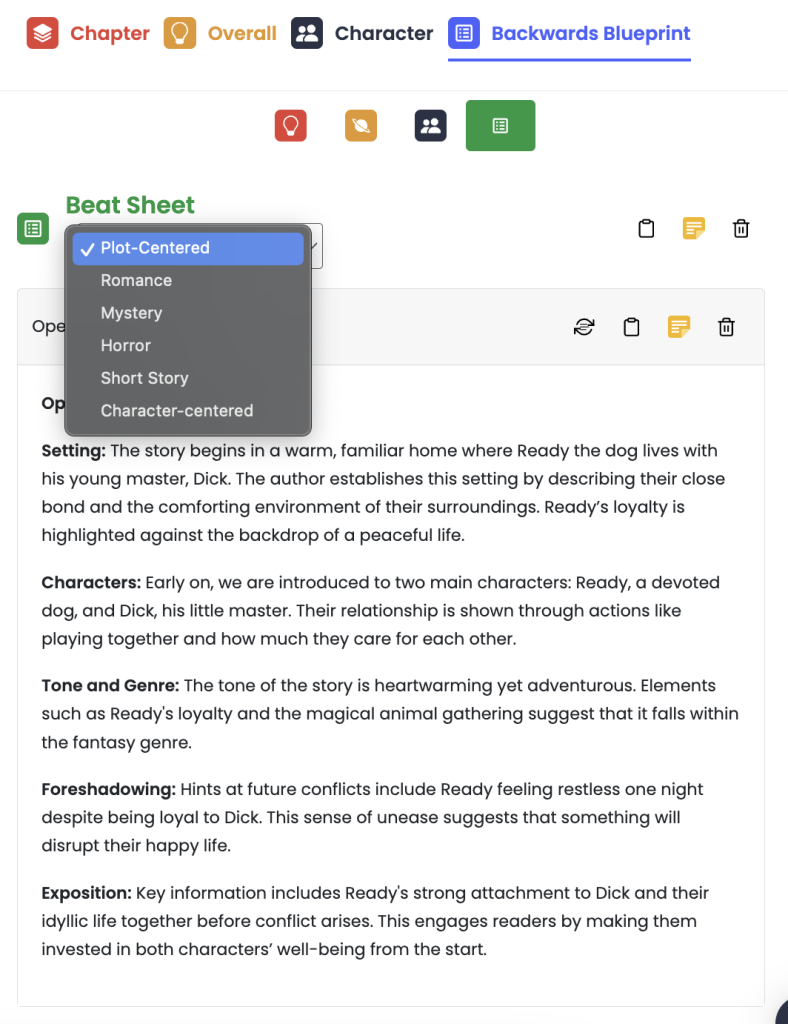
After going through the program’s algorithms, AutoCrit can give you an accurate judgment and constructive criticism tailored to your writing. Its story analyzer can help you plan out a synopsis, foreshadowing, timeline, characters, etc. And a more recent feature, Backwards Blueprint, will reverse outline your story to define and analyze your synopsis, genre, tropes, and even individual story beats.
And it’s not just stylistic insights that AutoCrit provides. With the simple push of a button, it provides over 20 different ways to improve your manuscript, ranging from poor dialogue choices to cliches you might want to eliminate. And it guides you through every step of the way. As far as this AutoCrit review is concerned… The idea behind the software is a solid one.
Side note: it’s worth pointing out that these analysis features that AutoCrit has used are simple algorithms scanning for things like dialogue tags, the number of adverbs you have, the instances of passive voice, etc.
Pricing: How Much Does AutoCrit Cost?
So what does a service like this cost? It’s a pretty invaluable tool, so how can you put a price on that?
Autocrit does that through a monthly subscription plan at three different levels.
| Free | AutoCrit Pro | Annual Professional |
|---|---|---|
|
|
|
Free Forever | $30/Month | $180/Year |
As you can see, there is a free version. However, I find it to be a glorified spell checker and grammar system – a step up from what you’d find in Word. But what makes AutoCrit special is when you pay for the Pro version – which them comes with all the legitimate features. You can either do $30 per month, or if you pay annually it turns out to be $15 per month or $180 for the year.
What about a lifetime membership?
When I first wrote this AutoCrit review, one of my major hangups was the fact that there was no lifetime membership option. I personally hate having to pay monthly subscription fees for my writing – and I was pretty vocal about this. I’d prefer to pay once and use it throughout my career, instead of waiting for it to dry up.
Because of what I wrote, I was actually able to negotiate a special lifetime deal that is ONLY for Kindlepreneur readers! Which is nice. So, for those of you who hate subscriptions, there is now an option for you. But again, this is only offered here:
My Experience with AutoCrit (And Why I’m Qualified to Write About It)
I’ll admit, I was skeptical about AutoCrit at first. I wasn’t sure how well its editing reports would work for fiction writing, or whether its comparisons against published books would actually be useful.
But then again I heard a lot of good things, and then a lifetime membership popped up, and I jumped on it.
I knew I was going to be writing this review soon anyway, and figured that AutoCrit had a 60 day money-back guarantee, which I can take advantage of if I didn’t like the software while I was reviewing it.
So with that in mind, let’s talk about AutoCrit and whether I kept it or took advantage of the money-back guarantee.
The Summary Report
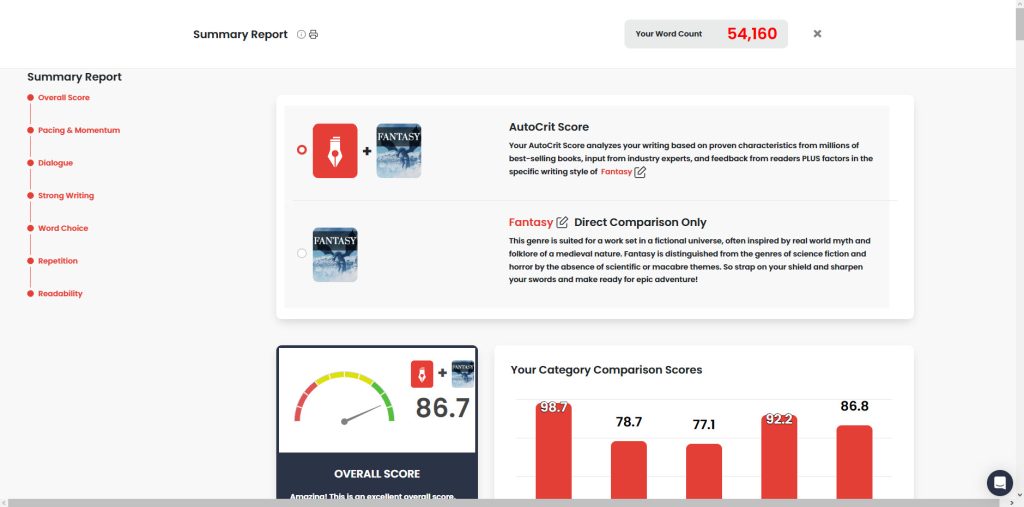
If you have the Pro version, you get access to the summary report, which is just a large report summarizing every one of the smaller reports that AutoCrit provides.
Doesn’t sound that innovative right?
Well, it turned out to be the thing that sold me on the software. After analyzing my book (which was a recent book that I just finished but not released yet), it gave me a list of reports, showing me a few that were very consistent with other fiction authors in my genre.
But then it showed me a number of reports of things that I could improve. I quickly saw that there were opportunities for better dialogue tags, as well as my use of adverbs.
But perhaps my favorite part was the peace of mind I got in seeing that my use of passive voice, for example, was actually lower than the average best-selling fantasy book.
And that’s my favorite part, the fact that you can compare these objective markers to bestsellers in your genre.
It’s not perfect, because these objective markers are not the only things that make a best-selling book, but it does provide some peace of mind for certain specific, identifiable issues.
How Does AutoCrit Work?
AutoCrit is broken down into a variety of different reports. This summary report I mentioned above can help you zone in on which reports are most relevant for you and your book, and which you don’t need to look at.
But for those who want to dive deeper, here’s a more comprehensive list of all of the different reports you could run, and how you can use them to improve your book:
Pacing & Momentum
AutoCrit provides several reports focused on improving the pacing and momentum of your story. These identify issues with variation at the sentence, paragraph, and chapter levels so you can pinpoint problem areas and enhance flow.
- Sentence Variation: Sentence variation refers to using a mix of short, medium, and long sentences to improve sentence length and flow. This report helps identify areas where sentence structure could be more diverse.
- Pacing: The pacing report lets you know if certain sections drag or move too fast so you can better control the speed of your story.
- Paragraph Variation: This report highlights paragraphs that are too long or short so you can break things up and vary paragraph length.
- Chapter Variation: The chapter variation report identifies chapters that are exceptionally longer or shorter than others and may need adjustment.
Dialogue
AutoCrit’s dialogue reports provide useful metrics and suggestions for improving character interactions in your story.
- % of Sentences With Dialogue: This report tells you if dialogue makes up an appropriate amount of your text or if there is too much or too little.
- Dialogue Tags: The dialogue tags report identifies repetitive or ineffective tags like “she said” so you can replace them with more dynamic alternatives.
- Adverbs in Dialogue: This report highlights unnecessary dialogue adverbs to eliminate so your character interactions sound more natural.
Strong Writing
AutoCrit provides a suite of reports focused on improving the strength of your prose for a more compelling read.
- Adverbs: This report identifies unnecessary or repetitive adverbs you can remove or replace for stronger verbs.
- Passive Indicators: The passive voice report allows you to pinpoint areas of passive voice to change into active voice for punchier writing.
- Tense Consistency: This checks for improper switches between past, present, and future tense so your writing remains consistent.
- Showing vs Telling: The showing and telling report helps identify passages dominated by exposition so you can turn them into more immersive scenes.
- Cliches: This highlights overused cliches so you can brainstorm fresh and original alternatives instead.
- Redundancies: Any redundant phrases that made it past editing are called out so they can be removed.
- Unnecessary Filler Words: Filler words that pad sentences rather than enhance them will be identified for trimming or removal.
Word Choice
AutoCrit provides numerous reports to improve word choice and variety in your manuscript.
- Initial Pronoun and Names: This checks that you effectively vary between pronouns, names, and nicknames when referring to characters.
- Sentence Starters: Any overused sentence starters are identified so you can vary how sentences begin.
- POV Consistency: The POV consistency report ensures your chosen narrative voice remains consistent and doesn’t accidentally switch perspectives.
- Generic Descriptions: This highlights bland descriptive words so more unique and vivid options can be used instead.
- Personal Worlds and Phrases: Quirky personal vocabulary choices stand out so you can decide if they align with voice and tone.
- Power Words: This suggests impactful verbs and descriptors that can replace weaker word choices.
Repetition
AutoCrit provides several reports focused on identifying repetitive elements you’ll want to revise.
- Repeated Words: This checks for repeated phrases used too many times in close proximity so you can replace them with synonyms.
- Word Frequency: Any words that appear with unusually high frequency throughout the manuscript are highlighted.
- Phrase Frequency: This identifies phrase patterns that repeat too often so you can mix things up.
Readability
AutoCrit offers some useful reports for assessing and improving your manuscript’s readability.
- Readability Statistics: This provides common readability metrics like Flesch-Kincaid grade level so you know the target audience.
- Dale Chall Readability: The Dale Chall formula specifically measures readability for fiction novels.
- Complex Words: Any unnecessarily complex vocabulary is flagged so simpler alternatives can improve readability.
AI Features
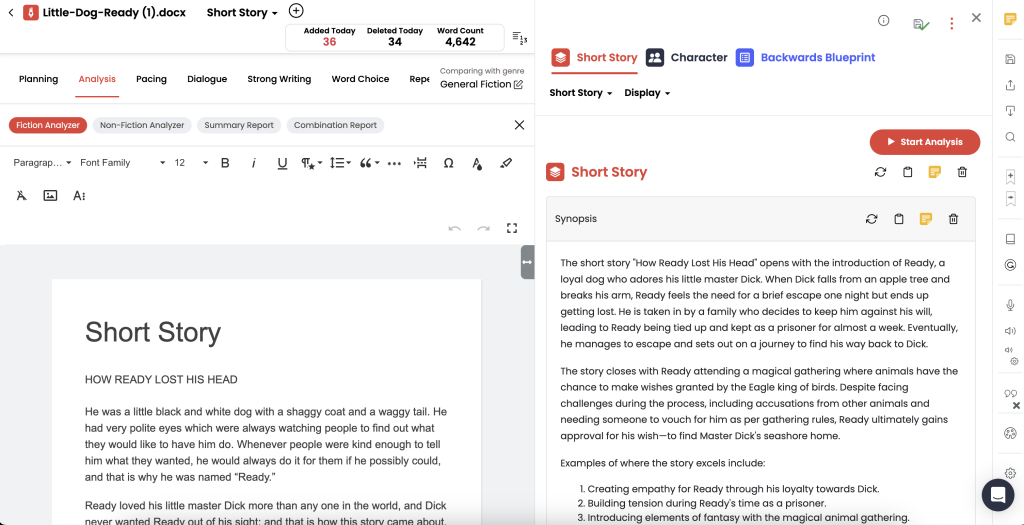
Note: AutoCrit has expanded its AI-assisted features since I originally tested the software. Its newer tools include Story Builder+, Story Analyzer+, Series Analysis, and automated alpha and beta readers that provide feedback on your manuscript. The Backwards Blueprint functionality discussed below is now part of Story Analyzer+. The following sections cover my experience with earlier versions of these tools. I’ll revisit the newer features in a future update!
But before we get too much further, let’s also talk about some of the newer AI features. AutoCrit is often mistaken as an AI writing software, but it existed long before generative AI became a thing.
Indeed, it is easy to mistake the comparisons with best-selling authors as AI features, but they are not. However, AutoCrit has begun to implement the small AI features…which is where things get interesting. Their AI features so far are only for inspiration and analysis, and they do a really useful job at both.
Here are the two biggest features:
Inspiration Studio
Inspiration Studio is a collection of AI features that let you do a number of brainstorming tasks.
- What Happens Next?: This is a place to look at everything you have written before, and get ideas on where to go next. The AI knows the context of your book, and so it can give you decent ideas of what happened next, basically eliminating writers block completely.
- Change the Mood: A feature that lets you highlight text, and it will give you suggestions on how to change the tone/mood of the scene.
- Story Builder: The Story Builder lets you brainstorm new story ideas from scratch, complete with premise, worldbuilding features, and characters. While rudimentary compared to some of the AI writing programs out there, this can be helpful for the author that doesn’t use AI a lot.
Story Analyzer
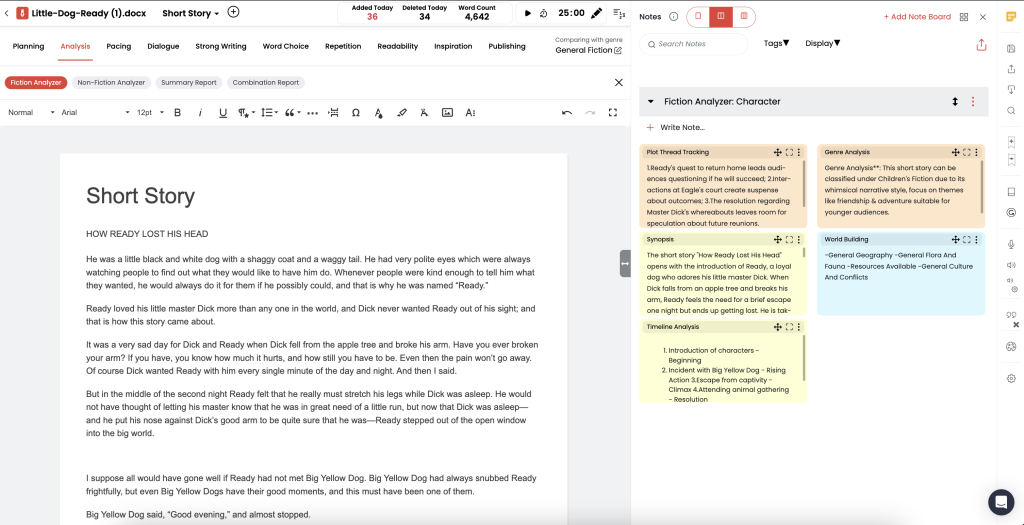
The story analyzer is another really useful tool that will analyze each chapter of your novel, providing you with a summary, information about conflict, characters, world building, possible contradictory events, the timeline, and more. The tool is a great way for users to get feedback on their work from a developmental editing perspecitve.
Once you have analyzed every chapter, it can also do an analysis of your story overall.
I found this to be a useful tool for larger, developmental edits.
Backwards Blueprint
As of the more recent months, Backwards Blueprint was launched and I have had the chance to test it out a bit.
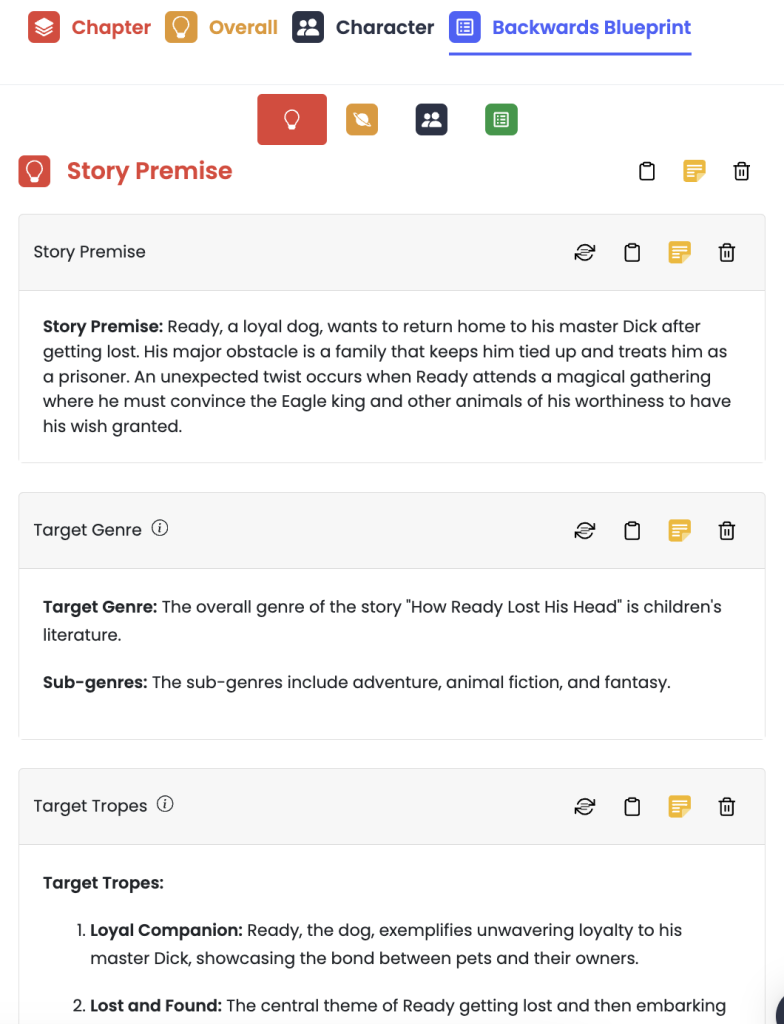
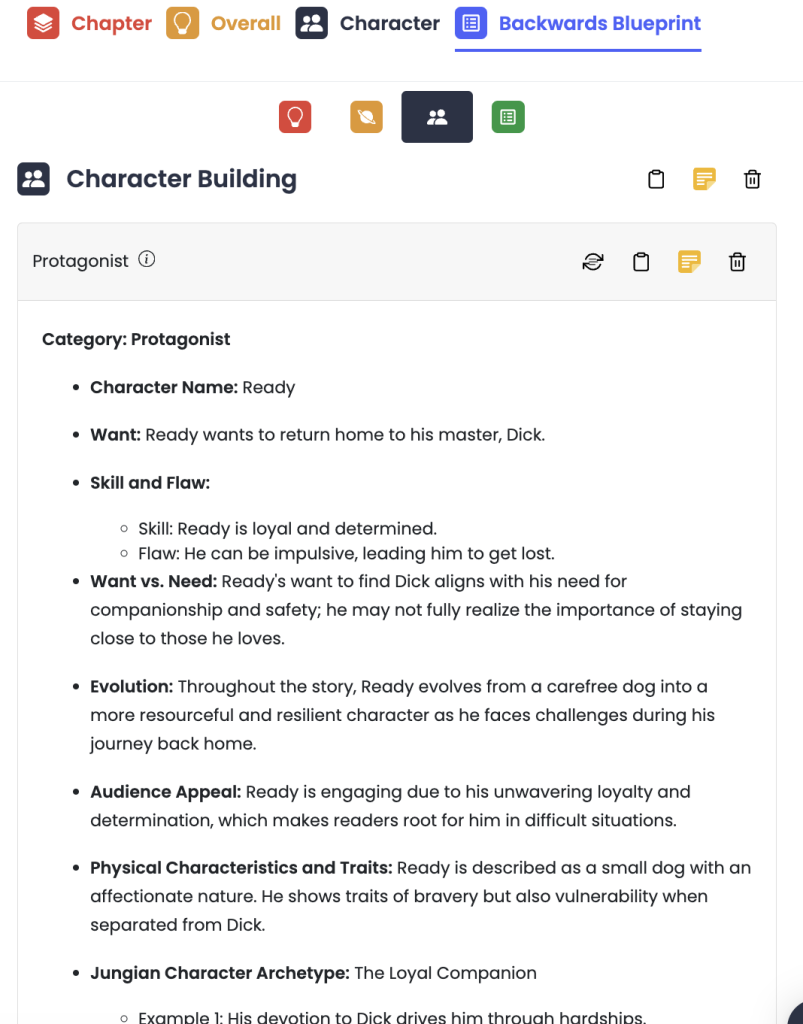
A part of the Story Analyzer tool, the Backwards Blueprint feature takes what you have already written and pulls out the premise, genre and tropes. On top of that, you can get even deeper into your work and see its world-building and character blocks with their own individual breakdowns and save any of these as notes for a quick refresher later on.
The last section of the Backwards Blueprint includes a beat sheet section. With this, the story analyzer will dissect the story and segment out your beats with your chosen beat sheet. Again, allowing you to filter through different beats and get a corresponding analysis from your choices.
Nonfiction Options
While most of the examples I’ve given in this review so far have been for fiction, Autocrit does work for nonfiction as well – it’s just not its specialty.
For example, there is a Nonfiction Builder, a Nonfiction Analyzer, and reports designed to compare your manuscript against other nonfiction manuscripts, in the same way that the fiction reports analyze your book in comparison to other books in your genre.
Here’s a brief look at the Nonfiction Analyzer as an example of what you will find.
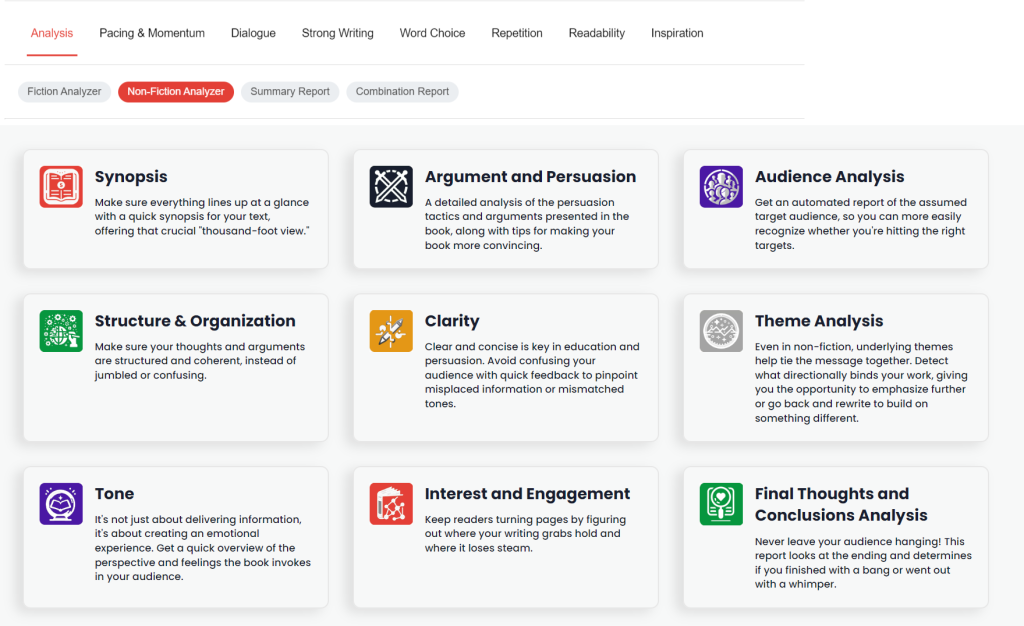
It’s pretty good at this, however, still better at fiction.
Goal Setting & Productivity Tools
Within the Writer’s Desk, you can also find a word count tracker, different goal settings and a customizable timer. All coming with their own customizations and allowing you to celebrate your achievements while writing.
The built-in Sprint and Pomodoro timers come with the option to play music, whether typing or resting, keeping everything within one program. The downside is the limited musical options. But the option is there, and it can make for a more focused and distraction free writing experience.
Lastly, AutoCrit is also equipped with visual planning tools, such as note cards and note boards. You can use the bookmark feature to insert a note directly into your text, save Story Builder ideas like I mentioned before, and reference your beat sheet all from your notes board.
All can be visually organized using the drag and drop on either a corkboard or timeline view.
Does AutoCrit Use Your Writing to Train AI?
One concern authors understandably have about any AI-assisted writing tool is whether or not their manuscripts are being used to train those AI models.
According to AutoCrit, that’s not something authors need to worry about here as the company says it does not use members’ manuscripts to train its AI systems. Its traditional editing reports use algorithms and comparison data, while its AI features are optional. Also, AutoCrit does not write for you and does not allow AI training on your work.
Of course, you’ll still need to submit your writing to AutoCrit to receive its analysis and recommendations. But that’s different from allowing your work to be used to train AI.
What About AutoCrit Formatting? (Problem)
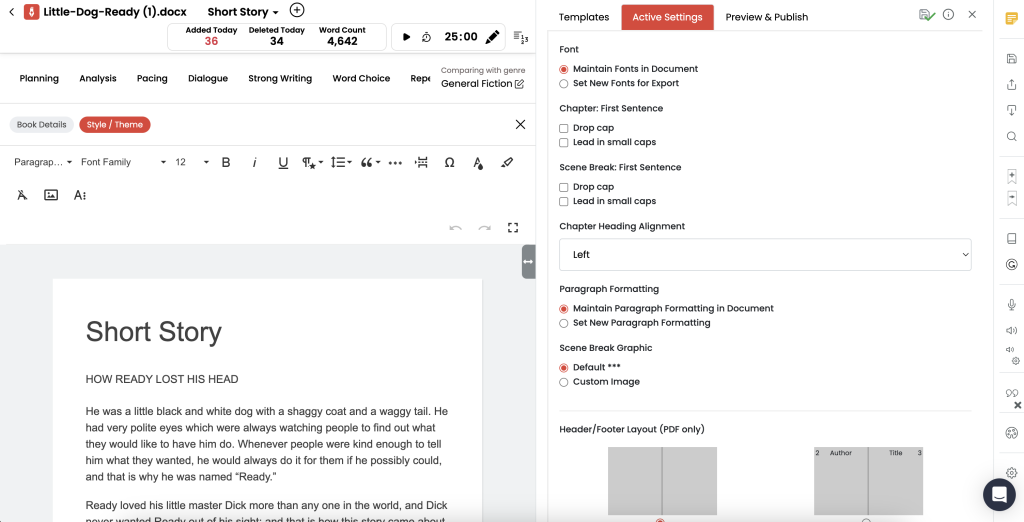
AutoCrit does have the ability to lightly format your writing into an ebook and print book. However, this feature is actually pretty poor and I’d stay away from it.
In the past, I’ve found the settings within the formatting tab to be pretty buggy and problematic. AutoCrit does support EPUB and PDF formatting, including tables of contents, customizable front matter, and scene breaks. However, I still found its formatting capabilities limited compared to dedicated book formatting software.
Of course, your mileage may vary!
Is the Price of AutoCrit worth it?
Well, it depends. At $30 a month, AutoCrit Pro can be a significant expense, particularly if you’re only interested in its editing reports. However, the subscription also includes unlimited access to its story analysis and AI-assisted features.
However, if you are a professional writer that is pumping out many books, and you’d like to have a go-to-system to check your work, then getting their lifetime deal (when it’s available) is a good idea. Still a little steep for some, but it’s a true LIFETIME plan that doesn’t have per use pricing. If you’re doing well sales wise from your books, then you might as well beef up your arsenal!
What I Liked About AutoCrit:
So let’s dig into my favorite parts about AutoCrit, and why I think you should use it.
- Reports: Unlike some other programs out there that do this, I’ll admit the reports are well done and seem to give good recommendations.
- Exporting: I haven’t talked about this yet, but the exporting features were excellent. It was able to easily read a DOCX file I gave it and accurately divided it into the correct chapters for me.
- Ease of Use: Overall I found the reports very easy to handle, and it didn’t take me long before I was in the weeds, fixing up my book based on the recommendations.
- Goal Setting: AutoCrit also has a fun goal setting app lets you set goals for words written and the like. While I don’t use these features for myself, they were are welcome addition.
What I Didn’t Like About AutoCrit:
While there is a lot to like about AutoCrit, there were a few things that didn’t quite work for me.
- Integrations: Sadly, you still have to work within AutoCrit’s own software rather than directly integrating it with programs like Scrivener, Google Docs, Microsoft Word, or Atticus. There is no standalone desktop app, although AutoCrit Pro now supports offline writing. You’ll still need an internet connection to run its AI features and editing reports. In my opinion, better integrations would help it compete with programs like ProWritingAid.
- Dictation Feature: I tried out their dictation feature to see if it worked, and found it to be better then it was in the past. But I still personally prefer using Dragon dictation or some of the AI dictation apps out there as the integrated one does not support real-time typing.
- Lots of Upsells: while this is a little nitpicky, I did find it slightly annoying that, after having paid hundreds of dollars for the lifetime version, that it was presenting me with courses and services that cost even more, in some cases. While I understand that these are separate products, it did feel a little annoying to have more things to buy, after I had already spent a good chunk of money on the software. Obviously you don’t have to make these purchases, but I thought I would mention it.
- Formatting Riddled with Errors: As I discussed the formatting was extremely limited and not something I would use to formate
- Pricing: At $30 per month, AutoCrit Pro is a significant expense, especially if you’re already paying for other writing tools. It does offer more than grammar checking, including story analysis, AI-powered feedback, and unlimited use of its analysis tools. Whether that’s worth the cost depends on how frequently you’ll use those features. At least there’s a lifetime option for authors who prefer to avoid subscriptions, and I love seeing that!
Verdict: Is AutoCrit Worth It?
As I wrap up this Autocrit review, the real question is… Is it worth it? And I believe the answer is: it depends on you and your needs.
Yes, the reports are very well done and is what makes this a great option. And while Autocrit does catch some grammar errors, I personally still run my writing through a program such as ProWritingAid. And, while it can do formatting, I found the version I tested limiting.
And I can’t stress enough the issue of not being able to work inside of other programs. There is no downloadable version or integrations. Furthermore, be prepared to get offer after offer for other things to buy like courses, or services, etc.
Now, if the above doesn’t bother you, then for what it’s worth, AutoCrit is a pretty good tool for fiction writers. I’ve been using it myself for my own novel ever since I purchased it to write this review. But I do make enough money from my books to justify paying that and keeping the program. So, not a necessary a must-have for me… just a good luxury.
And if you do get AutoCrit, I definitely recommend the lifetime version – which is what I did.