Grammarly is probably the first writing tool most people think of when they want a second set of eyes on their work.
It’s easy to use, it catches a lot of the obvious stuff, and if you’re writing an email, a blog post, a sales page, or something you just need cleaned up before you send it out into the world, Grammarly usually does a decent job.
But after you’ve tried enough writing tools, you start to notice that Grammarly is really just one version of what a writing tool can be.
Some tools are better at digging into style. Some are better for long-form writing, where the issues aren’t just commas and typos but pacing, repetition, sentence variety, and whether your manuscript starts to sound a little tired after chapter twelve. Some tools are more useful for quick rewrites. Some are better for writers who work in more than one language. And some of the newer AI tools aren’t really proofreading tools at all, even though people still compare them to Grammarly because they live in the same general “help me fix this writing” universe.
That’s why the best Grammarly alternative depends a lot on what you’re writing and what kind of help you actually want.
If you’re an author, ProWritingAid is still my favorite place to start because it was clearly built with longer work in mind. If you mostly want cleaner sentences, Hemingway or Wordtune may be enough. And if you’re looking for AI help with marketing copy, brainstorming, or rewriting, then you’re in a slightly different category altogether.
So in this guide, I’ll walk through the Grammarly alternatives worth knowing, where each one fits, and which ones make the most sense depending on how you write.
Grammar, style, and readability tools
If you like what Grammarly does, but want something a little different, this is where to look.
These tools focus on improving what you’ve already written.
They’ll catch grammar mistakes, tighten up your sentences, and help with clarity. Some go deeper than Grammarly in specific areas. Others keep things simpler and more focused.
I’ve used a mix of these over the years, and the biggest difference usually comes down to how much feedback you want.
Some writers want detailed reports and suggestions they can dig into. Others just want something that highlights issues and gets out of the way.
That’s really what separates the tools below. They’re all trying to make your writing better, just with slightly different approaches.
1. ProWritingAid (my top pick)
ProWritingAid (PWA) is my top choice for authors looking for a Grammarly alternative. It does everything Grammarly does (and a whole lot more) while costing less and offering deeper analysis for long-form writing.
Grammarly is great for catching basic mistakes, but ProWritingAid goes further. It helps you improve your style, tone, pacing, sentence variety, and even echoes, things that really matter when you’re writing a book or trying to polish up an article.
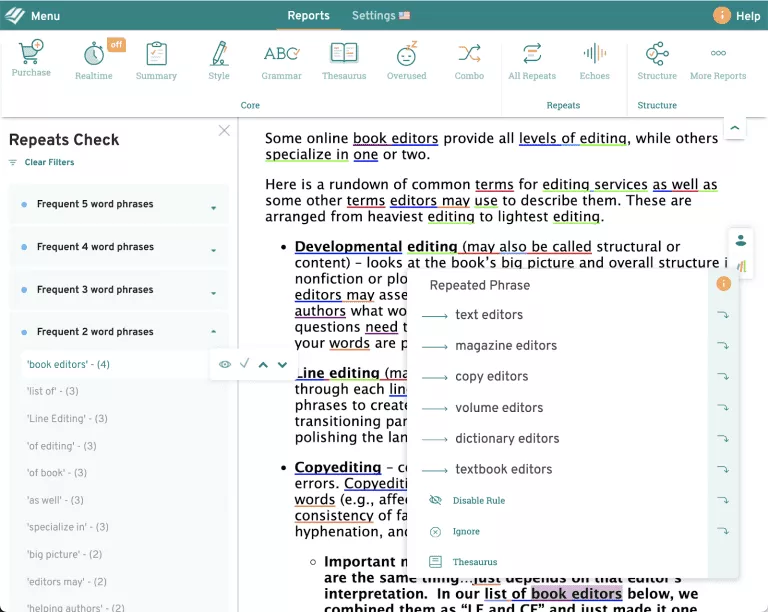
Whether you're working on a fantasy novel, a blog post, or an academic paper, PWA gives you insights that go beyond grammar rules. And that's a big reason I recommend it.
ProWritingAid Features
The free version gives you a solid taste of what the tool can do, though most of the advanced features live behind the Premium or Premium Pro plans.
live behind the Premium or Premium Pro plans.
Free Features:
- Browser extension
- Spelling and grammar checker
- Punctuation checker
- Definitions and synonyms (double-click)
- Limited style suggestions
- Sentence structure tips
- Access to 20+ writing reports (with limits)
- Emailed writing stats
Premium Adds:
- Passive voice detection
- Advanced grammar and style suggestions
- Inclusive language checks
- Genre- and tone-based enhancements
- Formatting and fluency improvements
- Full access to in-depth writing reports
- Plagiarism checker (with Premium Plus plan)
- Integrations with Google Docs, Word (Windows), and more
Premium Pro Adds (AI Tools):
- More daily AI Sparks
- More Chapter Critiques
- Rephrasing and rewrite help
- Manuscript-level analysis tools
- Advanced grammar, style, and storytelling feedback
ProWritingAid’s current plans are no longer best described in terms of “10,000 AI credits/month.” Their pricing now describes AI usage around daily Sparks and Chapter Critiques, with Premium Pro offering higher daily limits than Premium. Since those limits can change, check ProWritingAid’s pricing page before publishing exact numbers.
If you're looking for Grammarly-level feedback with stronger customization and optional AI features, Premium Pro gives you all of it under one roof, and it still costs less than Grammarly in most cases.
PWA Integrations
One reason authors love ProWritingAid? It works where we write. You can use it in Word (Windows), Google Docs, and most major browsers. It even plays nicely with Scrivener and, better yet, Atticus.
That’s not something you get with Grammarly.
One reason authors like ProWritingAid is that it works in a lot of the places writers already write.
You can use it with Google Docs, Microsoft Word, Scrivener, Vellum, browser extensions, and more. It also works with Atticus through ProWritingAid’s browser extensions, which means you don’t have to rely only on a manual copy-and-paste workflow.
ProWritingAid currently supports:
- Google Docs
- Microsoft Word
- Scrivener
- Vellum
- Chrome, Edge, and Firefox browser extensions
- Atticus through browser extension support
- Other writing apps and websites through its Desktop Everywhere and browser tools
Whether you’re editing a blog post or a 90,000-word manuscript, ProWritingAid has the flexibility and depth to support your writing process.
ProWritingAid Pricing
You have a few different options for PWA pricing. And remember, you can try out the free version before you buy! Honestly though, the free version is the best free Grammarly alternative, as well. You really can't go wrong with this tool.
- Premium Plan:
- Monthly: $30/month
- Yearly: $10/month ($120 billed annually)
- Lifetime: $399 one-time payment
- Premium Pro Plan:
- Monthly: $36/month
- Yearly: $12/month ($144 billed annually)
- Lifetime: $699 one-time payment
Of course, if you're a Kindlepreneur reader, you get a 20% discount on the annual plans and a 10% discount on lifetime. See below:
- Premium Plan:
- Yearly: $8/month ($96 billed annually) – 20% discount
- Lifetime: $359.10 one-time payment – 10% discount
- Premium Pro Plan:
- Yearly: $9.60/month ($115.20 billed annually) – 20% discount
- Lifetime: $629.10 one-time payment – 10% discount
Click here to try ProWritingAid at Kindlepreneur's special discounted price. Or, check out our in-depth review here.
We also have an in-depth ProWritingAid vs. Grammarly guide.
When you consider that the best deal for Grammarly Pro comes out to $144 a year, ProWritingAid is significantly cheaper for better functionality.
2. Ginger
Ginger has been around for a while, making them a well-known and viable Grammarly alternative. The tool finds spelling errors and grammatical mistakes. It can also read your text back to you, which is an excellent way to find awkward sentences and strange phrasings. You can even use this feature to listen to articles instead of reading them! #LifeHack

The best thing that Ginger has going for it is the translation feature. It can translate into over 40 languages! It does this with neural machine translation, which is something neither Grammarly nor PWA can do. Plus, if you're not a native English speaker, it offers some grammar tutorials to help you improve your writing.
However, it should note noted that Ginger's interface and update cadence are noticeably slower than both Grammarly and ProWritingAid, which could impact usability (depending on the speed of your machine)
Ginger Features
- Grammar and spelling checker
- Rephrase suggestions
- Browser extension (not for Firefox)
- Translates to over 40 languages
- Grammar lessons
- Desktop and mobile apps available
- Microsoft Office add-in
- Free version
Ginger Pricing
Ginger’s pricing changes often because the company regularly runs discounts and promotions. Rather than relying on fixed prices here, I’d check Ginger’s online store for the current Premium rate before buying.
The free version can give you a basic sense of the tool, while Premium unlocks more of Ginger’s AI-powered writing assistant features.
You can also check out our Ginger review to learn more.
3. Hemingway Editor
The Hemingway Editor stands apart on this list. Instead of picking out and underlying each grammatical or spelling error, the Hemingway app highlights things like complicated sentences, passive voice, adverbs, and excessive wordiness. Essentially, it's designed to make your writing more concise and clear through flow, word choice, and sentence structure. But it rarely gives you concrete suggestions on how to rephrase or restructure your writing. That's up to you.

Hemingway still works best as a style and readability tool, not a deep manuscript editor.
The classic version highlights wordy sentences, passive voice, adverbs, and readability issues, which makes it helpful when you want to tighten a section that feels too heavy. You can use the online editor for free, or buy Hemingway Editor Classic for Mac or PC as a one-time purchase.
Hemingway also now offers Hemingway Editor Plus, a subscription version with AI features that can fix wordy sentences, address grammar issues, and suggest rewrites with a click. That makes Hemingway more capable than it used to be, though I’d still think of it as a clarity and sentence-level tool rather than a full replacement for something like ProWritingAid.
Hemingway Editor Features
- Checks for adverbs
- Checks for passive voice
- Highlight complex and wordy sentences
- Website version is free
- Formatting options available in free version
- Super affordable premium version
Hemingway Editor Pricing
Since this tool deals with more complex writing issues and doesn't give suggestions, you'll learn to become a better writer if you use it consistently. That's not to say that you should always change anything it highlights. But it definitely guides you in the right direction.
- Online editor: Free
- Hemingway Editor Classic for Mac or PC: $19.99 one-time purchase
- Hemingway Editor Plus: Starts at $10/month, or $100/year when billed annually
Check out our Hemingway App review for more information.
4. LanguageTool
LanguageTool is a spelling and grammar tool that operates much like Grammarly or ProWritingAid. It's an open-source tool that you can try for free without even giving over your email address. If you regularly write in a language that's not native to you, LanguageTool is an excellent proofreading option.

With the “Mother tongue” features, you can select your native language and the other language you write in. This tool then looks for common mistakes between the two, in addition to looking for basic grammar and spelling errors. You can also use “Picky mode” to ensure you maintain your voice and style throughout your writing. The free version also does many of the same things Grammarly does, like highlighting passive voice and suggesting synonyms with a click of the mouse.
LanguageTool Features
- Basic grammar and spell check functions
- Checks punctuation
- Passive voice detection
- One-click synonyms
- Free version available
- Works in over 30 languages
- Ideal for those who write in a non-native language
- Affordable premium option
LanguageTool Pricing
The two major features that this tool doesn't have are reports and plagiarism detection. But if you purchase yearly, the price of the premium version may just make it worth your while! Definitely check out the free browser version to see if you like it before purchasing.
- Monthly: Check LanguageTool’s pricing page for the current rate
- Quarterly: $49.90 per quarter
- Annual: $69.90 per year
- Two-year plan: $119.80 for two years
LanguageTool changes discounts from time to time, so I’d check the pricing page before you buy.
Check out my full LanguageTool review.
AI writing and rewriting tools
This is where things start to feel a little different from what Grammarly does.
Because while Grammarly is built to clean up your writing after the fact, these AI tools tend to jump in much earlier in the process. Instead of just flagging mistakes or suggesting small tweaks, they’re often trying to help you reshape what you’ve already written, or even give you something to work with when you don’t have much on the page yet.
In my experience, that changes how you use them quite a bit. You’re not just running a final check before you publish. You’re using them while you write, whether that’s to test a different way of phrasing something, expand an idea that feels a little thin, or get past a section that just isn’t coming together the way you want.
That can be incredibly useful, especially if you’re writing a lot or working on longer pieces. At the same time, it’s easy to lean on these tools too much if you’re not paying attention, since they can start to smooth everything into the same kind of voice if you let them.
So the goal here isn’t to replace your writing. It’s to give you better options while you’re doing it, and to speed up the parts that tend to slow you down.
5. Jasper
Jasper feels less like a Grammarly replacement and more like an AI writing platform for marketing teams.
It can still help with blog posts, emails, campaign copy, and rewriting, but it’s not really built around the same use case as a grammar checker. Grammarly starts with text you’ve already written and helps clean it up. Jasper is more about creating, reshaping, and scaling content inside brand and campaign workflows.
For authors, that makes Jasper a more specialized recommendation. If you’re writing marketing copy, launch emails, ads, or content for an author business, it may be useful. If you mainly want help editing a manuscript, it’s probably more tool than you need.
That said, it’s not a “set it and forget it” tool. You still need to guide it, shape the output, and make sure it sounds like you. But as a way to speed up drafts or break through a blank page, it can be a big upgrade over traditional editing tools.
Jasper pricing currently starts with the Pro plan at $69/month when billed monthly or $59/month when billed yearly. Business pricing is custom.
6. Writesonic
Writesonic has moved well beyond the old “quick AI writing tool” category.
These days, it’s positioned more as an AI search visibility, SEO, and content platform. It can still help create AI-written content, but its current plans are built around things like AI articles, site audits, AI search tracking, brand visibility in ChatGPT/Gemini/Google AI Overviews, and SEO/GEO workflows.
Because of that, I wouldn’t treat Writesonic as a simple Grammarly alternative anymore. It may be useful if you’re running a content site, managing SEO, or trying to track how your brand appears in AI search results. But if you just want grammar help, sentence rewrites, or manuscript editing, there are better fits on this list.
It’s also a bit more lightweight in how it feels compared to some heavier AI tools. You don’t need to overthink it. You just drop something in, see what comes back, and decide if it helps.
In practice, that makes it a good middle ground. Not as deep as some tools, but faster to use when you just need a nudge in the right direction.
Writesonic’s current annual pricing starts at $79/month for Starter, $199/month for Basic, and $399/month for Growth, with higher monthly pricing if you don’t pay annually.
7. Wordtune
Wordtune is probably the closest thing in this group to a direct Grammarly replacement… just with more flexibility.
Instead of flagging issues, it focuses on rewriting what you’ve already written. You highlight a sentence, and it gives you alternative versions. Some shorter, some clearer, some more casual or more formal.
I’ve found it especially useful for tightening up clunky sentences. The kind where nothing is technically wrong, but it still doesn’t read quite right.
It doesn’t try to take over your writing. It stays pretty focused on sentence-level improvements. And because of that, it’s one of the easier tools to integrate into your normal workflow without feeling like you’re handing over too much control.
8. QuillBot
QuillBot is built around one core idea: rewriting.
You drop in a sentence or paragraph, and it gives you a reworked version based on the mode you choose. Some versions aim for clarity. Others try to be more concise or more formal.
It’s straightforward, and that’s part of the appeal. You don’t have to learn a system or set up a workflow. You just use it when you need to rephrase something quickly.
Where it works best is in small doses. Fixing awkward sentences, simplifying explanations, or reworking sections that feel repetitive.
It’s not trying to be a full writing assistant. But for targeted rewrites, it does its job well… and it’s often faster than trying to fix those sentences manually.
Other niche Grammarly alternatives
Beyond the tools above, there are a handful of other Grammarly alternatives you’ll see mentioned from time to time.
I’ve tried most of these at one point or another, and they’re not bad… they just don’t come up as often in real workflows anymore.
Some feel a bit dated. Some are more niche. And a few just don’t keep up with the newer tools in terms of features or usability.
Still, depending on what you’re looking for, one of these might fit.
9. WhiteSmoke
WhiteSmoke is another proofreading tool that has been around for some time. In addition to checking spelling and grammar errors, WhiteSmoke uses Natural Language Processing (NLP) to make suggestions based on your writing style. This is a good way to ensure that the style suggestions don't leave your writing flat and lacking personality (unless you want it to).

It checks for things like passive voice, subject-verb agreements, mechanical errors, and sentence structure. WhiteSmoke also includes a translation feature and plagiarism checking. Unfortunately, there's no free trial and no free version of the software. You can't try before you buy. That said, there are some other useful features included.
WhiteSmoke Features
- Grammar checking
- Spell checking
- Style checking
- Translator
- Plagiarism checker
- Video tutorials
- Over 100 templates for professional writing needs (business, medical, and legal writing, among others)
WhiteSmoke Pricing
This tool is cheaper than Grammarly, but you can't try it before you purchase. And it's more of a tool for professional writers in fields like law, medicine, and academia. Still, the pricing isn't bad! The lowest price tier only gets you the web version. Premium gets you the web version and the desktop version. Business gets you three licenses.
- WhiteSmoke Web: $5.00/month, billed as one payment of $59.95
- WhiteSmoke Premium: $6.66/month, billed as one payment of $79.95
- WhiteSmoke Business: $11.50/month, billed as one payment of $137.95
WhiteSmoke often displays sale pricing, so check the store before buying.
Check out my WhiteSmoke review to take a closer look!
10. PerfectIt
I've found that sometimes what I really need is a virtual editor rather than a virtual proofreader. If this piques your interest, PerfectIt might be right for you. Instead of pointing out spelling and grammar errors, PerfectIt looks for consistency across your document. Essentially, it's designed to help editors get the job done quickly and efficiently.

PerfectIt looks at things like hyphens, dashes, capitalization, abbreviations, headings, and bullet points. It will point out inconsistencies, allowing you to correct them with a couple of clicks. There are several style sheets you can work from, like the Chicago Manual of Style, so you can ensure clean, concise, and consistent writing.
And in 2024, it launched an enhanced AI consistency engine that helps match corporate style guides even more precisely.
PerfectIt Features
- Checks spelling consistency (won't flag spelling errors)
- Checks formatting, headings, abbreviations, lists, tables, and figures
- Generates reports of all corrections
- Provides different style sheets and allows you to customize your own
- Only available for MS Word but works on both Mac and PC
- 14-day free trial available
PerfectIt Pricing
You'll get the most use out of this tool if you're a proofreader or an editor. Or, if you write industry-specific papers a lot.
PerfectIt pricing currently starts with the Professional plan at $115/year, billed annually. Higher tiers are available for users or teams that need additional features.
Want to know more? Check out my in-depth PerfectIt review.
11. PaperRater
PaperRater is a free online writing analysis tool that checks your grammar, spelling, punctuation, and includes automatic scoring and a basic plagiarism checker. It's mostly useful for shorter pieces, especially academic assignments.

The free version allows up to 5 pages per submission, 50 submissions per month, and 10 plagiarism checks per month. Premium raises that to 20 pages per submission, 200 submissions per month, and 25 plagiarism checks per month, while also adding file uploads, faster processing, fewer ads, and more detailed plagiarism results.
Because it’s web-based and built more around short assignments than long manuscripts, I wouldn’t consider it a strong option for authors editing full books.
That said, it is cheap, and it definitely excels at some things, like checking for passive voice and varied sentence starts.
PaperRater Feature
- Spelling and grammar check
- Passive voice detection
- Plagiarism checker
- Style and word choice suggestions
- Automated scoring
- Free version that includes 10 plagiarism checks per month
- Cheap premium version
PaperRater Pricing
In my in-depth PaperRater review, I tested out the plagiarism checker against Copyscape. PaperRater's checker isn't very accurate, which is worrisome. I wouldn't completely rely on it. But its other features are great if you're writing high school or college papers! You can try their free version to see if you like it.
- Basic: Free, with 50 submissions and 10 plagiarism checks per month
- Premium: $14.95/month or $95.40/year, with higher submission limits, more plagiarism checks, file uploads, ad-free use, faster processing, and premium-only modules
12. Virtual Writing Tutor
The handy Virtual Writing Tutor is a completely free tool designed to help teachers, students, and those who are learning English as a second language. It's kind of like PaperRater in that it has features designed with essay writing and grading in mind. Still, you can use it as a general proofreading tool by picking and choosing only the features that you need.

Like other proofreading tools, this website-based checker will underline each spelling error in red to tell you it's an error. But it won't suggest how to fix it. The other features, like the grammar checker, won't underline your mistakes. Instead, it generates a report under the text window to show you your mistakes. While this can help you learn what you're doing wrong, it takes time to go back, locate the mistake, and fix it. Plus, the max number of words you can check is 3000.
If English is your first language, this tool may not be the best fit for you. Virtual Writing Tutor also includes tools and resources for ESL learners, including IELTS-related writing practice and feedback features.
Virtual Writing Tutor Features
- Check spelling and grammar
- Check vocabulary and punctuation
- Check topic sentence
- Essay scoring
- Proofreading gamification for new teachers
- Lots of tools for ESL students
- Text-to-speech feature
- Completely free
Virtual Writing Tutor Pricing
Virtual Writing Tutor is still best thought of as a free or low-cost ESL and academic writing tool, especially for students, teachers, and English learners.
Free users can use the grammar checker, but the larger feature set is tied to membership. According to Virtual Writing Tutor’s own membership materials, members can check up to 3,000 words at a time, save text and feedback, translate feedback, create essay outlines, track errors, and use other learning tools.
Because the site’s membership options and limits can vary, I’d check the current membership page before describing it as simply “completely free.”
13. Slick Write
Similar to Hemingway, Slick Write isn't so much an error location tool as it is a style enhancement tool. It underlines grammar mistakes, examines sentence structure, locates adverbs, roots out passive voice, and ensures that you vary the beginnings of your sentences. And it does it all for free, which is nice.

Slick Write also provides a nice statistical analysis of your writing. Along with these statistics, it offers benchmarks for certain things, suggesting a percentage to keep your writing under. For example, they say the percentage of adverbs in your total text shouldn't exceed 5%. Pretty cool! It also offers a word association feature, which is great for busting through writer's block.
Slick Write Features
- Checks grammar
- Helps enhance writing style
- Locates adverbs
- Provides statistical insights
- Underlines prepositional phrases
- Passive voice detection
- Completely free
- Word association feature
Slick Write Pricing
Since there's no premium option, you can't download a desktop version of this tool to use offline, as you can Hemingway. Still, the online version is pretty great, especially since it's free. But you'll still need a tool to locate any spelling mistakes!
- Free!
Read our in-depth Slick Write review here.
So, which Grammarly alternative should you actually use?
Grammarly is still the name most people start with, and for basic editing, it holds up fine. But once you’ve tried a few of these alternatives, it becomes pretty clear it’s just one option in a much bigger mix of tools.
What you end up using usually comes down to how you write.
If you’re working on longer pieces like books or blog posts, something like ProWritingAid tends to go a lot deeper and gives you more to work with over time. It's my personal favorite, and I think it's a great option.
If you just want quick clarity fixes, tools like Hemingway Editor or Wordtune can be easier to drop into your workflow without overthinking it. And if you’re experimenting with AI to speed things up, there’s a whole category of tools now that Grammarly never really set out to compete with in the first place.
In most cases, you won’t know what fits until you try a couple of them side by side. That’s usually when the differences start to click… not just in features, but in how each one affects the way you write.
If you’re still poking around and want to see a few more options, I’ve got another breakdown that goes a bit deeper into proofreading tools specifically.