I've used Grammarly and ProWritingAid for years, and I've probably put just about everything through them at one point or another. Blog posts, emails, sales pages, books… if I cared how it read, there's a good chance one of these tools got a look at it.
I like both of them, but I don't really use them the same way.
Grammarly is the one I tend to want around when I'm writing something shorter and just want another set of eyes on it. It's quick, it catches a lot, and most of the time I barely have to think about it.
ProWritingAid is the one I reach for when I'm working on something bigger, especially a book. It was already much more useful for that kind of work when I first wrote this comparison, and that's even more true now that they've added planning, drafting, and deeper story-analysis tools.
There are plenty of feature-by-feature comparisons of these two online. I've never found those terribly helpful because having 25 reports instead of 12 doesn't tell you which program you'll like using.
For me, the more useful question is what you're writing and what kind of help you want while you're writing it.
Here’s the Quick Take Before We Get into the Details
Grammarly is a great pick for short-form writing.
It’s fast, polished, and works almost everywhere, which is ideal for emails, shorter blog posts, and everyday copy that needs a quick cleanup. If you want smooth suggestions and minimal friction, Grammarly gets out of your way.
ProWritingAid is built for writers who want more than grammar.
It still has the 25+ editing reports that made it popular with authors, but it's grown into a much broader writing tool. Its new workspace is organized around Plan, Write, and Edit, with features for story planning, drafting, writing progress, line editing, and full-manuscript feedback. If you're writing a book, especially fiction, ProWritingAid now covers a lot more of that process than Grammarly does.
The table below breaks things down:
| Feature | ProWritingAid | Grammarly | |
|---|---|---|---|
| Core Focus | ⭐⭐⭐⭐⭐ Planning, writing, and editing long-form work, especially books | ⭐⭐⭐⭐ Real-time writing assistance for everyday and professional writing | |
| Grammar & Spelling | ⭐⭐⭐⭐ Excellent, but a little slower in real-time | ⭐⭐⭐⭐⭐ Instant, polished, and highly accurate | |
| Style & Clarity | ⭐⭐⭐⭐ Context-aware edits with useful explanations | ⭐⭐⭐ Slick and fast, but often shallow | |
| Fiction Tools | ⭐⭐⭐⭐⭐ Story planning, fiction-focused reports, character and plot analysis, manuscript feedback, and beta-reader-style feedback | ⭐⭐ Some broader AI feedback tools, but few features designed specifically around fiction | |
| Reports & Analysis | ⭐⭐⭐⭐⭐ 25+ writing reports plus deeper story and manuscript analysis | ⭐⭐⭐ Feedback and specialized AI agents, but much less fiction-specific analysis | |
| AI Tools | ⭐⭐⭐⭐ Rephrase and Sparks plus chapter, plot, character, manuscript, and beta-reader-style analysis | ⭐⭐⭐⭐ Rewrites, generative AI, and specialized agents such as Proofreader and Reader Reactions | |
| Integrations | ⭐⭐⭐⭐ Works with Docs, Word, Atticus, Scrivener, and browser extensions | ⭐⭐⭐⭐⭐ Ubiquitous (if you type into it, Grammarly likely works there) | |
| Ease of Use | ⭐⭐⭐ Takes some learning (no instant gratification) | ⭐⭐⭐⭐⭐ Zero learning curve. Just start typing. | |
| Learning Support | ⭐⭐⭐⭐ Detailed explanations and reports aimed at helping writers spot patterns | ⭐⭐⭐ Suggestions include explanations, plus newer feedback tools | |
| Best Use Cases | ⭐⭐⭐⭐⭐ Books and long-form writing, especially fiction | ⭐⭐⭐⭐ Emails, business writing, articles, and general-purpose writing | |
| Free Plan | ⭐⭐⭐ Grammar checking and 25+ reports, with a 500-word limit and daily usage limits | ⭐⭐⭐⭐ Grammar and tone suggestions (generous for casual use) | |
| Overall Verdict | ⭐⭐⭐⭐⭐ Best for serious writers who care about growth and depth | ⭐⭐⭐⭐ Best for fast, casual polish (not deep revision) |
Grammarly’s Strengths (and What It Gets Right)
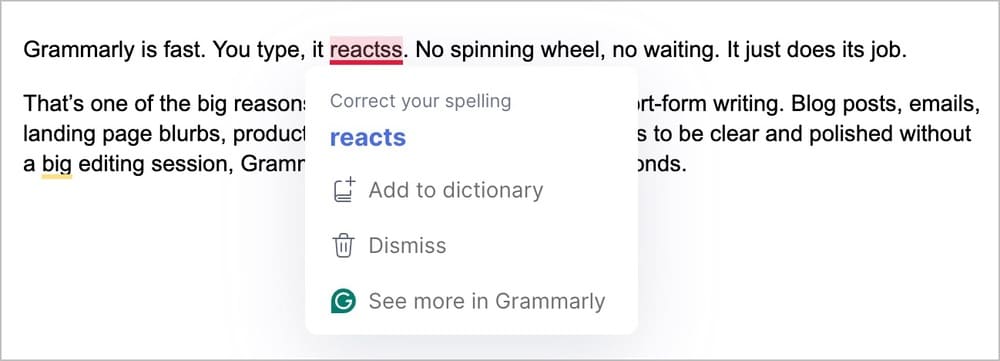
What I've always liked about Grammarly is how little I have to think about it. I'm usually typing, it catches something, I decide whether I agree, and I keep going.
That's especially useful with blog posts, emails, landing pages, and other shorter stuff where I'm not looking to stop what I'm doing and run a bunch of reports. Grammarly also works in enough of the places I already write that I rarely need to change my workflow just to use it.
The AI tools are actually decent. You can highlight a sentence and ask for a rewrite, or shift the tone, or make something shorter. Sometimes it nails it. Sometimes it misses by a mile. But either way, it gives you a starting point, which is useful when your brain is done for the day but the copy still isn’t.
It also wins on interface. Everything’s clean, intuitive, and easy to use. You don’t have to dig through reports or settings. It just works the way you want it to.
So if you want something that’ll clean up your writing without slowing you down (and without asking you to think like an editor), Grammarly’s a solid pick.
Where Grammarly Starts to Fall Short
Grammarly is still strongest at the sentence level: spelling slips, grammar mistakes, clarity problems, awkward phrasing, tone, and the kinds of things you want fixed while you're writing.
It has gotten better at explaining its suggestions, and its newer AI tools can give you broader feedback than they used to. Reader Reactions, for example, can look at a piece from the perspective of a target reader and point out possible confusion or questions.
But there's still a pretty big difference once you get into fiction.
Grammarly wasn't built around novels. It doesn't give me the same kind of dedicated feedback on plot, character development, story structure, pacing across an entire manuscript, or other fiction-specific problems that ProWritingAid does.
That's the limitation I run into. Grammarly is excellent when I want help with the writing on the page. Once I want to step back and look at the book as a book, ProWritingAid gives me a lot more to work with.
Why I Prefer ProWritingAid for Books
Grammarly works really well for the kind of sentence-level help I mentioned above. Where ProWritingAid starts becoming more useful to me is when I'm working on a book and want to look beyond whether an individual sentence is grammatically correct.
The 25+ reports are still a big part of that. I can look at readability, repetition, sentence variety, pacing, sticky words, dialogue, and a bunch of other things that are difficult to notice when I've been staring at the same draft for hours.
There's considerably more to ProWritingAid now, too. The new workspace is split into Plan, Write, and Edit, so Story Canvas can come into play while you're figuring out the book, Write Mode is there while you're drafting, and the reports and story-analysis tools are waiting when you're ready to edit.
For fiction writers, those story tools are probably the biggest difference between ProWritingAid and Grammarly. ProWritingAid can analyze plot and characters, look across an entire manuscript, and even run a Virtual Beta Reader that tries to identify where a reader might get confused, lose interest, or have a strong reaction to something in the story.
I wouldn't use all of that every day, and you certainly don't need it just to clean up a blog post. But when I'm working on something long enough that I can no longer keep every problem in my head at once, having those options is useful.
You can also change the Writing Style and document type, so ProWritingAid isn't giving the exact same recommendations to someone writing web content as it is to someone working on fiction.
Where ProWritingAid Can Improve
ProWritingAid still gives you a lot more to learn than Grammarly does.
The new menu helps. Splitting everything into Plan, Write, and Edit makes much more sense than throwing dozens of reports and tools at you at once. But there's still a lot under the hood, and if all you want is something quietly correcting sentences while you type, Grammarly is easier to live with.
Some of ProWritingAid's deeper tools also aren't the kind of thing you run constantly. Manuscript Analysis, Virtual Beta Reader, Plot Analysis, and Marketability Analysis use Story Credits, so I think of those as occasional tools for particular stages of a book rather than everyday editing features.
Even with the cleaner menu, I still think there's a bigger learning curve here than there is with Grammarly. Whether that's worth dealing with mostly depends on how much of ProWritingAid you expect to use.
What About AI Rewrites and Smart Suggestions?
Both tools have leaned much harder into AI since I first started comparing them, but they're using it in pretty different ways.
Grammarly still does the quick stuff very well. You can rewrite sentences, adjust tone, generate text, and get suggestions while you're working. It's also begun adding specialized AI agents, including a Proofreader and Reader Reactions, which tries to predict how a particular reader might respond to what you've written. Grammarly Pro currently includes up to 2,000 generative AI prompts per month.
ProWritingAid has sentence-level AI too. Rephrase and Sparks can rewrite, shorten, expand, summarize, or continue your writing. But for authors, I think its more interesting AI tools are the ones looking at the story rather than one sentence.
Manuscript Analysis can examine an entire manuscript for things like plot holes, character consistency, structure, pacing, dialogue, timelines, and world-building. Virtual Beta Reader comes at the book from a different direction and tries to simulate the reading experience, including where readers may become hooked, lose interest, or react strongly to a character or scene.

Those deeper reports use Story Credits, so they aren't just unlimited extras bundled into your subscription. But they're also a good example of why the two products feel increasingly different.
The Bottom Line:
I still find myself using Grammarly's AI more for everyday writing. If I'm stuck on an email or want to try another way of saying something, it's easy to reach for.
What interests me more about ProWritingAid is what it can do with a book once the problem gets bigger than a sentence. Finding a possible plot problem halfway through a manuscript is a very different use case from rewriting an email, and it's one Grammarly isn't really built around.
What About Pricing?
Both tools offer free versions, and both have paid plans with more features.
Here's how they compare if you're paying annually:
Main Plans (Annual Pricing)
| Plan | Key Features | Pricing |
|---|---|---|
| Grammarly Free | – Grammar & spelling checks – Basic clarity suggestions – Works across most platforms | Free (learn more) |
| Grammarly Pro | – Full grammar, tone, and clarity suggestions – Full-sentence rewrites and generative AI – 2,000 AI prompts per month – Specialized AI agents, including Proofreader and Reader Reactions | $12/month (learn more) |
| ProWritingAid Free | – Grammar, spelling, and punctuation checks – 25+ reports, with 2 runs per report per day – 500-word limit – 10 Rephrases and 3 Sparks per day | Free (learn more) |
| ProWritingAid Premium | – Unlimited word count and report runs – 25+ writing analysis reports – Unlimited Rephrases and 5 Sparks per day – 1 Chapter Critique per day – Up to 40% off Story Credits | $8/month with 20% Kindlepreneur discount (learn more) |
| ProWritingAid Premium Pro | – Everything in Premium – 50 Sparks per day – 3 Chapter Critiques per day – Up to 65% off Story Credits – Premium workshops and writing/community features | $9.60/month with 20% Kindlepreneur discount (learn more) |
Lifetime Access Options
| Plan | Lifetime Access | Pricing |
|---|---|---|
| Grammarly Pro | ❌ No lifetime option | – |
| ProWritingAid Premium | ✅ Available | One-time $359.10 payment with 10% Kindlepreneur discount (learn more) |
| ProWritingAid Premium Pro | ✅ Available | One-time $629.10 payment with 10% Kindlepreneur discount (learn more) |
Which One’s Right for You?
For most of the shorter things I write, Grammarly is easier. If I'm working on an email, a blog post, sales copy, or something else where I mainly want to catch mistakes and clean up awkward wording as I go, I don't need much more than that.
A book changes the equation.
Even before editing, ProWritingAid now gives fiction writers Story Canvas, Write Mode, writing sessions, and progress tracking. Once the draft exists, I can go through the normal editing reports or step back and look at plot, characters, pacing, and the manuscript as a whole.
That's why I wouldn't really choose between these two based on which grammar checker wins some isolated test. I'd choose based on what I spend most of my time writing.
Use Grammarly if:
- You write a lot of emails, articles, business copy, or other shorter content
- You want corrections and suggestions without having to stop and run reports
- You mainly care about grammar, clarity, wording, and tone
Use ProWritingAid if:
- You write books, especially fiction
- You want planning and drafting tools in addition to editing
- You want to dig into the prose and the larger story when you're revising
Still unsure?
We have other articles on Kindlepreneur that can help:
- A Hands On ProWritingAid Review (After Using It For 10 Years)
- Grammarly Review: Is the Free Version Enough?
- 10+ Best Grammarly Alternatives for Writers and Authors
- 6 Best Proofreading Software Options for Writers
Final Verdict: Grammarly’s Polished, but ProWritingAid Digs Deeper
I still like Grammarly, and I still use it. For everyday writing, there are plenty of times when I'd rather have Grammarly quietly catching things in the background than stop what I'm doing and open up a bunch of editing reports.
Books are where I start wanting something else.
ProWritingAid already had the advantage there because of how much more detail I could get out of its reports. Now I can use it earlier in the process too, and the story-level tools give me ways to look at a manuscript that Grammarly simply wasn't designed around.
That doesn't make Grammarly the worse product. If most of what I wrote were emails, articles, and other relatively short pieces, I'd probably lean toward Grammarly.
But that's not all I write. When I'm deep into a book and trying to figure out why a chapter isn't working, I get more out of ProWritingAid. That's ultimately why it wins this comparison for me.