Most authors treat Amazon categories like a formality. Upload the book, pick three categories that seem close enough, and move on. I did the same thing when I first started out.
But here's the problem with that approach.
Categories have a bigger impact on your book's discoverability than most authors realize. And since Amazon rolled out its A10 algorithm update, that impact has grown even more. A10 places heavier emphasis on relevance and performance signals, which means the categories you choose now send stronger signals to Amazon about who your book is for and where it belongs in the store.
Choose well, and Amazon has an easier time putting your book in front of the right readers. Choose poorly, and your book can quietly disappear into the wrong corner of the store, or worse, into a category that no reader can even find.
And I've seen authors get this wrong in both directions. Some choose categories that are technically relevant but way too competitive. Others chase easy categories that don't really fit the book, which can hurt more than it helps. Then there are the categories Amazon lets you choose inside KDP that don't behave the way authors expect them to at all.
That's the part most authors miss because Amazon book categories are not always as straightforward as they look. Some categories overlap. Some are duplicates. Some look like normal categories inside KDP but don't have a real browse page where shoppers can find them. And sometimes Amazon changes your categories after you publish because it thinks your metadata points somewhere else, which is always super fun.
So before you pick the first three categories that seem “close enough,” it's worth understanding how this system really works. Because the right categories won't magically sell a bad book, but they can give a good book a much better chance to be found, ranked, and taken seriously by readers.
The Mechanics of Becoming a Bestseller on Amazon
Being a #1 bestseller on Amazon isn't just about the cool points or bragging rights. It helps you sell more books.
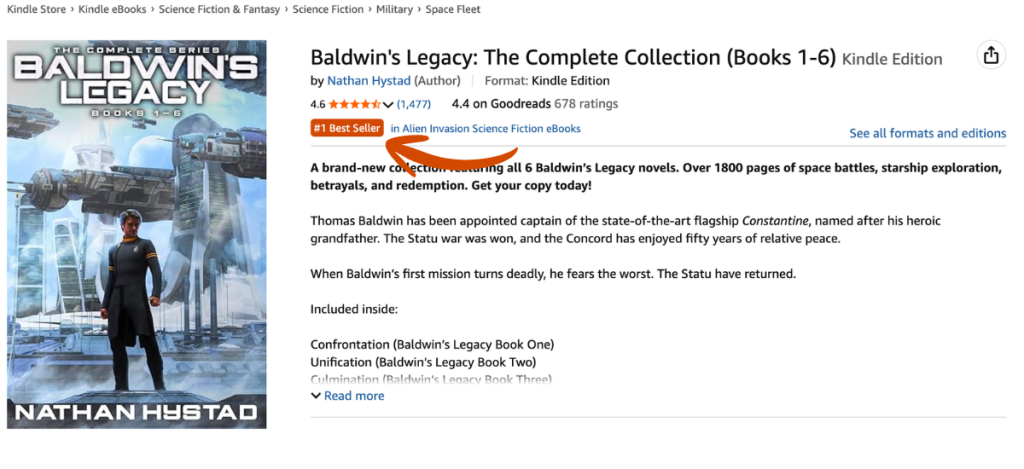
When your book hits #1 in a category, Amazon slaps an orange bestseller tag on it. And shoppers notice. That tag builds trust, and trust converts into sales.
So how do you get there and stay there? It all starts with your Amazon Best Seller Rank (ABSR) and the categories you choose.
Amazon assigns every book an ABSR based on its recent sales compared to every other book in the store.

With this, if you have an ABSR of 1000, then it means that at that point in time, there are 999 books on Amazon selling better than yours. If you have an ABSR of 1,000,000, then it means there are 999,999 books selling better than you.
So, if your book has the LOWEST ABSR of all books that are attached to an Amazon category, then you are the #1 best seller in that category. It is that simple. So, choosing your Amazon Kindle categories or book categories will have a direct effect on whether or not you become a bestseller.
And as you'll learn below, with over 14,000 book categories on Amazon, there are categories that might require you to make 1000 book sales a day to be #1, or with the right research, you can find an equivalent category that only requires 14 sales to be a bestseller. MAJOR DIFFERENCE!
Fun Fact: You can use this free Amazon Book Calculator and take the ABSR of any book, enter it in and see how many sales that book has made in a day. So, for example, if the book has an ABSR of of 66,433 then it made 4 sales that day. If that is the #1 bestseller in a category, then all you'd need to do is make 5 sales in a day, you're the new #1 bestseller.
WARNING: 3 Things Amazon Won't Tell You About Categories
Before we get into the how-to, there are a few things Amazon doesn't tell you about its own category system. And once you see them, you'll wonder why they aren't front and center in KDP.
The good news is that most authors have no idea about any of this. Which means learning it gives you a real leg up.
When you go to publish your book in KDP and then choose your categories, Amazon will show you every category on their system (which is great, because they didn't used to do this).
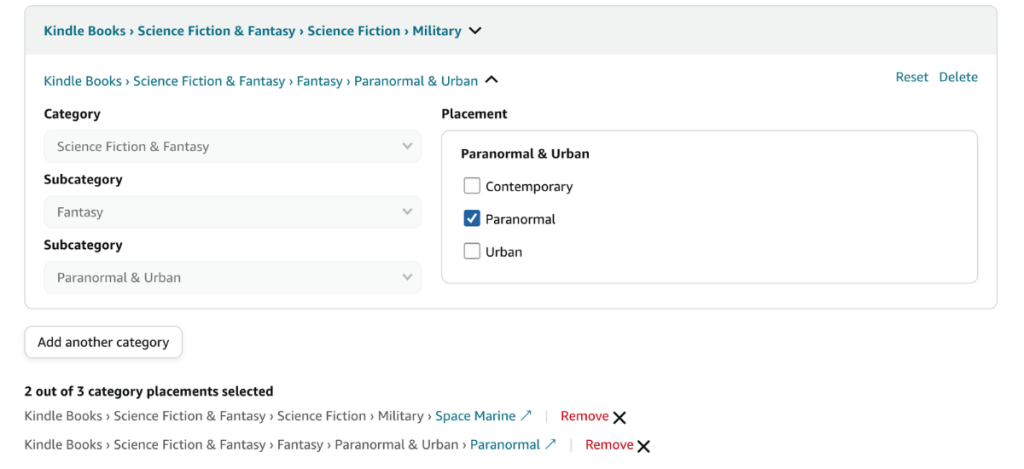
Out of these, there are over 14,000 possible categories you can choose from. Later on, I will show you how to best navigate this. Here are the pitfalls you need to know about before you start choosing categories.
These were important before A10. Under A10, they matter even more.
Secret #1: 54% of Amazon's Categories are Duplicates
Most authors don't realize that the majority of Amazon categories are duplicates. So if you select two or three of them as part of your three allowed categories, you may only be in one.
For example, these three category strings (which can all be selected independently as three categories in KDP), all lead to this single page.
- Books › Mystery, Thriller & Suspense › Mystery › Historical
- Books › Literature & Fiction › Historical Fiction › Mysteries
- Books › Literature & Fiction › Genre Fiction › Historical › Mysteries
Now, you might think I'd say avoid duplicates altogether. But actually, they can work in your favor. First thing about duplicates is that when you select a duplicate, Amazon won’t allow you to select another duplicate of that category.
Furthermore, if you’re in a duplicate placement, if your book’s sales do really well, then you will show up in the sub-categories in all the duplicate strings. So, knowing which ones are duplicates and the possible category strings you can be a part of is a good strategy.
The only manual way to check is by clicking on a category in KDP and seeing if other categories are greyed out. But this can be problematic because many times duplicates are in different sub categories and even broad categories.
(Good luck trying to find them all, too – we even saw one category with over 15 duplicates!)

However, with my Publisher Rocket this is incredibly easy. As you can see in the screenshot above, Publisher Rocket will mark if that category is a duplicate and by hovering over it, you can see where the other duplicates are listed. The best option is when you find a duplicate that not only the other duplicates fit your book, but they are in other subcategories and even broad categories.
Then you’re book gets even more coverage.
Secret #2: 27% of Categories are Ghost Categories (Fake)
This one is huge. Over 27% of the categories available in KDP are what I call ghost categories. These are fake categories. Your book can be placed in one, and you'll never be able to earn a bestseller tag there, no matter how many copies you sell.
Here's what you need to know about Ghost Categories, and why you should ABSOLUTELY stay away from them and never select one:
- Ghost categories are fake categories, so shoppers can't find them when browsing. That means less organic discovery and fewer potential sales.
- Since the category isn't real, you cannot become a bestseller for that category no matter what
- 1 out of every 4 categories offered by Amazon are ghosts
- As you can see in the image below, these aren't some obscure categories. Many ghost categories are big name categories.

So, now that we know to stay away from Ghost Categories and should NEVER choose them, let's discuss how you can figure out if a category is a ghost or not – because remember, Amazon doesn't tell you about these.
To find them manually, go to Amazon's category page, find the category strings on the left side, and follow the path all the way down to the final subcategory. If the page exists, it's real. If it doesn't, it's a ghost.
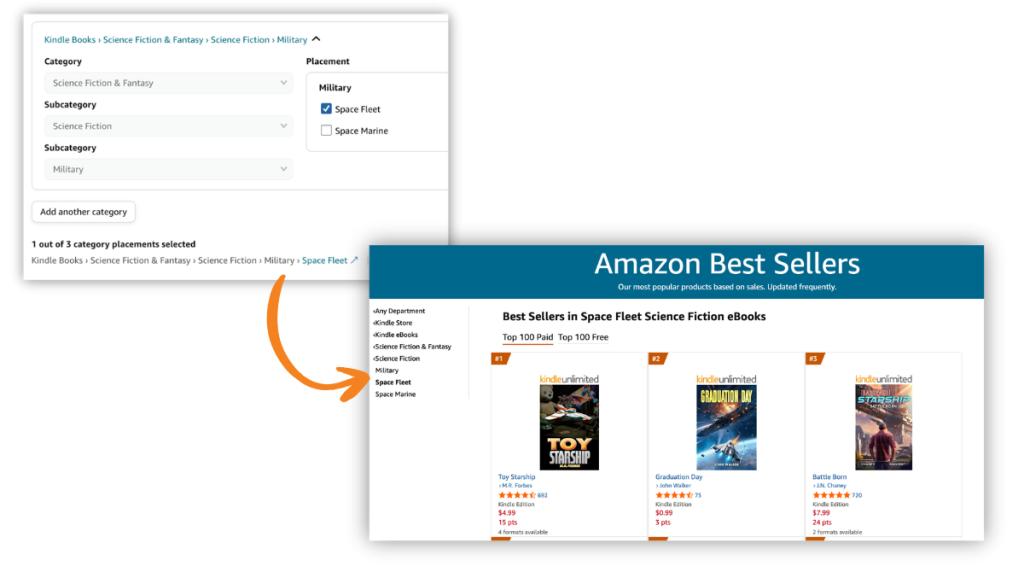
Now I know what you might be saying “what about finding a category on the KDP dashboard, and then clicking that link on the bottom. Doesn't that take you to a page?” Well, it does, but that is not a real category page…its always a link to a fake page. All of the category pages that link takes you to are dynamic pages and not an indication of whether it is a ghost page or not. So, you can't use that link to help.
If you have Publisher Rocket, finding out what is a ghost category or not is super easy. It just labels it a ghost or not.
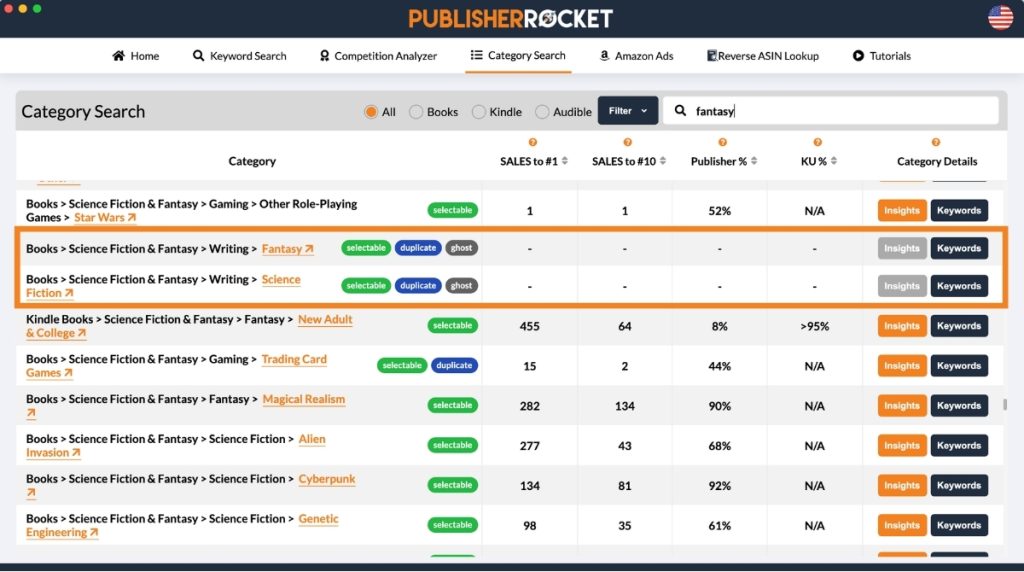
Not only will Rocket show you what is or isn't a ghost category, it will show you how many sales you'd need to make in order to be a bestseller, and more.
If you'd like to see a list of ghost, click here.
Secret #3: Amazon May Change Your Categories On You
Amazon allows you to select 3 categories when you publish. However, Amazon can and will change your categories on you if they choose too…and boy do they ever. Unlike the other two secrets above, this one they warn us about in a vague CYA way:

Through data we've collected with Publisher Rocket, we found that Amazon uses your keywords and metadata to decide where your book belongs. If your keywords don't match what Amazon expects to see for a book in that category, it'll move you into whatever category it thinks fits better.
This behavior has intensified since Amazon rolled out the A10 algorithm update. A10 places greater emphasis on relevance signals across your entire metadata, including your keywords, title, and book description. If those signals don't align with your chosen category, Amazon now acts on that mismatch faster and more aggressively than it used to.
The problem with this is that 9 times out of 10, the categories they end up putting you into are either terrible and poor fits, or are ghost categories…or both.
So, how do you stop this from happening? Well, ensure that inside of your 7 KDP keyword boxes, you are using phrases that fit with the category. Manually, you should take a second and think of words that would connect you to that category.
Or, if you have Publisher Rocket, you can easily see which words Amazon has already listed as keyword phrases they want to see to be in a category. Just find the category in Rocket's category feature, and click keywords and see a list of all the words that would influence Amazon to keep you in that category.
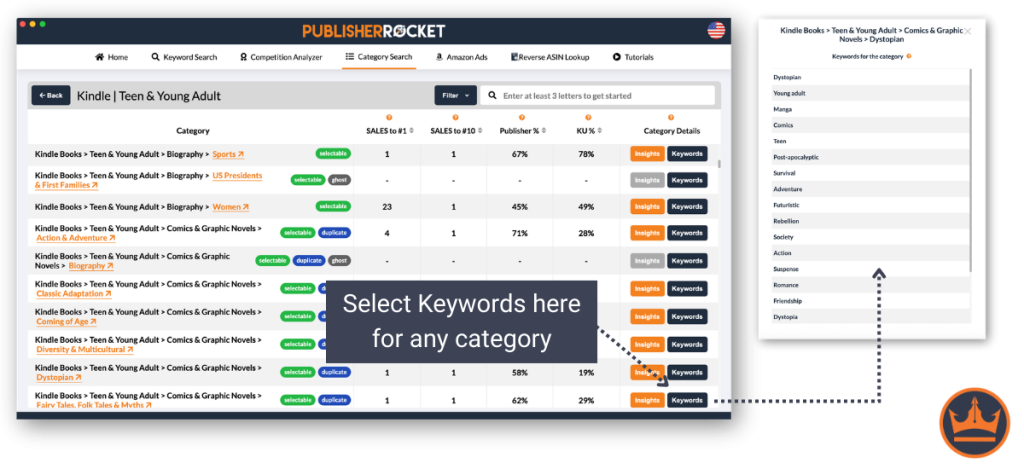
Again, this list isn't something Amazon makes public, but thanks to Publisher Rocket's data, it can see exactly what influences Amazon the most and lays it all out there for you.
So, in conclusion, to ensure you stay in your target categories, use 1-2 of your 7 KDP Keyword boxes to fill in with these words.
How to Find the Best Categories For Your Book
Now that we know the pitfalls, let's talk about how to choose the right categories for your book.
With A10 in the picture, relevance matters more than it used to. Amazon is paying closer attention to whether your category choices match your book's content and metadata.
In fact, one thing A10 has made clear is that a bad category choice compounds over time. The longer your book sits in the wrong spot, the more performance data Amazon collects, and the harder it can be to recover your positioning even after you fix the category. So as you work through the steps below, keep that in mind.
- Pick Relevant Categories: Authors have been miscategorizing their books (in the hopes of ranking well in low-competition categories) for years now. This will not work for you in the long run. Only pick categories that are relevant to your book. Otherwise, this may cause problems on how Amazon sees your book, and hurt your discoverability on their store.
- Niche Down: When entering your categories, you want to drill down as far as you can go into the subcategories. These will not only have the least competition, but it will give Amazon a better idea of what your book is about. Plus, if you pick a subcategory, Amazon automatically includes you in the broader categories above it.
- Think Outside the Box: While your book may best belong in a high-competition category, there may be other niche categories that you belong in. For example, if you write an epic fantasy, the category of “Epic Fantasy” will likely be crowded. You should still select that one because it's the most relevant, but maybe your book has Norse Mythology elements as well. In that case, you could select “Norse Mythology” as a second category. Try to pick categories that represent a broad array of interests, rather than three that are all closely related.
- Best Chance at Bestseller or On the Page: Choose categories where you have a realistic shot at hitting #1 and getting the bestseller tag, or at minimum landing in the top 20 so your book shows up on that category's browse page.
Category selection takes more thought than most authors give it. The goal is to find categories that fit your book well, give you a realistic shot at ranking, and ideally are growing rather than shrinking over time.

Okay, so with that, let's walk step by step through picking a the best Amazon book categories.
Step 1: Research Potential Book Categories on Amazon
There are over 14,000 Amazon categories. Most authors only look at the obvious ones, which means they end up in the most competitive spots. But dig a little deeper, and you'll find categories that fit your book just as well and require a fraction of the sales to hit #1.
Amazon Book Categories
| Category | ABSR | Book Sales To Be #1 |
|---|---|---|
| Language Experience Approach | 10,567 | 15 |
| Education Reference | 368 | 237 |
| Language Instruction - Misc. | 19.761 | 13 |
| Foreign Language Study & Reference | 268 | 386 |
| Linguistics | 11,612 | 15 |
| Pedagogy | 552 | 164 |
| Study & Teaching | 15,304 | 14 |
| Words, Language & Grammar | 1,810 | 94 |
| Memory Improvement | 368 | 237 |
| Test Preparation | 155 | 723 |
In order to do this, you can start by looking at competitive books or books similar to yours on Amazon and see which ones they are attached to. Just go to the book's details section and see the below:So, to start this, we’ll begin by typing into the Amazon search box any words to describe our book. Our goal is to get a list of books that are similar to our book.

Another option is to simply browse through Amazon's categories by going to the sidebar and drilling down until you find the specific categories that you want. See this image:
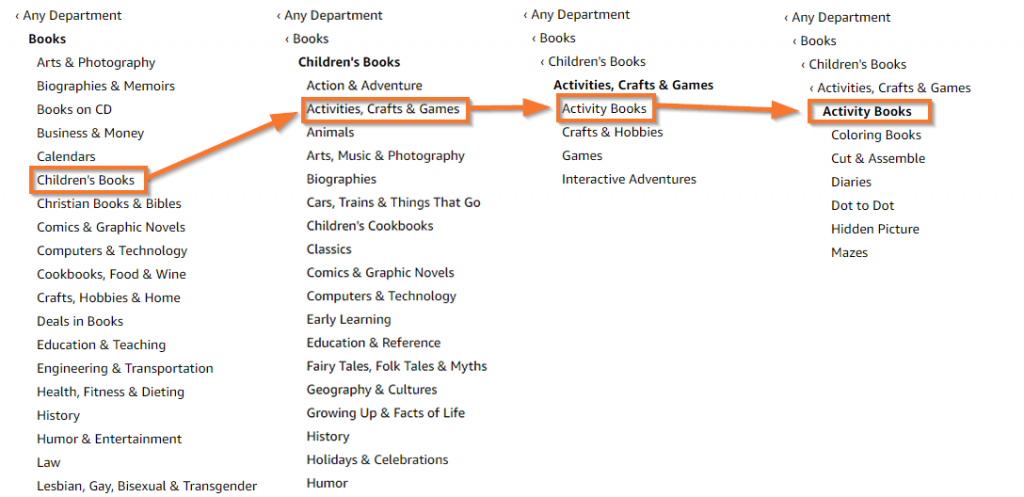
Or you can save hours of time spent searching through books and categories by simply using the category feature in Rocket.
And not only that, Publisher Rocket shows you all of the categories that are duplicates or ghost categories, so you can make more informed decisions on whether to select those categories or not.

Once you've done this, go ahead and make a list of all the categories you found…because you're going to have to test those categories to see if they are a good fit and will help your book.
Step 2: Check the #1 Best Seller in that Category
Now that we have a list of potential categories, it’s time to see which one has the best chance of making you a consistent bestseller. To do this:
- First go to that categories page on Amazon. This will take you to the list of Bestsellers for that Category.
- Next, click on the #1 best-selling book in that Amazon book category.
- Next, go down to its ABSR and record that number next to the category name in your notes. This is the ABSR number you’d need to beat in order to be the #1 bestseller.
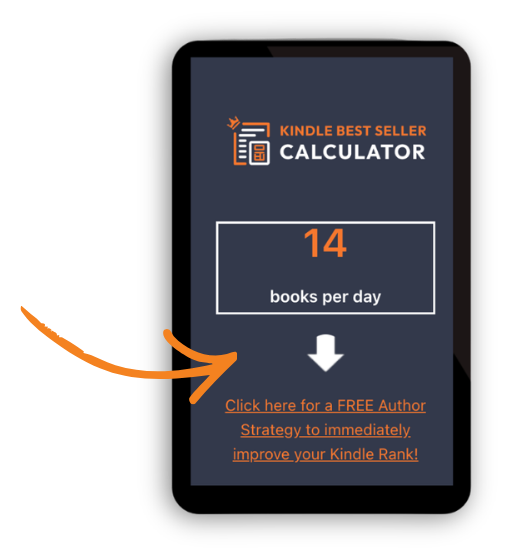
- Put the ABSR into this Kindle sales calculator and it will tell you how many books you’d need to sell today in order to be the #1 best-selling author in that category.
Once you’ve done that, look over your list and choose the ones that best represent your book and have the highest ABSR.
To save time, Publisher Rocket already does this for you. You can easily see the number of sales required to be the new #1 bestseller. You can even click to sort by easiest to be a bestseller to hardest.

See, just like that, Publisher Rocket will immediately:
- List all the categories books show up for
- Tell you how many books you’d need to sell in a day to be #1
- Tell you how many books you’d need to sell to be in the top #10
And just like that, you know exactly how many copies you'd need to sell to hit #1 or land in the top 10 for any category, in seconds.
Why Publisher Rocket Will Pay For Itself
Publisher Rocket makes category selection faster and more accurate, which gives your book a better shot at being found. It also helps you out greatly with your keywords as well. Now, it may seem like a bit of an investment, but just know that you get Publisher Rocket for life. That means you can use it on your current book, as well as all previous and future books. So, with this in mind…
Publisher Rocket will easily pay for itself, if:
- If using better keywords and Categories helps you to sell 62 more book in your entire author lifetime…
- Saves you more than 10 hours of research in your entire author lifetime…
As you can see, its an easy statement to make considering the thousands of authors who have benefited from using Rocket and its data than just guessing, or spending countless hours working on manually finding opportunities.
Extra Tips and Tricks to Amazon Book Categories:
- The ABSR changes every 2 hours, so what it takes to rank #1 can change as well
- New books enter the market, which can quickly change a GREAT category into a super hard one. Keep an eye on your categories and change as necessary
- Having tools like Publisher Rocket can make selecting or changing categories very fast, efficient and effective.
- Make sure you are moral about your choices…nothing grates my cheese more than seeing books that don’t belong in a category taking up the spot
- Don’t forget to do the same research discussed above but for ‘books' if you have a print version
If you don't have Publisher Rocket, there's another way you can check if Amazon has put your book in the 10 categories you've selected, though.
BookishNerd has created a tool that tells you which categories your book is in. All you have to do is input your book's ASIN or ISBN-10.
You can check it out here.
Now Go Get Listed For Your Ideal Categories and Become a Bestseller
Amazon book categories are not magic. They won’t fix a weak cover, a boring book description, bad reviews, or a book that simply doesn’t connect with readers.
But they do matter.
The right categories can put your book in front of better-fit readers, give Amazon clearer signals about where your book belongs, and improve your chances of earning that bestseller tag without needing to compete against every giant book in your genre.
That’s why I don’t recommend treating categories like a quick checkbox before you hit publish. Slow down a bit. Look at the categories similar books are ranking in. Check how competitive those categories are. Make sure the categories you choose fit your book. And don’t forget to keep checking them after your book is live, because Amazon changes things, competitors move around, and a category that looked great six months ago might not be the best option anymore.
You can do this research manually, but it takes time. You’ll need to click through category pages, check the #1 book in each one, look up its Amazon Best Seller Rank, estimate how many sales it’s getting, and keep track of everything yourself.
That’s exactly why we built this into Publisher Rocket. It shows you category opportunities, duplicate categories, ghost categories, and the estimated number of sales needed to hit #1 or reach the top 10. Instead of guessing, you can make your category choices with actual data in front of you.
Whether you use Publisher Rocket or do it by hand, the goal is the same: choose categories that are relevant, reachable, and worth being in.
Publisher Rocket can save you hours of researching for the best category. Increase your Category research efficiency and effectiveness for a one-time fee of ONLY $199. Soon, we will be making it a subscription. So lock in your lifetime access now!
Do that, and you’ll give your book a much better shot at getting discovered by the readers who are already looking for something like it.