The Amazon book categories you choose will directly affect whether or not you become an Amazon bestselling author, as well as how shoppers can find your book.
Choose the wrong one, and no matter how many books you sell, you won’t become an Amazon bestseller. Choose the right one, and you could become a daily bestseller with minimal marketing or effort. Yup, it can be that easy… but only if you know what you're looking for and some of the pitfalls that Amazon doesn't tell authors about.
In truth, there is a lot more to choosing Amazon book categories. There are secret fake Kindle categories that Amazon doesn’t warn you about when publishing, as well as key steps you need to take in order to stop Amazon from changing your categories on you.
More importantly, Amazon has made some changes to the way they do categories that will ultimately affect your book.
So, in this article, I will show you all of that, plus more.
In this article, you will learn:
- The mechanics to bestseller status in Amazon
- How to find the best categories to make you a bestseller
- Secret Kindle Categories and how to get them
- How to see all the categories a book ranks for
The Mechanics to a Bestseller in Amazon
Being a number #1 bestseller on Amazon isn’t just about the cool points, or bragging rights….it also helps you sell more books as well.
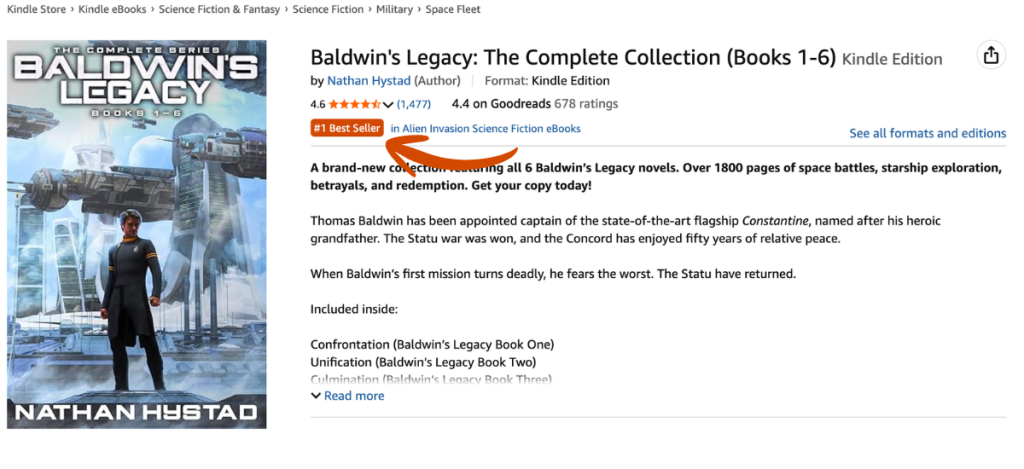
When your book is marked as a bestseller on Amazon, it gets a “bestseller” tag that shoppers see. It has been shown that when this occurs, shoppers have more trust in your book being better than the others and thus are more likely to buy your book.
However, how does an author not only ensure they make that rank but keep it too? Well, it all starts with your book’s Amazon Best Seller Rank (ABSR) and the categories you select.
Amazon assigns the ABSR of a book based on how many sales or downloads it has had over a certain period of time as compared to all other books on the Amazon market.

With this, if you have an ABSR of 1000, then it means that at that point in time, there are 999 books on Amazon selling better than yours. If you have an ABSR of 1,000,000, then it means there are 999,999 books selling better than you.
So, if your book has the LOWEST ABSR of all books that are attached to an Amazon category, then you are the #1 best seller in that category. It is that simple. So, choosing your Amazon Kindle categories or book categories will have a direct effect on whether or not you become a bestseller.
And as you'll learn below, with over 14,000 book categories on Amazon, there are categories that might require you to make 1000 book sales a day to be #1, or with the right research, you can find an equivalent category that only requires 14 sales to be a bestseller. MAJOR DIFFERENCE!
Fun Fact: You can use this free Amazon Book Calculator and take the ABSR of any book, enter it in and see how many sales that book has made in a day. So, for example, if the book has an ABSR of of 66,433 then it made 4 sales that day. If that is the #1 bestseller in a category, then all you'd need to do is make 5 sales in a day, you're the new #1 bestseller.
WARNING: 3 Secrets You Need to Know About Categories That Amazon Won't Tell You
Before we get into the steps on how to find the best categories for your book, and thus increase your sales, there are a couple of things you need to know, as well as some secrets that for some inexplicable reason, Amazon doesn't tell us about. I mean, once you see them, you'll realize how egregious these are.
The Good news is: A mass majority of authors don't know this, so by learning this, you will have a major competitive advantage over others.
When you go to publish your book in KDP and then choose your categories, Amazon will show you every category on their system (which is great, because they didn't used to do this).
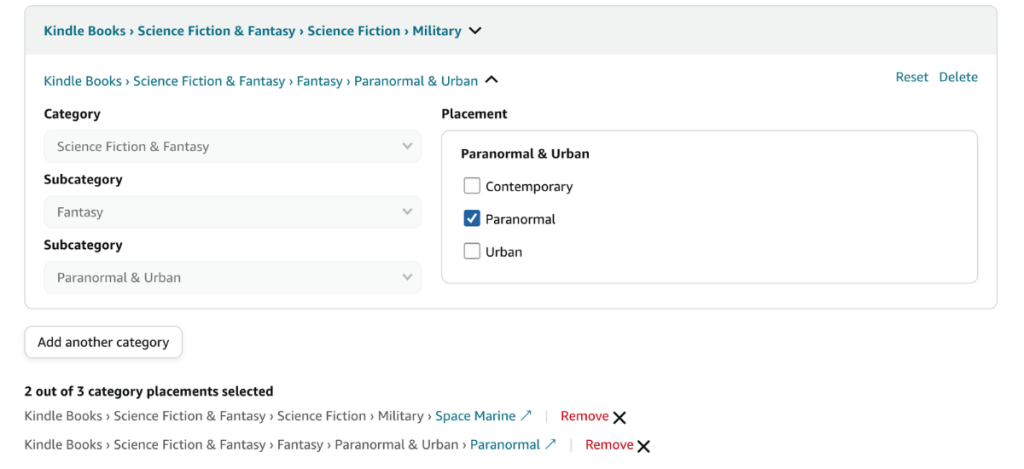
Out of these, there are over 14,000 possible categories you can choose from. Later on, I will show you how to best navigate this. However, there are some secrets or pitfalls you NEED to understand before starting the selection process:
Secret #1: 54% of Categories Are Duplicates
Many authors don't realize that the MAJORITY of categories on Amazon are duplicates, meaning that if you select 2-3 of these as part of your three categories, you are really selecting only one.
For example, these three category strings (which can all be selected independently as three categories in KDP), all lead to this single page.
- Books › Mystery, Thriller & Suspense › Mystery › Historical
- Books › Literature & Fiction › Historical Fiction › Mysteries
- Books › Literature & Fiction › Genre Fiction › Historical › Mysteries
Now you may be thinking that I’d recommend staying away from duplicates. Actually, no. They can be a good thing! First thing about duplicates is that when you select a duplicate, Amazon won’t allow you to select another duplicate of that category.
Furthermore, if you’re in a duplicate placement, if your book’s sales do really well, then you will show up in the sub-categories in all the duplicate strings. So, knowing which ones are duplicates and the possible category strings you can be a part of is a good strategy.
Now, the only manual way you can figure out whether something is a duplicate is by clicking on a category placement in KDP and see if other categories are greyed out. But this can be problematic because many times duplicates are in different sub categories and even broad categories.
(Good luck trying to find them all, too – we even saw one category with over 15 duplicates!)

However, with Publisher Rocket this is incredibly easy. As you can see in the screenshot above, Publisher Rocket will mark if that category is a duplicate and by hovering over it, you can see where the other duplicates are listed. The best option is when you find a duplicate that not only the other duplicates fit your book, but they are in other subcategories and even broad categories.
Then you’re book gets even more coverage.
Secret #2: 27% of Categories are Ghost Categories (Fake)
This is another EXTREMELY important piece of information. Over 27% of Categories that you can select in the KDP dashboard are what I call a “Ghost Category.” These are categories where if your book is listed in it, you can't get a bestseller tag for it, because they are fake categories.
Here's what you need to know about Ghost Categories, and why you should ABSOLUTELY stay away from them and never select one:
- Ghost categories are fake categories – so the category page can't be found by shoppers
- Because shoppers can't find a category page, this could hurt your sales potention
- Since the category isn't real, you cannot become a bestseller for that category no matter what
- 1 out of every 4 categories offered by Amazon are ghosts
- As you can see in the image below, these aren't some obscure categories. Many ghost categories are big name categories.

So, now that we know to stay away from Ghost Categories and should NEVER choose them, let's discuss how you can figure out if a category is a ghost or not – because remember, Amazon doesn't tell you about these.
When it comes to manually finding them, you'll need to do a lot of clicking around on Amazon. First, go to the Amazon category page where on the left side it shows the category strings. Click and follow the path until you can finally see the final sub sub category you are looking for. If it is there, then it isn't a ghost. If it is not, then it is a ghost category.
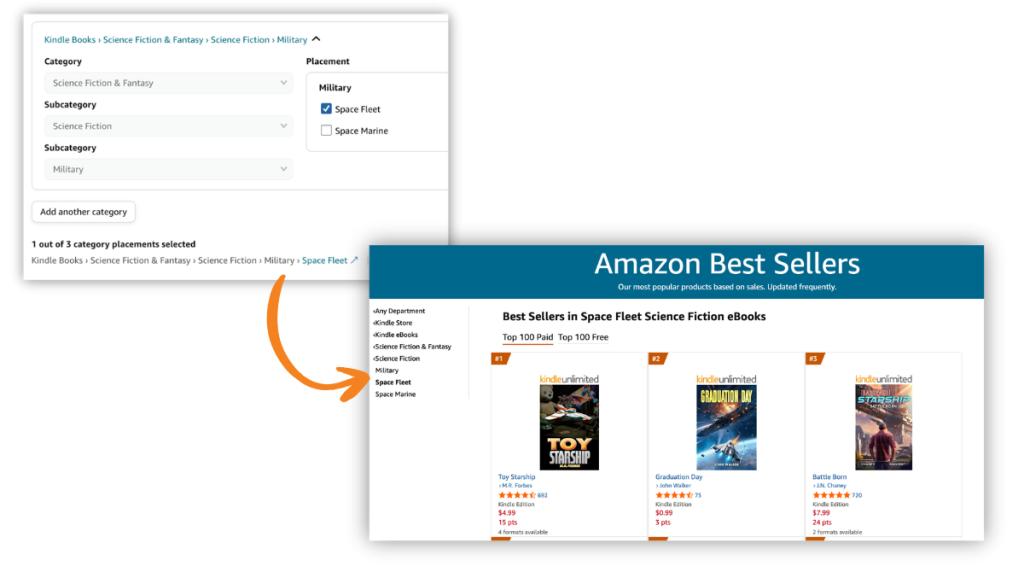
Now I know what you might be saying “what about finding a category on the KDP dashboard, and then clicking that link on the bottom. Doesn't that take you to a page?” Well, it does, but that is not a real category page…its always a link to a fake page. All of the category pages that link takes you to are dynamic pages and not an indication of whether it is a ghost page or not. So, you can't use that link to help.
If you have Publisher Rocket, finding out what is a ghost category or not is super easy. It just labels it a ghost or not.
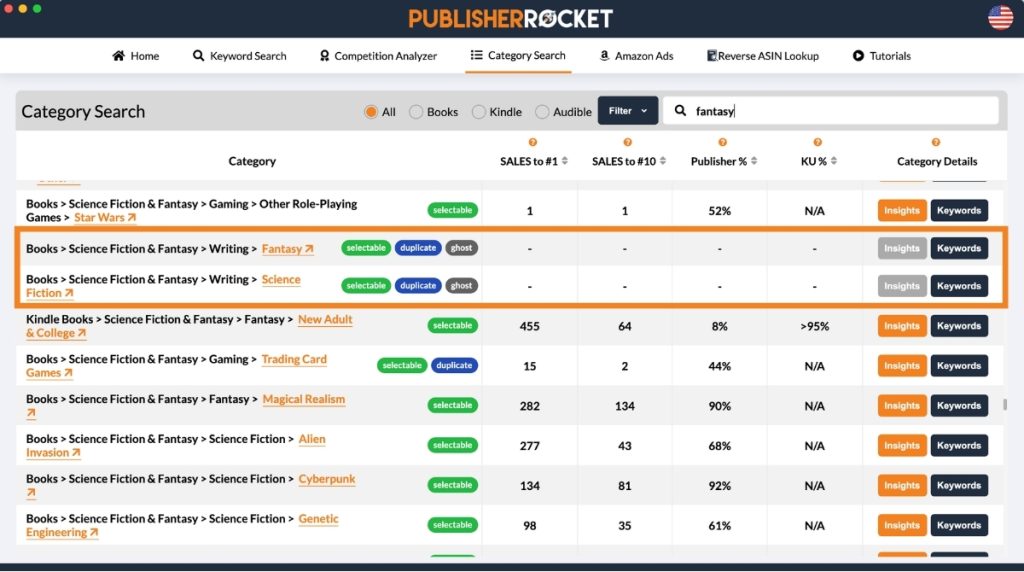
Not only will Rocket show you what is or isn't a ghost category, it will show you how many sales you'd need to make in order to be a bestseller, and more.
If you'd like to see a list of ghost, click here.
Secret #3: Amazon May Change Your Categories On You, if You Don't Do this….
Amazon allows you to select 3 categories when you publish. However, Amazon can and will change your categories on you if they choose too…and boy do they ever. Unlike the other two secrets above, this one they actually warn us about in a vague CYA way:

It was found through data collection on Publisher Rocket, that Amazon is using your keywords and metadata to decide where you book should be. What this means it that Amazon is looking at the keywords you entered, and if it feels like they aren't close to what they'd expect to see for a book in that category, they will just change you into whatever they think is appropriate.
The problem with this is that 9 times out of 10, the categories they end up putting you into are either terrible and poor fits, or are ghost categories…or both.
So, how do you stop this from happening? Well, ensure that inside of your 7 KDP keyword boxes, you are using phrases that fit with the category. Manually, you should take a second and think of words that would connect you to that category.
Or, if you have Publisher Rocket, you can easily see which words Amazon has already listed as keyword phrases they want to see to be in a category. Just find the category in Rocket's category feature, and click keywords and see a list of all the words that would influence Amazon to keep you in that category.
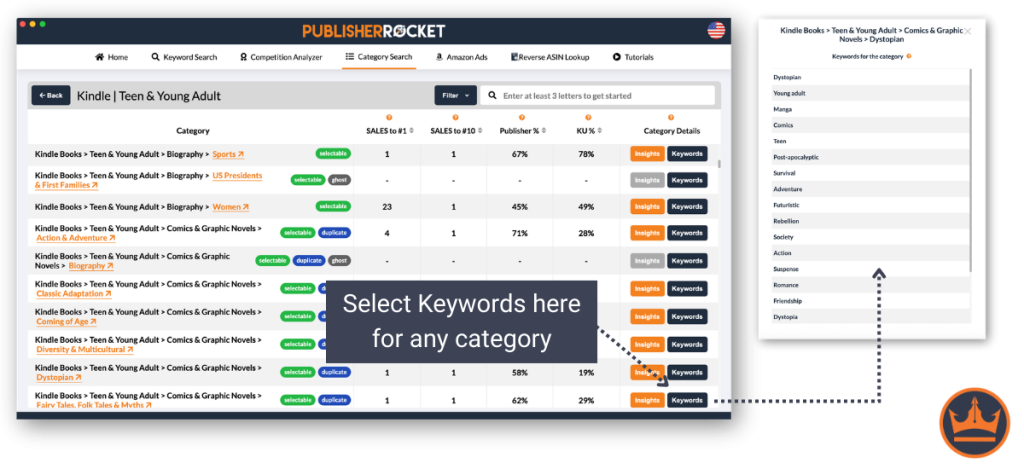
Again, this list isn't something Amazon makes public, but thanks to Publisher Rocket's data, it can see exactly what influences Amazon the most and lays it all out there for you.
So, in conclusion, to ensure you stay in your target categories, use 1-2 of your 7 KDP Keyword boxes to fill in with these words.
How to Find the Best Categories For Your Book
Okay, so now that we know about Duplicates, Ghost Categories, and ways to stay in your target categories, let's discuss what makes for a good Amazon book category. Or better said, how to you choose the best Amazon categories for you book?
Here are three points and tactics to keep in mind:
- Pick Relevant Categories: Authors have been miscategorizing their books (in the hopes of ranking well in low-competition categories) for years now. This will not work for you in the long run. Only pick categories that are relevant to your book. Otherwise, this may cause problems on how Amazon sees your book, and hurt your discoverability on their store.
- Niche Down: When entering your categories, you want to drill down as far as you can go into the subcategories. These will not only have the least competition, but it will give Amazon a better idea of what your book is about. Plus, if you pick a subcategory, Amazon automatically includes you in the broader categories above it.
- Think Outside the Box: While your book may best belong in a high-competition category, there may be other niche categories that you belong in. For example, if you write an epic fantasy, the category of “Epic Fantasy” will likely be crowded. You should still select that one because it's the most relevant, but maybe your book has Norse Mythology elements as well. In that case, you could select “Norse Mythology” as a second category. Try to pick categories that represent a broad array of interests, rather than three that are all closely related.
- Best Change at Bestseller or On their Page: Choose categories that give you the best chance to either be a #1 bestseller so that you get the bestseller tag and thus convert better, or at least are in the top 20 in that category so you are listed on that category page.
Ultimately, picking and choosing your categories is going to be a much more meticulous process. You will want to pay extra attention to Publisher Rocket to analyze the data and only pick the category that best matches your book, but also some categories that are niche and growing over time.

Okay, so with that, let's walk step by step through picking a the best Amazon book categories.
Step 1: Research Potential Book Categories on Amazon
As I've said before, there are over 14,000+ Amazon Categories. It is important that you take the time to find all the different opportunities out there because when you do this, you will find that there are amazing category opportunities that fit your book, but only require a low number of sales
Cause lets face it…if you only go after the obvious ones that everyone else finds, you'll just be in the most competitive categories out there. As you can see below, there are CLEAR differences between those that everyone else finds when researching for their categories, and those that most don't find…but are totally there!
Amazon Book Categories
| Category | ABSR | Book Sales To Be #1 |
|---|---|---|
| Language Experience Approach | 10,567 | 15 |
| Education Reference | 368 | 237 |
| Language Instruction - Misc. | 19.761 | 13 |
| Foreign Language Study & Reference | 268 | 386 |
| Linguistics | 11,612 | 15 |
| Pedagogy | 552 | 164 |
| Study & Teaching | 15,304 | 14 |
| Words, Language & Grammar | 1,810 | 94 |
| Memory Improvement | 368 | 237 |
| Test Preparation | 155 | 723 |
In order to do this, you can start by looking at competitive books or books similar to yours on Amazon and see which ones they are attached to. Just go to the book's details section and see the below:So, to start this, we’ll begin by typing into the Amazon search box any words to describe our book. Our goal is to get a list of books that are similar to our book.

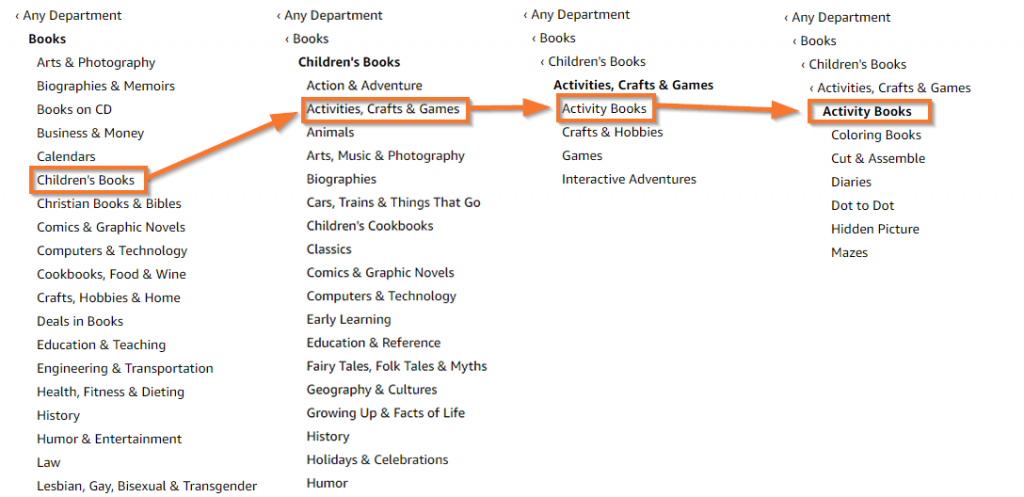
Another option is to simply browse through Amazon's categories by going to the sidebar and drilling down until you find the specific categories that you want. See this image:
Or you can save hours of time spent searching through books and categories by simply using the category feature in Rocket.
And not only that, Publisher Rocket shows you all of the categories that are duplicates or ghost categories, so you can make more informed decisions on whether to select those categories or not.

Once you've done this, go ahead and make a list of all the categories you found…because you're going to have to test those categories to see if they are a good fit and will help your book.
Step 2: Check the #1 Best Seller in that Category
Now that we have a list of potential categories, it’s time to see which one has the best chance of making you a consistent bestseller. To do this:
- First go to that categories page on Amazon. This will take you to the list of Bestsellers for that Category.
- Next, click on the #1 best-selling book in that Amazon book category.
- Next, go down to its ABSR and record that number next to the category name in your notes. This is the ABSR number you’d need to beat in order to be the #1 bestseller.
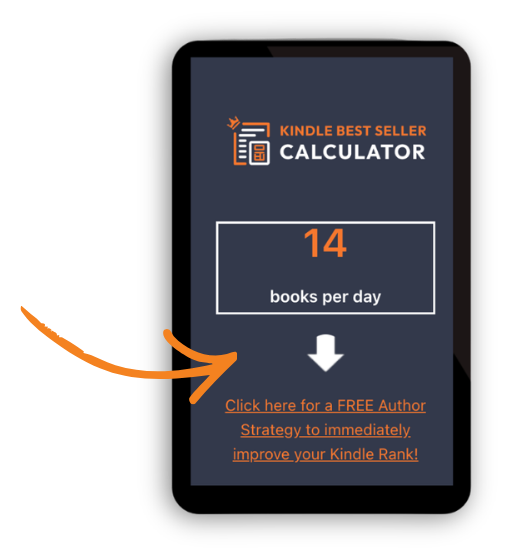
- Put the ABSR into this Kindle sales calculator and it will tell you how many books you’d need to sell today in order to be the #1 best-selling author in that category.
Once you’ve done that, look over your list and choose the ones that best represent your book and have the highest ABSR.
To save time, Publisher Rocket already does this for you. You can easily see the number of sales required to be the new #1 bestseller. You can even click to sort by easiest to be a bestseller to hardest.

See, just like that, Publisher Rocket will immediately:
- List all the categories books show up for
- Tell you how many books you’d need to sell in a day to be #1
- Tell you how many books you’d need to sell to be in the top #10
And just like that, you can now select the best categories for your book and know exactly how many copies you’d need to sell in order to be #1 or just to make it in the categories' Top 10 – all with a simple click of a button.
Why Publisher Rocket Will Pay For Itself
As you can see, Publisher Rocket will defeinitely make your category selection not just easier, but better….giving your book the best chance to be discovered. It also helps you out greatly with your keywords as well. Now, it may seem like a bit of an investment, but just know that you get Publisher Rocket for life. That means you can use it on your current book, as well as all previous and future books. So, with this in mind…
Publisher Rocket will easily pay for itself, if:
- If using better keywords and Categories helps you to sell 62 more book in your entire author lifetime…
- Saves you more than 10 hours of research in your entire author lifetime…
As you can see, its an easy statement to make considering the thousands of authors who have benefited from using Rocket and its data than just guessing, or spending countless hours working on manually finding opportunities.
Extra Tips and Tricks to Amazon Book Categories:
- The ABSR changes every 2 hours, so what it takes to rank #1 can change as well
- New books enter the market, which can quickly change a GREAT category into a super hard one. Keep an eye on your categories and change as necessary
- Having tools like Publisher Rocket can make selecting or changing categories very fast, efficient and effective.
- Make sure you are moral about your choices…nothing grates my cheese more than seeing books that don’t belong in a category taking up the spot
- Don’t forget to do the same research discussed above but for ‘books' if you have a print version
If you don't have Publisher Rocket, there's another way you can check if Amazon has put your book in the 10 categories you've selected, though.
BookishNerd has created a tool that tells you which categories your book is in. All you have to do is input your book's ASIN or ISBN-10.
You can check it out here.
Now Go Get Listed For Your Ideal Categories and Become a Bestseller
So, now that you know the power of categories and what it takes to rank #1 for a specific Amazon Book Category, it’s time to take action.
Of course, as bestselling author, Jeff Goins says, “Before you can launch a bestseller, you need to write a bestseller.” Then you need to implement these steps to find the best book category for your book.
Now, whether you’re using a tool like Publisher Rocket or doing it by hand, it’s important to keep checking your categories so that you can always ensure you stay at #1 and gain those extra sales because of it.
Publisher Rocket can save you hours of researching for the best category. Increase your Category research efficiency and effectiveness for a one-time fee of ONLY $199. Soon, we will be making it a subscription. So lock in your lifetime access now!
And with that, you should have no problem landing in the #1 bestseller position.