When you first open LivingWriter, the immediate impression is that it feels a lot like Google Docs.
The interface is clean, simple, and familiar. You can start typing almost immediately without digging through menus or figuring out a complicated layout. For a lot of writers, that’s actually one of the most appealing parts of the platform.
But once you start exploring the tool a little more, you realize LivingWriter is trying to do more than just give you a place to write. It includes outlining tools, story elements for tracking characters and locations, and a few other features designed to help manage the structure of a book.
In that sense, it’s aiming for something closer to Scrivener, but with a simpler interface and cloud syncing built in. That combination is interesting, and for certain writers it might be exactly what they’re looking for.
After spending some time with LivingWriter, there were a few things I genuinely liked about the platform. But there were also a couple of limitations that kept coming up, especially once you start thinking about the full process of writing and publishing a book.
LivingWriter focuses almost entirely on the writing side of things. When you finish your manuscript, you’ll still need another tool to format the book for ebook or print. That’s one reason I recommend that authors use Atticus, which lets you write and format your book in the same place instead of juggling multiple programs.
That doesn’t necessarily mean LivingWriter is a bad option, but it does change how useful it is depending on the kind of workflow you prefer. Let’s take a closer look at what LivingWriter does well, where it falls short, and which writers it’s actually a good fit for.
What is LivingWriter, What Does it Do, and Who’s it For?
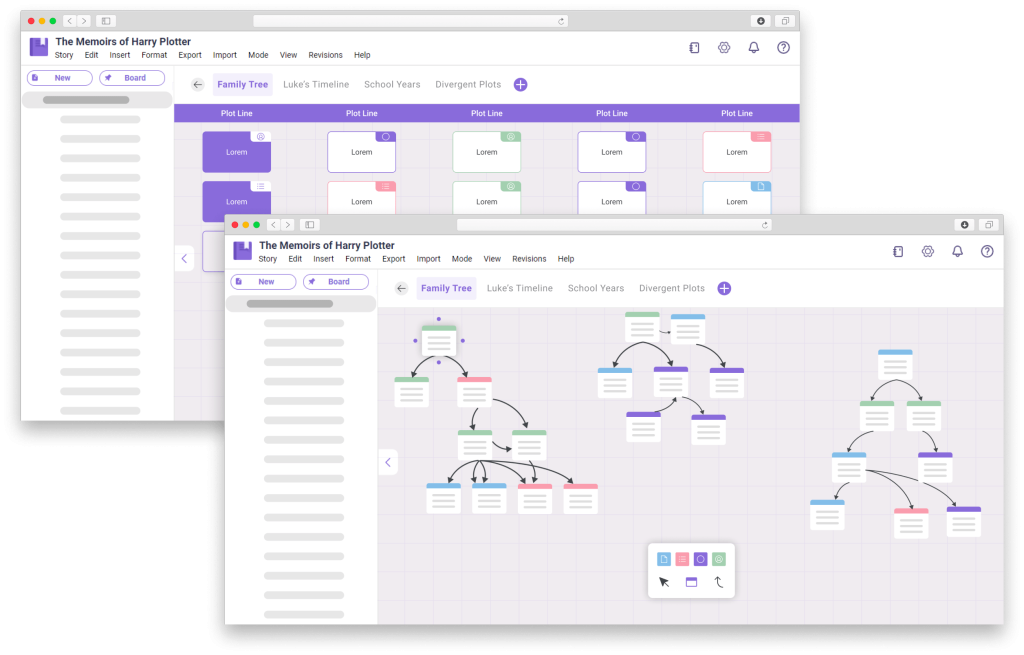
LivingWriter is a writing platform built specifically for authors who are working on longer projects like novels or nonfiction books.
Instead of just giving you a blank document like Google Docs or Word, the platform tries to help you organize the structure of your book while you’re writing it.
You can break your manuscript into chapters and scenes, track story elements like characters and locations, and outline different parts of your book before you start drafting. In that sense, it feels a lot like Scrivener — but with a simpler interface and cloud syncing built in.
That cloud-based design is actually one of LivingWriter’s biggest selling points. Because everything lives online, you can access your manuscript from multiple devices without worrying about syncing files manually.
At the same time, LivingWriter is focused almost entirely on the writing side of the process. It’s not designed to handle formatting your book for publication, which means you’ll still need another tool later when it’s time to turn your manuscript into a finished ebook or print book.
For authors who want a writing environment that helps them organize their story while keeping the interface simple, LivingWriter can be a solid option.
But that focus on writing alone is also one of the biggest reasons many authors eventually end up looking elsewhere.
LivingWriter: My Experience Using It
The easiest way to describe LivingWriter is that it’s trying to combine the simplicity of Google Docs with some of the structural tools that make platforms like Scrivener useful for writing books.
And in a lot of ways, it actually does a pretty good job of that.
The interface is clean and easy to understand, and many of the features are clearly designed to help authors manage the complexity that comes with writing longer projects.
One thing I kept noticing while using LivingWriter is that the platform sits in an interesting middle ground. It’s clearly trying to offer more structure than something like Google Docs, but it doesn’t go quite as deep as tools like Scrivener. For some writers that balance will be perfect. For others it might feel like it lands somewhere in no man’s land.
But let’s take a look at what it does well.
Custom Templates

One of the first things that caught my attention upon opening living writer was its custom templates.
This lets you to preselect various outline template such as The Hero’s Journey, Save the Cat, and even some more obscure options like Derek Murphy’s Plot Dot.
They even have some nonfiction options such as a memoir or PhD Thesis template.
Outline/Chapters/Sub-chapters
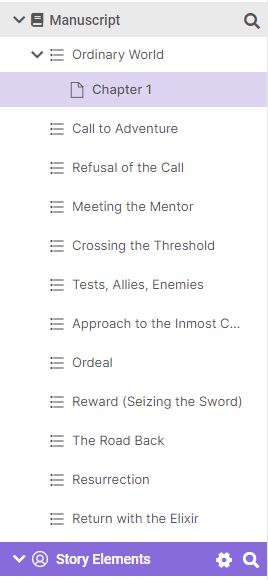
Much like Scrivener, LivingWriter has a breakdown of your chapters and scenes, although the structure is slightly different.
LivingWriter starts with outline sections, generated by the templates or you can create them yourself, with chapters and “sub- chapters” below that.
It’s essentially the same as what Scrivener does.
Story Elements

One unique feature of LivingWriter is the ability to add “story elements” that act as a type of glossary for your book. This can be breakdowns of your characters, locations, and events within your story.
Sadly, these elements are not terribly complicated, and I would recommend a tool like Campfire for more thorough world building options.
But the story elements can still provide a quick reminder of certain details that you need to have on hand.
Story Board

LivingWriter does have a convenient way of visualizing your plot with the Story Board option, which brings all of your different outline elements into one board, so you can switch them around and play with your outline much like sticky notes.
This combines some of the better elements of plotting tools like Plottr into LivingWriter, which is a big plus.
Online/Offline Support
While LivingWriter does provide desktop apps for Windows and Mac, this tool is primarily an online platform.
Unlike Scrivener, which is exclusively an offline tool, LivingWriter syncs to cloud, and there doesn’t appear to be a good way of keeping things offline permanently.
However, this is nothing new, and most similar platforms that come out these days also require cloud support.
But at least, it does appear that you can write offline for periods of time, as long as you sync it later.
Goals and Word Count
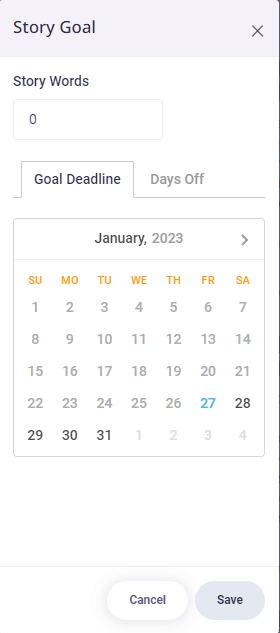
LivingWriter allows you to set goals for specific project, and see how you are progressing towards those goals. However, it does not have a way of tracking daily habits for writing, like Atticus does.
Version Control
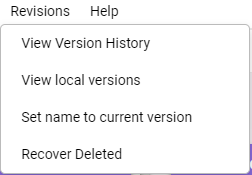
One of the better features of LivingWriter is the ability to have version control, much like Google Docs.
Everything in LivingWriter saves automatically, so if you find you have made some mistakes, and you need to go back to a previous version, there is a way to find those old versions and revert back to them.
Where LivingWriter Starts to Struggle
While LivingWriter has some useful features, there were also a few things that stood out while testing the platform that are worth mentioning.
Some of these are relatively small limitations. Others are bigger issues that might make certain authors hesitate before committing to the tool long term.
None of these are necessarily dealbreakers for everyone, but taken together they make it harder for LivingWriter to compete with some of the alternatives available today.
Here are the main drawbacks that stood out while using the software.
Very Expensive Lifetime Option
LivingWriter offers a lifetime plan, which at first sounds appealing. A lot of writers (including me!) prefer paying once instead of dealing with another monthly subscription.
The problem is the price.
The lifetime option right now is $699. That’s nearly 5X the cost of Atticus, which makes it hard to justify for most authors — especially since you’ll still need a separate tool to format your book.
Reports of Bugs
Another thing worth mentioning is that some users have reported bugs or stability issues with LivingWriter.
To be fair, almost every writing tool has occasional glitches. Software development is messy, and even well-established platforms run into problems from time to time.
But when you’re working on something as important as a book manuscript, reliability matters. Writers want to know their work is safe and that the platform won’t suddenly lose formatting or behave unpredictably while they’re in the middle of a project.
LivingWriter generally works well, but the reports of bugs are something potential users should keep in mind before fully committing to the platform. I should note, though, that I didn’t notice any bugs, and no one on the Kindlepreneur team mentioned seeing any when I asked them.
Bulk Editing and Formatting Limitations
LivingWriter does a good job helping authors organize their manuscript while they’re writing, but it starts to show its limits when it comes to editing and formatting larger sections of text.
For example, bulk editing features are fairly limited compared to some other writing tools. Making changes across multiple sections of a manuscript can require more manual work than you might expect.
And because LivingWriter isn’t designed to handle publishing-ready formatting, you’ll eventually need to move your manuscript into another program when it’s time to prepare your ebook or print version.
For many writers, that extra step ends up being a bit of a hassle.
Limited Documentation
Another small frustration is the amount of documentation available for the platform.
When you’re learning a new writing tool, it helps to have detailed guides, tutorials, or examples showing how different features work. LivingWriter does have some documentation available, but it isn’t always as extensive or easy to find as it could be.
For experienced writers this may not be a big deal. But for authors who are new to writing software, clearer documentation can make a big difference when trying to understand how everything fits together.
Neither my team nor I have had a chance to interface with the actual support people behind living writer, and so I have no basis to comment on their quality. The support might be awesome. But it almost has to be since the documentation is so limited.
Story Elements and Goals Feel Half-Finished
LivingWriter includes tools for tracking story elements like characters, locations, and other details related to your manuscript. On paper, this is a great idea because it helps writers keep track of the moving pieces inside a complex story.
In practice, though, some of these features feel a little underdeveloped.
For example, the goal-tracking system isn’t as robust as what you’ll find in some other writing platforms. There’s no built-in way to track daily writing habits or maintain long-term writing streaks, which are features many authors find helpful for staying consistent.
The story element tools themselves can also feel a bit limited, which means some writers may still end up relying on outside notes or documents to manage those details.
Why I Like Atticus Better Than LivingWriter

LivingWriter does a good job helping authors organize and draft their manuscripts. If your main goal is simply to have a clean writing environment with some built-in tools for outlining and managing story elements, it can definitely get the job done.
But there’s one major limitation that’s hard to ignore.
LivingWriter doesn’t format books.
That means when you finish your manuscript, you’ll still need to move everything into another tool to prepare your book for publishing.
That’s one of the reasons I recommend Atticus instead.
Atticus was originally built as a formatting tool, but over time it has grown into a full writing platform as well. It already includes features for writing, organizing chapters, setting goals, and tracking your progress, and it continues to add more capabilities with every update.
More importantly, it also handles the formatting side of things, so you don’t have to work with or pay for two separate tools.
There’s also the pricing difference. LivingWriter relies on subscriptions or an extremely expensive lifetime plan, while Atticus is a one-time purchase that includes all future updates.
For most authors, having writing and formatting in the same platform simply makes the process easier.
Which is why, even though LivingWriter has some interesting features, Atticus is still the tool I recommend.