For years, Kindlepreneur’s recommendations for email marketing platforms were pretty straightforward, even if Dave (our CEO) and I didn’t completely agree on which one was best.
Dave loved MailerLite. It was friendly on the wallet, friendly to beginners, and its free plan didn’t withhold the features needed by most authors. Dave liked MailerLite so much, he created a course showing people how to use it.
On the other hand, I was on team Kit. It’s what I used for my personal email list, it’s what Kindlepreneur uses (so I’m in it every day), and its free plan allowed a whopping 10k subscribers, along with a single automation workflow. For most people, it was great.
I wrote much of the above in the past tense for a reason, though. Alas, both MailerLite and Kit have made big changes to their free plans… so much so that I started looking for alternatives I could recommend to our readers.
I’ve used Keap and ActiveCampaign extensively in the past, so I knew they were too complex (and expensive) for most writers. I’ve used GetResponse, AWeber, and SendFox, too, and while each had their good points, I wasn’t sure any of them were worth bumping MailerLite or Kit from their perch (even WITH their changes).
When I stumbled upon Sender, I was pleased to find an email platform that reminded me of the reasons Dave and I liked MailerLite and Kit in the first place. Now, whether Sender is better than either of those platforms will depend on your situation and needs, because both MailerLite and Kit are still very good. But after testing Sender for several months, and even deciding to move my own email list from Kit over to it (more on that later), I can confidently say that Sender is worth recommending.
In fact, for those looking for a free plan, I think it’s the best option out there right now, and its paid plans are strong and affordable enough that you can stick with Sender even after you outgrow free.
I’ll explain why, plus how Sender fills the hole created by MailerLite and Kit, in this quasi-review. That way you can decide if it’s a good fit for you.
So, What Happened to MailerLite and Kit?
Before I get into the ins and outs of how Sender “fills the hole” left by its two competitors, I should probably explain what's changed. So let’s do that now.
In June and September 2026, respectively, MailerLite and Kit changed their free plans and made them considerably less generous.
Back in the day, you could have up to 1,000 subscribers on MailerLite’s free plan. Then that changed to 500. Then in June 2026, they changed the free plan so that you could only have 250 subscribers on it, a low number that’s really easy to outgrow.
Ironically, the free plan being less appealing is probably good for MailerLite affiliates like Kindlepreneur, because people have to upgrade to a paid plan sooner. But it makes it harder for us to recommend MailerLite to writers who are new to email marketing, hence the point of this review of mine.
Then you have Kit. As I mentioned earlier, its “Newsletter” plan was free for up to 10k subscribers, and it allowed you to have one automation and one email sequence. If someone wanted more automations, more sequences, or other advanced features (or surpassed the 10k subscriber mark), then they could upgrade to a paid Kit plan.
Fast forward to September 2026, when Kit emailed its affiliates saying the “Newsletter plan” was now called the “Free” plan and that it would no longer include visual automations and sequences (though existing Newsletter plan users were thankfully grandfathered in).
Yes, you can still have up to 10k subscribers, and you can send and schedule as many off-the-cuff emails as you want, but you can’t automate anything (not even a simple “welcome” or onboarding sequence for new subscribers) unless you upgrade to a paid plan.
And that’s why the “what email platform do you recommend” question gets a bit murky for us now…
If you know you’re beyond what any “free plan” can offer (either because you need advanced features or you already have lots of subscribers), that’s one thing. The paid plans for MailerLite and Kit are quite good, and I’ll talk about those, and how Sender compares to them, in a bit.
But at Kindlepreneur, we know that many of the writers in our audience are new to email marketing. Case in point, our most recent survey of authors who sell books directly from their own websites (ie, veteran authors who tend to be more advanced) showed that 23% of them weren’t using any kind of email marketing service. Not Kit, not MailerLite, not Mailchimp, not Sender. Nothing.
So if nearly a quarter of those authors weren't using an email platform of any kind, imagine how many writers who are just starting out aren't using one either.
And if you’re starting from scratch, you usually don’t begin with a paid plan unless you’re one of the fortunate few with money burning a hole in your wallet. No, you begin with a free plan, knowing you’ll upgrade to a paid one when and if it makes sense.
MailerLite and Kit used to be easy to recommend to Kindlepreneur’s readers because we knew 1) their free plans could serve the needs of many of them for a long time, and 2) that each offered plenty of reasons to stay for anyone who eventually needed to upgrade to a paid plan.
#2 is still true for both, but #1 is harder now.
In MailerLite’s case, its free plan still offers advanced features like email automations (which is awesome), but a cap of 250 subscribers is limiting. In Kit’s case, 10k subscribers is plenty for most people, but not being able to do even basic automation means its free plan will only be useful for people who want to collect subscribers and send one-off emails (and little else).
And that brings me to Sender…
Its free plan is one I can still recommend
Sender gives you 2,500 subscribers on its free plan, and you get unlimited basic automation workflows.
This puts it in the Goldilocks zone compared to MailerLite and Kit. Enough subscribers to last you for a while? Check. The ability to deliver reader magnets, create a welcome sequence, and build workflows? Check.
MailerLite’s free plan fails at the former and succeeds at the latter. Kit is the opposite. But Sender? It gives you a taste of both that’s “just right” for most people.
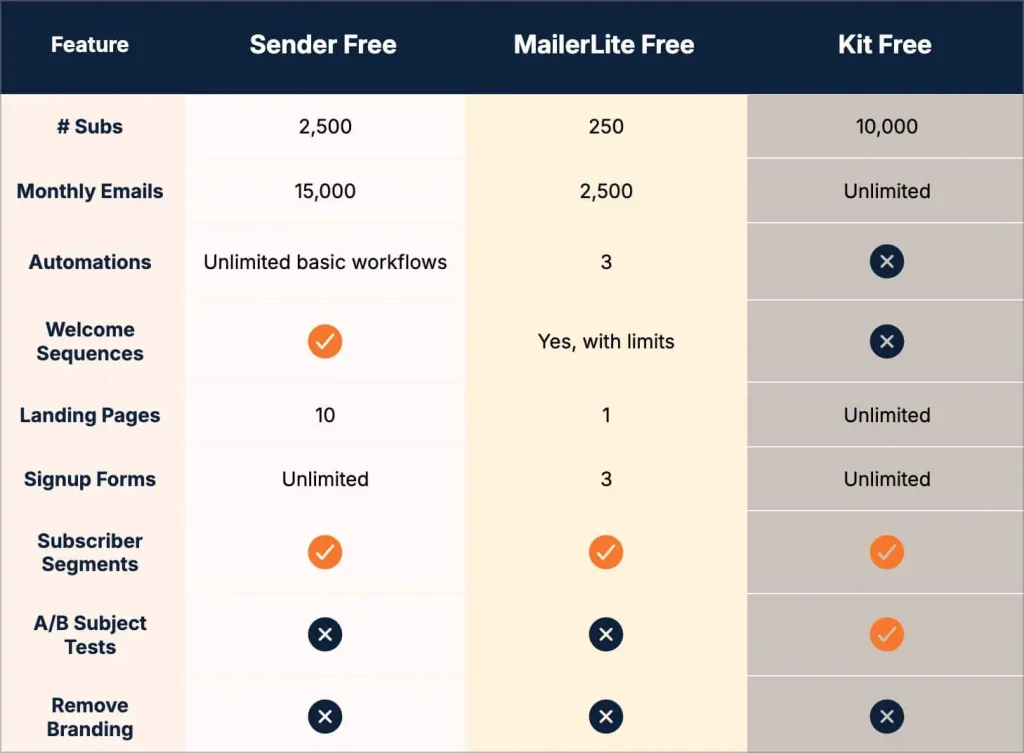
Yeah, you’ll have to deal with Sender branding when you’re on the free plan (but MailerLite, Kit, and basically every other email platform are the same way). And you’ll be capped at sending 15,000 emails per month (well below Kit’s unlimited, but above MailerLite’s 2,500/month). And yeah, there are certain premium features like A/B testing, SMS messages, and custom domains for landing pages you’ll need to be on a paid plan in order to get. But all free plans have their limitations, so this shouldn’t be a surprise.
There are other things I didn’t include in the table, so if what you care about isn’t listed, I’d encourage you to check out the full list of features Sender’s free plan offers. But for most people who are starting out, the two big features are 1) the number of subscribers you get and 2) whether you can do workflows and automations. And for those, Sender combines what Dave and I liked best about MailerLite and Kit.
Of course, this combo of subscribers and automations is only one piece of the puzzle. An email platform with a great free plan will only have limited appeal if its paid plans suck.
But thankfully…
Sender’s paid plans match up well with MailerLite and Kit
And that’s important because switching email platforms is a PAIN to do.
When I was the editor-in-chief of Smart Blogger, we switched from Keap (aka Infusionsoft) to ActiveCampaign. We spent months prepping and planning for it. We migrated subscribers bit by bit. We spent months duplicating every automation and email sequence we had. And we spent several more months slowly ramping up the number of emails we’d send out at a time. It was a huge undertaking.
I doubt I’m the first to say or think it, but whether intentional or not, this migration complexity creates a “moat” around these platforms that keeps people inside for as long as possible. The more entrenched you are, the less likely you are to muster up the courage to leave.
Email platforms know this, so to help convince you to leave your current provider and come over to them they often offer some type of migration service. These can be helpful, especially if your setup is simple and small, but they don't always eliminate every headache. When Smart Blogger switched, we had a dedicated concierge team at ActiveCampaign, but because everything was “mission critical,” we needed to be heavily involved. And we still endured tech pains and hiccups during the move.
Aside: This makes Kit’s decision to change its free plan particularly baffling to me. When someone has automations or sequences they have to recreate on a new service, they're less likely to bother. So Kit removing them from their free plan makes it EASIER for someone to switch to a different platform once it’s time to upgrade to a paid plan. But that’s apropos of nothing… and a rant for another day.
This “pain to switch” reality is why it’s important to pick an email platform that can grow with you. Sure, when you’re starting out, you might have 1 subscriber (hi mom!) and zero automations, but fast-forward a few months or years and that won’t be the case. Eventually, if you work hard and stick with it, you’ll outgrow that free plan that’s served you so well. And when that time comes, the easiest, simplest path is to stay with the same platform and upgrade your plan.
But… that only works if your “free” platform has good paid plans worth upgrading to. So let's see how Sender stacks up against MailerLite and Kit. Each has two paid plans (ignoring the “Enterprise” ones), which I’ll group into “basic” and “premium” buckets for simplicity’s sake.
Here’s the high-level feature set for each:
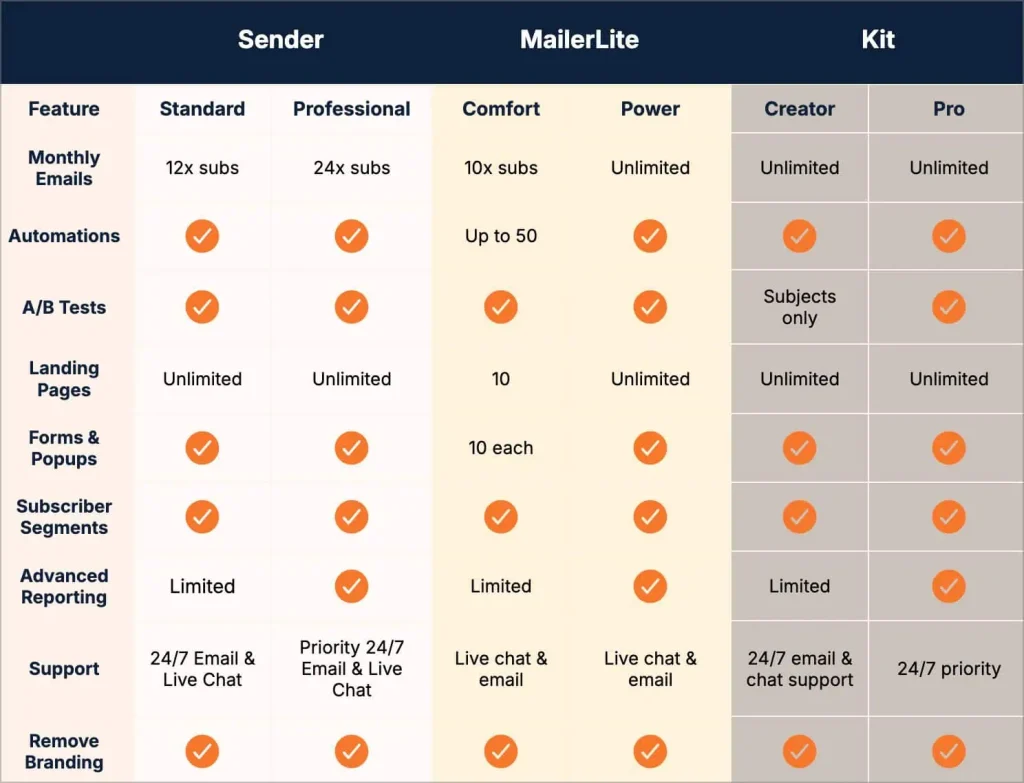
With the exception of monthly email allowance (which Kit wins on), and landing pages, forms, and popups (which MailerLite is more stingy with), the feature lists are pretty similar.
Now let’s look at the prices based on how many subscribers you have.
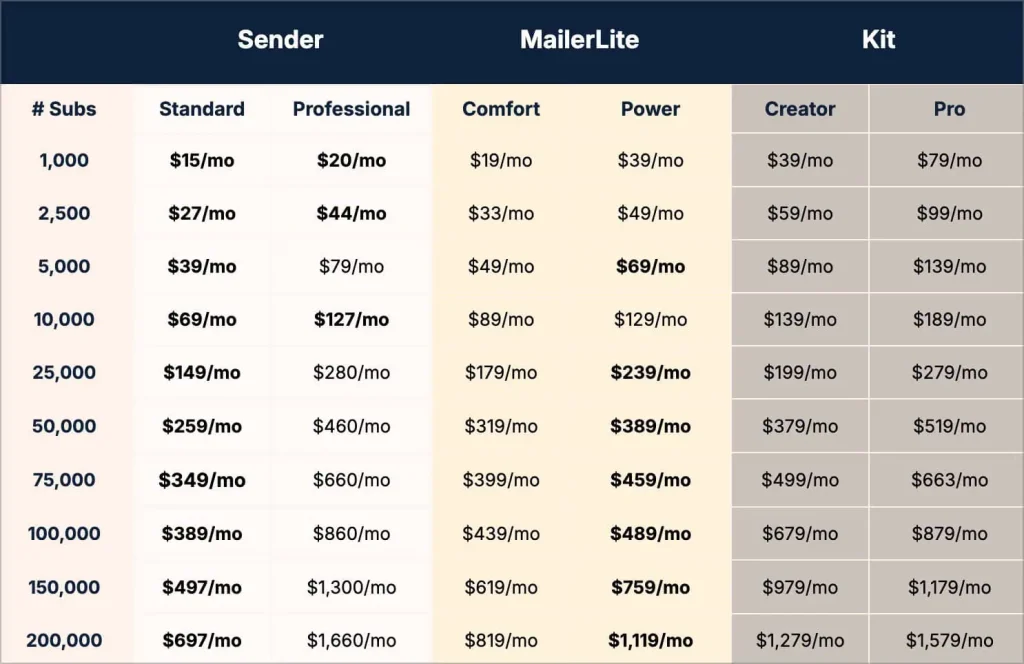
Kit is the most expensive, and as a Kit Pro account holder for several years, this doesn’t surprise me.
Still, I’d be remiss if I didn’t mention that Kit has special features and perks that, if you’re an advanced marketer, can make its price tag worth it. There’s a reason Kindlepreneur uses it, after all. The “Creator Network” gives you access to a recommendations engine that can bring in extra subscribers. You get complimentary access to SparkLoop’s referral program, if you have Kit Pro. There’s “Subscriber Signals” – also on the Pro plan – that gives you insights into the demographics and social influence of the subscribers on your list. There are newsletter sponsorships available if you want an easier way to monetize your emails. And there’s more too.
With the core features being pretty similar (save the ones unique to Kit I just mentioned), the choice usually comes down to price for most people.
And on that, Sender is the winner on basic paid plans. It's usually the winner on premium plans too, until you get near 25k subscribers. After that, MailerLite's “Power” plan wins.
So if you’re comparing paid plans, the choice might be as simple as answering “do I need basic features or premium ones?” and “how many subscribers will I realistically get up to?”
If you only need basic features, Sender’s Standard plan will be the least expensive, regardless of your subscriber count. If you need premium features and you hope (even aspirationally) to have tons of subscribers, MailerLite’s Power plan will cost less once you surpass 25k. And if advanced features, not price, matter most to you, Kit is still tough to beat.
Personally though, I couldn’t justify Kit’s higher price tag anymore once I discovered everything Sender could do. As much as I love its bells and whistles, I’d like my family to be able to afford to buy a house one day soon (yes… in this economy).
That’s why I migrated from Kit to Sender
In the middle of my research, and with the annual $2,000-ish invoice (for my personal email list) fast approaching, I made the decision to leave Kit and go to Sender.
By that point, I was familiar enough with it to make the leap. Plus, I figured the move would give me some nice first-hand experience for this review. For that reason, I politely declined Sender’s offer to migrate me over so that I could handle it myself. (Well, that and the fact I tend to be a micro-manager, so handing off a project like this is difficult for me to do.)
And overall, I’ve been very pleased with Sender so far. From personal experience, (almost) every email platform can do the basics well. Multi-step automation workflows, sending and scheduling broadcasts, analytics on my subscribers and how my emails are performing, that sort of thing. And Sender does all of that just fine.
So when I turned my (at times) overly-critical eye on it for evaluation, I focused on the things that go beyond the basics.
For example, Sender allows “custom fields” to trigger its automations. That’s good. It allows me to create a custom field for my subscribers named “engagement_status” that has values like “engaged,” “cold,” and “inactive.” Then I can create an automation aimed at re-engaging my subscribers that’s triggered when the field changes to “cold.”
I know that doesn’t sound like a big deal, but without it I would have to rely heavily on “groups” (aka “tags” if you’re using Kit) to make my automations go. The result is having dozens and dozens and dozens (and dozens) of tags/groups to track. And I know that might not sound like a big deal either, but it's easy to end up with subscribers with conflicting tags (such as “engaged” and “cold” tags at the same time). With custom fields, you don’t have that issue. If someone’s “engagement_status” is cold – it’s cold. Nothing else.
Kit and MailerLite do this too, and I was happy to see Sender had it.
One thing I missed right away was a small thing Kit did. If you’ve never heard of the CAN-SPAM Act, it’s the thing that requires email marketers to include a valid physical mailing address in their marketing emails. So regardless of which platform you use (Sender, Kit, MailerLite, Mailchimp, etc), you have to include a physical address.
If you have a business address, you can use that. If you have a PO Box or virtual mailbox, you could use that. I had none of those things. However, it didn’t matter because Kit lets customers use their mailing address in outgoing Kit emails. They don’t accept packages on your behalf or forward mail to you or anything like that, but they’re happy to let you use their address.
It’s a nice touch by Kit, and I’ve used it for years without thinking about it.
Well, while creating my Sender account, the setup wizard asked me for my address. So, I entered my home address. Later, when I was previewing a new email template I created, lo and behold, I spotted my home address at the bottom of it. If I hadn’t noticed it, I’d have inadvertently given thousands of people my home address the first time I sent out a Sender email to my subscribers.
Pro tip: don’t share your home address with strangers on the internet.
But big deal, right? Just use a PO Box. Well, yes, but one reason I switched to Sender was to save on expenses. Renting a PO Box for the sole purpose of having a physical address to include in my emails felt… wasteful.
So I sent a message to my POC at Sender. I told them how Kit handles this and asked if they could do something similar.
(I didn’t mention to them that I was too cheap to rent a PO Box, but it was probably implied.)
They forwarded my request to Sender’s Support Team, which replied back with “yes” in a matter of hours. Now, anyone on a paid – not free – plan can use Sender’s address in their email footer:
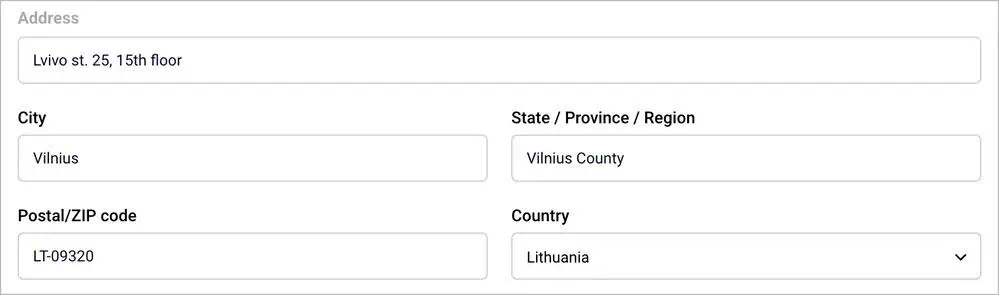
I asked my contact at Sender if it was okay to mention this lil’ tidbit in my review, and they agreed. But I should emphasize: using Sender’s address in your footer is something only paid customers can do, and Sender won’t forward or handle any mail that’s sent to you at that address.
It’s not as nice as a US-based address (like Kit offers) since I’m located in the United States, but it’ll do the job. And for my first real interaction with Sender’s Support team, their willingness to listen and help bodes well going forward, I think.
Another thing I noticed is that, when it comes to designing workflow automations, Sender isn’t as polished or as sharp-looking as MailerLite or Kit, the latter of which debuted an open-beta version of a new drag-and-drop builder in October 2026 that mirrors MailerLite’s version.
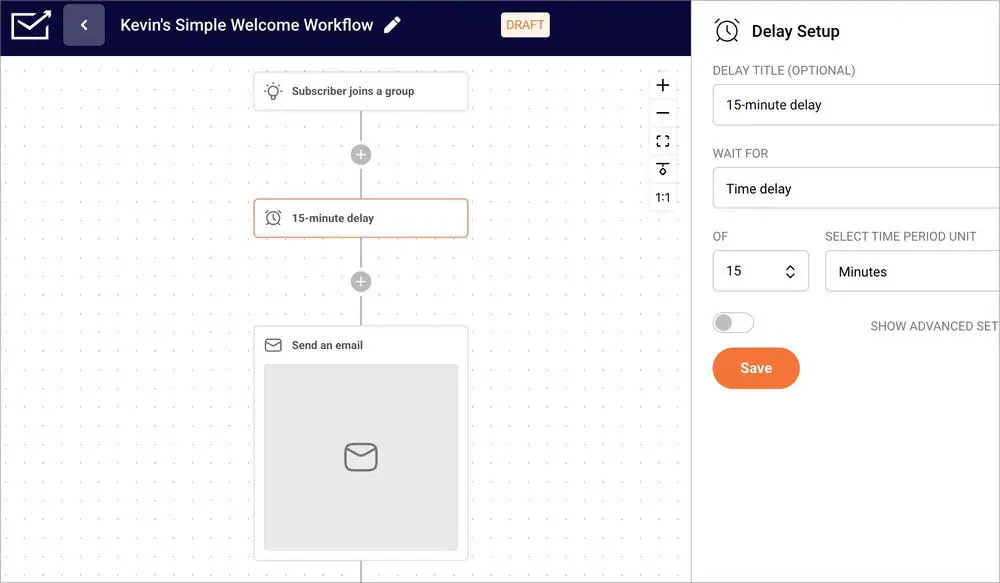
If you compare Sender’s builder to MailerLite’s and Kit’s, you’ll see what I mean.
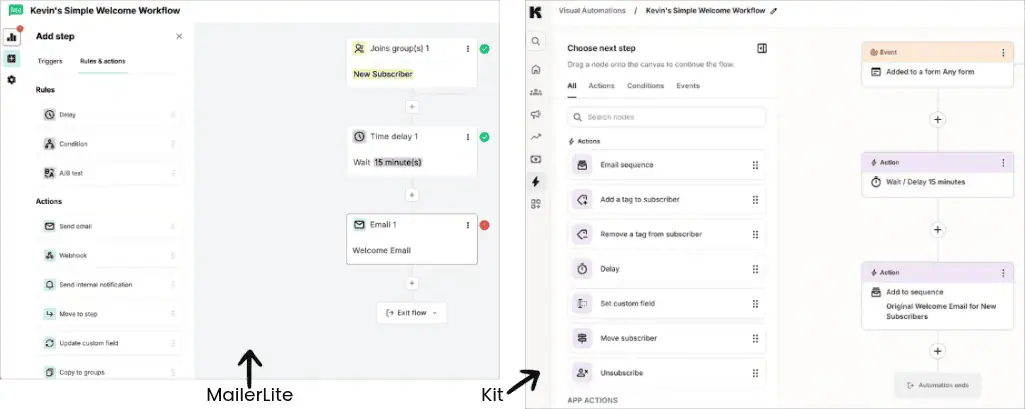
That doesn’t mean Sender’s automation workflow builder can’t get the job done, though. It does all the important things I need it to do, and on the Professional plan, it even includes the ability to send SMS messages as part of your automations, if that’s something you choose to use. Neither MailerLite nor Kit offers that. I’m personally not a fan of sending text messages for marketing, but the capability is there.
The “not as polished” story holds for Sender’s email builder too.
However, part of that is a learning curve on my part. I’ve created hundreds of emails in Kit, so crafting and designing broadcasts inside it feels as natural as breathing. MailerLite, from the bit I’ve used its template builder, is pleasing to the eye and intuitive to use too. The good news is that using Sender’s email editor will get easier the more I do it. Plus, once you have a template you’re happy with, you rarely have to touch it (evidenced by the fact we’re still using the same email template for Kindlepreneur that I designed two years ago).
The last compromise I’ll highlight, which thankfully has a workaround, is that Sender doesn’t natively integrate with my lead-generation tool of choice, OptinMonster. (When you see a pop-up or slide-in form on a website, it’s probably a tool like OptinMonster.)
MailerLite and Kit do this natively, which means if I was switching from Kit to MailerLite (or vice versa), the forms I’d created in OptinMonster could stay intact. All I’d need to do is change which email provider they were connected to.
With Sender, because there’s no native integration, I have to create forms inside Sender, grab their HTML code, and embed them inside my various OptinMonster campaigns. And, since HTML integrations don’t render the same way as native ones, there are cosmetic tweaks to make in order for my OptinMonster forms to look the way I want them to.
Of course, this is a “me” problem. If you’re not already using OptinMonster or a tool like it, you can simply use Sender’s own popup forms to get people to sign up to your newsletter from your website.
In fact, most of the things I just discussed are “me” problems. Sender's automation builder might not be as pretty as Kit’s, its email editor might take some getting used to, and switching my OptinMonster forms has meant some extra work. But if I wasn’t deeply familiar with Kit, MailerLite, Keap, ActiveCampaign, and the like, I’m not sure I would notice or even care about these things.
And when I look at how much I’m saving with Sender compared to Kit, these “shortcomings” are trivial.
Of course, your mileage may vary
A balancing act I’ve tried to maintain when reviewing Sender is sharing my feelings about it, plus how someone who’s not me would think about it. I needed to put my personal angle on it, of course, otherwise you might as well have asked ChatGPT or Claude what they thought.
But since “email marketing” is something I do every day, and have for years, I have to be mindful that my needs and preferences aren’t going to be the same as someone else’s. I think Sender’s automation workflow editor isn’t as polished as MailerLite’s or Kit’s, but someone else might enjoy its straightforward simplicity. I care about being able to build custom email templates, but most people will happily use one of the pre-built templates that Sender offers. I also chose to do the migration myself, even though I suspect most people would be better served taking advantage of Sender's migration service.
That’s why I think I need to end this review the same way I began it…
MailerLite and Kit changed their free plans, and for most people – who prefer to start on a free plan – that changes the game. MailerLite offers perks but too few subscribers, Kit offers lots of subscribers but too few perks. Sender’s free plan blends both.
Now, to be clear, if you’re already on a paid MailerLite or Kit plan, I’m not suggesting you switch or do anything (unless, like me, you’re looking to save money). MailerLite is very good. Kit is very good. If you’re on either, my guess is you’re very happy and will continue being happy for the foreseeable future.
But if you’re just starting out…
Or if you don’t have an email platform yet…
I think Sender’s free plan is the best one available right now. And its paid plans are strong enough that you could upgrade down the road and be happy with the decision.
You can click here to try them for free. It and the other Sender links throughout the review are affiliate ones, so we’ll receive a small commission if you click them and sign up. However, please know that I didn’t let Kindlepreneur’s being an affiliate of Sender influence my thoughts on them, and I certainly wouldn’t have spent weeks moving my personal email list over to them if I wasn’t a fan!
If you sign up, I hope you enjoy it as much as I have so far.
Good luck.