
For years, I formatted all of my books using a program called Jutoh. It worked well… until it stopped evolving. Updates slowed, support weakened, and it became clear I needed something more reliable. That’s when I switched to Vellum.
At the time, Vellum was the obvious choice. It was powerful, polished, and widely considered the gold standard of book formatting software. Luckily, I had a Mac, because Vellum only runs on macOS.
But here’s the thing. Back then, there weren’t many strong alternatives. If you wanted professional-level formatting, your options were limited.
That is no longer true and I have since switched from Vellum to use something else.
Over the past few years, several excellent formatting tools have entered the market. In fact, some of them have features that made me reconsider using Vellum altogether.
Now, to be clear, Vellum is still a capable piece of software. But it comes with some significant limitations:
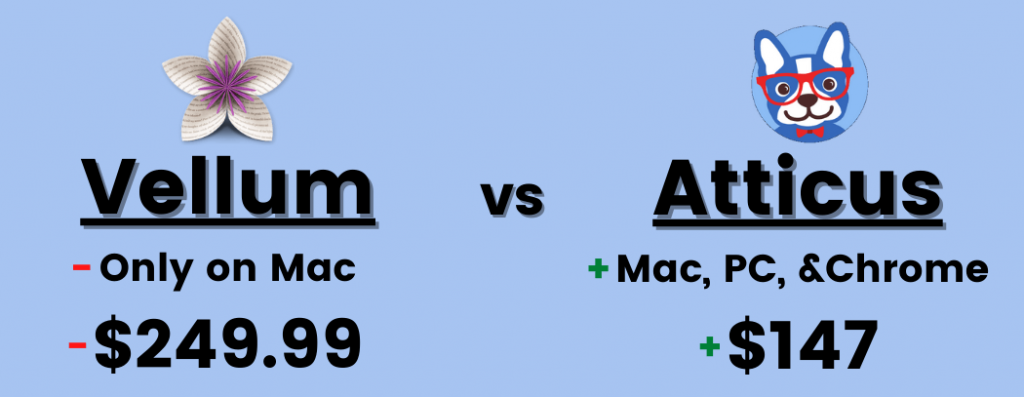
- It’s expensive, costing $249.99 for all formatting
- It only works on Mac
- It focuses solely on formatting and doesn’t offer broader writing or collaboration tools
So if you’re on PC, don’t want to buy a Mac just for one program, or simply want more flexibility for your money, you might be wondering:
What are the best Vellum alternatives available today?
Let’s take a look.
So what is the best alternative to Vellum? The best alternative is Atticus, an all-in-one tool for authors to write and format their books.
But even that might not be for everybody, so I've made a list of the best alternatives to Vellum here.
- What the best Vellum alternative is, and why
- The best paid alternatives
- The best free alternatives
So let's dive in…
Vellum Alternatives Comparison Table
If you're looking for the long and short of it, here are my top recommended alternatives to Vellum with a little info on each:
Feature | Vellum | Atticus | Word | Adobe InDesign | Scrivener |
Platforms | Mac | Windows, Mac, Linux, Chromebook | Mac (w/ poor performance), Windows, Chromebook, Linux | Mac, Windows | Mac, Windows, iOS |
Number of Chapter Themes | 24 | 17+ | (But you can purchase templates) | ||
Offline Use | |||||
Ease of Use | |||||
Reusable Elements | |||||
Custom Chapter Theme Builder | |||||
Cloud Storage and Backups | |||||
Cost | $249.99 USD | $147 USD | $7.99 USD/Month | $20.99 USD/Month | $49 USD for current version only |
The Best Vellum Alternative: Atticus
Atticus is, by far, the best formatting software, and the best Vellum alternative. Not only does it have all of the features that Vellum has, but it is also available for all computers including PC, it costs less, and it can do a lot more than just formatting. While there are some ways to use Vellum on a PC, those ways cost extra money by paying for a cloud service.
In fact, it is built as an all-in-one writing tool, meaning you can write your book, edit it, and then format it all in one place. See my full overview here as well as a breakdown of why Atticus is better than Vellum.
How Much Does Atticus Cost?
Atticus has a lifetime price of $147. That's it, no strings attached. After all, who wants to pay a monthly fee to write all of your books, only to potentially lose them if you quit paying that fee?
Atticus's lifetime price means that you get all future updates at no extra cost, and believe me, there are a lot of updates coming.
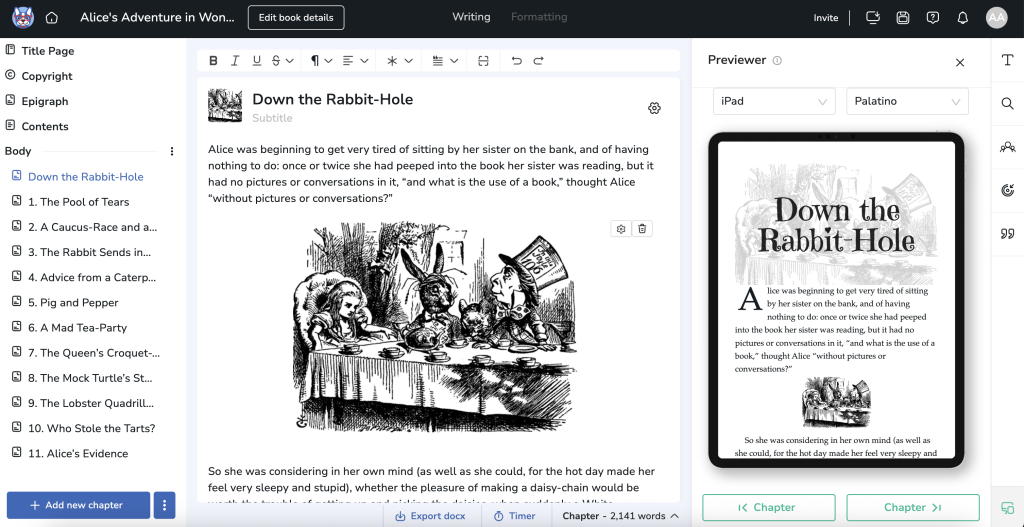
And if you don't believe me, check out how good your book can look
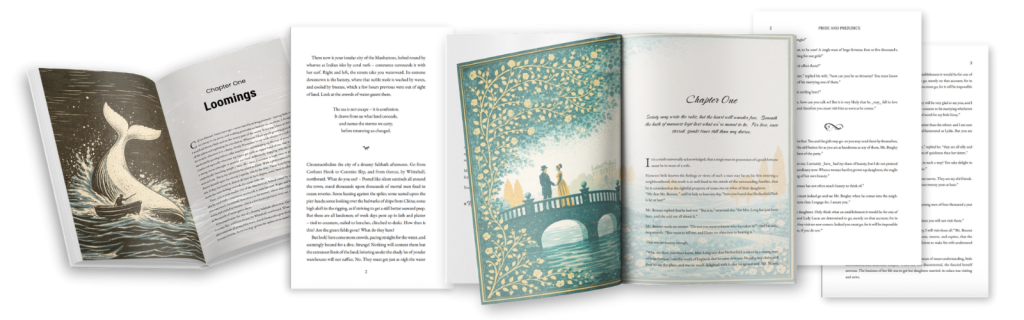
The above is using things like two page image spreads, custom chapters and even custom ornimental breaks. Basically, Atticus is as simple as you need it, and just a custom as you want it.
Pros to Using Atticus
- You can use it on any platform
- It is completely customizable
- Easy to use
- Far more affordable than Vellum
- A dynamic theme builder
- Works as a formatting software and as a word processor
Cons to Using Atticus
- Not all features are available at launch
The bottom line: Atticus is not only the best Vellum alternative, but it is shaping up to be the best writing software, period. I highly recommend that anyone searching for an alternative to Vellum look at Atticus.
All that said, if Atticus doesn't work for you for any reason, let's discuss a few of the other Vellum alternatives…
Paid Alternatives to Vellum
In addition to Atticus, there are a few other paid Vellum alternatives that are worth a look.
Microsoft Word
Technically, Microsoft Word can be used as a formatting software, even though this is not the purpose for which it was built. Additionally, formatting with Microsoft Word can be complicated, and involves a lot of small steps (all of which would be automated in programs like Atticus or Vellum).
Thankfully, I've done this before, and put together a comprehensive guide on how to format a book with Word, which you can check out here.
And while Word might have been a great option, back when it was automatically on all of our computers, Microsoft Word is now an annual cost coming in at $159.99. Usually, the better option is to get Microsoft 365, which has all of Microsoft's office software products in a monthly subscription of $6.99 per month. But still, that's a subscription for something that wasn't directly built for book writing, or formatting for that matter.
But if you already have it and you want to shove a square peg through a round hole, then this might be the best option.
Pros of Using Microsoft Word
- It's a common program
- You have a high degree of control
- A lot of people have access to Microsoft Word
Cons of Using Microsoft Word
- It takes forever to format a book properly
- It is easy to make mistakes
- You could easily use the wrong font
- There is a strong learning curve for formatting
The bottom line: Microsoft Word is not nearly as intuitive as Vellum, but can make a decent alternative for those who are well versed in Microsoft Word and happen to have it available.
Adobe Indesign
In terms of capability, Adobe Indesign is unmatched. It can do literally anything you want to do when it comes to formatting. Do you want a complex magazine layout? Done. Formatting a phone directory? Done.
However, it comes with an insane learning curve, and for most authors will be like trying to slice bread with a chainsaw. It's simply too much for what most of us need. Plus when I tried to format my book with Indesign, I gave up after hours of video watching, trying to follow each step. To put it bluntly, this is overkill and overcomplicated.
Another issue with InDesign, is that it's a subscription service. If you just want to subscribe to Adobe InDesign, it will cost $20.99/month. If you use more than one Adobe product, it is more economical to get the entire design suite, which comes in at $52.99/month. But still, that's not cheap, and I hate the idea of not ‘owning' the software I use to format and write my books. So, definitely keep that in mind.
But hey, if what you want to do can't be done in Vellum or Atticus, then you'll need to pony up, pay the price and suffer the hours of learning.
Pros of Using Adobe InDesign
- It can do virtually anything you can imagine with book formatting
- It creates beautiful, well designed books
Cons of Using Adobe InDesign
- The learning curve is extremely high
- Most features are unnecessary for most authors
- It is very expensive
The bottom line: Adobe InDesign is technically even more advanced than Vellum, but is much harder to use. Vellum is a much better program for ease-of-use and simple design, unless you are doing something more complicated like a magazine.
Scrivener
Many authors own Scrivener as their primary writing software. If this is you, you may be pleased to know that Scrivener has basic formatting capabilities.
However, and this is a BIG however, you are super limited in what you can do for formatting, and quite frankly, it too is super complicated to learn. I actually had to pay for a course on just “how to format a book with Scrivener.” The worst part was, after taking the course and formatting a book, I was not jazzed about what I got from it. As you can see below, there are major differences betweena Scrivener formatted book and what you cna do with a tool like Atticus.
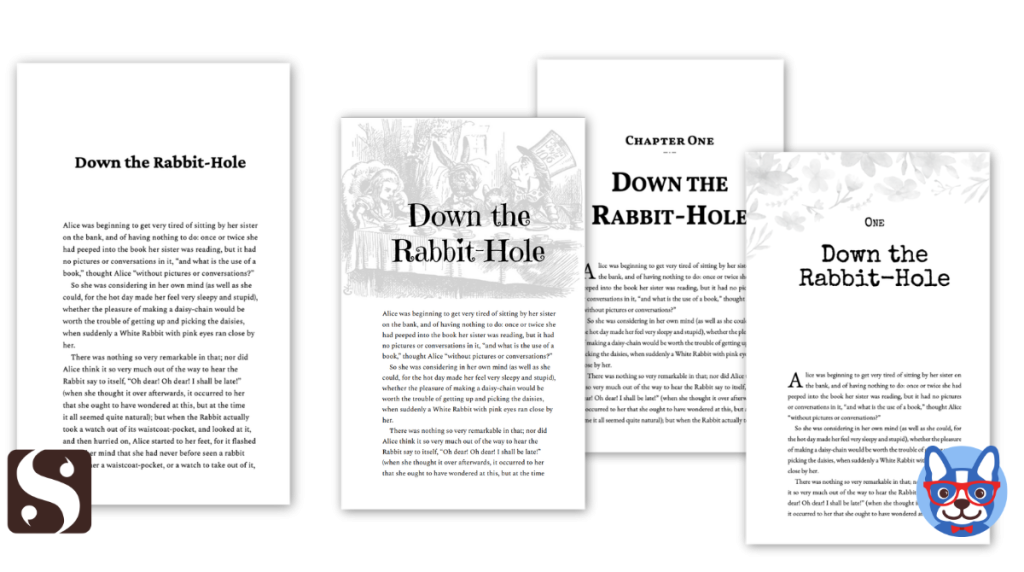
As for price, Scrivener is actually cheaper, coming in at a cost of $49 for the Windows package, $80 if you want Windows and Mac, and $19.99 for the iOS mobile version (which I definitely don't recommend). Additionally, Scrivener makes you pay for every major update. Meaning if you had Scrivener 2, and want to upgrade to Scrivener 3, you will have to pay again.
If however, you do decide to format you books with Scrivener, no need to buy that course I mentioned. I took what I learned and wrote an article on how to format a book using Scrivener…so, check that out.
Pros of Using Scrivener
- Convenient for authors that already own Scrivener
Cons of Using Scrivener
- It comes with a sharp learning curve
- Formatting capabilities are not as customizable as Vellum or Atticus, or even Microsoft Word
- No chapter theme builder
The bottom line: Scrivener does not have the intuitive formatting capabilities of Vellum, nor is it as customizable, but can still be useful for those who already own it and don’t want to spend extra money.
Free Alternatives to Vellum
If you can't afford Atticus, or any of the paid options, there are a few free options that you can look at. Obviously, you won't get the same results as a paid program, but some of these can be useful for basic formatting.
Kindle Create
Kindle Create is a free software created by Amazon themselves, so authors have at least one free option to format a book. The best thing about Kindle Create is that, since it was created by Amazon, you don't have to worry about the file types being incompatible with Amazon KDP. You can rest assured that your ebook will work when you upload it to their platform.
However, Amazon hasn't really kept up with this software and so every year I find more and more problems with what it does (and doesn't do), and Amazon isn't inclined to spend the money to improve or fix it. So, beware!
Pros of Using Kindle Create
- It's free
- It produces Amazon-compatible ebooks
Cons of Using Kindle Create
- It doesn't export to EPUB or MOBI, making it difficult to upload to other services
- It isn't as customizable as Atticus or Vellum
- Ease-of-use could be better
The bottom line: Kindle Create is a great free alternative to Vellum. However, its basic features leave much to be desired if you want more control over your formatting.
Reedsy
A second free option is the Reedsy Book Editor, which is an online service that lets you format your book in a simple, easy way. However, this is bare minimum and lacks lots of functionality. Furthermore, Reedsy makes its money by trying to convince you that you should hire their editors or even book formatters. So, if you sign up for this, be prepared for lots of sales pitches or pushes to use one of their experts instead.
Pros of Using Reedsy
- It's free
- Very easy to use
- Does most of what a fiction author would need
Cons of Using Reedsy
- It's overly simple
- It doesn't have the level of customization or themes that Atticus or Vellum have
- Reedsy's strategy is to get you to hire someone
- No offline option
The bottom line: Reedsy’s Book Editor is another great free alternative to Vellum. However, if you want something with more capability, you will have to look at Atticus or another of the paid options.
Draft2Digital
Draft2Digital is known as a book distribution platform that will get your book into any online bookstore, without the hassle of having to go in and do it yourself.
However, you might not have known that they also have a book formatting service. To use this, you have to upload your word document or an EPUB file, and it will walk you through the process of formatting your manuscript.
Let's be clear…this is SUPER simple and just functions as a book. You won't be able to add or create much…but it works.
For formatting, Draft2Digital does not cost anything. However, if you are selling your books through Draft2Digital, they take a 10% cut of your revenue. So, there is that.
Pros of Using Draft2Digital
- It's free
- They have a lot of custom templates
Cons of Using Draft2Digital
- The customization tools are a bit clunky
- You can't make edits to the text after you've uploaded to Draft2Digital. If you need to change the text, you have to upload again and format again.
The bottom line: Draft2Digital can format a book and has a lot of custom themes, but its capabilities pale in comparison to Vellum, and its ability to tweak the small things leave much to be desired.
Which Is the Best Vellum Alternative for You?
The best Vellum alternative for most authors will be Atticus, since it has all of the same capability (and more), is available on PC and other platforms, and costs less.
However, if you are looking for a free alternative, my recommendation would be Kindle Create.
But not every software is perfect for every person, which is why we have several more tools listed on this page. Let us know which one is best for you, and which alternative to Vellum you have found to be most helpful.
FAQ About Vellum Equivalents
Is there a program like Vellum for PC?
Yes, Atticus is a program like Vellum that is available for PC, Mac, Chromebook, and Linux. It has all of the capability of Vellum, costs less, and is available on more platforms. It is our #1 recommendation for the best formatting software, and the best alternative to Vellum.
What is equivalent to Vellum?
The best equivalent to Vellum is Atticus, since it is $100 cheaper, has the same features, and is available on more platforms. The best free equivalent to Vellum is Kindle Create, a formatting software developed by Amazon to format books. We recommend both for most authors.
Is there a free version of Vellum?
You can download Vellum for free, just to try it out, but you cannot use it to format a book for free. If you want to format your books using Vellum, you will have to pay $199.99 for the ebook version, or $249.99 for the full ebook and print package.
Is Vellum better than Scrivener?
As a writing software, Vellum is not better than Scrivener. However, as a formatting software, Vellum is definitely better than Scrivener. If you want an all-in-one package that is good for both writing and formatting, we recommend Atticus. It is cheaper than Vellum, and works on Windows as well.