No matter how amazing your book is, if you choose the wrong keywords on Amazon, readers may never find it.
Most authors treat keyword selection like an afterthought. They guess. They describe their book in broad terms and pick phrases that sound right instead of phrases that help Amazon to sell more of your book.
And that mistake quietly buries thousands of books every year. Because Amazon does not reward vague descriptions. It rewards relevance, intent, and performance.
Choose the wrong keywords, and your book gets lumped in with thousands of competitors, shown to the wrong readers, or worse, not shown at all. Your launch fades. Your sales stall. And you’re left wondering why.
But choose the right keywords, and something very different happens. Amazon begins to understand exactly who your book is for. It shows your book to shoppers that Amazon knows are actively searching for what you wrote. And that alignment creates consistent, compounding discoverability.
So how do you choose the right keywords instead of guessing?
In this article, I’ll walk you through a proven, step-by-step process for selecting powerful Kindle keywords. You’ll also learn key insights that most authors overlook, giving you a strategic advantage over those who are still guessing.
What you're about to read is something that even Amazon itself has promoted multiple times over the years as I've worked to update and keep relevant, telling authors to learn from this method in order to optimize your books for sales.
Because keyword selection isn’t just metadata.
It’s positioning.
What Makes a Kindle Keywords Good and Profitable
Before we dive into the step-by-step process, we need to define what actually makes a Kindle keyword valuable. Because not all keywords are created equal.
Amazon book keywords are the phrases shoppers type into Amazon when searching for a book or Kindle ebook. These are the exact search terms you want your book to appear for when the right reader is actively looking.
But here’s where most authors go wrong. They choose broad descriptions instead of specific search phrases. A keyword should not be something like “fantasy” or “epic adventure.” That is not how shoppers actually discover books.
Imagine someone types in “Romance book.” What are the chances Amazon immediately shows them the exact kind of romance they want? Very low.
So what happens? The shopper then refines their search.
“Victorian romance.”
Then they realize they don’t want steamy kind of romance, but something a lot less.
So they refine again: “Christian wholesome romance.”
Eventually, the phrase becomes something like:
“Wholesome Victorian second chance romance with family.”

Now that makes sense. That phrase clearly signals intent. It tells Amazon exactly what the shopper wants. And if your book fits that description, that is precisely where you want it to appear. Specific keywords match specific buyers.
But visibility alone is not enough. For a keyword to be truly powerful and profitable, it must also meet three critical criteria:
- Shoppers are actively typing it into Amazon.
If no one searches for it, it cannot drive sales. - Shoppers who use that phrase are willing to buy.
Some keywords get searched often but rarely convert into purchases, usually because they are too broad. - The competition is not overwhelmingly difficult.
Even high-traffic, high-converting phrases may be too competitive for your book to realistically rank for and thus benefit from.
So, as you can see, a great keyword sits at the intersection of demand, buying intent, and realistic competition.
Now that we understand what makes a keyword both good and profitable, let’s break down each of these three components and show you how to evaluate them properly.
How to Manually Find Keywords for Your Book
If you're manually looking for KDP keywords for your book, you will be limited on what you can do. You'll be missing key data as you'll see later, but this is a process you should follow if you can't afford a tool that will help to do it faster and give more accurate data.
Again, even though these steps take time to do, just guessing or using AI to help and moving along will hurt your book's chance for success. So, take this process seriously. You probably spent a lot of time working on your book, and great books deserve to be read.
The key to this is we must come up with specific descriptive phrases shoppers actually type into Amazon (even though we won't know how many search this), guess as whether or not books are making money from it, and decide if the competition is too great.
IMPORTANT NOTE: “Can't I just go to ChatGPT and ask keywords there?” I highly recommend against that. First, ChatGPT doesn't have data on Amazon's systems or searches and so will come up with generic terms that will more than likely NOT meet the requirements below. This would be almost as bad as just guessing and moving on. So, I would avoid using ChatGPT or other AI systems.
So, to begin, start by breaking out a sheet of paper, or an excel sheet, so you can record in each of the following steps:
Step 1: Find Phrases that Shoppers Search For
Luckily, there is a manual way to see whether or not phrases have been typed into Amazon in the past. You see, when you start typing something into Amazon's search bar, it uses its past history to try to guess at what you might be typing in. The ‘guesses' are some of the search terms previous shoppers have typed in the past (but definitely not all of them).
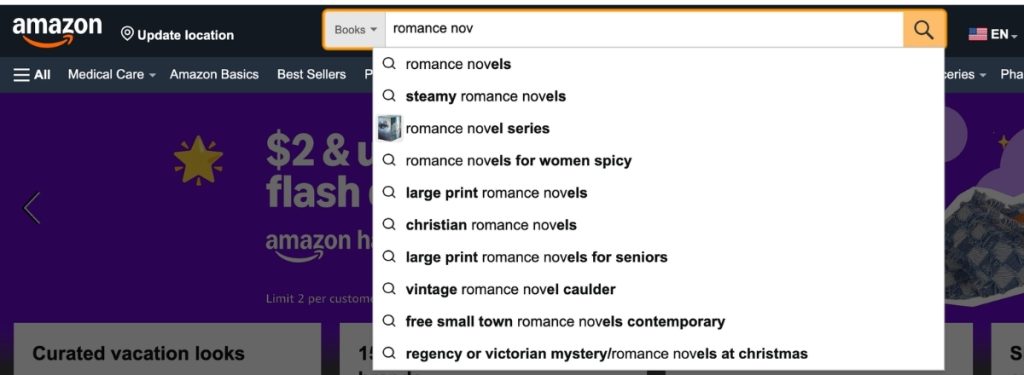
To get those search terms, there are a couple of steps you should take:
- In Amazon search select “Kindle Store” or “Books” as the Amazon category. You want to know what is popular in your industry and not be shown products or terms other than book terms.
- Start typing in a word, and look to see what Amazon immediately pre-populates in the search box.
- Once you've found a phrase that you're interested in, add each letter of the alphabet at the end of your word/phrase, and see what comes up.
The limitation to this step is that while people ‘have' typed that phrase into Amazon, you won't be able to see how many people typed it in. So you won't know which ones are more popular or better. To see something like that, you'd need to use this tool.
My recommendation is do this until you have a good 50 or so terms on your sheet you think fit your book.
Step 2: Check to See if the Books are Making Money From Those Phrases
Now that we have a list of keyword phrases that have been typed into Amazon, its time to check to see if books that show up for that phrase are making any money. We shouldn't target Amazon book keyword phrases that don't make any sales. It's a clear indication that shoppers are not buying from that phrase.
To find out if there is a chance that those keywords in step 1 are making money, do the following:
- Do a search for that keyword in Amazon. Then click on the top three books that show up for that search.
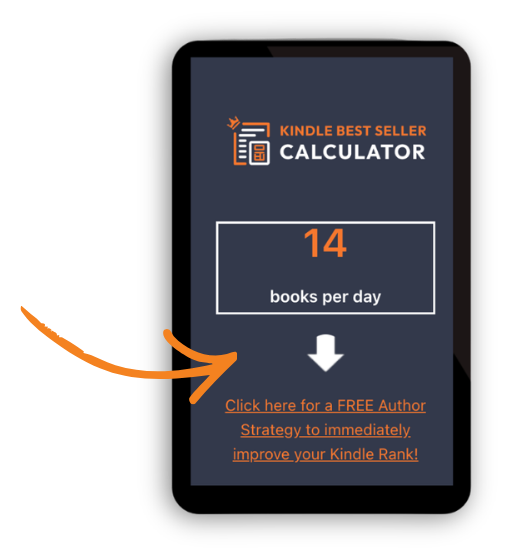
- Next, go to their Amazon Best Seller Rank (ABSR) located in the Book Details section, copy, and paste it into my Kindle Calculator. This calculator will convert the ABSR of a book or Kindle into the estimated sales that day.
- If the three books ranking at the top of Amazon don't make any money or less than other keyword options of yours, you now know one of two things:
- Not many people search for that keyword – thus, low sales
- People who do search for that keyword didn't find what they were looking for and didn't buy.
The limitation to this step is that you won't be able to know for sure if that keyword is contributing to the overall sales of the book or not. So, perhaps the books that show up are making sales from other keywords, but not this one. You won't know for sure. You'll need to use this tool to be able to see if that keyword phrase is actually contributing to the sales or not.
Now, go through your list, repeat, and see which of your keywords are not only getting searched but also making sales. At this point you should now have a couple of phrases you can cross off your list.
Step 3: Check the KDP Keyword Competition Level
If we can’t get our book to show up for a keyword, or show up at the top of the results, then that keyword won’t help us.
Don’t believe me, check this out:
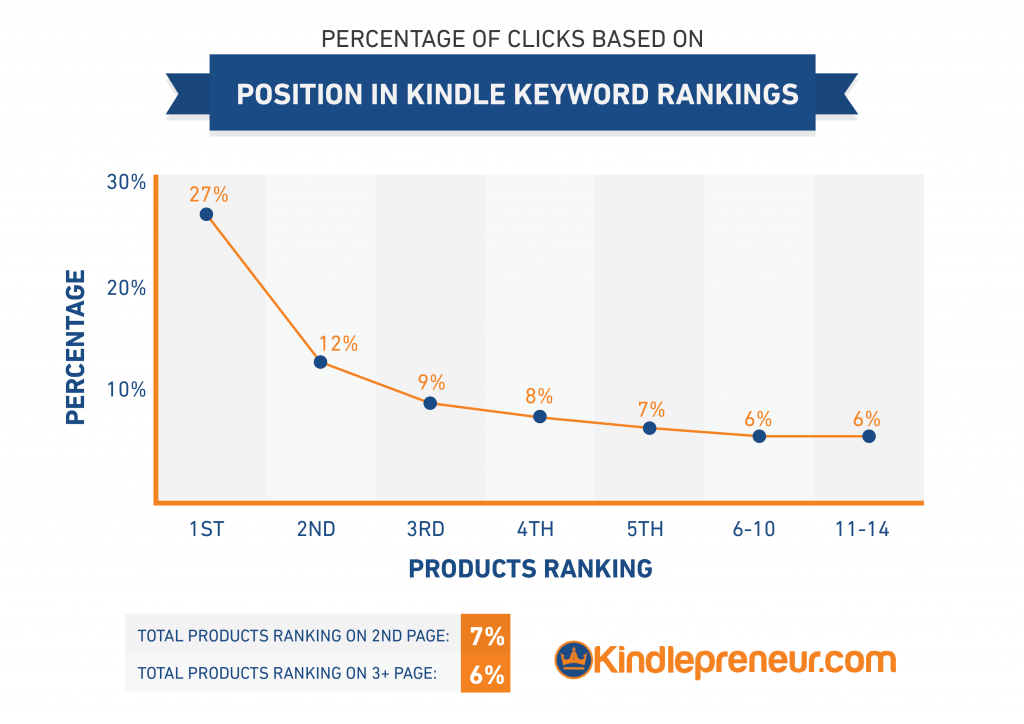
The above is a chart showing what percentage of shoppers click on the books that rank #1-14 in search results. So, if 1,000 people type into Amazon “How to write a book” per month, then statistically speaking, 270 will click on the book that shows up at the top, but only 60 will click on a book that shows up #6.
So, to help you with this step, here are some things you should consider when looking at the top 10 books that show up for a keyword phrase result. But you'll need to make a subjective opinion yourself on the below:
- Book Covers: A great looking book cover design is super important. If the book cover design stinks, but that book is making sales, then GREAT! Verify that you can create a cover better than what is there.
- Titles and Subtitles: Is the keyword in the title or subtitle? Does it make sense? If so, then know the author is targeting this term strongly.
- Book Reviews: How many book reviews do they have? Are they recent or super old? Are they verified or unverified? What rating do they have? Having better and more reviews than your competitors is a surefire way to beat the competition.
- Book Description: Book descriptions are more important than people think. It’s what makes shoppers click to buy. Is their book description well written, or are they structuring their book description so it looks presentable like my free Book Description HTML tool will help you do?
- Age: Newer books usually still have a lot of Amazon love, and are usually doing big marketing pushes. So, their numbers and popularity are a little inflated. However, if the book you’re competing against is years old and still crushing it on the market, then beware!
- Author’s Popularity: If the author is super famous or has a large following and email list, then they are really competitive. Look at their website, the number of reviews, and the overall rank of their books to get an idea of their popularity.
After looking at the level of competition, you should have some terms/phrases that not only get searched and bring in money, but won’t be too competitive for you to use and get in front of a buyer’s market. If it is too competitive, then scratch it off your list.
Now do that over and over again until you find enough phrases to fill your seven KDP keyword boxes.
But if you want an easier and better way of doing this, keep reading.
How to Find Profitable Keywords With Publisher Rocket
Unlike the manual process, by using Publisher Rocket you'll not only be able to find profitable keywords faster but you'll have more useful data so you can make better choices on your keywords.
Let's jump in!
Step 1: See Exactly What Keywords are Working for Other Books and Use Those
Instead of having to search around, or break out Excel sheets to calculate sales like we did in the manual process above, you can just see what keywords other similar books are benefiting from. This takes away all the guessing, and searching and such.
To do this, just use the Reverse ASIN feature of Publisher Rocket.
In this, you take the ASIN number of a competitor's book or a book similar to yours and hit enter. Just like that, you'll now see all the KDP keyword phrases that the book shows up for on Amazon. Then you can click to analyze and see how many people a month search for that keyword.
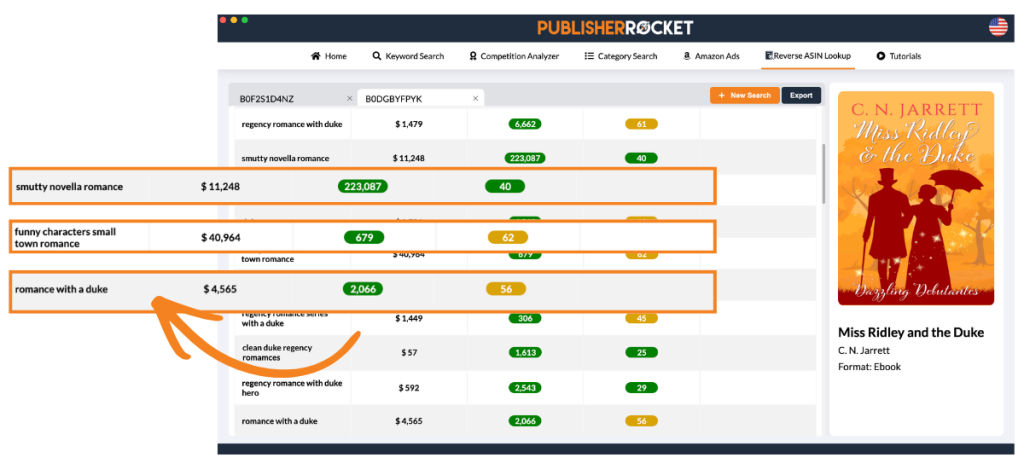
The best part is, you can put a bunch of books through this, and find the best ones.
These are the exact keyword phrases that have helped those books make their sales!
Plus you can see the number of searches people have made for that keyword phrase, and see the competition score – a number from 1 to 100 showing how hard it would be to rank for that keyword phrase with 1 being super easy, and 100 being really really hard.
And just with this feature alone, you can easily find the best most profitable keywords that would work for your book and fill in your 7 KDP keyword boxes. No more guessing, searching, or spreadsheets.
Step 2: Research Phrases for Searchability, Profitability and Competitiveness
Now, you could just use step 1 above and be done. That should absolutely help you find what you need in order to fill your 7 KDP keyword boxes. However, there is even more that Rocket can do!
Using the Keyword feature on Rocket, you can enter a phrase that describes your book, and Publisher Rocket will immediately get to work displaying all the different ways that phrases or phrases like it are on Amazon.
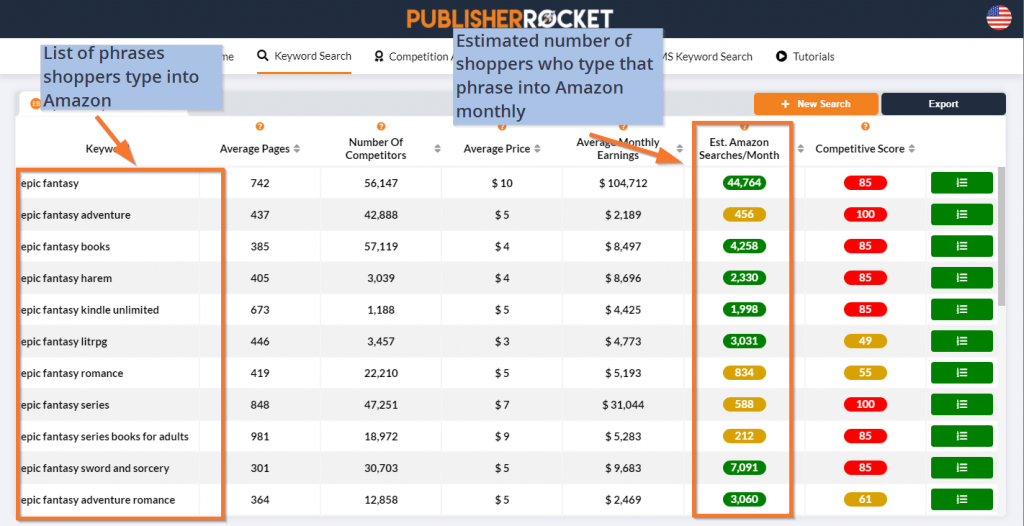
Not only does it give you the search volume data, but it's also color–coded so you know what is a good amount of search traffic with green being a good one, and red being not as great.
But it actually goes further than just ‘bigger number gets better color.' Rocket uses historical sales information to let you know which keyword phrase is more likely to end up in a sale. That's why you might see a keyword phrase that has more searches, but shows a red, while a phrase with less has a green.
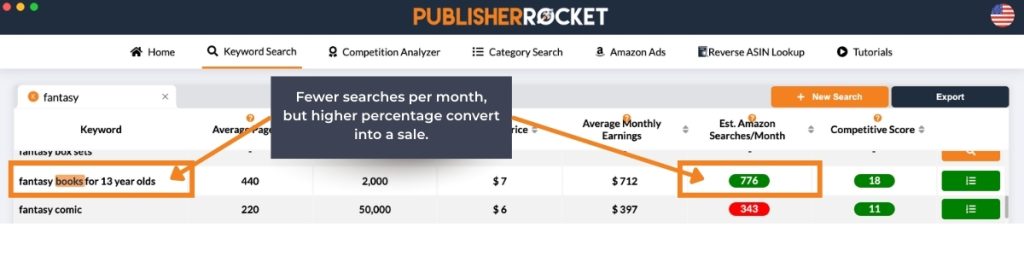
Another way this tool helps is that it will also automatically shows you the Average Monthly Earnings for all of these top-selling books, which shows you one convenient number for every keyword without you having to research anything.
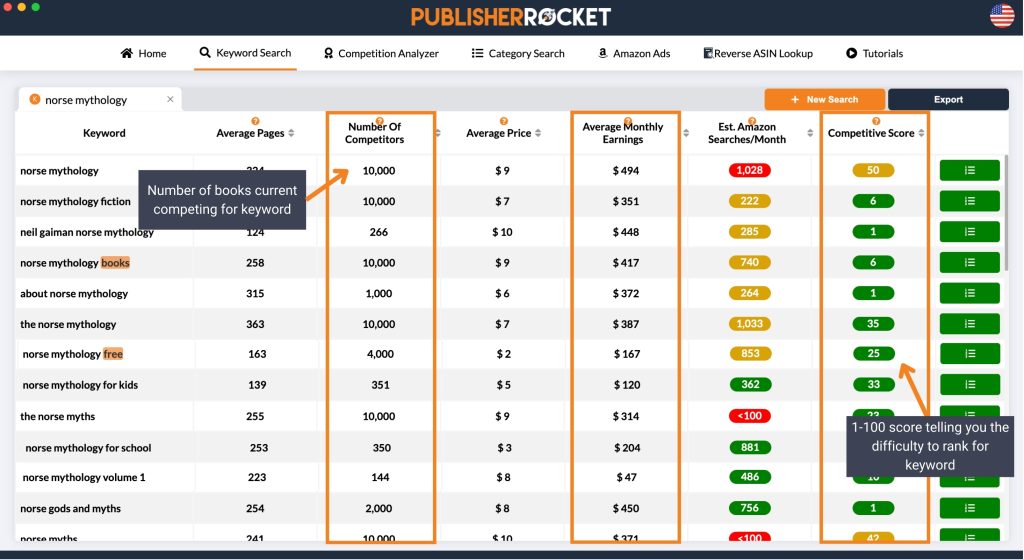
If you're not sure how to figure this out how competitive something is based on the above, or it seems like too much work, Publisher Rocket will actually do all of that for you. It looks at the information and gives each keyword a score from 1-100 on how hard it would be for your book to rank for that term.
Like the search volume column, it's color-coded to give you an idea of what a good competition score is, with green being the best.
But, it does more than that. It also tells you how many searches those phrases get, how much money books make that rank for that phrase, and even gives you the competition score (a score of 1-100 with 100 being super hard to rank for).
Basically this feature does all of the manual steps discussed above, in seconds.
Why Publisher Rocket Will Pay For Itself
It may seem like a bit of an investment, but just know that first you get Publisher Rocket for life. That means you can use on your current book, as well as all previous and future books. So, with this in mind…
Publisher Rocket will easily pay for itself, if:
- If using better keywords helps you to sell 62 more book in your entire author lifetime…
- Saves you more than 10 hours of research in your entire author lifetime…
As you can see, its an easy statement to make considering the thousands of authors who have benefited from using Rocket and its data than just guessing, or spending countless hours working on manually finding opportunities.
I’ve Got Great Keywords for My Book, Now What?
The above were steps to research and find profitable keywords, so now what?
Well, it’s time to convince Amazon KDP that your book should show up for those keywords when someone types them into Amazon. In the search engine world, we call this “getting indexed.”
Here are 3 ways to convince Amazon your book should show up for those keywords:
1. Your 7 Kindle Keywords: In your Kindle Direct Publishing (KDP) dashboard, Amazon will ask you to give them 7 Kindle keywords where you can fill each to over fifty characters each (that's fifty different letters and spaces total). Go ahead and put your well-chosen keywords here. To dig deeper into this subject, check out this article.
2. Your Book Title or Subtitle: Having the Amazon keyword phrase in your title or subtitle is a great indication that your book is about that. I’m not saying you should just ‘stuff’ a bunch of words in there…no no. But remember that Kindle Keywords are the words your target shopper uses when looking for their next book. I’ve got more on titles here.
3. Your Book Description: The same goes for your book description. There is debate, as to whether or not Amazon checks for Keywords in the description, but I am of the belief that they do, since their algorithm A9 used to say it on their homepage. However, like I said in #2 above, keywords are the words your customers use to describe what they want and a good book description should convince them this IS the book they want. If Amazon continues to see that when people type in a specific keyword, they buy your book, Amazon will wise up and realize, you’re the best product for that keyword.
Doing the above three steps, you should ‘show up’ for the keyword if a shopper types it in. But like you can see on the rankings chart above, if you aren’t ranking #1-5, then you’re not getting much out of that keyword. Even more so, the book that ranks #1 gets 2x more shoppers than the book that ranks #2.
So, how do you convince Amazon to rank your book #1 for that keyword so that your book benefits from all this research?
Well, that’s a completely different subject. Luckily, I have a full free pdf that shows you exactly how to do exactly that, legitimately.
Conclusion
Keywords are important. In order to make your book stand out from the crowd, you must learn how to strategically choose them and ethically harness their power. (Check out Kindlepreneur's 70 Book Marketing Tips!)
The right keyword combinations can open up new markets for you. Strategic keyword selection will drive more viewers to your book. You can use keywords to gain more viewers and ultimately, make more sales.
Find the right keywords one of two ways: either use my free methods or pay once for Publisher Rocket and have all the dirty work done for you. With Publisher Rocket, you will have instant access to loads of incredibly valuable information at your fingertips.
Whichever method you use, just use this information ethically and you will enjoy the rewards.
BONUS: Don't forget to download my free guide to increasing your Kindle rankings.