For years, authors really only had one legitimate way to personally format professional looking books and that was by using a software called Vellum. However, Vellum only works on Mac, and is extremely costly. Plus, it's really only for formatting and doesn't offer anything else beyond that.
But that all changed when Atticus came into the market. Now, there was an option that works with Windows users (and chromebook), that was designed to also be written in and is over $100 cheaper than Vellum.
So, the question is then, how good is Atticus at book formatting and writing? Should this be the new tool that authors use? The short answer is yes. I've personally moved all of my writing over to Atticus and do all my formatting as well.
So, in this review, I will not only show you what Atticus can do, but also give you an idea of what's to come.
Let’s dive in.
- What Atticus is
- How to use it
- A list of features at launch
- Forthcoming plans for new features
Atticus is not only listed as #1 for formatting, but also as #1 for the best book writing software. Learn more by continuing to read.
So, What is Atticus?
Atticus is a software that currently gives authors an excellent way to format their books at a lower cost and with equal formatting results as a program like Vellum.
But, Atticus is actually much more than that. Because it has a robust number of book writing features, and includes collaboration so you can work with other writers and editors in it, it has become what I consider the best book writing software on the market.
Let me explain that a bit. You see, many writing software lacks in the ability to either write long form chapter style and or the ability to format your writing into a book. Hence they might be good ‘writing' tools, but that doesn't necessarily make them a great ‘book writing' tool. Atticus combines all of it into one program you can use for all your needs as an author.
An easy way to put it is:
If Scrivener, Google Docs and Vellum got together and had a baby, it's name would be Atticus
Basically, with Atticus, you no longer have to buy a writing software, something to collaborate on or a formatting software. This not only reduces the cost overall, but means you don't have to learn 3 different sets of tools. Furthermore, you work stays on one program so there is no more version control issues.
How Does Atticus Work?
Atticus is currently both a word processor and a book formatting software. You can write, edit, and export your novel with ease.
You start in the dashboard where you can create a new book or upload an old one.
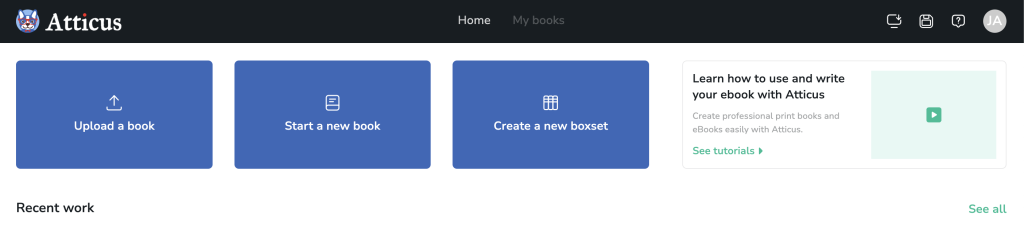
Then you’re brought to the word processor element of the program, where you can create chapters (or front and back matter elements), and begin writing. In this section, you can create and reorder chapters just like you can in Scrivener, and are offered an array of writing tools.
New features are being added to Atticus all the time to really make this one of the most fun, aesthetic and helpful book writing software out there – without being complicated or convoluted.
From there, it lets you format the book and export to ebook or print, to use in KDP, IngramSpark, Draft2Digital, or wherever you sell your books.

In other words, it has everything that the top formatting and writing software has, and there’s more coming to make it the best in the industry. Furthermore, you can see how it compares to vellum, and what others thought.
What I Love About Atticus and Its Features
Before I get into specific features that I love and that makes Atticus stand apart, let me first cover some of the biggest things about Atticus that really stand out.
First, as I said before, Atticus is a one time cost of $147 (which is over $100 cheaper than Vellum). Personally, I don't want to pay a subscription for my writing software. It feels like ransom…where if I stop paying, do I lose my work? Plus, as a writer, I write in patches. The key is, its important for me to know that my writing software in MINE and not something I'll lose.
Another amazing thing about Atticus how easy it is to use. Yes, it's got video tutorials to help, but in truth, it is something where you don't necessarily need to train in order to use. It's not like Scrivener where many features are hidden behind different windows or the sort. And if you do get stuck, their support team is amazing. Made up of authors, Atticus' support knows where you're coming from and are quick with great suggestions.
What Platforms, Does it Work Online or Offline and How Does it Save?
As I've said above, you can use Atticus on any computer, including Windows, Chromebook and Mac. You can download it onto your computer, or you can access it through a web browser…I love this because I once forgot my computer but I got to use my mother in laws browser to keep writing.
Because of the way Atticus is built, your work is the most protected it could be. You can also download a copy of your book on your computer, or save a version. But Atticus automatically does autosave, and saves your work on the cloud.
What's amazing about this is, let's say something happens to your computer (you lost it or spilled coffee on it and boom…its gone). With Atticus, your work is still protected and saved.
So, what about offline mode? Can you work on your book when you don't have internet connection? Yup! If you have the downloaded version (called a Progressive Web App or PWA), and you've logged into your Atticus account, you can go offline and work on your book, no problem. The only time you need to have an internet connection is if you want to export a book version or if you need to log into your account.
Why is Atticus Fun to Write in?
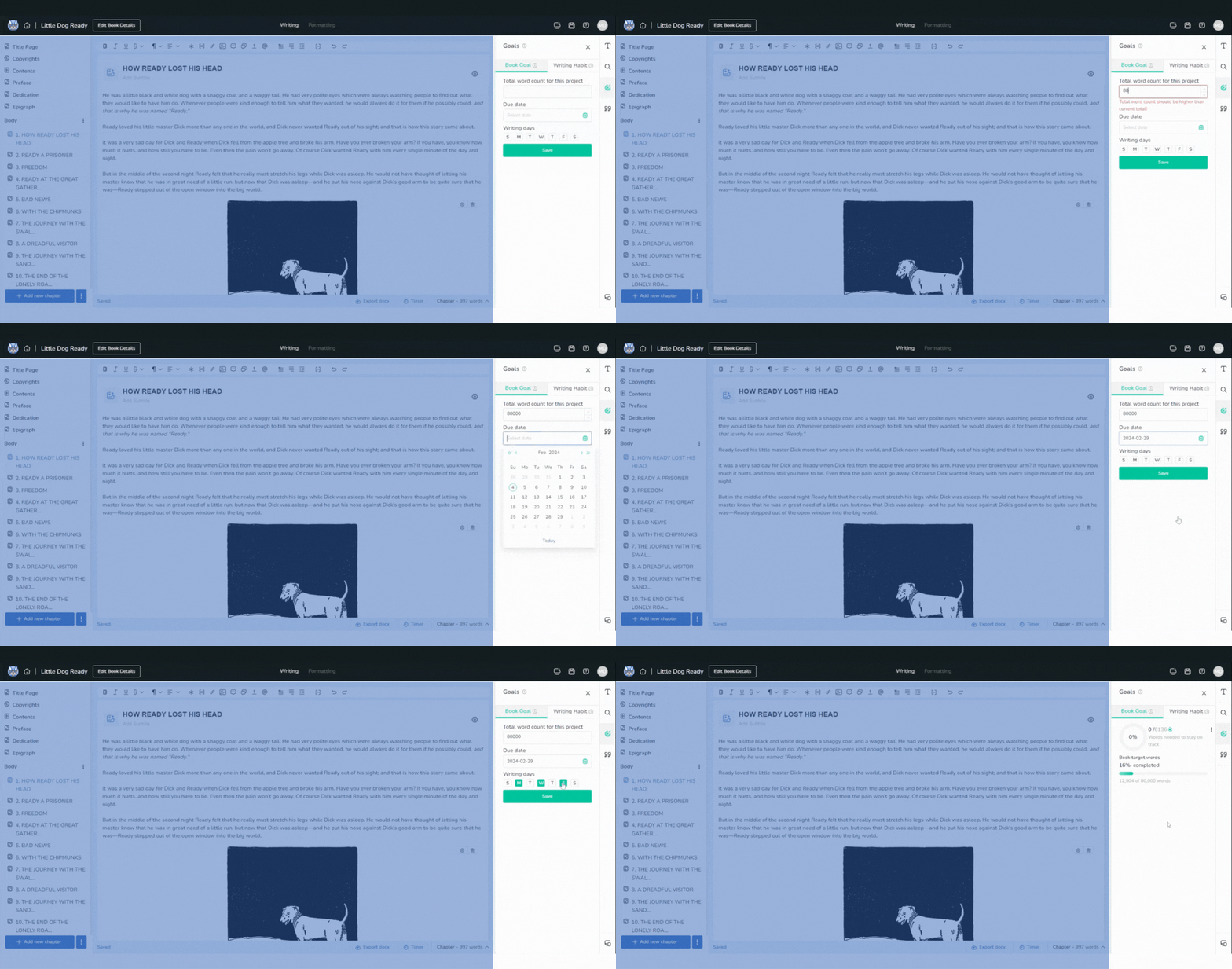
Unlike other formatting software, Atticus was made to be written in as well. To do this, it has a separate section where you can write and comes with everything you'd expect a good writing software to have, such as typical font and paragraph functionality, advanced find and replace, drag and drop chapter arrangement and more.
Atticus also has goal and habit settings to keep you motivated to write!
You can set the estimated word count for your book as a goal, as well as your deadline, then it automatically calculates for you how many words per day you need to write in order to make that goal.
Additionally, you can set a daily writing habit goal, so that you're never missing those writing streaks!
What About It's Formatting Capability
This is one place where Atticus really shines. There is a lot you can do, but let me start by showing you some of my favorites.

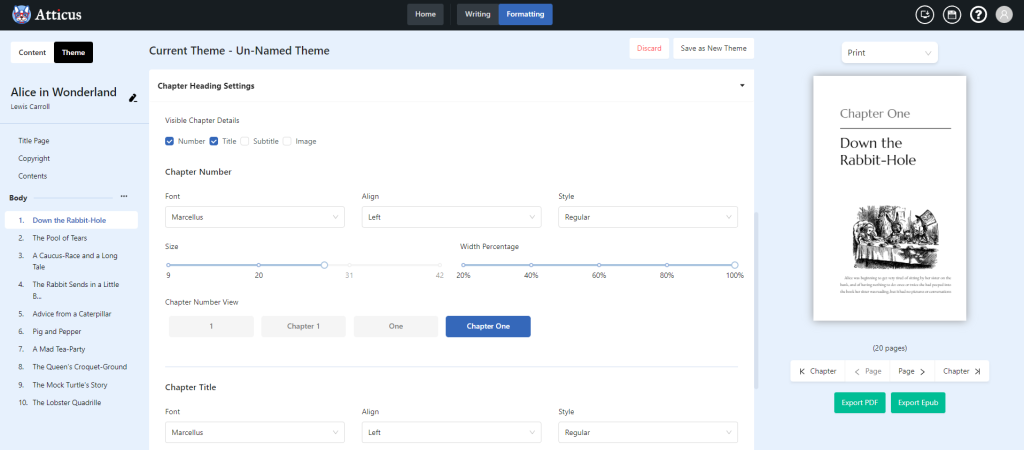
First off, Atticus allows you to see in real time what your book will look like. You can click on the previewer and see immediately how your book will look on any ereader device, or as a print book.
So, as you write, you can keep an eye out on how your book is looking and see how your images turn out and more.
Next is the formatting theme builder. This is an amazing option for authors where you can just go, click on one of the pre-developed templates and just apply it to your book. This is fast and super simple.

But perhaps you're like me and would prefer to make something custom? Well, you most definitely can. The theme builder allows you to create and save your own custom styles for your book. And my favorite part is that once you've built a theme, you can use it on future books too. So, if you have a series, no problem.
Next is the two page image, image bleed and Chapter Images.
Atticus is excellent at not only taking an image and ensuring it will look good in an ebook and print, it also allows you to do some wonderful things. For example, you can create a two page image where on side of the image is on the left page and the other side is on the right page.
Many authors will use this to create a two page image chapter. This has it where the left page shows half the image, and then on the right side is the new chapter and the other half of the image.
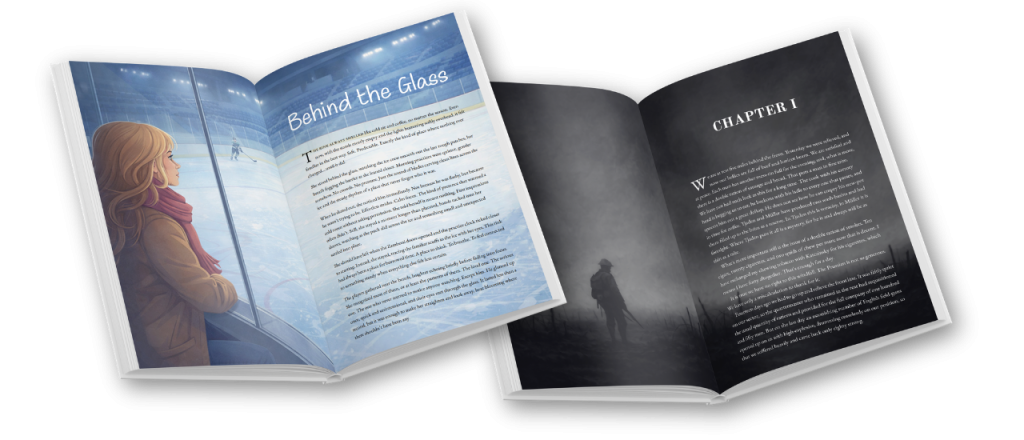
Notice how Atticus will change the font color to reflect the darker image.
This feature alone is one of my favorites and something I do in all of my books. It just makes your book have that ‘wow' factor and makes you and your work look that much more professional.
Better than Most for Nonfiction Too

One thing I didn't like about Vellum and other formatting software is that most of them just focused on fiction book capabilities, leaving nonfiction authors without things we need in order to organize a great looking nonfiction book. Luckily, Atticus has a lot of what you need to do this.
First is that unlike many, Atticus allows you to use H2-H6 headers. This is incredible for nonfiction so as to layout subsections and sub subsections and so forth. Honestly, if a formatter or writing software doesn't do this (which many don't) this is a big deal. Additionally, you can customize the size and style of each heading type, which actually means that fiction authors can make use of the headings as well.
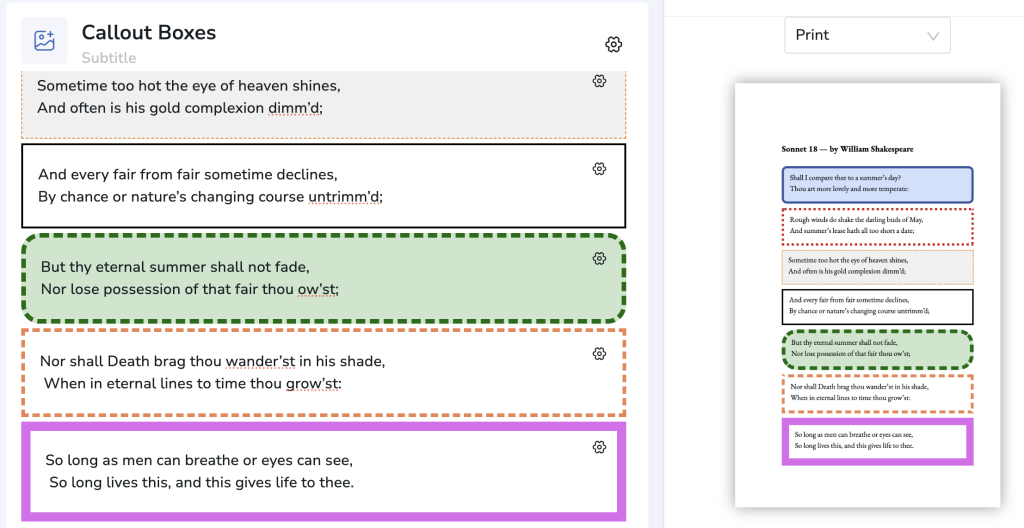
Also, unlike many out there, Atticus even has the ability for you to make some good looking callout boxes. Now, back when I was using other software, I had to make a callout box, and then screen capture it and enter it as an image. However, this doesn't look good in ebooks and was a hassle. I love that Atticus does this.
And finally, Atticus comes with a full cadres of footnotes and endnotes. I was shocked at how many different formatting tools can't do this.
How Does Atticus Compare to Vellum
Back in the day, Vellum was the most popular option for formatting books. So, it's only natural that you'd ask yourself, what is the difference between the two. Well, here is a quick breakdown on the two. But later on, I'll expand more:
| Feature |  Vellum |  Atticus |
|---|---|---|
| Platforms | ||
| Exporting Options | ||
| Importing Options | ||
| Number of Chapter Themes | ||
| Number of Fonts Supported | ||
| Number of Trim Sizes | ||
| Volumes and Parts |  | |
| Custom Chapter Theme Builder | | |
| Offline Use | | |
| Text Message builder | | |
| Full Bleed Images | | |
| Footnotes | | |
| A Dark Mode | | |
| Call Out Boxes (Non-fiction) |  | |
| H2 - H6 Headings | | |
| Large Print (all features) | | |
| Cloud Storage and Backups | | |
| Collaboration | | |
| Cost | $249.99 USD | $147 USD |
Upcoming Features for Atticus
Atticus is a living program with a ton of new features coming down the line. While it’s already primed as a formatting software, it’s set to become the last piece of writing, organization, plotting, and collaboration programming that you’ll ever need.
Here is a rundown of some of the features currently in development, or soon to be. And if you're curious to learn more, check out the Atticus roadmap to see what's being worked on currently, and what's coming soon – we like to be open about our timeline 🙂
Organizational/Plotting Tools
In addition to motivational and productivity features, Atticus will eventually have tools to help plot and outline your novel, as well as provide features to aid in your characterization and worldbuilding.
Version History
Eventually Atticus will also have version history, or the ability to save and revisit past revisions of your manuscript. This will eliminate the need to have a ton of files with each different revision of your manuscript.
Atticus Review: The Bottom Line
As you can see, Atticus is an easy-to-use software that will help authors build professional books and ebooks, and is cheaper than Vellum. But, Atticus isn't going to be only a formatting software. In time, with the planned new features, it will be more than that.
Pros:
- Far more affordable than the leading alternatives
- Available on all conceivable platforms
- Easy to use
- Contains all the major features of Vellum, with more on the way
- A dynamic theme builder
- Works as a formatting software and as a word processor
- A stellar support team
Cons:
- Not all the features are available at launch
The Bottom Line: I truly believe that Atticus is geared to be the best book writing and formatting software on the market, and it does so for less than the trending market price, and on far more platforms so every author can take advantage of it.