When I published my first book, the copyright page was one of those things I knew I was supposed to include, but I didn’t really understand why.
I’d open traditionally published books, flip to the front matter, and see the copyright symbol, “All rights reserved,” an ISBN, a publisher name, a strange string of numbers near the bottom, and a bunch of legal-sounding language that made me feel like I was one missing sentence away from doing the whole thing wrong.
Thankfully, the copyright page is usually not as complicated as it looks, especially if you’re self-publishing.
For most authors, it’s just a short page near the front of the book that says who owns the copyright, what year the book was published, and what rights are being reserved. Depending on the book, you might also include an ISBN, a disclaimer, contributor credits, a publisher name, or a permissions note. But you probably don’t need every single thing you see in a traditionally published book.
That’s where a lot of authors get tripped up. They look at copyright pages from big publishers and assume they need to copy all of it: printer’s keys, Library of Congress numbers, CIP data, ordering information, edition notes, and anything else that looks official. Some of those pieces matter in certain situations, but many of them won’t apply to a typical self-published ebook or print-on-demand paperback.
So before you go down a rabbit hole trying to decode every line, take a breath. The goal is not to make your copyright page look as complicated as possible. The goal is to include the pieces your book actually needs, make it look professional, and move on with your life.
Quick disclaimer before we get into it: I’m not a lawyer, and nothing here should be treated as legal advice. This is practical publishing guidance based on what authors commonly include in their books.
What a copyright page actually does (and whether you need one)
At its core, a copyright page serves two simple purposes.
First, it tells readers who owns the copyright to the book and when that copyright was claimed. That small line is what formally states that the work belongs to you and that it’s protected under copyright law.
Second, it gives you a place to include a few pieces of publishing information that sometimes matter to bookstores, libraries, distributors, and even reviewers. Things like the edition of the book, the ISBN, publisher information, or where the book was printed often end up here.
If you want to go deeper, this article is part of a larger series that breaks down the different parts of a book: what they’re for, when you need them, and how to set them up without overthinking it. You can find the full walkthrough in my in-depth guide.
Now, if you look at a lot of traditionally published books, the copyright page can seem surprisingly dense. You’ll see lines about rights reserved, disclaimers, cataloging data, printer’s keys, and sometimes a handful of legal notes.
But most of that exists because large publishers distribute books through many different channels and need to include information for libraries, retailers, and international rights.
For self-published authors, the page is usually much simpler.
In fact, many indie books include just a handful of elements: a copyright notice, the author or publisher name, and sometimes an ISBN or edition statement. That’s often enough to make the book look professional and clearly establish ownership.
And while a copyright page technically isn’t required to claim copyright protection, most authors still include one because it’s a standard part of book publishing and helps the book feel complete.
So instead of worrying about doing it “perfectly,” the better approach is simply to understand the common elements authors tend to include. Once you see a few examples, you’ll realize the structure is actually very straightforward.
What you’ll usually see on a copyright page
If you open the copyright page of a traditionally published book, it can look surprisingly dense.
You might see a block of legal language, a few mysterious numbers, and a handful of publishing details that most authors have never heard of before. But once you break it down, a copyright page is really just a collection of small pieces of information about the book and its publication.
Some of those pieces appear on almost every book. Others only show up in certain situations, depending on the publisher, the format of the book, or where the book is being distributed.
Below are the most common elements you’ll see on modern copyright pages:
- Copyright notice (required)
- Rights reserved notice (required)
- ISBN
- Library of Congress Control Number
- Disclaimers
- Permissions notice
- Credits
- Print edition
- CIP data block
- Ordering information
- Author’s website
- Printing details
- Trademarks
- Printer’s key
- Publisher information
Now, before this list makes things feel more complicated than they need to be, it’s important to remember that most books only include a handful of these elements.
In fact, the simplest copyright pages often include nothing more than the copyright notice and a short rights statement. The rest are optional details that publishers sometimes include when they’re relevant.
So instead of thinking of this as a checklist, it’s better to think of it as a menu of elements you can include if they make sense for your book.
And to make things easier to understand, I’ll walk through each one below and show you what they look like in real copyright pages.
1. Copyright Notice
The copyright notice is one of the two most common elements on a copyright page. It tells the public who owns the rights to the book, when it was published, and that the content is protected.
A proper copyright notice includes three parts:
- The copyright symbol ©, the word “Copyright,” or the abbreviation “Copr.” (Choose one)
- The year of first publication (you can include multiple years if the book has new editions)
- The name of the copyright holder (usually your name, pen name, or publishing company)
Here’s what a typical copyright notice looks like:

While a copyright notice isn’t legally required for protection in the United States, it’s still widely used and recommended for clarity.
What if I use a pen name?
Using a pen name is perfectly fine. On your copyright page, you can list either your pen name or your publishing company name. Both are valid.
When you register your copyright with the U.S. Copyright Office, you’ll have the option to include both your real name and pen name. That keeps your legal records accurate without revealing your identity in the book itself.
What if I write under my own LLC?
If you’re publishing under an LLC or sole proprietorship, you can list your company as the copyright owner. The formatting doesn’t change — just use the company name instead of your personal name.
You should also use your business address when adding publisher contact info. This helps protect your privacy as your audience grows, and ensures any fan mail (or official communication) gets routed properly.
If you're thinking about setting up your own publishing company, I recommend reading my full guide on how to create a publishing company. For important updates on LLC reporting requirements, be sure to check out our article on beneficial ownership information.
2. Rights Reserved Notice (All Rights Reserved)
The rights reserved notice is one of the most common elements on a copyright page. It reinforces your ownership claim by making it clear others can’t copy or distribute your book without permission.
You can keep it short and simple by stating:
All rights reserved.
Or you can expand the language for more clarity and legal weight.
Here’s a basic example that combines the copyright notice and the rights reserved statement:
© 2021 Dave Chesson. All rights reserved.
Technically, that’s all you need. If your copyright page includes a copyright notice and the phrase “All rights reserved,” you’re covered. This language doesn’t grant copyright protection by itself, but it clearly communicates that you’re not licensing or waiving any rights.
Still, many authors prefer to include a longer version. Here are some options you can choose from:

All Rights Reserved Example #1 (Simplest)
All Rights Reserved.
All Rights Reserved Example #2
All rights reserved, including the right to reproduce this book or portions thereof in any form whatsoever. For information, contact the publisher at: permissions@publisher.com.
All Rights Reserved Example #3
All rights reserved. This book or parts thereof may not be reproduced in any form, stored in any retrieval system, or transmitted in any form by any means (electronic, mechanical, photocopy, recording, or otherwise) without prior written permission of the publisher, except as provided by United States of America copyright law and fair use. For permission requests, write to the publisher, “Attention: Permissions Coordinator,” at the address below.
3. ISBN
An ISBN (International Standard Book Number) is a unique identifier for your book. It doesn’t serve a legal purpose, but the publishing industry uses it to distinguish your book from others in the marketplace.
If your book has an ISBN, it should be listed on the copyright page. Some books — especially ebooks sold through certain retailers — don’t require an ISBN, while most print editions and wide distribution formats do.
Here’s what it might look like:
ISBN 978-1-4767-9386-4 (print)

Does my book need an ISBN?
In most cases, yes (especially for print editions or wide ebook distribution). However, some platforms don’t require one.
Here’s a quick breakdown:
- Amazon (Kindle eBook): No ISBN required
- Apple Books (EPUB): No ISBN required (optional)
- Barnes & Noble Press (EPUB): ISBN required or provided by B&N
- Libraries and bookstores (print): Yes
(Note: Apple Books confirms that ISBNs are optional for ebooks distributed through its platform.)
So, it really depends on where you plan to sell your book.
Want to learn more about ISBNs and print formats? Check out my article on Self-Publishing Hardcover Books to learn more about ISBNs.
Where to get an ISBN in different countries:
- ISBN in the US – isbn.org
- ISBN in Canada – collectionscanada.gc.ca/publishers/index-e.html
- ISBN in the UK – nielsenisbnstore.com
- ISBN in Australia – bowker.com/products/ISBN-AU.html
- ISBN in New Zealand – natlib.govt.nz/publishers-and-authors/isbns-issns-and-ismns
For ISBN agencies in other countries, visit the International ISBN Agency.
Do I need a separate ISBN for each eBook format?
Often, yes. If you’re assigning ISBNs, each distinct format is typically treated as a separate product. For example:
- Kindle eBook
- EPUB eBook
- Paperback
- Hardcover
- Audiobook
Each of those counts as a different format. If you plan to publish across all five, you’ll need five ISBNs.
Go to the ISBN-issuing website here for more details on ISBNs for eBooks.
Do I need an ISBN if I’m a self-publisher?
In many cases, yes. Just like any other publisher, self-publishers use ISBNs for most print formats and for some ebook distribution channels.
In the United States, ISBNs are issued through Bowker. You can purchase official ISBNs at MyIdentifiers.com.
Pro tip: If you plan to publish more books (or multiple versions of the same book), it’s cheaper to buy a block of 10 ISBNs upfront. You’ll save money in the long run.
4. Library of Congress Control Number
The Library of Congress Control Number (LCCN) is a free number you can get that facilitates libraries cataloging your book. Authors can apply online to the Preassigned Control Number (PCN) program. The PCN program is intended for U.S. publishers planning to distribute print books to libraries.
This is most useful if you want your book cataloged by libraries. An LCCN helps librarians identify and catalog your book more easily, but it is not an absolute requirement for a book to be shelved.
Side note: LCCN is a separate (but similar) number from the Cataloging in Publication (CIP) data block.
Here’s what an LCCN looks like on a copyright page:

5. Disclaimers
Disclaimers are where you deny responsibility for particular aspects of your book, such as denying characters were based on actual persons. A disclaimer helps protect the writer and publishing company from potential liability.
An entire book could be written on disclaimers alone. As legal and liability concerns have increased over time, book disclaimers have become much more common.
Some genres, like investing or health, might require specific language to stay compliant with the SEC.
For some sample disclaimer language, look inside other books of your genre published by traditional publishing companies large enough to have a legal staff.
A legal disclaimer in your book copyright page doesn’t have to be long. But a small disclaimer might save you a lot of trouble down the road.
Keep in mind that disclaimers don’t override the law or eliminate all legal risk. They simply help set expectations and reduce misunderstandings.
Here’s Kindlepreneur’s disclaimer:
We are not lawyers. This website and the content provided herein are simply for educational purposes and do not take the place of legal advice from your attorney. Every effort has been made to ensure that the content provided on this website is accurate and helpful for my readers at publishing time. However, this is not an exhaustive treatment of the subjects. No liability is assumed for losses or damages due to the information provided. You are responsible for your own choices, actions, and results. You should consult your attorney for your specific publishing and disclaimer questions and needs.
Below is another example of a disclaimer, but in a nonfiction book:
Some of the recipes in this book include raw eggs. Raw eggs may contain bacteria. It is recommended that you purchase certified salmonella-free eggs from a reliable source and store them in the refrigerator. You should not feed raw eggs to babies or small kids. Likewise, pregnant women, elderly persons, or those with a compromised immune system should not eat raw eggs. Neither the author nor the publisher claims responsibility for adverse effects resulting from the use of the recipes and/or information found within this book.
Here’s an example of a book disclaimer about the resemblance to actual places, people, or events:

6. Permissions Notice
You need to put in a permissions notice if you used any copyrighted material with permission from the owner. This announces that you sought and obtained the necessary permissions.
This is different from the next element, credits, because a permissions notice is required only when you’ve used copyrighted material owned by someone else. Credits, by contrast, are typically a courtesy for contributors you hired or worked with directly, such as a cover designer.
Example of permissions notice on a copyright page:

7. Credits
Give credit to anyone who made a contribution to your book, such as:
- The graphic designer who created your book cover design
- Photographers whose photographs you used
- Your formatting service
- Editor(s)
- Proofreaders
Can I use a public domain photograph? You may use a photo in your book that is in the public domain. However, make sure it is actually public domain. No verbiage can protect you from accidentally using a copyrighted photo that you thought was public domain.
You are not legally required to credit public domain works, but some authors choose to do so as a courtesy or to document sources. You also do not need to use the PD-US logo.
Examples of credits on a copyright page:

8. Print Edition
Your book’s edition is a nice thing to include, especially if it is not the first edition. Simply write “Second Edition” or “Third Edition: December 2020”.
An edition refers to a meaningful revision of the content, not a routine reprint of the same version.
Here is an example of a print edition on your copyright page:

9. CIP (Cataloging in Publication) Data Block
Most self-published eBook authors won’t include a CIP data block. A Cataloging In Publication (CIP) data block is not required to publish or sell a book.
The Library of Congress can issue a CIP data block to eligible publishers. It is not something you can create for yourself. Most self-published authors are not eligible to obtain a Library of Congress CIP data block.
You can, however, pay to have a P-CIP (Publisher’s Catalog-in-Publication) data block generated for you. Having P-CIP data might make your book look more professional. It costs anywhere from $60-$100 and can be done by CIPblock.com.
In practice, the primary audience for CIP data is librarians. CIP data exists to help them categorize (“catalog”) your book in the library more quickly and easily. Unless you plan to market your book specifically to librarians, CIP data is unnecessary.
A CIP data block example looks something like this:

A side note for Canadian self-published authors
Library and Archives Canada does not issue Cataloguing in Publication (CIP) data for self-published books. Some publisher services are still available, including ISBNs, but CIP eligibility is limited to qualifying publishers.
If you are located outside of Canada, check with your country’s local copyright laws to make the right choice about CIP data for your copyright page.
10. Ordering Information
The ordering information section includes info for people or organizations wishing to order more copies of your book. Different information may be listed for people looking to make individual orders, bulk orders for bookstores, college classroom orders, etc.
Often, ordering information doesn’t apply to self-published ebooks, and many indie authors omit this section entirely unless they sell print books directly or in bulk.
Example of ordering information on the copyright page:

11. Author's Website
Include your author website on your copyright page so readers can easily find more of your work.
This is optional, but especially useful for print books and wide ebook distribution where readers may not otherwise see your author profile.
Here’s an example of what an author’s website looks like on the copyright page:

12. Printing Details
On the copyright page, you can include any details about your publishing company’s environmentally-friendly printing practices, the location of printing, fonts you used, etc.
This section is optional and is more common in traditionally published or offset-printed books than in print-on-demand or ebook formats.
Here are 3 examples of printing details to include on the copyright page:

13. Trademarks
Disclose any trademarks your publisher may hold to names, logos, or imprints included in your book.
This disclosure does not create trademark rights. It simply acknowledges existing trademarks and helps avoid confusion.
Example of a trademark on the copyright page:

14. Printer’s Key
The printer’s key is not typical for self-published books or eBooks. Most self-published authors using print-on-demand services can safely omit a printer’s key without any downside.
Ever wonder what that strange, long string of numbers float along near the bottom of the copyright page means? Those numbers are actually there for the publisher’s production department. They represent the printing number (or sometimes, the printing year).
Every publisher has its own unique method. Typically, they are in descending order, from left to right. However, they can be in ascending or even in random order.
They were initially put there so that the book’s printing plates wouldn’t need to be remade with each reprint. The applicable number was simply removed from the plate.
However, as digital printing and ebooks take over, these are likely to go extinct.
Side note: These numbers are helpful for book collectors. Just look for the lowest number on the list; that’s the printing you have.
Another note: A printer’s key is different from the edition number. There may be multiple printings of the same edition.
In the example below, the printer’s key indicates I have a copy from the book’s 2nd printing:

15. Publisher's Information
For traditionally published books, the publisher’s information is usually included so that readers know who and how to contact for reproduction permissions. This may include their address (or just the city), website, social media profile(s), logo, or other contact information.
For self-published authors, this section is optional and often replaced with an author name, imprint name, or author website instead of full publisher contact details.
Below is an example of publisher information on the copyright page of a traditionally published book:

How to format your copyright page
Once you’ve decided what to include on your copyright page, the next step is simply formatting it so it looks right inside your book.
Fortunately, this part is usually straightforward.
Most copyright pages follow a similar layout, and once you’ve seen a few examples, the formatting becomes pretty easy to replicate.
Here are a few common things publishers tend to do:
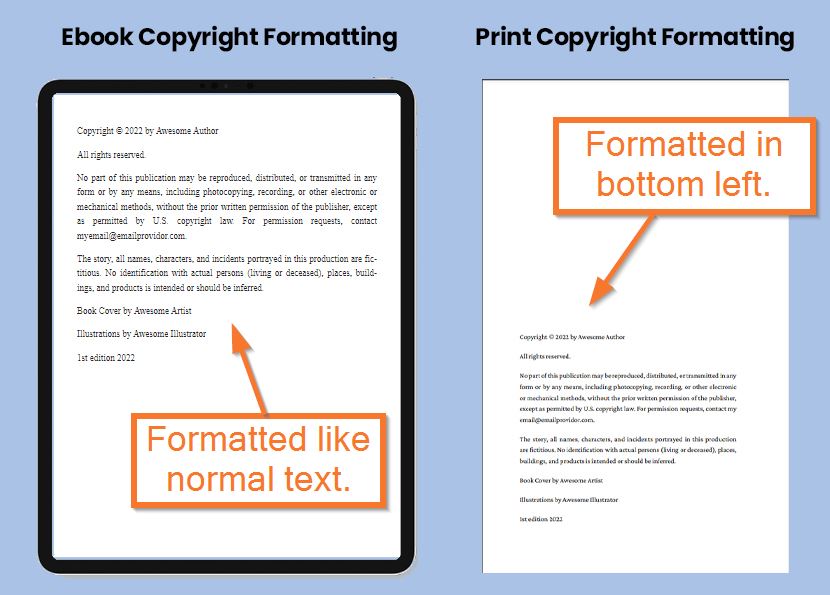
Placement: The copyright page usually appears right after the title page. In print books, that typically makes it the second page. In ebooks, the exact placement can vary slightly depending on the retailer or how the book is formatted.
Alignment: In print books, copyright text is often aligned toward the bottom-left of the page, though some publishers center it. In ebooks, alignment is usually handled automatically by the reading device or the formatting software.
Font size: Print books often use a slightly smaller font for copyright text so the page stays clean and unobtrusive. In ebooks, readers control the font size themselves, so this detail usually isn’t as important.
The main goal is clarity. Your copyright page doesn’t need to follow a rigid visual rulebook, but it should look clean and professional.
If you're formatting your book manually in Microsoft Word or Google Docs, getting the spacing and layout right can take a little trial and error.
That’s one reason I recommend Atticus. It handles the formatting automatically, which means you don’t have to worry about alignment, spacing, or font sizing across different ebook and print formats.
Even better, many of the copyright templates we talked about earlier are already built directly into the software.
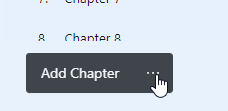
To use them, simply add a new front-matter element by clicking the three dots next to Add Chapter.
Then scroll up to Copyright Templates and choose the template you want to use.
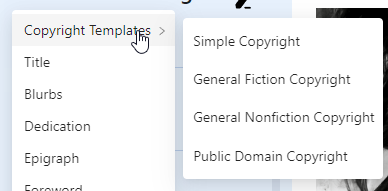
From there, you simply fill in your book’s information and the copyright page is generated for you automatically.
Simple copyright page templates you can use
Once you understand the basic elements, creating a copyright page is mostly a matter of putting the pieces together in a way that fits your book.
Most authors don’t start from scratch. Instead, they look at a few examples, copy the structure that makes sense for their situation, and then adjust the details like names, dates, ISBNs, or credits.
The templates below cover some of the most common publishing scenarios. You can copy the one that fits your book and modify it as needed.
Side Note: All These Templates are Available in Atticus
By the way, if you own Atticus, creating these copyright templates is incredibly simple.
If you don't know what Atticus is: it's one of the best book formatting software out there! Just a few clicks and you have a book that is beautifully formatted with a solid copyright page.
Check Out Atticus

Basic Copyright Page Template
All you need is a copyright notice and a rights reserved notice to create a standard copyright page.
You have my permission to copy this template below and use it however you wish.
Copyright © [Year of First Publication] by [Author or Pen Name]
All rights reserved.
No portion of this book may be reproduced in any form without written permission from the publisher or author, except as permitted by U.S. copyright law.
Note: While a copyright notice isn’t legally required for protection in the United States, this format is widely used and clearly communicates ownership to readers and retailers.
General Fiction Copyright Page Template
If what you need is a fiction book copyright page template to copy and paste into your self-published book, here it is.
You have my permission to use it as you like.
Copyright © [Year of First Publication] by [Author or Pen Name]
All rights reserved.
No part of this publication may be reproduced, distributed, or transmitted in any form or by any means, including photocopying, recording, or other electronic or mechanical methods, without the prior written permission of the publisher or author, except as permitted by U.S. copyright law. For permission requests, contact [include publisher/author contact info].
The story, all names, characters, and incidents portrayed in this book are fictitious. Any resemblance to actual persons (living or deceased), places, buildings, or products is purely coincidental.
Book Cover by [Artist]
Illustrations by [Illustrator]
[Edition Number] edition [Year of Publication]
General Nonfiction Copyright Page Template
If all you need is a nonfiction copyright page template to copy and paste into your self-published book, here it is.
Use it as you like — you have my full permission.
Copyright © [Year of First Publication] by [Author or Pen Name]
All rights reserved.
No portion of this book may be reproduced in any form without written permission from the publisher or author, except as permitted by U.S. copyright law.
This publication is designed to provide accurate and authoritative information in regard to the subject matter covered. It is provided with the understanding that neither the author nor the publisher is engaged in rendering legal, financial, medical, or other professional services. While the author and publisher have used their best efforts in preparing this book, they make no representations or warranties with respect to the accuracy or completeness of the contents. The advice and strategies contained herein may not be suitable for your specific situation. You should consult a qualified professional where appropriate. Neither the author nor the publisher shall be liable for any losses or damages resulting from the use of this information.
Book Cover by [Artist]
Illustrations by [Illustrator]
[Edition Number] edition [Year of Publication]
Public Domain Copyright Page Template
If you're publishing a public domain book, you need a copyright page for that as well. Because even though the content of a public domain book is in the public domain, any original contributions you make (annotations, illustrations, book covers, etc.) are all copyrightable.
Here is a template, which you can use with my permission.
[Source Material Title] is in the public domain. All original additions to this edition, including illustrations and chapter summaries, are copyright © [Year of First Publication] by [Author or Pen Name] and may not be reproduced without permission from the publisher or author, except as permitted by U.S. copyright law.
Book Cover by [Artist]
Illustrations by [Illustrator]
[Edition Number] edition [Year of Publication]
Important note: Copyright protection applies only to the original material added in this edition. The original public domain text itself remains free for anyone to use.
Memoir Copyright Page Template
Memoirs are slightly different because you often need to protect the privacy of the individual.
Here is my template which you can use however you like.
Copyright © [Year of First Publication] by [Author or Pen Name]
All rights reserved.
No part of this publication may be reproduced, distributed, or transmitted in any form or by any means, including photocopying, recording, or other electronic or mechanical methods, without the prior written permission of the publisher, except as permitted by U.S. copyright law. For permission requests, contact [include publisher/author contact info].
For privacy reasons, some names, locations, and dates may have been changed.
Book Cover by [Artist]
Illustrations by [Illustrator]
[Edition Number] edition [Year of Publication]
Note: Changing names or details can help protect privacy, but it does not automatically protect against defamation or other legal claims. If your memoir discusses real people or sensitive events, consider seeking legal advice.
Low or No Content Books Copyright Page Template
A low content book generally only needs a simple copyright, such as the below template.
Although since art is often a big part of low-content books (coloring books for example), you should definitely include artists on this page.
Feel free to use this.
Copyright © [Year of First Publication] by [Author or Pen Name]
All rights reserved.
No portion of this book may be reproduced in any form without written permission from the publisher or author, except as permitted by U.S. copyright law.
Cover by [Artist]
Illustrations by [Illustrator]
Note: For low- or no-content books, copyright protection generally applies to original artwork, illustrations, and creative text, not to blank pages, forms, or purely functional layouts.
AI Disclosure Copyright Page Template
Some authors choose to disclose whether artificial intelligence tools were used during the writing or editing process. While this is not legally required, an AI disclosure can help set expectations for readers and add transparency, especially as questions around AI-assisted content become more common.
Below are two example copyright page templates showing how an AI disclosure might be included. You can adapt the wording and placement to fit your book.
If AI tools were used:
Copyright © [Year of First Publication] by [Author or Pen Name]
All rights reserved.
This book was written by the author with the assistance of artificial intelligence tools. All ideas, structure, and final editorial decisions are the author’s own.
No portion of this book may be reproduced in any form without written permission from the publisher or author, except as permitted by U.S. copyright law.
If AI tools were not used:
Copyright © [Year of First Publication] by [Author or Pen Name]
All rights reserved.
This book was written entirely by the author without the use of artificial intelligence tools.
No portion of this book may be reproduced in any form without written permission from the publisher or author, except as permitted by U.S. copyright law.
If you include an AI disclosure, keep it factual and specific. Avoid broad claims about ownership or originality that could create confusion.
How to make sure your copyright page isn’t skipped on eReaders
One thing many authors don’t realize is that ebooks usually don’t open on the very first page of the file.
When someone opens a Kindle book for the first time, Amazon estimates where the “real” beginning of the book is. In many cases that ends up being Chapter 1, which means the front matter — including the copyright page — gets skipped.
Sometimes that’s intentional. Many publishers prefer readers to jump straight into the story.
But if you do want readers to start earlier in the book, you need to define a Start Page inside the ebook file.
Thankfully, this is easy to control in Atticus.
All you have to do is open Book Details and scroll down until you see the section labeled Start Page.

From there you can choose exactly where the book should open the first time someone reads it.
This setting simply tells ebook retailers where to begin the reading experience. Once the book is open, readers can still navigate anywhere they want.
Behind the scenes, Atticus inserts the proper code into the ebook file so retailers like Amazon know exactly where the book should start.
It’s a small setting, but it helps ensure your book opens exactly the way you want it to.
Don’t make the copyright page harder than it needs to be
A copyright page can feel intimidating because it looks like the kind of page you’re not supposed to touch unless you went to law school or work in the basement of a major publishing house.
But for most self-published authors, it’s a lot simpler than that.
You need to clearly show who owns the copyright, what year it applies to, and what rights you’re reserving. From there, you can add the details that make sense for your book: an ISBN, a disclaimer, contributor credits, edition information, permissions language, publisher information, or anything else that genuinely applies.
What you don’t need to do is copy every mysterious line from a traditionally published book just because it looks official. Big publishers include certain details because they’re dealing with bookstores, libraries, international rights, large print runs, distribution systems, and internal production tracking. That doesn’t automatically mean your self-published novel, memoir, workbook, or nonfiction book needs all of it.
Use one of the templates above as a starting point, adjust it for your situation, and keep it clean. If your book has legal risk, sensitive material, medical advice, financial advice, real people, copyrighted material, or anything else that makes you nervous, that’s when it’s worth talking to an attorney.
Otherwise, don’t let this page slow you down.
And if you’re formatting in Atticus, this is one of those small publishing tasks that gets much easier. You can choose a built-in copyright page template, fill in your information, and move on instead of manually lining things up in Word or trying to rebuild something you saw in a traditionally published book.