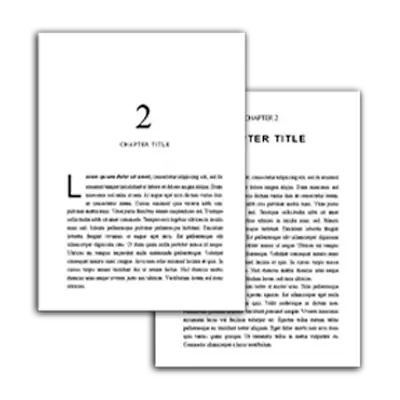
Home

Learn

Book Publishing

How to Self Publish a Hardcover Book on Amazon

by

Jason Hamilton

Updated on Oct 1, 2025

Home

Learn

Book Publishing

How to Self Publish a Hardcover Book on Amazon

Publishing a hardcover book used to be a complicated task. Amazon didn’t produce them through KDP Print, so you had to go to Lulu or IngramSpark to get them done, which cost extra and resulted in really expensive hardcovers for readers.

But that has changed.

Amazon now allows authors to publish hardcover books on their platform. As of this writing it’s still in beta, and missing a few key details that make it a true competitor to Lulu or IngramSpark (such as dust jackets). But overall it is a solid platform that makes it much easier to publish a hardcover on Amazon.

So how do you publish a hardcover on KDP?

Don’t worry, I’ve got you covered with step-by-step instructions on how to do that in this article, along with some info on Lulu and IngramSpark, and which you should choose.

In this article, you will learn:
  1. Why you should consider publishing a hardcover book
  2. Which platform you should choose, IngramSpark, Lulu, or KDP Print
  3. Step by step instructions to create your hardcover book in KDP

Why Should You Publish Hardcovers on Amazon?

There are three reasons why you might want to publish your hardcover book on Amazon.

  1. You have multiple options: Having a hardcover in addition to your ebook and paperback give your readers more options. If they like hardcovers, they might be attracted to you because you offer them. But even if they don’t read hardcovers, readers will be more attracted to your cheaper ebook when they see both a paperback and a hardcover that are much higher in price.Β 
  2. It looks more professional: Having a hardcover on your Amazon makes it look more like the bestsellers that often have one of each major book format (ebook, paperback, hardcover, audiobook).Β 
  3. Because they’re awesome: Okay, maybe they’re not for everyone, but a primary reason why you might want one is because it looks good on your shelf. There’s also something nice about the solid feel of a durable hardcover. When you hold a hardcover that you wrote, it feels like an accomplishment, more so than normal that is.

I will say, hardcovers do take additional work to put together, so if you’re short on time, it’s not necessarily a β€œmust-have” for authors. However, it can be a fun little way to diversify your income and turn your book into a more professional-looking machine.

KDP Hardcovers vs. IngramSpark vs. Lulu

All three of these platforms: IngramSpark, Lulu, and KDP offer ways to create hardcovers. But which should you choose?

We’ll come out with a full review and breakdown of each in a future article, but from my own experience I find that IngramSpark produces the better quality hardcovers, and offers better options for expanded distribution of hardcovers.

That said, KDP is by far the best when it comes to simplicity of creating a hardcover.Β 

Lulu used to be a big name in publishing, and they do have one advantage in that they have integration with Shopify for selling books directly. But I find that their end result is too expensive for the reader.

With this in mind, I’d make your decision this way:

  1. If you’re published wide and therefore value expanded distribution, go with IngramSpark
  2. If you’re exclusive to Amazon, go with KDP

With that out of the way, let’s talk about how you can actually publish a hardcover book through KDP print.

Step 1: Get Started in KDP Hardcover Creation

KDP only recently (as of this writing) created a beta to publish hardcovers. Amazon has already updated it with new features.

If you are part of the beta, there are two places where you can go to find the hardcover creation area. The first is near the top of the page, under β€œCreate New Title”, as seen here:

publish a hardcover button on KDP

You can also reach it by looking under a specific book, where it will have an option for creating a hardcover.

publish hardcover button on book

For this article, I actually created a hardcover using these steps, so follow along with me as we set about putting this sucker together.

Step 2: Book Details Page

If you’ve published a paperback book on KDP before, the next page will look very familiar to you.

Note: If you haven’t published an ebook or a paperback on KDP before, I highly recommend you do that first. Hardcovers are slightly more complicated, but build nicely on what you learn in ebook and paperback publication. If you don’t have a book to publish, I’d finish that first.

The book details page has pretty much all the same information that you would find when publishing a paperback. So you’ll want to start by filling out all the relevant fields:

Once you’re done there, go ahead and hit β€œSave and Continue”.

Step 3: Hardcover Content

print options in kpd for hardcover books

Next you’ll come to the Hardcover Content page, where you upload your manuscript and book cover. Now, if you don’t have those yet, don’t worry, we’ll cover it in steps 4 and 5.Β 

This area also looks very similar to publishing a paperback, with a few exceptions. The most important of which is…

Trim Size

hardcover trim sizes in kdp

Amazon has a more limited number of trim sizes available for hardcover publishing. They include:

  • 5.5×8.5” (13.97×21.59cm)
  • 6×9” (15.24×22.86 cm)
  • 6.14×9.21” (15.6×23.39 cm)
  • 7×10” (17.78×25.4 cm)
  • 8.25×11” (20.95×27.94 cm)

So if you published a paperback using any trim size that is not included here, such as 5×8”, then you will have to reformat your manuscript and cover to work with the new size.

Step 4: Formatting Your Manuscript

As mentioned, there’s a good chance that the manuscript you already prepared for a paperback will not work for a hardcover. If that’s the case, you will need to resize it to the desired dimensions.

Thankfully, Atticus makes this easy.

I had published my paperback as a 5×8”, so I had to resize it to a 5.5×8.5”. Since my book was already formatted in Atticus, all I had to do was go to the formatting tab and hit one button, and presto, it was ready to be exported to a PDF in the correct size.Β 

That’s it, literally just one click. It was one of the easiest processes I’ve gone through.
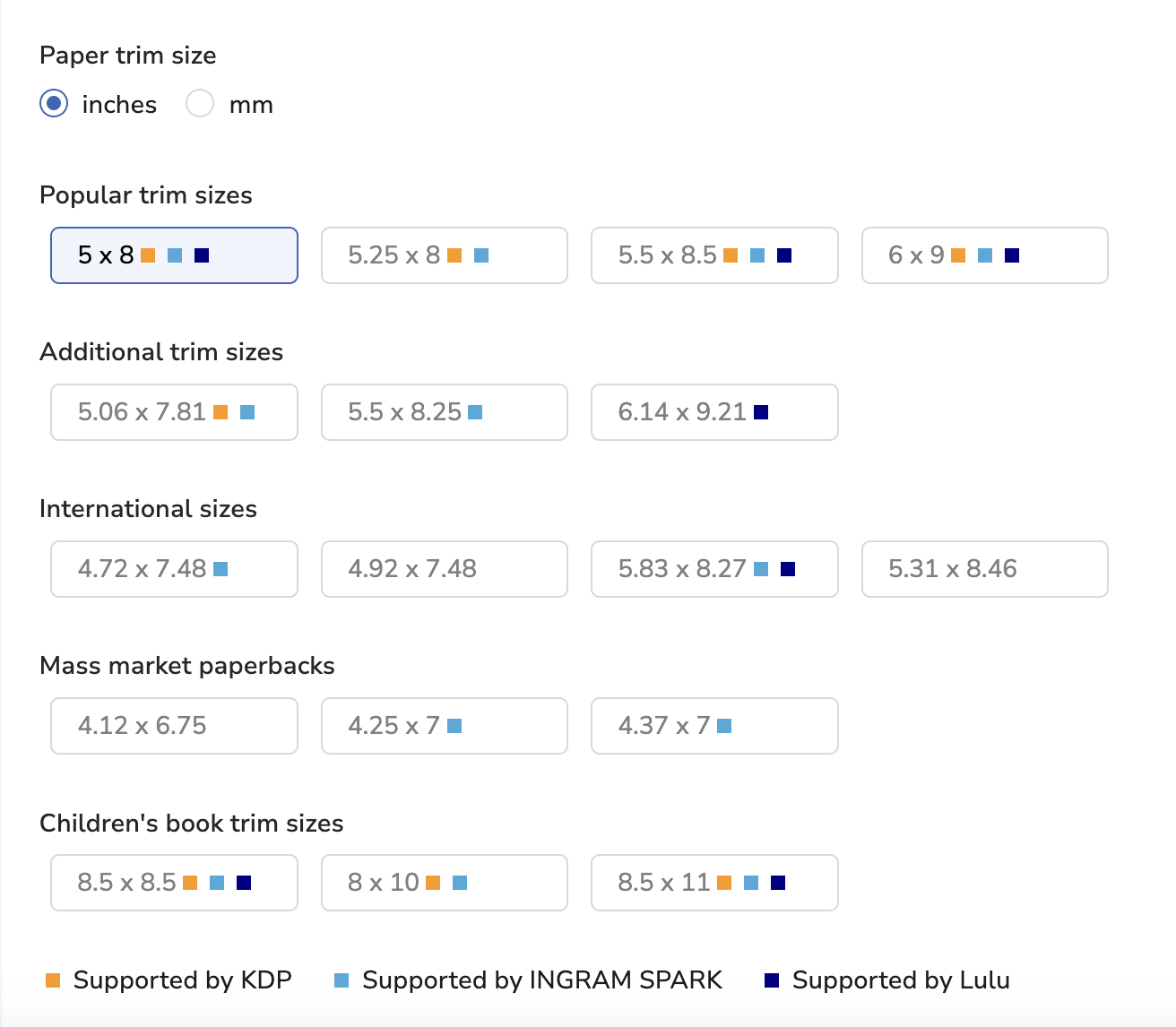
trim sizes in Atticus
Changing Trim Sizes in Atticus.io

Once that was done, I downloaded the PDF and immediately uploaded it into the β€œManuscript” section of the Hardcover Content page. Easy.

Atticus saves a ton of time, not just with changing trim sizes, but with formatting in general. It has all the features that Vellum has, and it’s available for nearly half the cost. In short, it’s one of the most important tools you can have for creating your manuscript.

Get Atticus Now

Step 5: Adjusting Your Book Cover

Next, you will need to adjust your book cover to fit the dimensions that they require. Hardcovers have extra wide margins, so you will need to do this regardless of the current size of your paperback cover.

On the Hardcover Content page, under β€œBook Cover”, you’ll find a link that says β€œdownload a KDP template”. Click this link to find the exact dimensions that you should use.

Once you’ve done that, you’ll get a field with these options to fill out:

getting your hardcover cover template on kdp

Make sure these fields match the Print Options that you selected in the Hardcover Content page.

For this example, I made the above selections and entered my word count.

Once you’ve done that, click β€œDownload Template” and you should be given a file that looks like this:

an example hardcover template in kdp

If you’re familiar with the templates for paperback, you’ll notice that the margins are a lot bigger in this template, which means you may have to get creative to make sure that your cover doesn’t lose much of the important parts.

Additionally, you will almost certainly have to adjust the title, author name, and any other text on the cover to fit the new margins.

This can be a complicated step. If you do not have skills with Photoshop or Canva to do it yourself, then I suggest reaching out to the cover designer to do it for you. Give them the template that you downloaded and they can fit it to the right dimensions.

Once you have a PDF of your cover, upload it and then click on β€œLaunch Previewer”.

This will allow you the time to take a final look at the cover and manuscript together to make sure that everything looks good. If it does, move on to the Rights and Pricing page by clicking β€œSave and Continue”.

Step 6: Rights and Pricing Page

This page should also be very familiar to authors who have published ebooks and paperbacks before. It’s almost identical.

Start by entering in the number of territories you plan to publish in (for most authors this will be all of them), then select your primary marketplace.

Under β€œPricing, royalty and distribution” you’ll enter the price of the hardcover book.

As with paperback publishing, it gives you a minimum price to make a profit. Unlike paperback publishing, there is no expanded distribution option, which as far as I can tell is the only part of this page that is different.

Step 7: Publish!

Then all you have to do is click publish! Amazon will look it over to make sure that everything is in order, and if it is, your hardcover should be available to purchase on Amazon within 72 hours (though I find that it’s usually within the first 24 hours).

Next is the β€œsimple” matter of marketing your book, and we have a lot of tools to help you there as well. Just check out our Book Marketing Hub.

Final Thoughts

Publishing a hardcover book is not quite as simple as an ebook or paperback, but it’s certainly a lot simpler than it used to be.

Now that Amazon offers hardcover publishing, the biggest hurdles that you should focus on are reformatting the manuscript and resizing the cover.Β 

The first is easy with Atticus, but the second may require hiring your cover designer to adjust it for you if you’re not comfortable with Photoshop to do so.

Amazon hardcovers still have a ways to go, particularly with the lack of dust jackets and expanded distribution. But since this is still in beta, I have a feeling that more updates are coming soon.

Share on:

[social_warfare ]

Share on:

Author, Former Content Manager at Kindlepreneur

Jason Hamilton

Author, Former Content Manager at Kindlepreneur

Jason Hamilton

Author, Former Content Manager at Kindlepreneur

Jason Hamilton

Author, Former Content Manager at Kindlepreneur

Grab Our FREE Book Formatting Templates

Fiction and non-fiction templates in various trim sizes to save you TONS of time.

Download Now For Free

button-arrow

Share:

[social_warfare ]

Table of Contents

Authorpreneur Academy

Related Articles

Here are a few other Kindlepreneur articles we think you'll like.

free download

Amazon Kindle Rankings eBook

Learn how to rank your Kindle book #1 on Amazon with our collection of time tested tips and tricks.

Sell more books on Amazon

Publisher Rocket is our premium tool for finding keywords and categories to help you hit best-seller status faster and earn more money in book sales.

57 thoughts on “How to Self Publish a Hardcover Book on Amazon”

  1. Thanks for this great information.
    I have a question: When a hardcover sale is made on Amazon what royalties will you receive?
    What percentage does Amazon retain?

  2. Is there a character letter limit for the spine on Lulu. Ingram said I had 3 letters too many and refused to print my title. It’s on all my materials so I was upset. All my files were immediately deleted, including my manuscript, a children’s book. I hired the manuscript formatted so would have to hire again and change everything so I’m hoping Lulu is more accommodating. Is it?

  3. Great article, thanks for sharing all this information! Question: Does publishing a hardcover on Lulu interact with your paperback or ebook listing on Amazon/KDP? I notice that many titles on Amazon have a hardcover option, though we know they don’t print. Is your method above one of the ways to get the hardcover listed alongside your title on Amazon? Does Lulu offer the service to integrate with Amazon? Thanks!

  4. My interest in self publishing is really only to print my Mum’s memoir for the family. I’m not trying to print and sell to general public. I was going to just make a photo book using text from Word and pics. My sister asked about this self pub option…likely because she incisions several family members wanting it and photobooks for the numbers of pages I anticipate could be 100.00 per person. Is this opt a better bet

  5. Thank you so much for the very informative site you put together and the step by step Instructions! Question: You said you always start at a $50 price point on Upwork and expect it to be between $50-$100. Is this total price or price per hour? Also, is it just for the covers and spine format or does that include the complete manuscript? I would need someone to do all of it for me as I’m not very computer savvy.
    Thank you!

    • To take your cover and turn it into a cover that would work with a Hardcover (so front, back and spine) is the $50 to $100. But that assumes you already have a front cover and so they are to design the back and spine.

  6. Is it still valid that KDP doesn’t print hard cover? Just checking since things change so often! Thanks for any input.

    • Yup, that is correct. KDP doesn’t print hardcover. Which is why we need to use IngramSpark or Lulu for such things.

  7. Very informative. What kind of authors commissions are left on sales with Lulu and Amazon. Is there an difference if the book is soft or hard back, or the internal pages are black and white or colour ? You want manuscripts in PDF format

    • When you price your book, that will dictate how much is left for you. Generally for physical books, there is a point of the cost of hte book and the markets commission. Anything above that is yours.

  8. How is it possible to include the ISBN number on your internal copyright page, if you don’t get it until after you have completed the manuscript containing the copyright page, and it must be uploaded during the publishing process? This is the part i”m confused about. I know that you can download the ISBN after creating the publishing entry for the cover page, but what to do about ISBN for the internal page of the manuscript?

    • If you are using Bowker to get your identifiers then you should have it prior to creating. If you are getting the number from Lulu or another publishing/print website then you will be assigned one once you start the process and can edit your manuscript once assigned. It can be the last thing you do. You can create the copyright page and then add the ISBN prior to uploading. Hope that makes sense.

    • You get the book at print cost. Not the price you set for customers. Example: If it costs $5.00 to print my book and I set my price at $10.99…when others purchase they will pay $10.99 but I pay $5.00.

  9. Hi there.I had a question. I’m looking to self pub my first hardcover. I was wondering if Lulu or IS allows you to design the inside flaps of the dust jacket? If not, are there any self-pub services that do?

  10. I wanted to offer two corrections to the information about Ingram.1) Revisions are only $25 per updated file. It would only be $50 if you update both the cover file and the interior file, and That is only after you accept the initial proof. Revisions are free up to that point.2) Ingram gives you a discount on ISBNs purchased during a title setup. The single ISBN cost is only $87, not $125. The ISBN is still registered to you and owned by you, they’re just offering a discount on the purchase made through Bowker. And, you need to have an account on Bowker to register the ISBN.One additional point: there are no setup or revision fees at all for using Ingram if you’re an IBPA member ($129 per year). The membership has pretty much paid for itself just with the saving on title setup and revisions through Ingram, so just throwing that out there.

  11. Super helpful article! Unfortunate PB self pub authors. Seems like picture books have to be paperbacks. No parent wants to (or will) pay over $20 for a short (<32 pages) children`s picture book. The average picture books is less than $9.99. Looks like only non self pub books with big publishers’ deep pockets get board and hardcover books.There has to be a cheaper way. Paperbacks do not live long with babies and toddlers. I know I do not but paperbacks for my toddlers. My search continues. Maybe working directly with China or Mexico printing presses? do not even know if That is a thing. I wish the women who mentioned the 5.59 quote figured the cost of FDA and see what the price came out to be.Thanks again for the information!

    • Exactly! I have a wonderful Christian bedtime storybook that I finished on KDP but a paperback won’t survive, even its a read aloud by the parent story of about 30 pages. Anyone have any ideas? I think a special hardback could go $12, however, to get it done in hardback at a price-point That is realistic is my challenge. Hope God blesses all your endeavors!

  12. Thank you for the great information. I am confused that Lulu is supposed to be cost effective to use to print and distribute. I have an 8.5 x 8.5 hardcover 24 page children`s book which is priced at $13.95. After I clicked a few boxes on the Lulu website it was giving me a cost of over $14.00 to print. The cover is a hardcover glossy which is common for children`s books. Yikes!!! I want to believe that I must be doing something horribly wrong. The book is complete from the illustrator and ready to go to print.

    • That sounds about right. Have you checked other services and seen what their price would be?

      • I have a print quote from a printing company starting at 500 for $5.59 per book. Including shipping to me. With your knowledge if I was to go with that printer and want to have a distributor handle my inventory and distribution do you have a suggestion who might be the best company to go with? I do like Amazon but again, the cost. Thanks so much.

        • With regards to distributors, no…I do not have enough experience to recommend one.

          • I want to make sure I understand that Lulu is not positioned to receive a completed book from an author and warehouse, mail and collect the money? Thank You

          • That is correct. Lulu does the book printing for you (That is the $5.59/book price you were given from the other company) and then it also handles distribution and order fulfillment… that accounts for the rest of the price difference. You’ll want to use something like the Amazon FBA, or Deliverr, or Fulfillmentworks.com …get a bid for fulfillment of 500 discrete (separate) orders, divide that by 500, and add that amount to the $5.59 price per book from the other printing & binding company.
            If the price per book is still below $14, then by all means go piecemeal, and please post your findings here!
            But I’ll bet it will be close enough to $14 that the all-in-one simplicity of Lulu will look a lot more appealing than it does now.

  13. Do you have to pay for the hardcover books up front or they just take everything out of the total price that the author pays?

  14. Thank you so much for this awesome information, as lots of questions and you have addressed so many within this one article. Brilliant

  15. Hi, my name is Audrey and just have a quick question.
    So as a Christmas present, I wanted to write a fictional book for 5 of my best friends about our lives (how we save the day in this new world I created. Here is my question:Is there any place I can go to that will be willing to create only 5 HARD COVER books just for us? Or does it have to be published for everyone to real?

    • Lulu allows you to only supply to yourself. I think same with Ingram Spark. Just Amazon who force you to publicly publish.

  16. Can I use both Lulu for hardcover and Createspace for soft cover to have both options for purchase of the same book? Thanks fornyou article. Very informative and helpful.

    • I cannot speak out of experience (I have not personally done it) but of all the interactions I’ve had with both, I see no reason why one could not do that.

  17. Great article John, thank you. Do you know if Ingram Spark has the capacity to offer similar direct discounts on their hardback books? It would be easier for me to work with them

    • Hi Jem, thanks, glad you liked it! I’m not sure about similar direct discounts for IS as I’m mainly familiar with the Lulu hardcover process.

  18. Hey all — Lulu also does at least one other thing that Createspace/KDP Paperbacks do not do: Spiral-bound books. Perfect for manuals of various kinds because they open and lay flat. My books on building kit acoustic guitars are done as spiral-bound editions that I sell in Amazon`s marketplace, so they show up when a buyer clicks “available from third-party sellers” on the sales page for the Createspace-printed library bound book. In my book description for the library bound version, Amazon had no problem with me noting that a spiral bound version is available from third-party sellers (me), and I sell them there under my own name. A little bonus is, since I send the book myself after having ordered a few from Lulu as inventory, I can sign the book for the buyer and wish them “Happy Building.” Another way to add to sales.

  19. If I have a professionally designed cover for my paperback at the 6 x 9 size would I need to reformat my cover? I’ve always wanted to do a hard-cover and have had a few requests. Thanks for this great article.

    • The cover would need to be reformatted for Lulu, but only very slightly, with addition of front and back flaps and copy. The size needed is slightly larger for the same size book with same # of pages.

    • Hi Tam, like William said, the cover would have to be reformatted for Lulu hardcover dimensions. The reason for this is because the hardcover design will be wrapping in the interior of the physical back and front covers. You can find experienced Lulu cover creators on Upwork.

  20. Excellent article! When I get around to finally publishing my novel, I’m going to follow this to the T. Thank you!

  21. I have had a hard cover (case- https://uploads.disquscdn.c… wrap) edition created at Lulu. The end result was just beautiful. I noticed that the postage indicated it was sent from USA to France…to Belgium and back to Australia. The price was pro https://uploads.disquscdn.c… hibitive ($60 to create) so I deleted it from Lulu. But, my grand daughter still has a revised copy of this: 13″ x 11″ (33cm x 28cm). Lulu was very helpful with this product.

    • Hi Marieseltenrych, Yikes! That manufacturing price is steep for Lulu hardcovers!

  22. Great article. Really well done!John, i ‘d like to see a picture of your book. I saw one by Lulu a long, long time ago and it looked pretty plasticy! Read that yukky! 😊

    • Hi Carolyn, thanks for the kind words. I have a couple of hardcover books under pen names I keep discreet (different niches). I’m working on creating a health/fitness author blog with my bro where we’ll be adding self-published books. If the books are long enough, we’ll consider adding a hardcover. As for cover material, yes I do agree with you. It does look a little plastic. Yet, It is not a deal breaker for me as it is another royalty stream. For better cover quality material I suggest going with Ingramspark, but it does cost a little more.

      • Mmmm. Maybe authors / self- publishers should ask for a sample copy before taking the plunge and compare the sample to hard copies produced by some of the big five before making a decision. There are books without dust covers usually have a lineny look or the appearance of a tightly woven fabric. I love hardcovers, too, but I think that generally the hardcover purchaser wants and is looking for high-quality in terms of things like endpapers, three-dimensional (embossed) dustcovers, etc Depending on the genre or clientele, I would be very careful how about choosing anything very much short of what readers are used to in the general market.

    • Hi Michael, from my experience, the only advantage Lulu has over CS is that it allows you to publish hardcovers. They do offer a paperback service, but you’ll get more royalties on Createspace. Hope that helps.

  23. EXCELLENT article!
    Could you expound on the royalties? Did I understand that correctly that -Zon takes more ie. you get LESS royalties on -Zon than on Lulu?

    • Hi Eric, glad you liked the article! I’m not familiar with “Zon.” Can you fill me in? As for the royalties, you get more royalties if readers buy through Lulu`s book store versus buying you hardcover on Amazon. Your hardcover royalties on Amazon are low, but with enough volume, it adds up quick. I recommend doing hardcovers for your best books in your portfolio – those with a proven track record. To leverage Lulu`s bookstore it takes an author platform (explained in the “SELL AND PROMOTE YOUR HARDCOVER BOOK” section of the article). Hope that helps!

      • -zon is short for Amazon πŸ™‚
        Thanks! Will try it out for sure. Already have a few books on Lulu and did not even know that they publish to Ama-zon.

        • Haha “The Zon!” Makes sense now. Might as well get those existing Lulu books on the Zon.

        • Why do we need help designing a cover? I was planning on just a plain one color . .black back cover

Comments are closed.

Interested in book marketing?

Join the Community

Join 325,000+ other authors who receive weekly emails from us to help them make more money selling books.

INTRODUCING: AUTHORPRENEUR ACADEMY

A Complete, Step-by-Step Course to Successful Self-Publishing

Join 1,500 (and counting) students who have learned our proven process for crafting, publishing, and marketing a book that stands out β€” without feeling overwhelmed.

Authorpreneur Academy