I’m a big fan of keeping things simple when it comes to book marketing for authors.
And yes, you can get super-ambitious with retargeting campaigns, split segmentation, on-page optimization, split testing, and all the other shiny tactics that start popping up once you spend more than five minutes reading about book marketing.
But in my experience, most of that “stuff” only works if you’ve nailed the fundamentals first.
In other words:
- Having books people actually want to read, and
- Building an audience of people who want to read them.
This is where a lot of authors get stuck, because there’s always a temptation to fall into “author marketing overload.” That’s the feeling that we need to do something to boost our book sales, so we try a bit of everything and wind up frustrated, overwhelmed, and wondering why none of it seems to be working.
If that sounds familiar, you’re definitely not the only one.
Instead, I want to spend some time looking at how we can grow an audience of readers who actively want to hear from us and read our books.
Then we’ll look at how to build a direct line to that audience, so we can run better launches and promotions without turning the whole thing into a stressful mess.
Let’s jump on in…
Chapter 1
Choosing an Email Provider
I’ve spoken to many a newbie author who (quite naturally) assumed that building an email list simply meant adding contact names to your regular email address book and emailing in bulk from there.

It’s an understandable assumption, but, unfortunately, using your own regular email service (like Gmail) isn’t going to cut it, for a few reasons.
First, there are gazillions of laws and regulations throughout the world that regulate who you can – and can’t – send marketing emails to. To stay compliant (without having to worry about “how”) you’ll need a professional email marketing tool that handles all this compliance for you.
Second, email providers like Outlook and Gmail have spent decades figuring out how to stop businesses using their service to send out marketing emails – and if you start trying to bend the rules, you’ll likely end up getting flagged.
Thirdly, personal email providers just don’t have the features and tools you need to make email marketing work for you – like recording opt-in consent, running automated emails, segmenting, tagging, and more.
If all that sounds complicated, don’t worry – we’ll cover all this soon. But first, how do you choose a professional email marketing provider that’s right for you?
Let’s cover some of the most popular choices:
MailerLite
Hugely popular among authors, MailerLite strikes a solid balance between simplicity and power — especially for writers who want automation without the overwhelm.
Their free plan includes:
- Up to 250 active subscribers
- 2,500 monthly emails
- 2 user seats
- Email campaigns
- Visual automations
- Drag-and-drop, Custom HTML, and Simple email editors
- Campaign A/B testing
- Performance reporting
MailerLite has also introduced feature-use limits on the free plan. Free users can have up to 3 automations, 3 forms, 1 digital product, 1 landing page, and 1 website.
That’s a pretty major change from the old free plan, which was much more generous on subscribers and monthly email sends. The upside is that MailerLite has opened up some features that used to be paid-only, including the Custom HTML editor, custom templates, promotional pop-ups, blogs, and campaign A/B testing.
Upgrading to a paid plan unlocks higher limits and more advanced features. Comfort starts at $12/month and gives you 50 active automations, up to 100 automation steps, 10 signup forms and pop-ups, 10 websites and landing pages, unlimited templates, auto-resend campaigns, dynamic emails, smart sending, and the ability to remove MailerLite branding.
Power starts at $25/month and adds unlimited monthly emails, unlimited user seats, unlimited automations, unlimited signup forms and pop-ups, unlimited landing pages and websites, multiple automation triggers, and 24/7 live chat support.
MailerLite’s visual automation builder is still easy to use, and it remains a strong choice for authors who want to create onboarding sequences, deliver reader magnets, or set up automated launches without fuss.
Just keep the current free-plan limits in mind. On the free plan, you can have up to 3 active automations and 5 automation steps. Comfort gives you up to 50 active automations and 100 steps. Power gives you unlimited active automations, with up to 100 steps per automation.
Mailchimp
Once the gold standard for creatives on a budget, Mailchimp has since evolved into a broader marketing platform — which means authors may find some of its tools either overbuilt or missing key features they actually need.
As of this writing, Mailchimp’s free plan is much more limited than it used to be. You now get:
- Up to 250 contacts
- 500 email sends per month
- Daily send limit of 250
- One audience
- One user seat
- Limited templates and basic reporting
- Landing pages and forms
- A one-click automated welcome email
Automations are extremely limited on the free plan — you can send a basic welcome email, but that’s about it. More advanced features like multi-step automations, A/B testing, and custom branding require a paid plan.
Paid plans start at $13/month for Essentials and $20/month for Standard, with pricing increasing based on your contact total and plan features. Importantly, Mailchimp now counts unsubscribed and non-subscribed contacts toward your contact total, unless you manually archive them — which can quickly inflate your costs.
Navigation inside Mailchimp can also be tricky for new users, and the automation builder is still list-based (rather than visual), which can feel clunky compared to tools like Mailerlite or Kit.
Verdict?
If you’re just sending one newsletter a month and don’t need automation, it’s a passable option. But for most authors looking to grow and engage an email list, other platforms offer a better experience — especially on free or low-cost plans.
Kit (Formerly ConvertKit)
ConvertKit (recently rebranded as Kit) has become especially popular with authors, podcasters, and creators who want powerful tools for growing and monetizing an audience — without needing a degree in tech.
Kit offers a free Newsletter plan for up to 10,000 active, unique subscribers, which includes:
- Unlimited email sends / broadcasts
- Unlimited forms and landing pages
- One basic visual automation
- One email sequence
- Subscriber tagging and segmentation
- Digital products, subscriptions, and tips
- A newsletter feed / mini-website
If you upgrade to Creator or Pro, you unlock more automation power and paid-plan features. Creator starts at $33/month when paid yearly for 1,000 subscribers. Pro starts at $66/month when paid yearly for 1,000 subscribers.
Creator gives you unlimited visual automations and unlimited email sequences. Pro adds features like unlimited users, priority support, engagement analytics, deliverability reporting, subscriber engagement scoring, Facebook custom audiences, newsletter referral tools, and more.
One thing to be aware of: Kit includes one Kit-managed Recommendation slot on the free Newsletter plan. If that slot generates Paid Recommendation earnings, those earnings go to Kit. That’s part of how Kit keeps the plan free up to 10,000 subscribers, but it’s worth knowing before you sign up.
While the email design options are a little more limited than Mailerlite’s, Kit shines in automations, segmentation, and built-in monetization tools — like selling ebooks, offering coaching, or setting up a tip jar. For many authors looking to grow and earn directly from their list, it’s a strong option.
SendFox
Created by the folks behind AppSumo, SendFox is built for simplicity and affordability — a solid choice for authors who want a no-frills email solution that just works.
Key features include:
- Up to 1,000 contacts on the free plan
- 3,000 sends per month on the free plan
- 1 Smart Page and 1 form on the free plan
- Drag-and-drop editor
- SendFox branding on free emails
- No automations on the free plan
- No API access on the free plan
- A $29 Lifetime plan through AppSumo with 5,000 contacts, 300,000 lifetime sends, unlimited automations, unlimited Smart Pages and forms, and full API access
- Pro plans starting at $19/month for authors who need more sending capacity, white labeling, paid newsletters, or higher deliverability features
- Integrations are limited on the free plan because SendFox does not include API access there. Paid plans unlock API access, which also unlocks Zapier and other integrations that depend on the API.
One caveat: the free version includes SendFox branding on your emails. The Lifetime plan reduces the branding, but a small SendFox footer still remains. To remove SendFox branding completely, you need Pro. Also, compared to tools like MailerLite or Kit, automation options are more limited and not visually driven.
Still, if you’re on a budget and want something straightforward to get started, SendFox offers a strong bang for your buck — especially if you grab a lifetime deal.
Recommendation
There are plenty of email marketing tools out there, but these four options remain the most popular among authors — and for good reason.
The right platform for you comes down to two key things: your goals and your comfort level with tech. Don’t overthink it — just pick the tool that fits your current needs (you can always switch later).
If you’re just getting started, MailerLite is still a strong all-around choice because it’s easy to use and affordable. But its free plan is no longer the automatic slam dunk it used to be. It now caps you at 250 active subscribers and 2,500 monthly emails. You do get access to useful tools like visual automations, landing pages, signup forms, and campaign A/B testing, but you’ll hit the limits much faster than before.
If you want a much larger free subscriber allowance, or you like the idea of built-in monetization tools such as digital products, paid newsletters, subscriptions, and tips, Kit is worth a close look. The free Newsletter plan goes up to 10,000 active subscribers, though it only includes one basic visual automation and one email sequence. However, if you need unlimited automations and sequences, you’ll need a paid Kit plan.
SendFox is a strong budget option — especially if you can grab a lifetime deal. It’s not fancy, but it’s affordable and gets the job done for simple newsletters.
Mailchimp, while still widely used, has scaled back its free plan and added complexity to its interface. The team at Kindlepreneur does not recommend it.
For more on growing an email list of raving fans (and what to do with your list once you’ve grown one) join me in a free seven day course all about how to go from $0 to $1k per month from books.
Registration is free. Sign up here.
Chapter 2
Setting up an Email List
The next step is to set up your email list, which includes setting up your signup forms and welcome emails.
Once you have your email marketing platform set up, all you need to do is:
- Set up a signup form – where readers enter their email address (don’t worry, these email software providers have GREAT help videos if you get stuck)
- Set up a welcome email – this email gets sent out after someone joins and contains a link where they can download their Reader Magnet (more on this shortly)
Now, exactly how to set these things up will depend on the email marketing service you choose, but there are a few standard “rules” to bear in mind regardless of the tool you use.
Your Signup Form
To get readers onto your email list, they’ll need to complete a sign-up form to be added to your email marketing provider and receive emails from you.
This also allows you to track where people have signed up and when, so you have a record of their consent – which is a legal requirement in most parts of the world.
To create your signup form, there should be a section inside your email marketing provider that allows you to build your own form from scratch, and choose the fields of information you’d like to collect.
For most authors, you’ll want to collect:
- Just the email address, or
- The first name and email address
Collecting a first name makes it easier to personalize your emails (you can greet people by name) which can also help prevent you getting blocked by spam filters.
However, the more fields someone has to fill in, the lower the conversion rate of the form. Meaning, if you ask for a first name AND an email address, you’ll have slightly fewer people completing your signup process.
You may also want to collect extra information like a second name, phone number, location, or interests – but also bear in mind, each extra field can reduce your signup rate. So only collect information you really need.
Your Signup Page
The form you create to collect readers’ contact information needs to be displayed on a webpage that anyone can access.
Many of the email providers we talk about above will give you a page like this as part of their service – so if you don’t have a website yet, don’t worry, you’re still good to go.
However, if you want full control over the look and feel and function of the page, you can create a page on your own website and host the signup form there instead. You can copy and paste the html code of your form from your email provider, or use a third-party tool to integrate directly with your email host for the ultimate control.
Whichever route you go, your signup page should include an image of your Reader Magnet (usually a book or short story, or similar), a compelling headline and description, a strong call to action, and a form readers can fill in to join your email list and get their free gift.
Like this:

That’s the whole page. There’s nothing else. No links to your bio, or Twitter page, or anything else to distract from this page’s core purpose.
Your Landing Page is the link you’ll give readers in the front and back of all your books, at live events, in your advertising, and everywhere else you can. So it’s important you get it right.
Chapter 3
Creating a Reader Magnet
Your reader magnet is one of the most important aspects of your email marketing. It is what will allow you to interest readers in joining your list. But what is a reader magnet?
In short, a Reader Magnet is a book (or short story, or help guide, or “something else”) that you offer to readers in exchange for them joining your email list – which you advertise in the front and the back of all your books (and anywhere else you can).

One of the most versatile and powerful business assets you can have is an email list. An email list of readers who genuinely like your work and are waiting for your next release. And using Reader Magnets is an extremely effective way of attracting your ideal reader and developing a one-to-one line of communication with them.
The best Reader Magnets follow these rules of thumb:
- The “free gift” is compelling, complete, and relevant to the rest of your work. If you write thrillers, offer something in the same genre. Don’t offer them a cook book.
- Position your Reader Magnet offer in the front AND the back of your books. Include an eye-catching graphic. If you’ve buried your offer in a bunch of other text, people won’t see it.
- Give readers an easy way to sign up and get their freebie – make sure you have a webpage set up to collect email addresses, that’s free of any distractions.
Some examples:
Fiction:
- A free novel
- Short story
- Collection of stories (multi-author, or solo)
- Deleted scenes
- Background material (particularly in genres like Historical Fiction where you can blend fiction and non-fiction together)
- Audio version (super high value)
Non Fiction
- “Cheat Sheet” summaries of your book
- Bonus chapters
- Video training
- Private Facebook group for coaching / support
- Audio version (again, very popular)
Key point: whatever you offer, it needs to be relevant to your audience and provide value. And the best “perceived value” is usually something complete – rather than an excerpt or chapter. This doesn’t mean you have to start giving away full novels, but whatever you do decide to offer will ideally be “complete” (like a short story).
Once your Reader Magnet is ready, you’ll need a simple way to deliver it automatically to new subscribers — usually through a link in your welcome email.
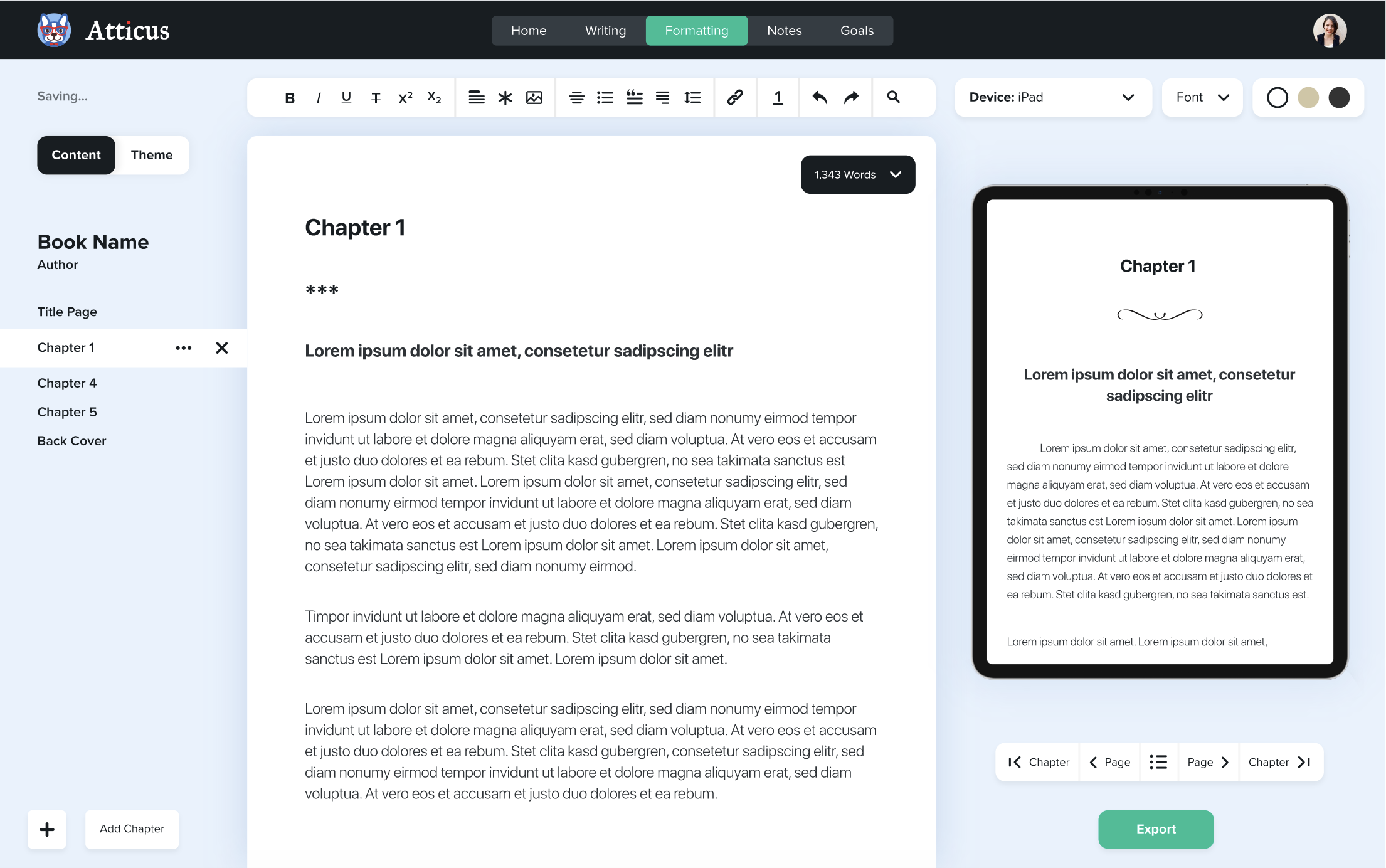
Format Beautiful Professional Books
Easy to use, and full of amazing features, you can quickly turn your book into a professional book.
Check It OutFor ebooks, it’s best to offer both ePub and PDF formats (ePub for e-readers, PDF for easy viewing on any device).
For audio, use MP3 files.
For video, you can host it on YouTube (unlisted) or a platform like Vimeo to avoid large downloads.
The easiest solution for most authors is BookFunnel. It was built specifically for authors and can handle:
- Hosting your files
- Delivering reader magnets
- Helping readers get ebooks onto their devices
- Connecting the download process to your email list, depending on your plan
You just send people a BookFunnel link, and they’re guided through the whole process — no tech headaches.
Alternatively, you can upload your files to Google Drive, Dropbox, or Amazon S3, and include direct download links in your welcome email. Just be sure to test the links and add clear instructions.
Now, with your Reader Magnet written and ready to rock, it’s time to look at how we get more people to discover you.
For more on growing an email list of raving fans (and what to do with your list once you’ve grown one) join me in a free seven day course all about how to go from $0 to $1k per month from books.
Registration is free. Sign up here.
Chapter 4
Helping People Find Your Reader Magnet
With your Reader Magnets “machine” all set up, you’ll need to start driving traffic to your offer to get more people on your email list.
We’ve got a few options here:
Free or Permafree Books
A free book will usually get downloaded more often than a paid one, sometimes dramatically more. If your “read through” is good, a decent number of those free downloaders will move through the rest of your catalogue (and join your email list).
With permafree, your read-through rate will be lower. BUT… if we’re getting 50 times as many downloads to make up for it, even a 1-2% read-through rate can work well because you’ll be getting far more free downloads compared to paid sales to make up for it.
You can even set your book to $0.00 permanently and set that up to run on autopilot. Best part? It costs you precisely… nothing.
Or, if your ebook is enrolled in KDP Select, you can run a Free Book Promotion for up to 5 days during each 90-day KDP Select enrollment period. BUT… you’ll need to pay for some ads to make that worthwhile (you’ll need hundreds – or thousands – of downloads over that 5 day period to make it worthwhile).
Here’s a helpful list with some places you can list your free book for extra exposure.
So, if you have a series, or multiple books in the same genre, you can set one of these books (usually #1 in the series if you write in order) permanently free on Amazon. This way, you’ll pick up free downloads and readers will not only see your Reader Magnet offer and sign up for it, but many will pick up the other books in the series too. A win win!
Setting up a permafree book on Amazon is still possible, but it’s not something Amazon officially lets you choose as your ebook’s list price inside KDP.
The usual author workaround is:
- Publish the ebook wide through retailers like Apple Books, Kobo, Barnes & Noble, or through a distributor like Draft2Digital
- Set the ebook to free on those other retailers
- Contact KDP Support with the links and ask if Amazon will price-match the ebook to free
Amazon does have price-matching language in its Digital Book Pricing terms, but it also says you can’t set your book’s list price as free inside KDP. So treat this as a workaround, not a guaranteed feature.
While Amazon doesn’t officially support permafree pricing, authors have been using this workaround successfully for years. Just be patient — and don’t be discouraged if it takes a couple of tries.
Or, if your book is in KDP Select and you want to run a free promo, just schedule that from your KDP dashboard.
So, having a perma-free book is a great way to get the ball rolling, but what else can we do? Let’s take a look at some other traffic options…
Giveaways and Contests
You can do these solo, or with promo partners (see above). The premise is simple – offer a sweepstake prize that your target reader would be interested in (e.g. – a bundle of books, a Kindle, etc.) and post your contest up on some giveaway directories.
There are plenty of giveaway directories out there, including general sites like GiveawayFrenzy. Just remember that general giveaway sites can attract a lot of prize-seekers, not necessarily readers in your genre.
If you use them, be strict about the prize and the follow-up. Offer something your ideal readers would actually want, then keep only the people who engage with your Reader Magnet afterward.
As people enter your giveaway, follow up with a link to your Reader Magnet. Keep the ones who click through and download it, and unsubscribe the rest — that way you’re only building a list of engaged readers.
Here’s how to run a successful giveaway:
- Choose the right prize: Aim for something relevant to your audience. A Kindle Paperwhite paired with ebooks in your genre usually works well. Avoid cash or gift cards — they attract the wrong crowd.
- Use giveaway software: Tools like KingSumo, UpViral, or SweepWidget make setup easy and allow for viral sharing (extra entries for sharing with friends). Most also integrate with email providers so you can tag entrants automatically.
- List your giveaway on directories: Optional, but a good way to get extra traffic. A few paid “featured spots” can go a long way.
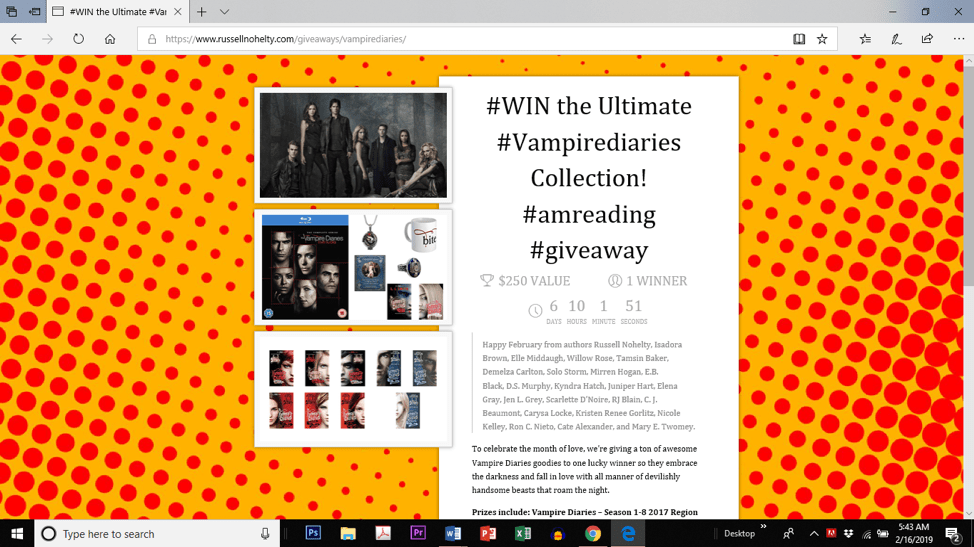
After the contest, offer your Reader Magnet again when announcing the winner. Then prune your list — keep the clickers, let the others go.
When someone enters the contest, email them a confirmation and offer them a copy of your Reader Magnet (see previous section for more on that).
Offer your Reader Magnet again when you announce the winner.
Once the contest has ended, keep the people who downloaded your Reader Magnet (you can track the link clicks) and delete / unsubscribe everyone else to keep your list clean.
And voila! Lots of new readers joining up on your email list. Easy! And while these promotions can cost money, they’re often cheaper than paid ads if you choose the right prize and clean the list afterward.
Joint Promotions
If you’ve set up a Reader Magnet and maybe even a permafree book, you’re probably starting to grow your list — slowly.
But if you want to accelerate things, here’s a powerful approach:
Joint Promotions let you “borrow” other authors’ audiences. Instead of waiting 6–12 months to build reach on your own, you can multiply your impact by teaming up with others.
Say you’ve got 300 subscribers, and you partner with 3 other authors who each have a similar list. Now you’re promoting to 1,200 people instead of 300 — with zero extra ad spend.
The key is reciprocity and alignment. Find authors in your niche and offer something valuable in return — even if it’s just helping share their promo.
In practical terms… if you’ve got 300 people on your mailing list, Facebook page, X/Twitter account, Instagram account, or wherever else you reach readers…
And you find 3 other people with a similar reach…
Next time you run a promotion or launch a new book, you’ll launch it to 1,200 people instead of 300.
The key is reciprocity. Offering value. Learning how to network effectively. No fancy advertising strategies, no super-wowza publicity stunts, no over-complicated psychoanalytical software and business automation…
Just good ol’ fashioned network building and working together.
Here are 4 types of joint promotions that work well:
- Joint Contests – Pool together a prize (e.g., a Kindle + genre-themed books). Promote it to all your audiences. Afterward, send your Reader Magnet to entrants. Keep the ones who click and clean the rest.
- Joint Sales Pages – Combine your books into one sale event. Everyone emails their audience, and you direct traffic to a shared landing page with all the deals listed.
- Cross Promotions – Instead of launching all at once, take turns promoting each other’s books. It’s a great strategy for solo launches or drip-fed visibility.
- Boxed Sets & Anthologies – Bundle your work with 8–12 other authors. Promote as a launch event. These bundles can even hit major bestseller lists with the right strategy.
Tools like BookFunnel and StoryOrigin are especially useful for organizing newsletter swaps, group promotions, landing pages, and reader magnet delivery. BookCave can also be useful for reaching readers through free and discounted book promotions.
Once you have 2-3 people you can team up with, you can start running these joint promo campaigns – and the more you run, the better your results will be.
Other Traffic Options
Permafree, giveaways, and joint promos are your best low-cost options for growing a list. But if you’re ready to scale — and you’ve got a budget — paid ads can speed things up.
Think of it like visiting the “traffic store.” You’re paying for clicks, impressions, or exposure when you need it most (like during a launch).
There are two main types of paid ads for authors:
- One-off Email Blasts – You pay a flat fee to have your book featured in someone else’s newsletter. Results vary, but stringing together 3–5 placements during a launch can create strong momentum.
- Ongoing Ad Platforms – These include Facebook Ads, Amazon Ads, and BookBub Ads, where you set a budget and bid for clicks or impressions.
If you’re list-building, Facebook Ads are still the most versatile. You can:
- Target readers of similar authors
- Send traffic to your signup page
- Track conversions using Meta Pixel (if you’re using a website)
Just keep in mind: ad costs fluctuate. CPMs (cost per 1,000 views) have increased in many genres, and not every campaign is profitable right away.
Amazon Ads tend to work best for non-fiction or highly niched fiction — where buyer intent is high. But they’re more suited to direct book sales than list-building.
BookBub Ads (not to be confused with BookBub Featured Deals) give you another way to target readers by author or genre, but expect to test a lot to find what works.
Pro Tip: Paid ads are powerful once your system is in place. But if you only have one book or no backend (like a series or premium offer), proceed with caution. Ads scale momentum — but they don’t fix a leaky funnel.
Going Deeper
To dive into this process in more detail, come along to a free seven day course and I’ll break down all the options and help you decide what’s right for you.
Registration is free. Sign up here.
We’ll cover the Reader Magnets process, talk about traffic options, and I’ll show you a simple way to figure out how many clicks you’ll need each day to hit your revenue goals (so you know you’re always going to make a profit).
Now, with a steady stream of traffic to your Reader Magnet offer, and with readers joining your email list, it’s time to think about what you actually need to DO with your email list once you’ve got one.
Chapter 5
Nurturing Your Subscribers (ie autoresponders)
To “prime” your audience to make more sales, you are going to need to nurture them over time. One of the best ways to do this is with an autoresponder.
While your email list is going to be your #1 source of sales during a launch or promotion (and your go-to resource for getting reviews) the goal is not to continually “blast” your audience with sales messages.
In fact, “selling” should be very much the last thing on your mind – especially in the beginning – as you aim to build a lasting relationship and turn “curious browsers” into loyal fans.
To help develop this, we need to send out regular content that delivers value to your subscribers and keeps them engaged between launches and promotions.
That way, your audience will be only too pleased you’ve got a new book coming out – and will be first in line to purchase during launch week.
So, how can we deliver great content and engage people without spending all day trying to write emails? Thankfully, there’s a process…
Chapter 6
What to Write in Your Newsletter
Writing a great email isn’t that different from writing a great book. You’re telling a story. You’re trying to get the reader to feel something or take action.
But let’s be honest — most emails don’t feel like that.
They feel like sales pitches.
Every. Single. Time.
Readers don’t want to be “sold” to constantly. Heck, you don’t want to be sold to either — unless you’re already shopping for something.
The truth? That constant “brute force” approach wears people out. It’s why inbox fatigue is real.
And this is where many authors go wrong. They assume email marketing means “pitching people nonstop.” It doesn’t.
In fact, your best emails won’t feel like marketing at all — they’ll feel like connection
Your email marketing should be an extension of your books. You don’t relentlessly pitch your latest boxed-set in chapters one through forty, do you? No.
Instead, you provide readers with an exceptional EXPERIENCE. Build their trust, develop your brand, and prove your value.
What Do I Put in My Emails?
Here’s where we dig a little deeper…
You’ll need to know how your main objective (reviews, sales, responses, getting someone to download a free book, etc) can be “framed”.
Meaning – it’s not always enough just to know what your objective is (eg – “make sales”, “get reviews”, etc). You need to know how to frame it in the right way to suit your audience, your own personal style, and to fit the action you actually want people to perform.
In other words, you need to define the “tone” you want to use. Or, more specifically, the “character or attitude” of your message.
Here’s how that works.
Setting Your Tone
Your emails will generally fall into one of four tone categories:
- Information – “Here’s what’s happening,” or “Here’s how to get your freebie.” These are often short and practical.
- Education – “Here’s how to solve a problem” or “Here’s something useful.” These work great for both fiction and nonfiction authors.
- Inspiration – “You’re not alone,” or “Here’s what’s possible.” Great for launch emails or reader-focused storytelling.
- Entertainment – “This made me laugh,” or “Here’s something weird and wonderful.” A great way to deepen connection and keep people opening.
You don’t have to use all four — but cycling between them gives your newsletter more texture and keeps readers engaged.
This is the “easy” part for fiction writers – or, at least, it should be. Consider what JK Rowling does on her website – it’s filled with quizzes, videos, community, and… well, it’s fun!
Or children’s author David Walliams – who uses challenges, competitions, and multi-media to get kids reading.
Or non-fiction author and journalist Lesley MM Blume who uses articles and slideshows to show her target audience a glimpse into the subject matter of her books.
While other authors are relentlessly pushing their latest release, these are some examples of authors putting their readers’ experiences first.
If you can do that with your website, you can do that with your emails. When your readers know you’re a source of value – that’s not hidden behind a paywall or dripped out in tiny pieces as a “bonus” for buying something – then you’re building massive equity with your audience.
And guess what? When “sales time” rolls around, that pays back in spades.
Structure of an Email
Like writing a book, it helps to have a plan – or structure – in place before you sit down to write anything.
For emails, I like to use a simple four-part structure called HTOC.
- Hook (get Attention)
- Transition (make it relevant and generate Interest)
- Offer (a segue from the transition, and evokes desire)
- Call to Action (get people to “do” something)
With your framework, your idea, and your structure – you’re ready to rock.
Let’s Take a Fiction Example
Bob writes thrillers, with a forensic science twist. He’s got a book coming out soon and wants to get some great ARC readers to read his book and give him a review on launch day. Here’s how Bob would approach that process:
Objective
Two objectives here – (1) get the “best” people to download an ARC copy of his book, and (2) ensure they’re primed to leave a review on launch day.
Tone
Bob writes fiction, with a forensic twist. That means his readers are interested in thrillers and forensic science (duh). Bob decides to use a mix of entertainment and education – a little science behind the story.
Central Idea
Bob read in the newspaper that scientists have been studying one of the oldest complete human skeletons ever found – dubbed “Cheddar Man”. He learns that, using modern techniques, they’ve been able to identify that his skin was black and his eyes were blue.
Bob knows for anyone interested in forensic science, this is an interesting topic. And it’s something he can relate back to his books quite easily.
Structure
- Hook – the “Cheddar Man” story (Interest)
- Transition – the process of including “correct” science in Bob’s books, the research he does, the work he puts in. Letting his readers into his world (Attention).
- Offer – Bob wants to offer a limited number of ARC copies of his latest forensic thriller, which contains elements explored in the “Cheddar Man” story (Desire).
- Call to Action – Bob asks those who are interested to complete a short questionnaire. Bob will choose the best 10 responses and invite those people onto his “Launch Team” (Action).
The process is the same, whatever genre you write.
It’s the Same for Non-fiction…
Jane runs a Facebook consulting service and has written several books on paid advertising on that platform. She is launching a new book all about “Facebook Advertising for Etsy Shop Owners” and wants to get as many sales as possible on launch day.
Objective
Get people excited about an upcoming promotion
Tone
Jane wants to sell a book about Facebook advertising, so she’ll use a mix of Education (showing off her expertise) and Inspiration (showing what results people might get and how it will improve their businesses).
Idea
Jane read that Facebook recently updated their algorithms and knows a lot of people are concerned about it. So Jane wants to dispel some myths and show how she can help.
Structure
- Hook – Facebook’s changing algorithm and how it will affect your Etsy shop (Attention)
- Transition – Jane “busts some myths” about the new algorithm and tells her readers what they really need to focus on (Interest)
- Offer – Jane wants to take all the stress away from “guessing” how Facebook ads work, and has a book that covers everything readers need to know, with a link to a free consultation as a special launch bonus, where Jane might also sell coaching packages down the line (Desire).
- Action – Jane tells her readers to pre-order the book within 72 hours to qualify for the free consultation. She includes links to everywhere the book is sold (Action).
See how this works? There’s a defined process for coming up with ideas, expanding those ideas, and crafting emails that take readers “on a journey” towards the action you want them to perform.
Frequency
How often should you email your list? The answer is… it depends.
You should email your list as often as you can, taking into account your schedule and how well your readers respond to regular content.
An education business that sells instructional books, courses, and coaching can quite feasibly send an email out 3-5 times per week and get great results.
A fiction author, on the other hand, might see complaints coming through if he or she emails out more than once per week (or a couple times a month).
There is no magic number – but a good rule of thumb is for non-fiction / educational authors to email once per week minimum, and fiction authors once per month minimum.
With a solid plan in place, each email should only take 20-30 minutes to write, and you can often re-use these broadcasts in your automated sequences later on as new people join your list. So it’s work that definitely pays dividends!
For more on email marketing strategies join me in a free seven day course about how to go from $0 to $1k per month from books.
Registration is free. Sign up here.
So, with a content plan in place (and a structure to write great emails quickly) it’s time to think about how to structure your next launch or promotion around your email list – without coming across as “spammy”. Let’s dive in…
Chapter 7
Launching a Book to Your Newsletter
So, you’ve got a list. You’ve got a new book. Now what?
Well… you could send one quick email and hope for a few sales.
But we can do much better than that.
A strong launch uses a sequence — not a single “Hey, it’s out!” blast. That sequence has two parts:
- Pre-launch — these emails build excitement and anticipation before the book is available
- Launch — these emails drive clicks and sales once your book is live
Think of it like a movie trailer followed by the premiere. The first gets attention. The second gets results.
The objective, “tone”, and content of your emails during these two phases is going to be slightly different, but they’re all going to follow a standard model:
The marketing principle we call AIDA. Attention, Interest, Desire, Action…
During the pre-launch, you’re going to focus on Attention, Interest, and Desire by introducing exciting elements of your books, and promising an amazing offer during your launch window.
During the launch, you’re going to deliver on that promise. End result? More sales, less stress, happier readers:
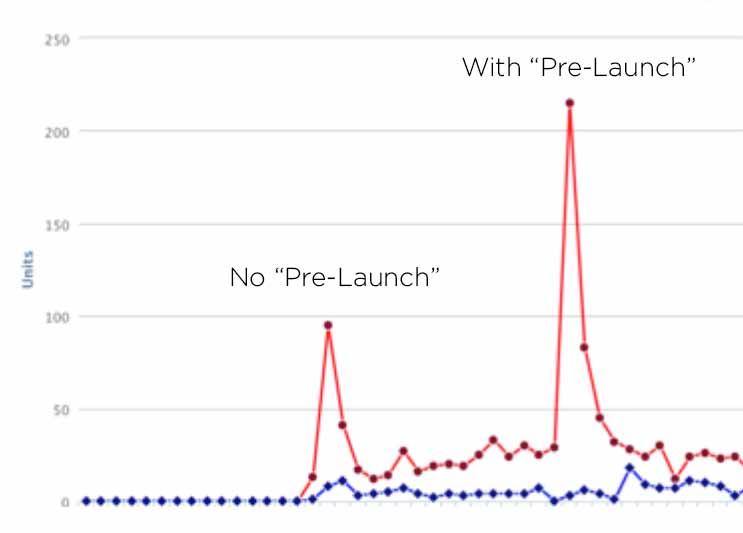
^^ the peak on the left had no pre-launch series. The peak on the right did. You can see the difference.
Chapter 8
Launch Blueprint Examples
In this section, we’ll go over a few examples of how you can put your email marketing into action.
Let’s say Julie writes historical romance.
Her new book includes assassination attempts on the queen, violent rebellions, and the looming threat of a Spanish invasion.
She needs a launch “theme” — something to tie her emails together.
So she frames it with a question:
“How would your relationship survive assassination, rebellion, and betrayal?”
It’s intriguing, emotional, and directly tied to her story.
Launch Plan Template
Julie’s 6-email sequence might look like this:
Email 1 – Attention
Subject: Would your marriage survive an assassination attempt?
- Tease the book’s theme
- Preview launch bonuses
- Hint at a real-life historical story coming soon
Email 2 – Attention + Interest
- Share a historical “lovers in jeopardy” anecdote
- Reveal the book cover
- Tease more about the main characters
Email 3 – Interest + Desire
- Share behind-the-scenes research and writing process
- Introduce the antagonist and central conflict
- Link to a Chapter 1 preview
- Remind readers about bonuses
Email 4 – Desire + Action
- Announce the book is LIVE
- Highlight bonuses again
- Include strong CTA + early reviews
Email 5 – Desire + Action
- Tell the historical love story teased earlier
- Tie it emotionally to the book
- CTA + remind of launch bonus deadline
Email 6 – Action
- Final reminder + “don’t miss out” tone
- Reframe offer as a moment readers don’t want to regret
- Add urgency with countdown or deadline
Whether you’re writing fiction or nonfiction, the process is the same:
Find a theme. Build anticipation. Then launch with confidence and a clear ask.
What About Nonfiction?
This is just an example of a “launch plan” or “promotion plan”. While the specific details will vary depending on your genre or audience, the overall objectives and structure don’t change.
It’s the same with non-fiction too. What are the main problems your book is trying to solve? Choose one or two examples and give your readers some help.
For example, if your non-fiction book is all about “building a house”, you could craft your launch emails around “planning and legal requirements” (and maybe include some stories of “the world’s craziest houses that got planning permission”) or “how to find the best contractors” (and include similar amusing / interesting stories).
The key thing is to tie your “theme” into your books and provide readers with something interesting to read.
It’s a simple story. But it’s a “big idea”.
In a Nutshell
Your emails need to focus on 2 things during the pre-launch and launch phases:
- Get people excited by telling a story or teaching them something that’s relevant to your book
- Use launch bonuses to make sure people buy during promo week (very important).
Your launch bonus might be a free book (yours, or even another author’s book that’s similar), extra chapters, an audio / video version, deleted scenes, or anything else compelling. Or, you might keep it simple and just do a price reduction for the first week.
So long as there’s a reason to buy NOW, readers won’t procrastinate.
Let’s recap…
Chapter 9
Pulling it All Together
Let’s zoom out and pull everything together.
You’ve built a compelling Reader Magnet to attract new readers.
You’ve set up a system for delivering it automatically.
You’ve got multiple ways to drive traffic — permafree books, giveaways, joint promos, even ads if you’re ready.
And when launch time rolls around, you’re not winging it — you’ve got a proven email strategy (with bonuses and structure) that drives real results.
Follow this system, and building an engaged audience becomes less of a mystery — and more of a rhythm. Something you can set up once, then improve with every book you release.
Each launch gets easier. Each list gets stronger.
And before long, your email list becomes the single most valuable asset in your author career.