I get it. Not everyone uses a grammar checker.
And honestly, that’s fine. There are plenty of writers who just write, read it over once or twice, fix what they see, and move on. And if that works for you, great. You don’t need another tool in your stack.
On one hand, there are writers who just want a bit of a safety net. Something that catches the obvious stuff. Misspellings, weird sentences, things that just don’t read right. Basically, a second set of eyes before you hit publish.
And then there’s another group. The ones who actually want to get better. Not just fix mistakes, but understand the stuff they keep doing. The writing they do over and over again without realizing it.
That’s usually where tools like ProWritingAid come in.
For me, it’s a little different
I’m dyslexic. So editing has never really been the easy part for me. I can read something multiple times and still miss the same mistake. It’s just how my brain works. (My high school English teacher and editor could tell you a few stories there.)
So for me, using a tool like this isn’t really optional. It’s just part of how I write.
Over the years, I’ve tried a few of them. Grammarly, ProWritingAid, Hemingway, a couple others here and there. Some are faster. Some are simpler. Some are better if you just want to clean something up quickly and be done with it.
ProWritingAid isn’t really that. It’s a bit more involved. Which, depending on what you want, can either be helpful… or just a lot. If you’re just looking for something quick to clean up a few sentences before you hit publish, it can feel like more than you need.
But it’s also the one app I’ve stuck with the longest.
I’ve been using it for… I don’t know, probably over a decade at this point. Mostly on blog posts, emails to subscribers, book drafts. Stuff where I actually care about how it reads. Not all the time. Quick stuff usually doesn’t go through it. It’s more for the pieces I actually want to take a second look at.
After a while, you get a feel for how these tools work.
They can do a lot.
But you probably won’t use most of it.
What actually matters to me
There’s a lot I don’t touch.
I know that sounds a bit strange, especially since ProWritingAid has a lot of cool features. Reports, suggestions, different ways to analyze your writing… there’s a lot there if you want to dig into it. And to be fair, some people really like that. They’ll go through everything, tweak every sentence, try to optimize their writing as much as possible.
For me, there are really just a couple things I care about. And honestly, one of them matters more than everything else.
The lifetime deal is a big part of it
I don’t like subscriptions. I know that’s how most software works now, but I’ve never been a big fan of paying every month or every year for something if I can avoid it. It adds up. And after a while, you’re paying for a bunch of tools you don’t even think about anymore.
ProWritingAid lets you buy it once and not think about it again.
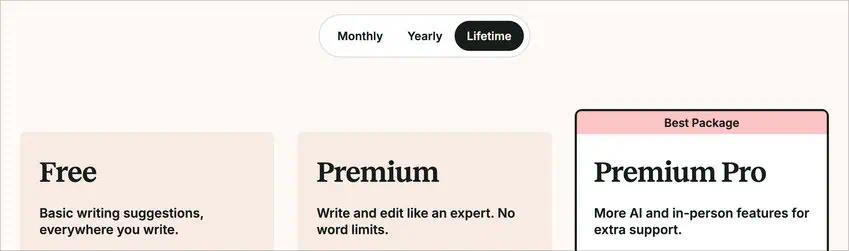
If you’re writing regularly, that one-time cost ends up being cheaper than most subscriptions pretty quickly.
In fact, if Grammarly ever offered a lifetime plan, I’d probably have to sit down and really think about which one I’d use long-term.
Because while I do like ProWritingAid, not having another subscription hanging over my head is a huge part of why I’ve used it for so long.
Note: I'd be remiss if I didn't mention my affiliate link for ProWritingAid gives you a 10% discount on their lifetime plans and a 20% discount on the yearly ones. I'll receive a small commission if you use it and decide to sign up, but there's no extra cost to you.
The grammar checker is the other big one
That’s the part I actually use a lot.
So catching grammar issues, proofreading, missing words, awkward phrasing… that’s always been something I need help with. I can read something multiple times and still miss things that are right in front of me.
And this is where ProWritingAid has been really helpful.
I’ve used Grammarly quite a bit too, and it’s good. It’s fast, it’s simple, and for a lot of people it’s probably enough. But for me, ProWritingAid tends to catch more. It’s a bit more thorough, especially for big pieces of content. It’ll point out things I would have missed otherwise.
It’s not perfect.
But it’s been reliable enough that I trust it to catch what I don’t see. And honestly, that’s the bare minimum for something like this. If a writing tool can’t catch the obvious stuff, nothing else it does really matters.
After that, it’s more about how I use it
Most of the time, I’m writing in Google Docs. Articles, blog posts, books… that’s where I spend most of my time. My process is pretty simple. I’ll write a section, then run it through ProWritingAid, then move on to the next section. And once I’m done, I’ll usually run the whole thing through again for a final pass.
That second pass is usually where it helps the most, because it starts noticing stuff. Things like repetition, overused words, sentences that all start to sound the same. The kind of stuff that’s hard to see when you’re in the middle of writing, but becomes obvious once something points it out.
Repetition is the big one. It’s really easy to fall into using the same words or phrases over and over without realizing it. And once you see it, you can’t unsee it. ProWritingAid does a good job of surfacing that.
Same with word choice. There’s a feature in there called Word Explorer, which I don’t use all the time, but when I’m stuck on a sentence or I know something isn’t quite right, it helps me find a better way to say it. Sometimes it’s just swapping out a word. Sometimes it’s reworking the whole sentence. Either way, it helps clean things up.
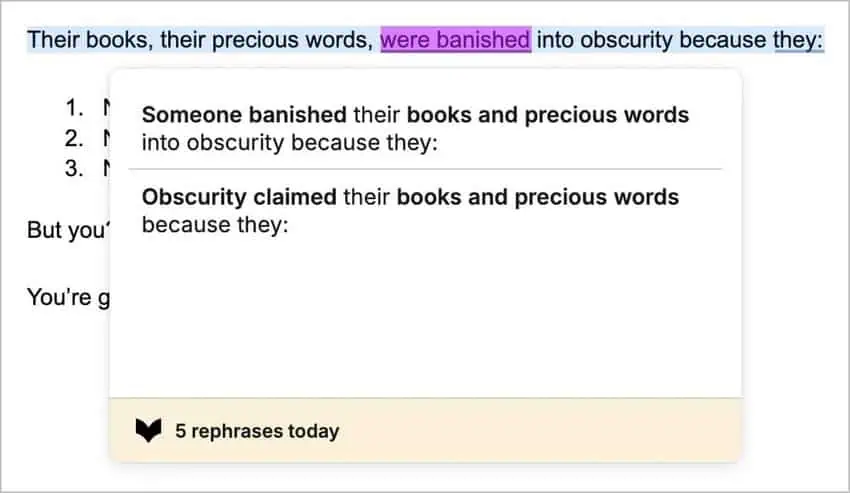
There’s also a rephrase feature that I’ve used quite a bit, especially for sentences that are technically fine but just feel a bit clunky. You can select the sentence and it’ll give you a few different ways to rewrite it. I don’t listen to all of it. In fact, if you try to follow everything it tells you to do, you’ll probably make your writing worse. That’s probably the biggest thing to understand going in. But it’s good for those moments where you know something isn’t working and you just can’t quite fix it yourself.
Another thing I didn’t expect to use much, but ended up liking, is the writing style settings. You can tell it whether you’re writing something more casual, more technical, more formal… and it adjusts its suggestions based on that. So it’s not constantly trying to make everything sound overly polished if you don’t want it to.
When I’m writing for Kindlepreneur, I usually keep it more casual. When I’m working on something else, I might change it depending on who it’s for. It’s a small thing, but it helps.
And over time, you do start to pick up on your own habits. That’s probably the nicest thing. It doesn’t just fix your writing… it shows you what you tend to do. The mistakes you repeat. The habits you fall into. And once you see those enough times, you start catching them on your own.
But again… most of that is optional.
For me, it really comes down to those two things, the lifetime pricing and the grammar checker.
I want something that catches what I miss… and something I don’t have to keep paying for every month.
Everything else is a bonus.
Where it can get frustrating
There’s just… a lot going on.
A lot of reports. A lot of suggestions. A lot of things it’s pointing out as you go. And if you’re the kind of person who wants something simple and fast, ProWritingAid can feel like overkill pretty quickly. Especially at the beginning, before you get used to what actually matters and what you can ignore.
Grammarly is more of a “fix it as you go” kind of tool. You write, it underlines a few things, you clean them up, and you move on. And if that’s all you want, it’s usually the easier option.
ProWritingAid isn’t really built like that.
It wants you to slow down a bit. It wants you to look at what you wrote, think about it, and decide what to change and what to leave alone. That can be helpful… but it also means it’s not something you just turn on and forget about.
I don’t follow everything it suggests
I mentioned it earlier, but this is probably the biggest mistake people make with it.
They try to fix everything.
If you do that, you’re going to end up rewriting your entire piece… and it probably won’t even sound like you anymore.
It flags a lot of things. Some of it’s helpful. Some of it you can ignore. And part of using it well is learning what to ignore. That takes a bit of time.
Once you figure that out, it becomes a lot more useful. But at the beginning, it can feel like it’s just constantly telling you everything you wrote is wrong.
It doesn’t really fit a mobile workflow
This is probably the biggest gap for me personally.
There’s no real mobile app for ProWritingAid. So if you’re someone who writes a lot on your phone or tablet, it’s not going to fit into your workflow very well.
You can use the web editor as a workaround, but it’s not the same thing as having something built directly into your keyboard or apps.
That’s one area where Grammarly definitely has the advantage. You can use it almost anywhere, including on your phone.
For me, most of my writing happens on a computer, so it’s not a dealbreaker. But if you’re someone who writes a lot on the go, it’s something to think about.
It’s not built for quick writing
If all you want is something to catch a few mistakes before you hit publish, there are simpler tools that will do that just fine. That’s usually where something like Grammarly makes more sense.
ProWritingAid tends to make more sense when you’re working on something longer… something you actually want to go back through and clean up.
For example, there’s a Manuscript Analysis feature where you can run an entire book through it at once and get a full breakdown of things like pacing, sentence variety, and overused words. That’s not something I use all the time, but if you’re working on a full manuscript, it can be helpful to step back and look at everything as a whole.
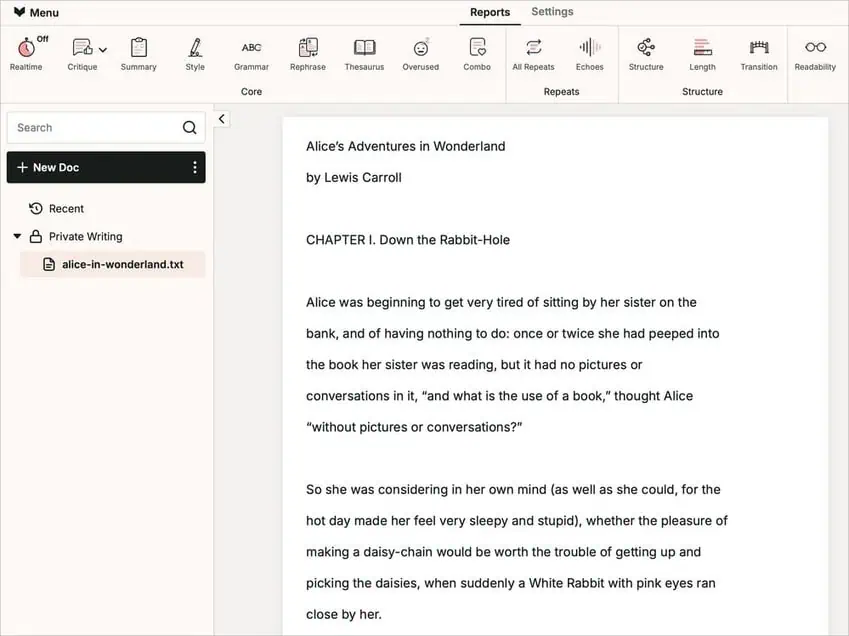
If you want to see how Manuscript Analysis works, Kevin did a full breakdown of that here if you want to dig into it.
How I think about ProWritingAid vs Grammarly
Basically, I don’t really think of these as “better” or “worse.”
They’re just different.
I use them for different things.
If I’m just writing something quick, Grammarly is usually easier. It runs in the background, catches obvious things, and I don’t really have to think about it.
ProWritingAid is more something I use when I’m actually editing. When I’ve written something and want to go back through it and clean it up a bit so that it’s good to go.
If you want a quick side-by-side, here’s how I usually think about it.
| ProWritingAid | Grammarly | |
| Best for | Editing longer pieces (articles, books) | Quick writing and everyday use |
| Style | More detailed, more in-depth | Simpler, faster suggestions |
| Grammar checking | More thorough, especially long-form | Fast and accurate for most use |
| Speed & workflow | More involved editing | Fast, runs in the background |
| Mobile use | No native mobile app | Full mobile support |
| Integrations | Strong (Docs, Scrivener, etc.) | Very broad (browser, apps, mobile) |
| Pricing | One-time lifetime option available | Subscription only |
Who I’d actually recommend this to
If you’re mostly writing shorter content… emails, social posts, quick drafts… you probably don’t need something this involved. There are simpler tools that will handle that just fine.
But if you’re working on anything you’re actually editing, not just writing… and you actually want to go back through and improve what you wrote, that’s where ProWritingAid is really good.
Especially if you like the idea of seeing patterns in your writing and gradually getting better over time, not just fixing mistakes.
That’s where it stands out, at least for me.
It’s not really a quick fix tool. It’s more something you use when you’re editing.
So if that’s how you tend to write, it’s probably worth trying. If not, you’re probably better off with something simpler.
If you want to test it, you can check out ProWritingAid here with my discount code. They have a free version and a couple paid options depending on what you need. If you can afford it, I recommend the lifetime plan so you don’t have to think about it again.
And if you'd like to dig a bit deeper before deciding, we have a video that goes over the full list of ProWritingAid features. Check it out below.