Wouldn't you love to increase the number of times your book is shown on Amazon so you can boost its rankings and have it show up sooner and more often in searches?
Most self-publishers know that the keywords you choose play an important role when it comes to showing up for certain searches. However, knowing what to do with keywords can get a bit complicated.
See, Amazon presents us with seven boxes where we can enter our desired target Kindle keywords. In each box, we can use up to 50 characters, which allows us to either put in a particular target phrase we want to rank for or fill up the box to include as many phrases as possible.
Some book marketing gurus out there argue you should use up as many of the available characters as possible, while others believe you should only enter a target phrase. Needless to say, this conflicting advice has left lots of authors scratching their heads, wondering how to actually approach their Kindle keywords.
Well, in this article, I’m going to use data we gained from experimentation to provide the most optimal way to fill in your seven Kindle keywords. This will give you the best strategy going forward and answer some other questions we tackled through this experiment. By using this technique, you will not only increase how many times your book is shown, but also increase your book’s rankings in Amazon for your target keywords.
Below I will detail my data approach and the experiment we conducted to get the information, but if you’d like to just skip that and get straight to the part that talks about what the findings show and what you should do, then click here.
What are the 7 Kindle Keyword Boxes?
Before we dive into how to approach your keywords, let’s first look at what those 7 Kindle keyword boxes are (in case you're unfamiliar with them):

You're allowed to input your target keywords into these 7 boxes. Each box allows for a maximum of 50 characters. A character is a letter, space, punctuation, etc.
This has left authors wondering:
“Should I fill in all 50 characters per box, or should I only target one particular phrase regardless of whether I have filled in all 50 characters or not?”
In other words…
Is it better to be more targeted or more broad with your keywords?
To help answer this with finality, I built out an experiment. I'll explain how that worked in just a moment.
Terminology For This Article
Before we go further, it might be useful to first define some of the terminology I will use throughout this article:
Keyword boxes: These are the seven Kindle keyword boxes where you get to choose the keywords you want your book to show up for.
You can find these seven boxes in your Kindle Direct Publishing account when you are either editing an existing book or uploading and publishing a new book.
Amazon Search Result Page: When someone types in a phrase into Amazon's search box, Amazon then presents them with a list of products. These are called the Amazon Search Results. If your book shows up on this page immediately, then we say that it is listed on the first page of search results. If, however, you need to click to see the next set of results, then we call this the second page of search results, and so on.
Indexing for a Keyword: For the purposes of book marketing, indexing for a keyword is when you convince Amazon to list your book for that keyword phrase. It doesn't necessarily mean you show up on the first page of the Amazon search results, it just means Amazon acknowledges your book should be listed for that search phrase and you will therefore show up somewhere in the search results for that keyword. If Amazon has listed 11,041 books for that search result, and you are now ‘indexed' for that keyword, then there will be 11,042 books listed in total for that search result.
Ranking for a Keyword: In a previous definition, we discussed that Amazon Search Results is a listing of products shown after a customer does a search. The rankings for that phrase or keyword the customer typed in is the number at which the product shows up. So, say for example someone types in “War Mage” and your book is the 7th book shown on the search results, then you have a ranking of 7 for that keyword phrase. If you rank #100 however, that means the shopper would need to go through many search results pages in order to see your book as the 100th book listed for that keyword.
Rankings are very important because, as you can see from the below graph, the book that ranks #1 for a keyword gets the most clicks by a huge margin.

The Experiment with Kindle Keywords
To do this experiment, I needed two things:
- Volunteers willing to submit their current keywords and be willing to change their keywords
- To build a specialized crawler to find keywords and whether books are indexed for it and where they rank
For the volunteers, I emailed the Kindlepreneur email list and got an AMAZING response. In the end I choose 120 books with 82 being fiction and 38 being nonfiction. Each author submitted the current keywords they have listed in the 7 boxes. We marked whether or not the author had used the strategy of filling in as many of the characters as possible or was specific with their keyword phrase choices — or some combination of the two.
I then utilized a special crawler that the Publisher Rocket development team created just for this experiment.
The crawler was designed to rapidly go through thousands of genre and topic specific keywords, Amazon suggested keywords, keywords in their title and subtitle, and the listed keywords that fit our 120 volunteer books. Then it would index whether or not it found any of the volunteer books and at what rank (up to 300 since that is a far as we could financially go).
We then ran the crawler for days to ensure that over 100,000+ keyword possibilities were checked.
Once we had our data, we then had the volunteers change their data depending on whether or not they used the full box strategy or the specific strategy. Afterwards, we ran the crawler again and marked the changes in results. We even went further to check if there was a decay of rankings or not over time.
For the Statistician Friends Out There: I know, I know… 120 books is not perfect for generating statistical proof and the standard deviation and sample size are not ideal. However, I'd request that you keep in mind the results were pretty sound to allow for such conclusions, and it was all we could afford to run considering this was a very expensive experiment.
I'll go over our findings below, but first let's talk about what you can actually DO to get your 7 Kindle Keywords…
So, Here is What Authors Should Do
As I mentioned earlier, to determine the best way to fill out your 7 KDP keyword boxes, I conducted an experiment using over 120 books. We intentionally altered their keywords and then tracked the results using data from Publisher Rocket along with a monitoring system to observe how Amazon responded.
Specifically, we measured how changes in keywords affected both indexing and rankings across Amazon’s search results.
Based on the data from that experiment, here is the most effective way to structure your 7 KDP keyword boxes for optimal discoverability and sales.
One important note: this assumes you have already selected strong, relevant keywords. If you have not, I highly recommend reviewing my step-by-step guide on finding profitable, high-intent keywords first. Choosing the right phrases is foundational. Without that, even perfect keyword placement will not deliver results.
Here's how to build out those 7 blocks, and I'll discuss each section below:
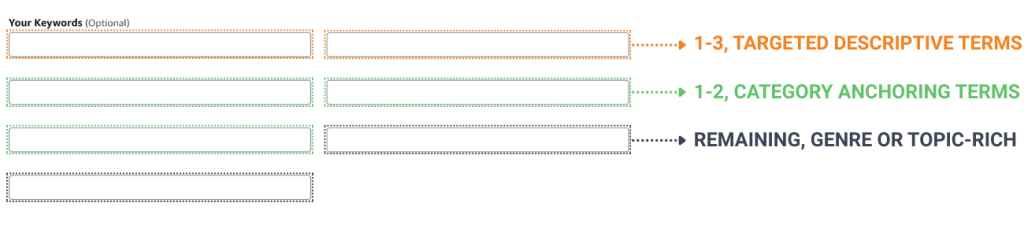
Step 1: Fill 1-3 Targeted Descriptive Phrases
A Descriptive phrase is a fully 5-7 word phrase that truly describes your book. Sometimes these are called specific phrases as opposed to broad phrases. To learn more about how to find and build targeted Descriptive Phrases, you can check out this for fiction, and this for nonfiction.
Examples of great targeted Descriptive Phrases as opposed to a bunch of broad terms are:
-Victorian Second Chance steamy Romance single mother
-Beach body workout plan for busy moms
-Epic scifi military space marines bug hunt

As you can see, each and every one of those phrases truly tells you a LOT about not only what the book is actually about, but also helps to establish either who this is for (nonfiction) or what true sub sub genre this book is part of.
So, In order for these targeted descriptive phrases to help your book in sales, these 1-3 keyword phrases need to be:
- Very relevant to your book: Think of them as the perfect descriptive phrase your target reader would type into Amazon when searching for your book. Examples: How to lose weight fast as a single mom, gaslamp supernatural wholesome romance, master Evernote for authors, military scifi space marines bug hunt. They read like real terms, and truly fit your book.
- Have shoppers looking for them: Since we’ll be burning a couple of our seven boxes for these phrases, they NEED to actually have people searching for them. This is where Publisher Rocket’s Amazon Searches Per Month number is SUPER important. Don’t waste your boxes on something that has no shoppers searching for it.
- Not overly competitive: On Publisher Rocket, the competition score is a number from 1-100 which tells you how hard it would be to rank for that keyword. In essence, if you’re using one keyword box for that term or phrase, you might want to ensure you can actually rank for it and thus benefit from it.
You can learn how to come up with some of these terms here, however, if you own Publisher Rocket, doing research to find amazing targeted descriptive terms has never been easier. First, Publisher Rocket shows you terms that shoppers actually type into Amazon, and then tells you the number of people who typed in that exact phrase when shopping. And finally, it even gives you a competitive score of 1-100 with 1 being super easy to rank for, and 100 being super hard.

Or, better yet, you can use the Reverse ASIN feature of Publisher Rocket and actually see the keywords that other books have ranked for and thus benefited from. This is incredible because you don't to learn the steps above…you are given amazing terms that your competitors or other similar books have used, and you just get to choose the best ones for you. Very simple!
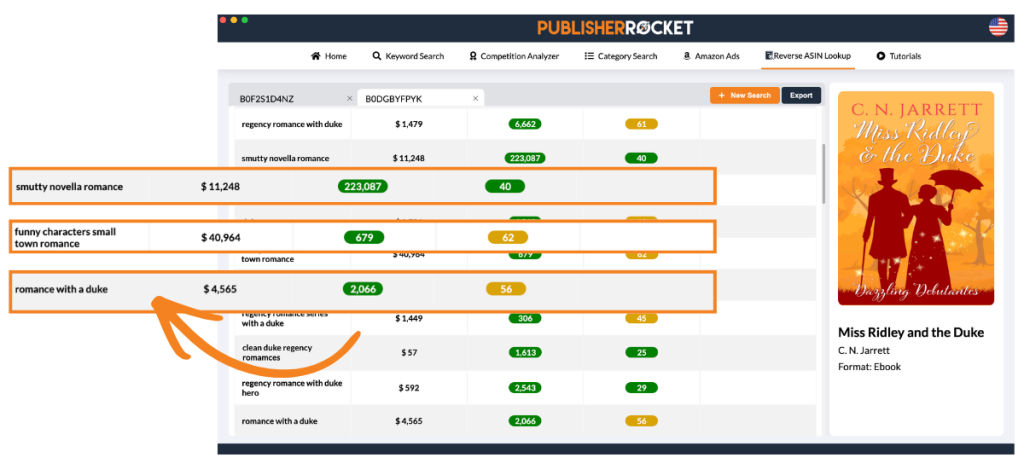
If you find 1-3 phrases that exude these three characteristics, then I'd absolutely recommend using a specific box for each.
Step 2: Fill 1-2 with Category Anchoring Terms
For authors who want more control over where Amazon places their book, these next 1-2 blocks of the 7 KDP keywords can be used to anchor your book in the categories you select. This is because a couple of years ago when Amazon rolled out the new category system, they made it so that even though you can select 3 categories, if your metadata/keywords don't make what they'd expect for that category, their system will automatically move you to a different category.
This can be problematic since many times, Amazon will either move you into super competitive broad categories, or worse, Ghost categories – which are fake categories where you can never hit bestseller status.
Therefore, if staying in your desired categories matters to you, filling 1-2 KDP keyword boxes with category anchoring terms (remember you can use 50 characters in each box) can make a real difference. To do this manually, think through phrases that are relevant to both your book and your chosen category.
If you have Publisher Rocket, its system has already catalogued all the keyword phrases it knows Amazon likes to see. Just click the “keywords button” on a category you're interested in, and it will display a list of keywords to choose from.
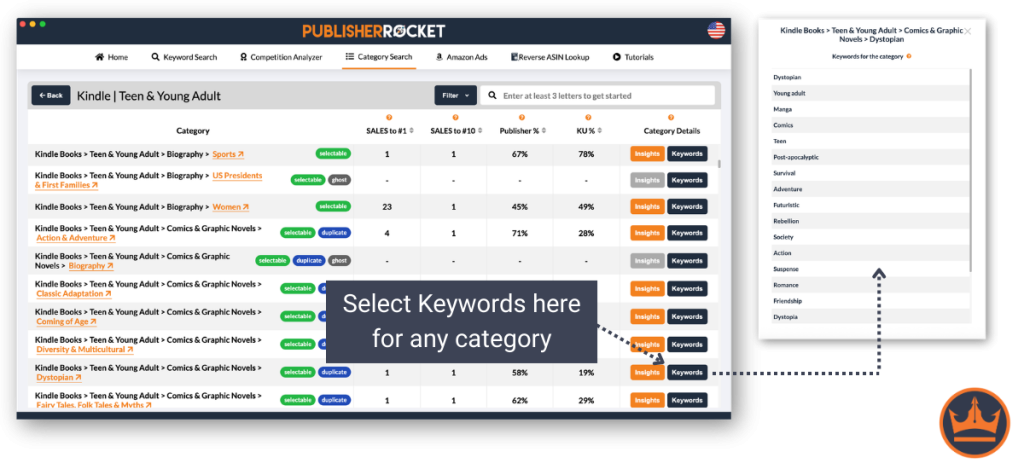
So, either come up with terms you think will work for your book or use Publisher Rocket and access a list of keywords known to have Amazon keep you in your desired categories and not confuse your book with something else.
Step 3: For the Rest, Fill With Genre or Topic-Rich Terms
For the rest of your KDP boxes, it would be best to fill in as many of the 50 characters as possible with words or phrases that fit your type of book. These would be broad terms that fit your niche or genre but aren’t as important because the chances that someone would type them into Amazon and you’d be the exact type of book they are looking for would be small.
Here are some things to help you figure out how to generate those words.
For Fiction create a list of words that Describe:
- Your character or their role
- The Setting and Time of the story
- The Catalyst that kickstarts your story
- Your genre or the flavor of your genre (steamy romance vs wholesome love vs erotica, etc)
- Synonyms of the above
For Nonfiction create a list of words that Describe:
- The pain points of your target reader
- The success your reader hopes to gain from your book
- The type of reader or their demographic
- Descriptive words
- Synonyms of the above
If you follow these steps for each, you should not have a problem at all coming up with multiple 50 character boxes and should help to increase your book's indexing on Amazon.
5 Questions Answered By the Experiment
Here are some of the questions we were able to answer thanks to the experiment results:
1. Does Filling In All 50 Characters Index Your Book For More Keywords?

Based on our findings, the answer is clearly yes. We found that the more words or phrases you entered in the Kindle box, so as to fill in as much of the 50 characters as possible, the more your book was indexed for. Which leads us to our next observation…
2. Does Amazon Rearrange the Words and Index for them or just use the exact phrase you type in?

It turns out that Amazon does use all variations of the words you enter as you can see from the diagram above. Therefore, if you typed in “Dragon War Mage” into one of the 7 keyword boxes, you would also be indexed for War Dragon Mage, Mage Dragon, War Mage, Mage, and all other versions of the phrase. This is a major reason why our graph above shows an almost exponential increase in words indexed as you move to the right.
This makes a lot of sense since Amazon specifically tells people to not put quotation marks around your phrase, or else you will only show up for that exact phrase and nothing else. In boolean search criteria, if you ever want to only be shown an exact phrase, put quotations around it. You can do this on Google the next time you only want to see results based on exactly what you type, and no subsets of it. Looks like Amazon's search engine (and thus their indexing) works the same way.
However, it is important to note that Amazon only indexed the books for terms they deemed legitimate — terms that would actually produce results if you typed into Amazon. So, if one of the combinations of the phrase is something that Amazon doesn't acknowledge or show books for, they won't start ranking you for it either just because you had it listed. Apparently they are smarter than that.
Also of important note, Amazon includes pluralizations of the word automatically and so we found that you also indexed for the pluralizations of most of the phrases as well.
3. If I have the Same Keyword More than Once, Does that Help or Hurt?
Amazon makes it clear that you should avoid reusing the same keyword that shows up elsewhere in your book's metadata (title, contributor, etc). If you were to click the link above your 7 kindle boxes that says “how do I choose keywords” (see above image of the keyword boxes to find the link), you'll see this popup:

So, does it hurt us if we do repeat words? Will this be something Amazon penalizes us for?
The answer to both is no. From our findings, authors did not get penalized for reusing a keyword that is in the title, subtitle or elsewhere. They also didn't get penalized if they had the same keyword in different boxes. But we also found that it didn't help either. Having the same keyword in the title and in different boxes didn't mean you got better rankings.
BUT, I wouldn't avoid using the same keyword in another box if it fits in a specific phrase you have. Say for example you have two phrases that you want to target for your book. Thanks to your research using Publisher Rocket, you know there are specific Amazon searches per month for both and low competition. One is War Mage, and the other is Fantasy Mage. I wouldn't remove the word “Mage” from one of them just because you used it already in your title or in another keyword box. In the next question, you'll find out why.
4. Does Targeting a Specific Phrase Help With Rankings?
Amazon specifically says that the degree of text match plays a major part in rankings. This is our first indication that the more specific you are in the 7 keyword boxes, the more likely you are to rank for those target phrases.

Our experiment also showed the same. We found that the more specific you were for a particular keyword phrase in the keyword box, the higher you'd initially rank for that phrase in Amazon search results on average. So, while Amazon does rearrange the words and index them for you, the way you put them into the box has a stronger affect than a random combination of them.
In the graph above, you can see a 300 dashed line. That's because in our experiment, our special crawler would only check the rankings up to #300. It was a very costly process and to go above that number would have cost us a LOT more time and money. Sorry for the limitation, but looking at the data, I think we have enough to make a more solid decision here.
5. Is it Better to Put My Keyword in the Title and Subtitle, or the Keyword Box?
The short answer is yes, it is better to put your keyword in the title or subtitle. We saw an increase of 37% in rankings when someone had the phrase in the title or subtitle, compared to if it was just one of the phrases in a keyword box. This makes sense considering what is in the title or subtitle is a better indication of what the book focuses on. However, this is NOT a recommendation to keyword stuff. It only shows that those two spots have a larger effect on rankings than your 7 keyword boxes.
Conclusion (and a Quick Note)
As you can see, the more words you put into the boxes, the more you will index for on Amazon. But, at the same time, you’ll weaken your overall rankings for those terms since their power will be diluted.
Through this experiment, we now see that authors should use a combination of the two tactics where they target specific words or phrases that best fit their book, but also reserve certain keyword boxes for including the other terms and phrases not included.
This will give you the most optimal rankings and indexing so you can get your book found by readers.
Important Note: The crawler I discussed in the experiment was something I was hoping to employ for Rocket users, where we could help authors see how many words and phrases they index for and what their rankings are. However, even after months of madness, I could never get the operations to be cheap enough to make it a viable option. Sorry guys… we tried and will keep trying. As Rocket users are accustomed to, I'm always working to add to Rocket and make it better and better, but sometimes we have test flights that just don't make the light of day.