A book title page seems like it should be the easiest page in the world to create.
You put the title on it. Maybe the subtitle. Add your author name. Done.
And honestly, for most books, it isn’t complicated. But it is one of those little front-matter pages where authors suddenly start second-guessing themselves. Should the publisher name go there? Does the subtitle need to be included? What side of the book should it appear on? Do ebooks need one? And why do some books have one title page while others seem to have two?
When I first started formatting books, I didn’t think much about any of this. Like a lot of authors, I was more focused on the manuscript, the cover, and getting everything ready to publish. But after writing and formatting my own books for more than 10 years, and eventually building Atticus, I learned that the small pages at the front of a book matter more than most authors realize.
And no, readers aren't going to sit there and admire your title page for five minutes. They won’t. But when the front matter is clean, organized, and formatted the way readers expect, the book feels more professional right away. When it’s missing, awkward, or shoved into the wrong place, something feels off even if the reader can’t explain why.
The title page is one of the simplest parts of a book, but it still has a job to do. It introduces the book, confirms the title and author, and helps set the tone before the reader reaches the actual content. Once you know what belongs on it and where it should go, it’s easy to get right.
This is a part of a series where I am analyzing all of the different parts of a book, and how to best craft them. If you'd like to learn more about the different parts of a book, be sure to check it out here.
Why Should You Trust Me?
I've actually been writing and formatting books for a long time. Over 10 years so far, and counting.
But that's not the real reason, because there are plenty of authors who have lots of experience, but know next to nothing about the different parts of a book, or book formatting in general.
The real reason you should trust me is because I actually created my own formatting software that solved all my problems. I called it Atticus.
But this isn't meant to be a sales pitch. I just want to make sure it's clear that I know what I'm talking about. The amount of research that went into not only formatting my own books, but also creating a formatting software is huge.
I researched everything, which led me to learn all about every. single. part. of. a. book. And there were a lot more than I realized.
And of course, that includes the Title Page.
So if all that makes sense, hopefully you'll come along with me as show you everything I've learned.
What is a Title Page in a Book?
The title page is one of the first pages in any book. It signals the beginning of the front matter and shares the title, subtitle, author, and publisher. Of course, not all books these days have a publisher. And many books don’t have a subtitle. In these cases, it just lists the title and the author or authors.
You may be wondering why books even have a title page. After all, doesn’t the book cover have the title on it? Why reiterate the name of the book?
Title pages are useful for referencing and cataloging. They help libraries and academic citations. And, believe it or not, many books have two title pages. One is simply called the “title page” and the other is called the “half title page.”
Half Title Page
You may be able to take a book off your bookshelf and open it up to see two different title pages. The first one, known as the half title, only has the name of the book and nothing else. The second one has the name of the book, the subtitle (if there is one), the name of the author(s), and the publishing company. Sometimes the publisher logo is located here, too.
The half title book page is from back when books had to be bound in a separate location than where they were printed. The half title book page served two purposes back then: to protect the actual title page in case something happened and the first page was ripped, and to tell the bookbinder the name of the book (presumably so they didn’t put the wrong cover on it).
Having two title pages is no longer the norm, but you can still find books with both.
Having trouble thinking of a book title? Check out this book title generator.
What is the Page Behind the Title Page Called?
The page behind the title page is called the title verso. You may not be surprised to learn that verso is Latin for “reverse.” Sometimes this page is simply known as the “Copyright Page.” It contains important information such as the:
- Copyright notice
- ISBN number
- Date of publication
- Publisher information
- Disclaimers
- Cover or book design attribution
- Formatting attribution
Not every book has an ISBN or a publisher, in which case these things are left off. The same can be said for cover design (if you designed it yourself) and formatting. However, it’s important to include the copyright information, date of publication, and any disclaimers you deem fit.
Industry Standards for Title Pages
When developing your title page, it's important to know what is the industry standards for that title page. Otherwise you could get it wrong and you'd be left with a book that is unprofessional.
While readers are unlikely to know these industry standards, they will understand them unconsciously, and it will make your book appear cheap and unorganized. So with that said, here are some best practices to include in your title page:
- The title of your book
- The subtitle of your book
- The name of the author (or editors if this is an anthology)
- The name of the illustrator, if applicable
- The name and location of the publisher
- The title's typeface should match or compliment the cover's typeface
- The title page must be located on the right side (the left side is typically left blank)
So how do we actually include this title page in our book? Well there are a few ways to do this…
How Do You Format a Title Page for a Book?
Creating the title page for your book depends on the software you are using. For this article, let's look at two different options:
Formatting a Title Page in Microsoft Word
Formatting a title page in Word is possible, but it's a slightly complicated process. Word is capable of formatting books, but it's also not what it was built for. See this post for more on formatting with Word. Here is an example of what a title page in Word might look like:

To create your title page in Word, follow these steps:
- Step 1: Click the “Insert” tab
- Step 2: Click the “Cover Page” button in the Pages group
- Step 3: Click on the cover page that you prefer. Make sure you have the space to include the industry standard fields above, and make provisions for the following:
- Make sure the style matches your book and genre
- Ensure you have the commercial license for any fonts used
- Don't pick something that is overly styled unless this is an intentional choice
- Step 4: Insert any needed images
- Step 5: Insert the appropriate text, especially the title, subtitle, author/editor, and publishing company
- Step 6: Ensure your trim size is properly adjusted
- Step 7: Make sure your margins are correct, especially the “gutter” margin which will need to be larger than the rest
- Step 8: Make sure the title page is displaying on the right side, and that the left page directly opposite the title page is blank
- Step 9: Convert to PDF to see how it looks (you can also upload to KDP without publishing to see if it passes their automated formatting inspection)
You may need to tweak this here and there, but ultimately you should be left with a passable title page. Now, if you want to save some time in this process and boil it all down to three simple steps, read on…
Formatting a Title Page in Atticus
By far the easiest option is to use a program like Atticus, which provides a pre-made template and automatically generates the title page for your book. All you have to do is enter the information and you’re good to go!
Here’s an example of the preview of a title page on Atticus.

Made in Atticus.io
As you can see, the font size varies, separating each element from the other. This makes it look good and signals to the reader that some time and effort went into the book. It's a small thing, but it's important to get it right.
So whether the reader has a printed book in their hand, or they're reading an ebook, a good title page is important.
Keep in mind that all title pages are on the right hand page when you open the book (something Atticus automatically adjusts for). This may not matter for ebooks, but it's best to make sure this is the case on your print book.
Also, remember that the title page has no page number.

Are Title Pages Different for Fiction and Nonfiction Books?
Both fiction and nonfiction books generally stick with the same formatting styles. Academic or textbooks may have more information on the title page due to the number of authors involved in the work.
Title Page Examples
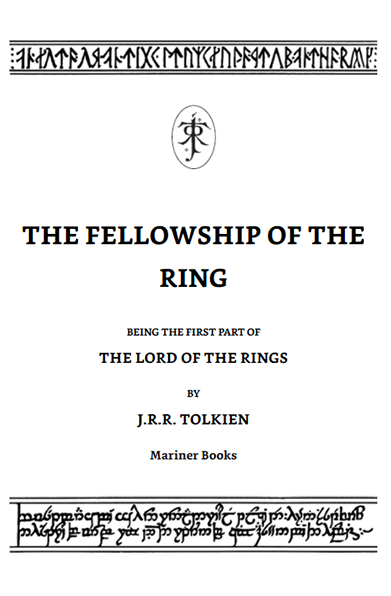
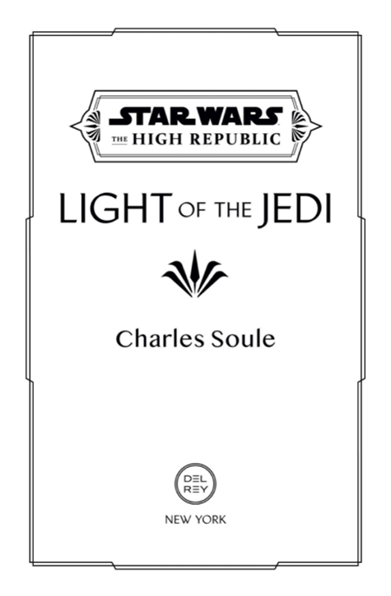
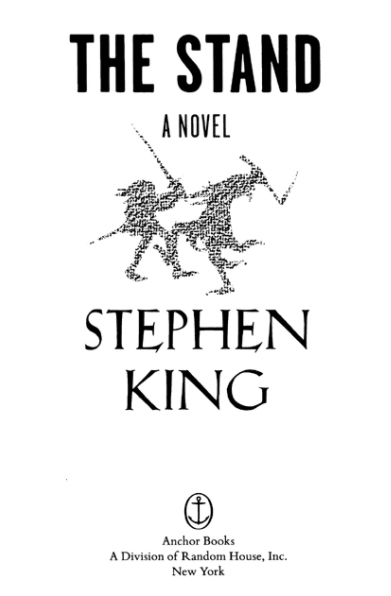
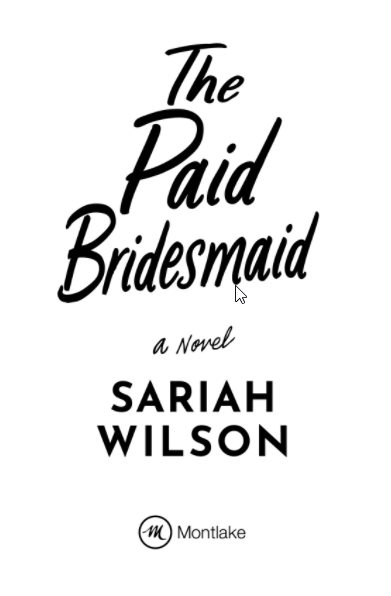
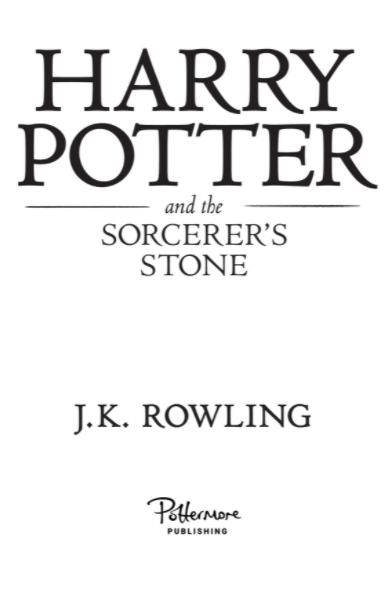
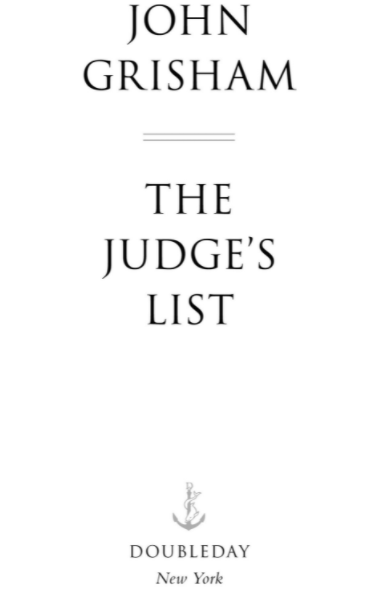
Here are a couple of examples of title pages for various genres. Notice how each contains the title, author name, and publisher at the very least. The good ones include artwork as well.
 |  |  |
 |  |  |
What Comes After the Title Page?
As mentioned above, the page right after the title page is called the verso or copyright page. However, when putting your fiction or nonfiction book together, it's important for the author to know what comes next in the front matter before the main text begins.
Here's the most common formatting order for the front matter of a book:
- Title Page
- Copyright Page
- Table of Contents (i.e. chapter headings)
- Dedication Page
- Acknowledgments
- Foreword
- Preface
- Epigraph
Not every book has each of these elements. Again, it’s up to you as the author to decide which ones you want to include. However, the first three elements are the most important and every nonfiction and fiction book should have them.
How to Ensure an eReader Doesn't Skip Your Title Page
You may have noticed that when you open an eBook on a Kindle or other device, that it usually doesn't start at the very beginning (i.e. the cover of your book).
Instead, Amazon and other retailers estimate where the book starts, and in some cases this can lead to a reader starting with chapter 1 and completely missing your title page!
So, assuming you want people to open to your title page (and you might not), you need a way for readers to start there, instead of chapter 1.
Thankfully, Atticus is the only formatting program that lets you do this.
All you have to do is go to the Book Details and select the section called “Start Page”.
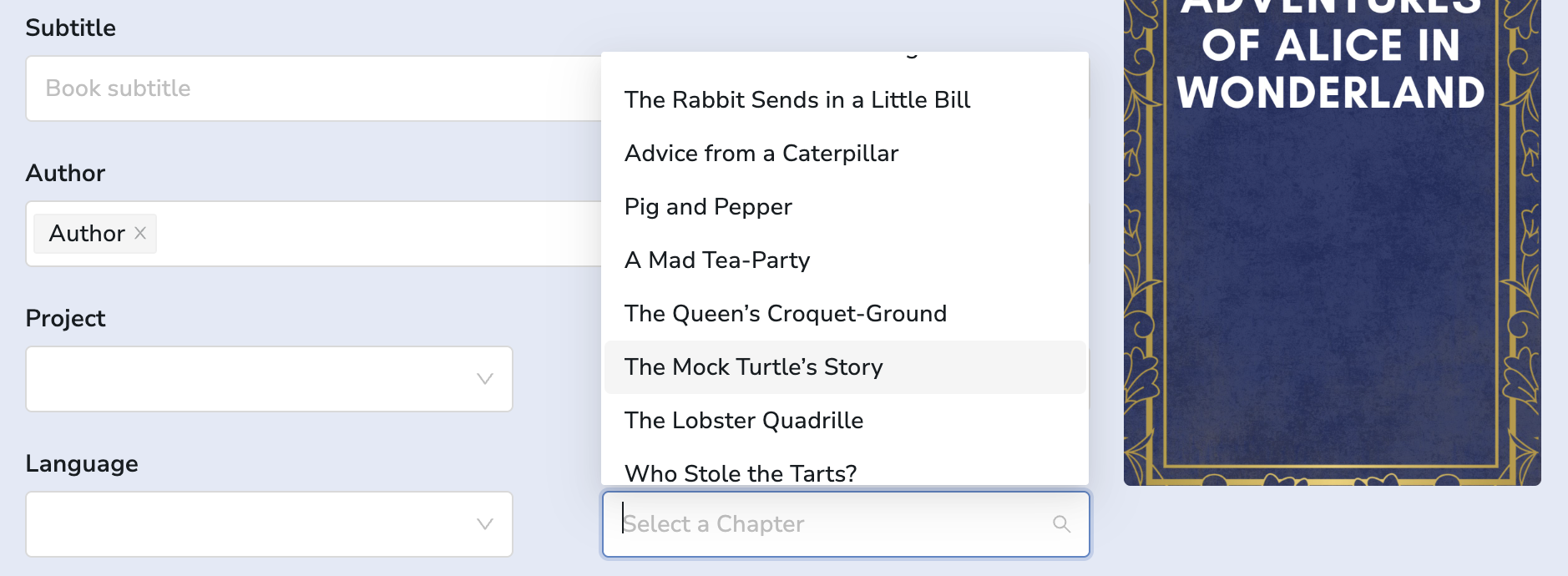
From there, you simply select where you would like readers to start when they open your book for the first time.
This inserts a special code into the eBook file that lets Amazon know exactly where to open the book for new readers. Simple as that!
Atticus is the currently the only formatting software that lets you customize the Start Page of your book, and not only that, but it also works on virtually every platform, and it's over $100 cheaper than the competition (which does not have this Start Page feature).
Now It's Time to Make Your Own Title Page
The title page isn’t the flashiest part of your book, but it’s one of those small details that helps the whole thing feel finished.
At the very least, it should include your book title and author name. If your book has a subtitle, publisher name, illustrator, editor, or other important credit, you can include those too. Just don’t feel like you need to cram every possible detail onto the page. A clean, simple title page usually looks better than one trying to do too much.
The main things to remember are pretty straightforward. The title page normally appears near the beginning of the book, it should land on the right-hand side in print, and it shouldn’t have a page number. The style should also match the rest of the book well enough that it feels intentional, not like something you added five minutes before uploading the file.
You can build a title page yourself in Word or another writing program, but this is also the kind of formatting detail that software like Atticus handles automatically. That’s part of why I like using dedicated book formatting software. It takes care of the small pieces authors often overlook, so the book feels professional without you having to manually fight every margin, page break, and front-matter element yourself.
Either way, don’t overcomplicate it. Give the reader a clean first impression, make sure the right information is there, and then let the book do what it came to do.